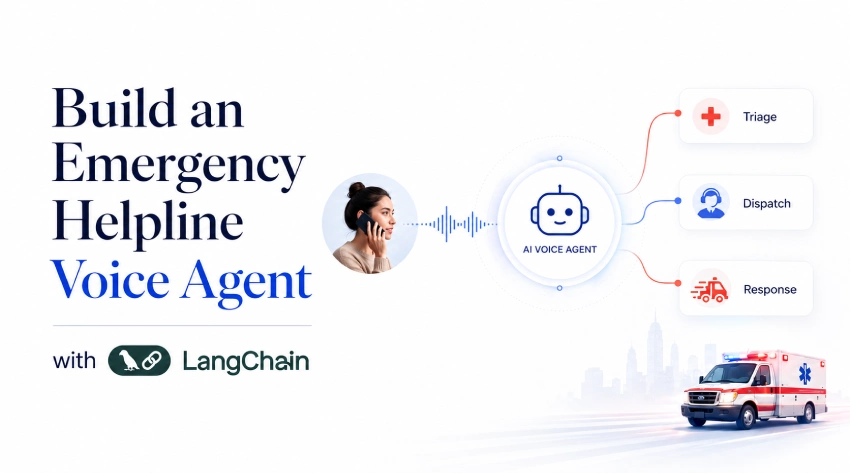
We have all been in an emergency where every second matters. Someone’s life is at risk but there you’re panicking. Now, imagine in this situation of distress when a helpline asks you to press numbers on your keypad to connect with the right agent? Pure chaos, right? Here, we just need someone to listen and act immediately instead of passing it on and that too without dropping the call.
In this blog, we’ll be solving this huge challenge by building our very own AI Emergency Helpline voice agent. The agent listens to a caller’s spoken distress, triages the situation, dispatches the right emergency service, and keeps the caller calm, all in real-time, all-over voice.
No typing. No menus. Just talk.
Why an Emergency Helpline?
Perhaps the most common examples of voice assistants in use today are food ordering or music streaming. These “functional” use cases are relatively harmless from a perspective of user experience, but easily forgettable. On the other hand, the use case of an emergency helpline is entirely different.
For this use case, latency is a critical factor, the tone of the voice assistant can affect who receives help first, and you cannot use an alternative method to dispatch an emergency vehicle (ambulance). As such, every design decision made within this pipeline has a potential to cause real consequences, making this design the most valuable use case to gain experience from.
How the Pipeline Works?
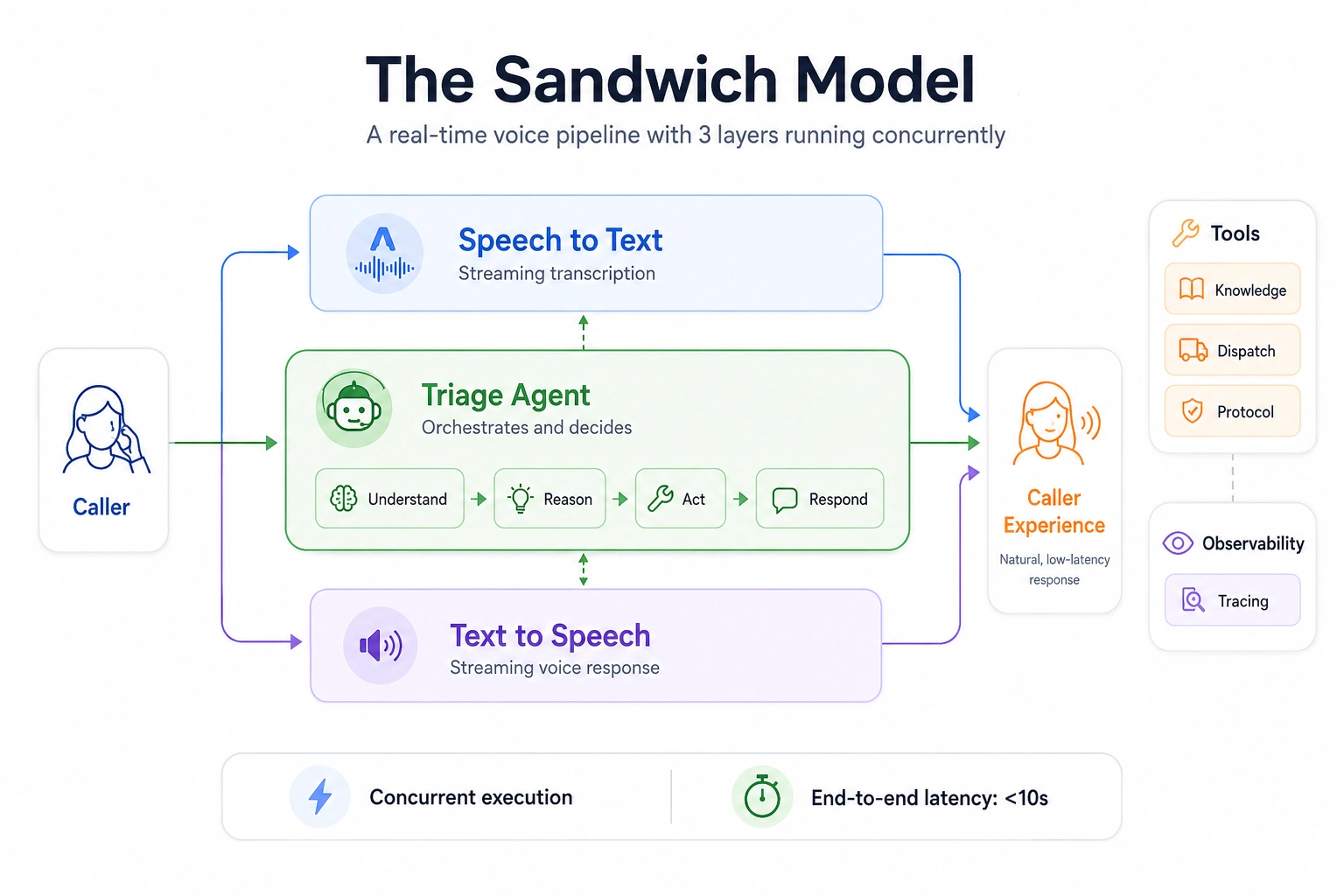
The Sandwich Model of Architecture comprises 3 independent components, and each one is designed to work concurrently. Each one will begin processing independently and at the same time as the one before it finishes its processing stage, i.e.:
- while speaking, transcribing will begin during the middle of the speaker’s sentence,
- the reasoning agent will begin reasoning on the previous responses while the speaker finishes their sentence,
- text-to-speech will begin synthesizing responses to that speaker’s sentence while the reasoning agent continues reasoning.
If everything is implemented correctly, the entire process will be completed in less than ten seconds. In a timed execution scenario, this would allow the audio to be continuously streamed, providing no interruptions in audio delivery.
Getting Started with the Voice Agent
You’ll need API keys for AssemblyAI (real-time STT) and OpenAI (both the agent brain and TTS). You can easily consolidate your APIs into one provider and one job by using OpenAI TTS.
Here are the command lines needed to install the required libraries:
!pip install langchain langgraph assemblyai websockets fastapi uvicorn openai Instructions for setting environment variables:
export ASSEMBLYAI_API_KEY="your_key"
export OPENAI_API_KEY="your_key"
export LANGSMITH_TRACING="true"
export LANGSMITH_API_KEY="your_key"
You should enable Langsmith to ensure that every conversation between your agent and a customer can be considered an audit as well as that it can be utilized as a potential support ticket. Auditing provides for compliance and debugging by providing documentation regarding what your agent said when.
Stage 1: Speech-to-Text with AssemblyAI
At the STT stage, we transcribe the voice of the caller live. As such, we will use the WebSocket API from AssemblyAI following a producer-consumer model, where audio chunks go inside and transcripts go out, respectively, at the same time.
from typing import AsyncIterator
import asyncio
import contextlib


async def stt_stream(
    audio_stream: AsyncIterator[bytes],
) -> AsyncIterator[VoiceAgentEvent]:
    stt = AssemblyAISTT(sample_rate=16000)

    async def send_audio():
        try:
            async for chunk in audio_stream:
                await stt.send_audio(chunk)
        finally:
            await stt.close()

    send_task = asyncio.create_task(send_audio())

    try:
        async for event in stt.receive_events():
            yield event
    finally:
        send_task.cancel()

        with contextlib.suppress(asyncio.CancelledError):
            await send_task

        await stt.close()
The two key event types are STT Chunk and STT Output. STT Chunk contains partial transcripts generated while the caller is speaking, allowing a human supervisor to monitor the conversation in real time. STT Output is the final punctuated transcript used by the agent to trigger actions.
When using AssemblyAI for a helpline, the content safety detection flag should be enabled. It provides early warnings of distress signals through transcript metadata before the agent processes the text, giving the agent more time to determine an appropriate response.
Stage 2: The Emergency Triage Agent
The second stage of aiding a caller will be through an Emergency Triage Agent. This is where the agent analyzes the transcript received from a caller, evaluates whether assistance is needed, determines which tool should be used, and interacts with the caller in a calm manner.
The agent has four tools available to perform these tasks: location lookup, emergency dispatch, escalation to a live operator and deescalation of non-life-threatening distress to reduce emotional discomfort.
from uuid import uuid4

from langchain.agents import create_agent
from langchain.messages import HumanMessage
from langgraph.checkpoint.memory import InMemorySaver


# Active call registry
active_calls = {}


def get_caller_location(caller_id: str) -> str:
    """Look up the caller's registered address or last known GPS location."""
    locations = {
        "caller_001": "12 MG Road, Bengaluru, Karnataka 560001",
        "caller_002": "45 Park Street, Kolkata, West Bengal 700016",
    }

    return locations.get(
        caller_id,
        "Location not found. Ask caller to confirm address.",
    )


def dispatch_emergency(service: str, location: str, severity: str) -> str:
    """Dispatch police, ambulance, or fire services to a location."""
    valid_services = ["ambulance", "police", "fire"]

    if service.lower() not in valid_services:
        return f"Unknown service: {service}. Use ambulance, police, or fire."

    return (
        f"{service.capitalize()} dispatched to {location}. "
        f"Severity: {severity}. ETA: 8-12 minutes. "
        f"Reference: EM-{uuid4().hex[:6].upper()}"
    )


def escalate_to_human(caller_id: str, reason: str) -> str:
    """Escalate the call to a human operator when the situation exceeds AI capability."""
    active_calls[caller_id] = {
        "status": "escalated",
        "reason": reason,
    }

    return (
        f"Escalating call {caller_id} to human operator. "
        f"Reason: {reason}. Hold time: under 2 minutes."
    )


def calming_protocol(situation: str) -> str:
    """Return guided breathing or grounding instructions for distressed callers."""
    return (
        "I hear you. You are safe right now. "
        "Take a slow breath in for 4 counts, hold for 4, out for 4. "
        "I am here with you."
    )


agent = create_agent(
    model="openai:gpt-4o-mini",
    tools=[
        get_caller_location,
        dispatch_emergency,
        escalate_to_human,
        calming_protocol,
    ],
    system_prompt="""You are ARIA, an AI emergency response assistant for a 24/7 helpline.

Your job is to stay calm, assess the situation quickly, and take the right action.

Rules you must always follow:

- Always acknowledge the caller's distress before asking questions.
- Ask only one question at a time. Never overwhelm a panicking caller.
- If someone mentions chest pain, difficulty breathing, or unconsciousness — dispatch ambulance immediately.
- If someone mentions violence, threats, or break-in — dispatch police immediately.
- If the situation is unclear or emotional crisis — use calming protocol first.
- Escalate to a human operator if the caller is unresponsive or the situation is ambiguous.
- Keep every response under 3 sentences. Short and clear saves lives.
- Do NOT use emojis, asterisks, bullet points, or markdown. You are speaking aloud.""",
    checkpointer=InMemorySaver(),
)
The InMemorySaver checkpointer plays a crucial role here as it allows ARIA to remember the entire call history, including:
- what was said by the caller three calls ago,
- what has already been sent to the caller,
- whether the caller verified their own location, etc.
If there were no memory, then every response would begin from a blank state, which can be very problematic in an urgent situation.
Next, consider the streaming agent function.
async def agent_stream(
    event_stream: AsyncIterator[VoiceAgentEvent],
) -> AsyncIterator[VoiceAgentEvent]:
    thread_id = str(uuid4())  # Unique per call session

    async for event in event_stream:
        yield event

        if event.type == "stt_output":
            stream = agent.astream(
                {"messages": [HumanMessage(content=event.transcript)]},
                {"configurable": {"thread_id": thread_id}},
                stream_mode="messages",
            )

            async for message, _ in stream:
                if message.text:
                    yield AgentChunkEvent.create(message.text)
stream_mode="messages" sends tokens to TTS as they are produced. ARIA’s first words have started to be spoken before she has completed her reasoning process. This is what creates a 400-millisecond response vs. a 2-second response!
Stage 3: Text-to-Speech with OpenAI TTS
OpenAI TTS is the natural choice, you are already using an OpenAI API key for your agent, thus making one API call, one SDK, and no extra accounts. The tts-1 model was built for real-time/streamed text-to-speech rendering. The shimmer voice is very calm, clear, and rational; all appropriate tones for a helpline.
from utils import merge_async_iters
from openai import AsyncOpenAI


client = AsyncOpenAI()


async def tts_stream(
    event_stream: AsyncIterator[VoiceAgentEvent],
) -> AsyncIterator[VoiceAgentEvent]:
    text_buffer = []

    async def process_upstream() -> AsyncIterator[VoiceAgentEvent]:
        async for event in event_stream:
            yield event

            if event.type == "agent_chunk":
                text_buffer.append(event.text)

    async def synthesize_audio() -> AsyncIterator[VoiceAgentEvent]:
        full_text = "".join(text_buffer)

        if not full_text.strip():
            return

        async with client.audio.speech.with_streaming_response.create(
            model="tts-1",
            voice="shimmer",  # Calm, composed — right for emergencies
            input=full_text,
            response_format="pcm",  # Raw PCM for lowest latency playback
        ) as response:
            async for chunk in response.iter_bytes(chunk_size=4096):
                yield TTSChunkEvent.create(chunk)

    async for event in merge_async_iters(
        process_upstream(),
        synthesize_audio(),
    ):
        yield event
Tts-1 begins streaming audio chunks as soon as the initial sentence has been synthesized rather than waiting until the entire sentence has been created. You can use response_format="pcm" to skip the overhead of a container and stream audio directly into the websocket byte stream. With a tts-1-hd this means that while the quality is increased, there will be approximately a 200ms increase in latency compared to using tts-1. To get the best performance for an emergency helpline, it is advisable to use the tts-1 voice option.
There are several voice options available to you: alloy is a neutral and confident voice; echo has a little bit of warmth in his voice; shimmer has a calm and steady voice. All three are good choices for helpline contexts, while you should avoid fable and onyx because they may be too casual or too authoritative respectively.
Using merge_async_iters, you will be able to perform text accumulation and audio synthesis simultaneously so that your audio byte stream will begin to flow immediately after the first sentence has been completed.
Wiring the Full Pipeline
LangChain’s RunnableGenerator connects all three stages into a single composable pipeline:
from langchain_core.runnables import RunnableGenerator
from fastapi import FastAPI, WebSocket


app = FastAPI()

pipeline = (
    RunnableGenerator(stt_stream)
    | RunnableGenerator(agent_stream)
    | RunnableGenerator(tts_stream)
)


@app.websocket("/ws/{caller_id}")
async def websocket_endpoint(websocket: WebSocket, caller_id: str):
    await websocket.accept()

    active_calls[caller_id] = {"status": "active"}

    async def audio_stream():
        while True:
            data = await websocket.receive_bytes()
            yield data

    try:
        async for event in pipeline.atransform(audio_stream()):
            if event.type == "tts_chunk":
                await websocket.send_bytes(event.audio)
    finally:
        active_calls[caller_id]["status"] = "ended"
        await websocket.close()
Keep an eye on the caller_id within the WebSocket path. Each call connection will be tracked from the start of the connection until the end of the connection. All entries in the call’s registry will be updated, even if there is a loss of connection mid-call (which can occur during actual emergencies).
Testing the Voice Agent
We have built the entire pipeline and now we’ll do some testing based on different scenarios.
Scenario 1: Call for Medical Chest pain
A woman’s husband collapses with chest pain and a numb left arm. ARIA identifies a cardiac emergency, dispatches an ambulance, and gives her instructions while she waits.
Response:
Scenario 2: Break-In and facing active Threat
A caller is hiding in their bedroom while someone breaks in downstairs. ARIA dispatches police immediately and keeps the caller quiet and still until help arrives.
Response:
Scenario 3: Fire causing smoke and Confusion
A neighbour spots thick smoke from the flat next door with no sign of the occupant. ARIA dispatches the fire department and guides the caller to evacuate and alert the building.
Response:
Scenario 4: Emotional Crisis due to panic attack
A caller hasn’t left their flat in three days and is hyperventilating with no clear emergency. ARIA applies the calming protocol first, then dispatches an ambulance when breathing difficulty is confirmed.
Response:
Conclusion
You now have an operational emergency agent at your disposal. ARIA listens 24/7 and provides triage, service dispatch through the correct channel and retransmits messages back to the caller using an accurate and calm voice in less than 700 ms. The sandwich architecture gives you full interchangeability of all components.
Next enhancements include call recording, per-response auditing, live monitoring dashboards for escalations, and voice activity detection for smoother interruptions. These can be added without rewriting the pipeline. Critical voice agents are harder than help desks because they must deliver urgent support without silence when callers need help most.

Data Science Trainee at Analytics Vidhya
I am currently working as a Data Science Trainee at Analytics Vidhya, where I focus on building data-driven solutions and applying AI/ML techniques to solve real-world business problems. My work allows me to explore advanced analytics, machine learning, and AI applications that empower organizations to make smarter, evidence-based decisions.
With a strong foundation in computer science, software development, and data analytics, I am passionate about leveraging AI to create impactful, scalable solutions that bridge the gap between technology and business.
📩 You can also reach out to me at [email protected]
Login to continue reading and enjoy expert-curated content.


