Is it possible for a law firm to use an LLM when client confidentiality matters more than speed? Many law firms answer this question with a cautious “no”: case files, contracts, privileged information, transaction materials, and litigation documents are too sensitive to be shared with public AI services without careful review. And this concern is justified.
However, this does not mean that law firms have to reject LLMs altogether. The real question is not whether to use AI, but where the data is processed, who controls access to it, and what review processes are built into the system.
In this article, we will look at the key risks of using LLMs in legal work, where private AI can be useful, which architecture options law firms can consider, and what to keep in mind before building a private AI solution.
Why Public LLMs Can Be Risky for Law Firms
Public LLMs can be useful for general tasks: explaining a complex topic, helping with ideas, outlining a document, or simplifying wording. But for law firms, risks appear when client data enters the workflow: contracts, case files, litigation materials, emails, privileged information, personal data, or commercially sensitive information.

Risk 1: Loss of Control Over Client Data
The main risk is not that AI itself is “dangerous”, but that a law firm may lose control over its data. It is important to understand where the information goes, how long it is stored, who can access it, and whether it can be used by a third party.
For legal practice, this is especially sensitive because of client confidentiality, attorney-client privilege, or legal professional privilege. Even accidentally uploading a contract fragment, a client name, a litigation position, or transaction details into a public AI tool can become a problem if this data should not leave the firm’s controlled environment.
Risk 2: Data Retention and Unclear Data Residency
Not all public AI tools clearly explain how user prompts are processed, where the data is physically stored, and whether its use for service improvement can be fully excluded.
For law firms, this can be critical, especially when client agreements, internal policies, or jurisdiction-specific requirements restrict the transfer of information to external providers.
Risk 3: Hallucinations and False Citations
Another risk is related to answer quality. An LLM may sound confident but still be wrong: it can misinterpret context, invent references, distort the meaning of a document, or present an assumption as a fact.
In legal work, such an error can affect client advice, an internal memo, a draft agreement, or a litigation strategy. That is why AI-generated outputs should not be used without professional review by a lawyer.
Risk 4: Lack of Auditability and Governance
Public AI workflows do not always give a law firm enough transparency. It may be difficult to track who used the tool, what data they entered, what answers they received, and how that information was used afterward.
If a client, regulator, or compliance team asks how sensitive information was processed, the firm needs access logs, policies, supervision, and a clear review process. Without these controls, AI becomes not only a productivity tool but also a governance risk.
Other concerns may include vendor lock-in, limited customization, and unclear control over AI workflows. This is why private AI for law firms can be a more practical option for confidential legal tasks: it does not remove all legal, ethical, and compliance risks, but it can give the firm more control over data, access, logging, retention, and human review.
What Is a Private AI Assistant for Law Firms?
A private AI assistant for law firms is an AI system that helps lawyers work with documents, notes, contracts, case files, and an internal knowledge base while processing data in a controlled environment. Unlike public AI tools, such a system can be deployed in a way that prevents confidential, privileged, or commercially sensitive information from being unnecessarily shared with public AI services.
In simple terms, it is a secure AI assistant inside a law firm’s infrastructure. A lawyer can ask it to find a relevant document, summarize case materials, compare clauses, prepare a draft email, or extract action items from meeting notes. At the same time, data access, retention rules, user permissions, and the review process remain under the firm’s control.
However, private AI should not be seen as a tool that automatically removes all legal, ethical, and compliance risks. It can reduce risks related to sharing data with third parties, but safe use still requires governance, access control, a clear review process, user training, and human oversight. In other words, a private AI assistant is not a replacement for internal security policies, but a technical foundation that helps a law firm use LLMs in a more controlled and responsible way.
| Approach | How It Works | When It Fits |
| On-device AI | The model runs on a user’s laptop, phone, or another local device; in some cases, this can work as an on-device LLM for lawyers | For smaller tasks, offline use, and maximum control over data |
| On-premise AI server | The model runs on the law firm’s internal server | For firms with strict security requirements and access rules |
| Private cloud / VPC | AI is deployed in an isolated cloud environment | For firms that need scalability, control, and integration with enterprise systems |
| Hybrid AI | Sensitive data is processed privately, while non-sensitive tasks may run in the cloud | For balancing quality, cost, speed, and security |
Private AI Deployment Options for Law Firms
How a Private AI Assistant Works in a Law Firm
A private AI assistant does not have to be a complicated system from the lawyer’s perspective. In practice, it works as an additional layer between the firm’s internal documents and the legal team.
A law firm may already store documents in a DMS, SharePoint, Google Drive, an internal database, or a case management system. A private AI assistant connects to these sources according to the firm’s access rules. This means the system should only work with the data that a specific user is allowed to see.
The process usually looks like this:
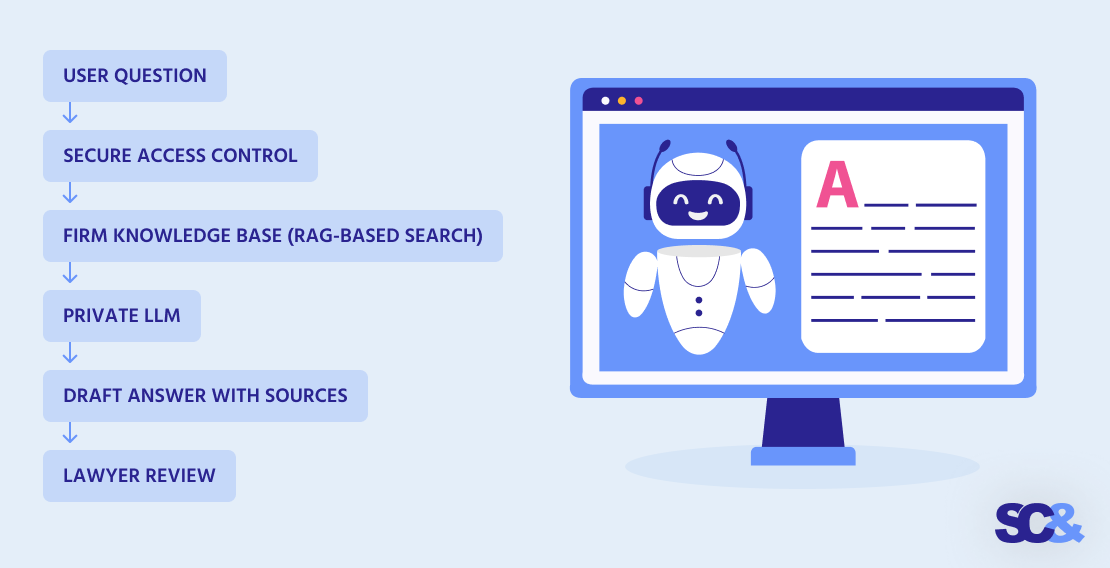
For example, a lawyer asks: “Find the latest version of the supplier agreement and summarize the termination clause.” The system checks access permissions, semantically searches the approved document sources, finds the relevant file or clause, and then uses the LLM to prepare a summary, draft, or answer with links to the source documents.
The final step always stays with the lawyer. Private AI can help find information faster, detect risks, find insights, organize materials, and prepare first drafts, but the result should be reviewed before it is used in client communication, legal advice, or formal documents.
Key Use Cases for Private AI in Law Firms
A private AI assistant does not replace lawyers or make legal decisions. Its role is to help legal teams find information faster, prepare first drafts, structure materials, and work with the law firm’s internal knowledge in a more secure environment.
Case File Search
In large case files, relevant information is often spread across documents, emails, clauses, notes, and previous arguments. An AI assistant can help lawyers find facts, dates, names, and document fragments faster, so they do not have to review dozens of files manually.
Legal Document Drafting
For recurring drafting tasks, AI can prepare first drafts of contracts, summaries of long documents, standard clauses, internal memos, client update drafts, or litigation chronology drafts. However, the final review of accuracy, wording, and legal reasoning always remains with the lawyer.
Contract Review and Clause Comparison
When working with contracts, an AI assistant can compare document versions, identify missing clauses, highlight unusual terms, detect risks, and check alignment with internal templates. This helps lawyers quickly see which sections may need closer attention.
Voice Notes and Meeting Summaries
After client calls, internal meetings, or court-related discussions, AI can turn voice notes and transcripts into structured summaries, action items, draft follow-up emails, and internal tasks. This is especially useful when the discussed information should not be processed through public AI services.
Internal Knowledge Assistant
For the firm’s internal knowledge base, an AI assistant can answer questions about internal policies, templates, previous cases, playbooks, checklists, and onboarding materials. This helps teams find the information they need faster without long manual searches.
Offline Legal AI
Offline legal AI is useful when lawyers need AI functionality without a constant internet connection: while traveling, in court, in secure environments, or when network access is limited. In this setup, AI can run on a local device or an internal law firm server.
Private AI vs Public AI Tools for Legal Work
Before choosing an AI tool, a law firm should assess not only convenience but also the level of control required for specific tasks. The same tool may be acceptable for general queries, but insufficient for working with confidential or privileged information.
The table below helps quickly show how public AI tools differ from a private AI assistant in the context of legal workflows, and where the practical line is between a simple productivity tool and a solution for more sensitive legal tasks.
| Criteria | Public AI Tools | Private AI Assistant |
| Data control | Limited; depends on vendor settings and terms | Higher; controlled by the law firm |
| Client confidentiality | Requires careful review, policies, and consent where needed | Easier to align with internal confidentiality policies |
| Custom legal knowledge | Limited unless connected to firm-specific systems | Can work with firm-specific documents, templates, and knowledge bases |
| Auditability | May be limited | Can include logs, access tracking, and review workflows |
| Offline mode | Usually not available | Possible with local, on-device, or internal server setup |
| Cost model | Subscription or API-based costs | Higher initial setup, but more control over long-term use |
| Best for | Low-risk general tasks without sensitive client data | Confidential legal workflows and internal document-based work |
Private AI vs Public AI Tools
RAG for Law Firms: Why It Matters
Imagine a common task: a lawyer needs to quickly understand which termination clauses appear in a specific client’s supplier agreements. Manually, this may mean searching through multiple folders, contract versions, and related documents. A standard LLM without access to these materials cannot provide a reliable answer because it does not “see” the law firm’s documents.

This is where RAG becomes useful. In simple terms, RAG allows an AI assistant to first find relevant information in contracts, case files, templates, or an internal knowledge base, and only then generate an answer, summary, or draft based on the retrieved fragments.
For example, a lawyer asks: “What are the termination clauses in this client’s supplier agreements?” The system searches for the relevant agreements, identifies the necessary clauses, prepares a brief summary, and shows links to the source documents. The lawyer then reviews the result and decides how to use it.
The main value of RAG is that answers become more grounded in firm-specific documents. This helps reduce the risk of hallucinations, shows sources, and works more efficiently with large document collections.
However, RAG does not make AI error-proof. The quality of answers depends on how clean and up-to-date the connected data is, whether permissions are configured correctly, how well indexing works, and whether documents are regularly updated. In addition, an AI assistant should not make final legal conclusions without review by a lawyer.
How SCAND Could Build a Private AI Assistant for a Mid-Sized Law Firm
Imagine a mid-sized law firm with around 40 lawyers. The firm stores contracts, case files, internal templates, and client-related documents across several systems, which makes it difficult for lawyers to quickly find the right information, compare document versions, and prepare recurring drafts.
In a project like this, SCAND could start with a discovery phase to define the most valuable use cases, data sources, access rules, and security requirements. Based on this assessment, the team could design a private AI assistant connected to the firm’s internal document storage with role-based access control.
The solution could support case file search, document summaries, draft generation, clause comparison, and voice note summaries after client calls or internal meetings. For example, a lawyer could ask the assistant to find a specific contract, summarize key terms, or prepare a first draft of a client update based on approved internal materials.
During a PoC or pilot, the firm could measure improvements such as faster document review, better reuse of internal knowledge, less manual search, and reduced reliance on public AI tools for confidential workflows. Final review, legal assessment, and responsibility for the result would still remain with the lawyer.
Private Legal AI Development Services by SCAND
Building a private AI assistant for lawyers is not only about choosing an LLM. A law firm also needs the right architecture, secure data access, integrations with existing systems, user-friendly workflows, and clear controls for confidentiality and human review.

SCAND can help law firms design and develop a secure AI solution that fits their internal processes, data policies, and technology environment. This may include AI consulting, private LLM architecture, RAG system design, secure AI assistant development, and integration with document storage, DMS, case management platforms, internal databases, or enterprise systems.
Depending on the firm’s requirements, SCAND can support different deployment models: on-device, on-premise, private cloud, or hybrid infrastructure. The solution can also include role-based access control, audit logs, source linking, admin tools, and UX/UI designed specifically for legal teams rather than generic AI users.
If your firm is exploring private AI for legal workflows, SCAND can help start with a discovery phase or PoC to validate the right use cases, architecture, and security requirements before full-scale development.
Frequently Asked Questions (FAQs)
Can law firms use LLMs without sending client data to the cloud?
Yes. Law firms can use AI through on-device, on-premise, private server, or private cloud setups. However, the right approach depends on the firm’s jurisdiction, client agreements, confidentiality obligations, internal policies, and risk tolerance.
What types of private AI can law firms use for confidential workflows?
Law firms can use on-device LLMs, on-premise AI servers, private servers, private cloud environments, or hybrid setups. The right option depends on data sensitivity, confidentiality obligations, client agreements, existing systems, and security requirements.
What is private AI for law firms?
Private AI for law firms is an AI system that works in a controlled environment and helps lawyers with search, summaries, drafts, document review, risk detection, and internal knowledge tasks. The key difference is that sensitive legal data is processed according to the firm’s own access, security, and governance rules.
Is private AI safer than public AI tools?
Private AI can reduce certain data exposure risks because the firm has more control over where data is processed, who can access it, and how activity is logged. However, safety still depends on architecture, access control, governance, user training, secure logging, and human review.
What is a private LLM for law firms?
A private LLM for law firms is a language model deployed or configured so that the firm can use it for internal legal workflows without unnecessarily sending sensitive client data to public AI services. It can be used for document search, summaries, first drafts, internal Q&A, and other controlled tasks.
Can private AI draft legal documents?
Yes, but it should be used as an assistant for first drafts, not as a replacement for a lawyer. A private AI assistant can help prepare contracts, clauses, memos, client updates, or litigation chronology drafts, but a lawyer must review accuracy, legal reasoning, citations, and final wording.
How long does it take to build a private AI assistant for a law firm?
The timeline depends on data sources, security requirements, integrations, deployment model, number of users, and the complexity of legal workflows. A simple PoC can usually be developed faster, while a full production rollout requires more time for security setup, testing, user training, governance, and scaling.


