


Upgrade pick
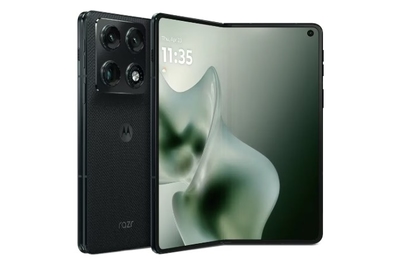
Motorola’s first phablet-style foldable packs big, bright displays, excellent cameras, useful multitasking features, and long-lasting battery life into a thin, lightweight body. And thanks to its stylus support, you can also use it to take notes, annotate documents, and sketch.
The Motorola Razr Fold is the company’s first phablet-style foldable. It’s expensive, but it has large, bright screens, multiday battery life, an excellent triple-camera system, stylus support, and seven years of both software and security updates. It’s a great option if you’re willing to spend a bit more for a foldable with the largest screens, the longest battery life, excellent cameras, and the ability to use your phone as a digital notepad.
You can use this foldable in fun ways. The Razr Fold’s dual displays and foldable design enable unique uses you can’t match with a standard phone. Tent mode essentially turns the Razr Fold into a smart display with different widgets to see information at a glance, and laptop mode lets you type out emails by using the keyboard on the bottom half of the display and viewing the content on the top half.
The Razr Fold has a 6.6-inch cover screen. Since I rely on a foldable’s cover display more often than I do the main display, any extra screen real estate is always welcome, especially for swiping through Instagram, watching TikTok videos, or swiping through photos.


The Razr Fold opens up to an 8.1-inch interior display, which supports up to three apps in split-screen mode. If you want to add more, you can open other apps in freeform mode, which causes them to appear as floating windows that you can then resize, move around, or minimize. I typically used the Moto Notes app, Slack, and Gmail in split-screen mode while using Messages and YouTube in freeform — that way I could stream a video podcast and keep an eye on texts while jotting down notes and checking emails.
It delivers smooth performance, especially when multitasking. The Razr Fold uses Qualcomm’s Snapdragon 8 Gen 5 processor with 16 GB of RAM and runs Android 16. Whether I was using various apps in split-screen mode and freeform, swapping between apps and multitasking, scrolling through social media apps, or using AI features, I never felt it stutter, lag, or get warm to the touch.
It has impressively lengthy battery life. The Razr Fold comes with a 6,000 mAh battery, larger than those of the Pixel 10 Pro Fold and the Galaxy Z Fold7. With standard usage, during work-from-home days or weekends when I didn’t use the phone as much, I was able to stretch the Razr Fold to 37 hours on a single charge.


It has an impressive triple-camera system with a 100x zoom. The Razr Fold has a triple-lens rear camera system with a 50-megapixel main sensor, a 50-megapixel ultrawide sensor, and a 50-megapixel telephoto lens with 3x optical zoom. There’s also a 32-megapixel selfie camera on the cover display and a 20-megapixel selfie camera on the main display.
I was pleasantly surprised with the resulting shots. In broad daylight, the phone delivered great dynamic range and balanced color saturation. Low-light shots were equally crisp. Though Motorola’s camera software falls short of Google’s, the Razr Fold’s cameras are overall comparable to the Pixel 10 Pro Fold’s.
And the Razr Fold offers one camera feature the Pixel 10 Pro Fold doesn’t: the ability to zoom in at 100x. Using generative AI, the Razr Fold fills in any details that are typically lost when you zoom in that close. (Google’s non-folding Pixel 10 Pro has a similar feature.)
Unlike our other picks, it offers stylus support. Using the Moto Pen Ultra, you can take notes, sketch, and mark up documents on both the cover screen and the main display. The stylus also supports pressure sensitivity and tilt detection, so you can adjust line thickness and shading at different angles. Thanks to its Bluetooth connectivity, you can also use it as a remote shutter to take photos or trigger features (like Circle to Search or screenshots) with the side button. It comes with a carrying case that doubles as a charger, as well.


I mainly used it to take notes during meetings or to jot down to-do lists via the Moto Notes app. The pen did a solid job of accurately converting my handwriting into digital text. I also set shortcuts for my most-used apps, including Google Keep and Google Docs, so that I could quickly access them via the toolbar by pressing the side button.
Stylus support is a welcome feature, especially because phablet-style foldables have large interior displays that beg to be written on. But because the stylus costs extra, I recommend it only if you plan on relying on it often.


It’s sleeker and lighter than the Pixel 10 Pro Fold. While the Motorola Razr Fold isn’t as impressively thin as Samsung’s Galaxy Z Fold7, it is slimmer and lighter than Google’s Pixel 10 Pro Fold, so it’s easier to slide into a pocket, carry in a small bag, or hold one-handed for longer periods.


The Razr Fold’s textured back also makes gripping the phone easier, in contrast to the glass backs on the Pixel 10 Pro Fold and Galaxy Z Fold7, which feel slippery without cases.


It has the longest software support of all the Razr foldables. The Razr Fold will receive Android OS and security updates for the next seven years, matching the support time frame for the Pixel 10 Pro Fold and the Galaxy Z Fold7.
Flaws but not dealbreakers
It’s expensive. At $1,900, the Razr Fold is $100 more than what the Pixel 10 Pro Fold cost at launch (and with Google’s next-generation model likely launching this summer, the Pixel 10 Pro Fold can often be found on sale). That cost doesn’t include the additional $100 for the Moto Pen Ultra stylus, which brings the Razr Fold’s price to $2,000.


It isn’t as durable as the Pixel 10 Pro Fold. The Razr Fold has an IP48/49 rating, which means it can withstand immersion in 1.5 meters of water for up to 30 minutes. The hinge is made of stainless steel, while the outer glass is Corning Gorilla Glass Ceramic 3 (Corning’s latest version, which has enhanced drop durability). But it’s less resilient than the IP68-rated Google Pixel 10 Pro Fold, which offers full dust protection in addition to water resistance. Although I didn’t feel like I had to treat the Razr Fold too delicately, I was a lot more mindful about where I set it down.
Motorola’s AI features aren’t as useful as Google’s. The Razr Fold comes with a variety of Motorola’s generative-AI features, including Catch Me Up (which summarizes your notifications), Playlist Studio (for creating playlists using Amazon Music), and Image Studio (a standalone app for generating images, stickers, and avatars through prompts). You also have access to Google Gemini and Perplexity, in addition to Motorola’s own AI assistant.
But I find the Pixel 10 Pro Fold’s AI capabilities to be more practical.


The stylus is sold separately, and the Razr Fold has no built-in storage slot. The Moto Pen Ultra doesn’t come included with the Razr Fold, so you have to pay an extra $100 for it. The phone also lacks a slot to store the stylus or a magnetic back for attaching it, so you have to carry the stylus separately in its included case. While the stylus is compact and easy to throw into a bag, it’s also an extra accessory to remember; I found that I would often leave it at home by accident or forget to swap it between bags.
You need to buy a separate charger to unlock faster charging speeds. The Motorola Razr Fold supports 80 W wired-charging speeds, but to unlock those speeds, you need to purchase Motorola’s proprietary Turbopower charger for an extra $100. I charged the phone using a 68 W charging brick and found that it reached from 0% to 100% in just under two hours. It also supports up to 50 W wireless charging.


