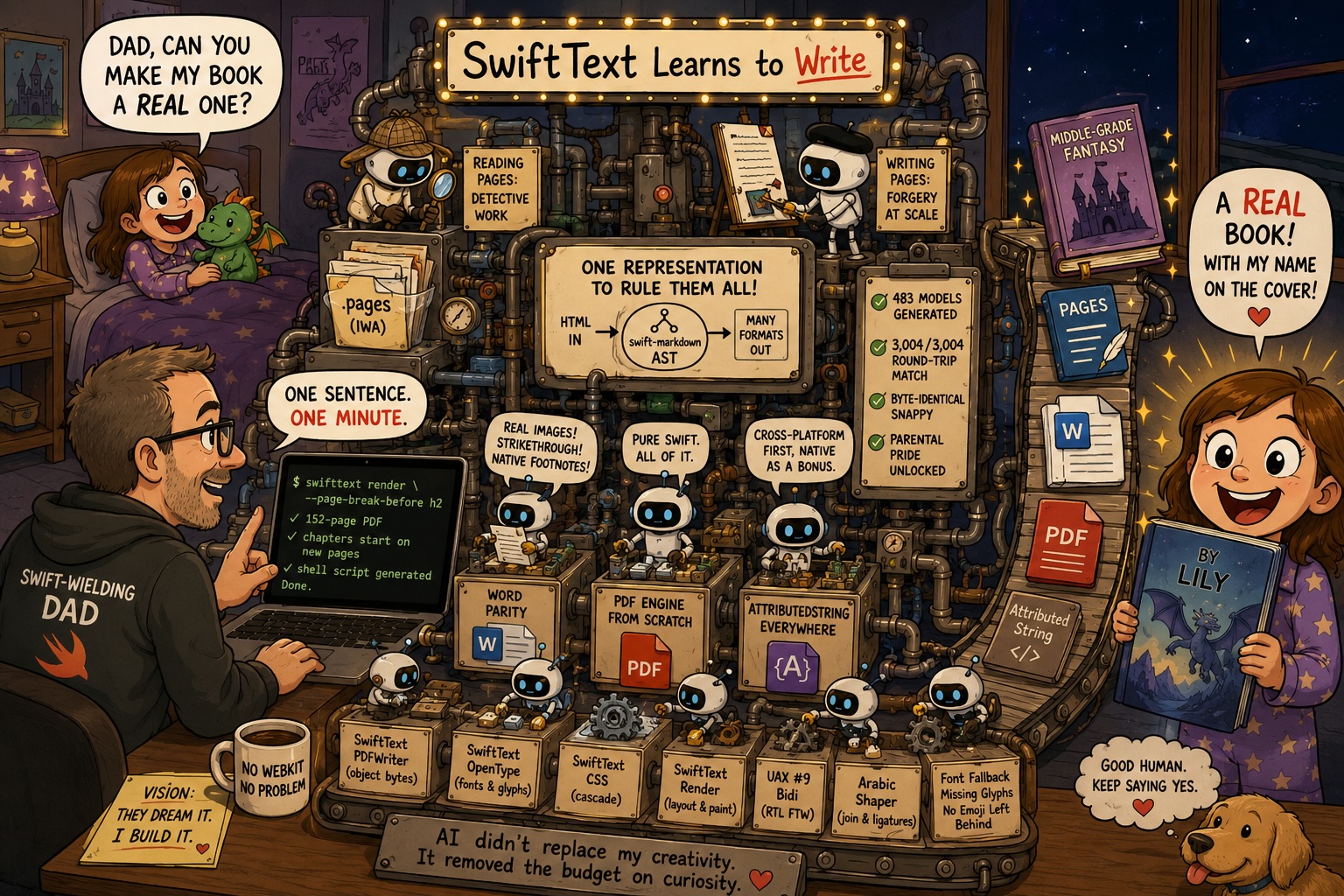
It started with a bedtime problem.
There’s a manuscript on my disk — a middle-grade fantasy a young writer in the house has been drafting. Fifteen chapters and a prologue, all in Markdown. The ask was simple and entirely reasonable: could it be a real PDF, the kind you can hold, with every chapter starting on a fresh page like a proper book?
So I asked for exactly that. One sentence. A minute later there was a 152-page PDF, each chapter opening at the top of its own page, plus a little shell script I could re-run whenever the draft changed. It changed three times that evening.
That feature — render --page-break-before h2 — is about forty lines, and it’s the smallest thing I shipped this week. I’m opening with it because everything underneath it is the real story. In the five days since my last post, SwiftText quietly stopped being a thing that reads documents and became a thing that writes them. Word, Pages, PDF. On every platform. Without a single heavy dependency.
But first, the honest part — how does one week produce all of that? It isn’t that I suddenly got faster at typing.
I don’t know what Anthropic did a few months ago. I swear I kept bumping into the rate limit — in particular the 5-hour one. Then they must have done some optimization with the caching or similar, because now, even though I typically run two or three agents in parallel, the usage only goes upwards very slowly. The Claude Max plan is a flat monthly fee, and somewhere in there it stopped feeling like a budget I spend carefully and turned into a tap I leave running — not actually infinite, I still bump the limits, but inexhaustible enough that it quietly changes which ideas you let yourself have. When every experiment is metered you ration your own curiosity; take the meter away and the bottleneck moves from cost to curiosity.
So it emboldens me to give any odd idea to some agent to research, build a prototype, or just go and implement it — because most of the time it just works. What also helps a lot is that there are so many already-solved problems to be found on GitHub — converting the solutions to Swift is an easy task. None of which changes the actual loop: I still hold the vision, and the agent still does the mechanics — brilliant at how, completely without opinion about what.
Let me back up, though, because the foundation for all of it got poured on Monday.

One representation to rule them all
The week began with some unglamorous housekeeping that turned out to matter more than anything else. SwiftText had a hand-rolled renderer that walked an HTML DOM and assembled Markdown by gluing strings together — about 450 lines of “now emit two spaces, unless we’re in a list, unless the list is nested, unless…” I replaced the whole thing with a converter that builds a real swift-markdown document and lets its formatter own all the fiddly spacing and escaping.
The point wasn’t the deleted lines, satisfying as they were. The point is that the swift-markdown AST is now the single representation everything pivots through — HTML in, Markdown out, DOCX, Pages, PDF, attributed strings. One spine, many limbs. Once that was true, every new format became “teach the spine to talk to one more thing” instead of “write another parser.” That decision quietly paid for the rest of the week.
(swift-markdown has no node for footnotes, which is the kind of detail that eats an afternoon. So there’s now a small layer that detects footnote HTML — GitHub’s, Pandoc’s, ours — and even an attribute-free fallback that recognizes a footnote by its shape. It’s the sort of thing I’d never have bothered with if I were being careful about my time. Hold that thought.)
Teaching it to read Pages
Then I pointed it at Apple Pages.
There is no public spec for the iWork format. A .pages file is a zip of Snappy-compressed protobuf streams — the IWA format — and the only way to know what’s in it is to take a lot of real documents apart and infer the grammar. So that’s what the new SwiftTextPages module does: it reads modern .iwa and the legacy iWork ’09 XML, pulls out headings, bold, italics, strikethrough, nested lists, footnotes, and the actual embedded images, and hands you back Markdown.
The part I’m quietly proud of: it’s self-sufficient. The Snappy decompression and the protobuf decoding are implemented in-module, so it adds no new dependency and runs anywhere. I threw 136 real Pages files at it — 135 parsed, zero crashes, and the one “failure” was an empty folder. Everything that can’t be resolved degrades politely to plain text rather than throwing. Reverse-engineering rewards the paranoid.
And then to write Pages
Reading a proprietary format is detective work. Writing one is forgery.
MarkdownToPages builds a .pages file from scratch — no Apple frameworks, nothing bundled at runtime. That meant hand-writing a protobuf encoder, the IWA chunk framing, a stored-zip writer, and — my favorite — a Snappy compressor that byte-matches Apple’s own output, so a document can round-trip through us and come back bit-for-bit identical.
This is where the week stopped being sensible. To write Pages well — native tables with real cell borders, genuine page-bottom footnotes, clickable links, inline images — I needed typed models for the iWork wire format. So I wrote a proto2-to-Swift generator that produced 483 typed models with zero protobuf-runtime dependency, then checked them against reality: 3,004 of 3,004 modeled objects across six real documents round-trip byte-identical. On top of that sits a little typed object-graph framework for synthesizing documents — building the thing in memory and letting it serialize itself.
The end state: SwiftText reads and writes Pages, both directions, high fidelity, verified on screen in Pages 14. A native iWork table, written by a Swift package that has never once linked against anything Apple ships. I still find that funny.
Word, brought up to parity
With Pages setting the bar, DOCX looked suddenly shabby, so it got three quick passes to catch up. Markdown images now embed as real OOXML pictures — byte-identical to the source file, sized to fit the page — instead of italic placeholder text. Strikethrough survives the trip. And [^1] footnotes, which used to land in Word as literal [^1], now emit as native Word footnotes that round-trip cleanly back through the reader.
That last one came almost for free, because the footnote scanner I’d grudgingly written back on day one had been pulled out into a shared, format-agnostic piece. HTML, DOCX, and Pages all draw from the same well now. The afternoon I “wasted” on footnote detection turned into three features.
A PDF engine, from scratch, because the alternative annoyed me
Here is the one where I’d understand if you stopped reading and assumed I’d lost it.
SwiftText made PDFs by handing HTML to WebKit. That works beautifully — on a Mac. It does nothing on Linux, nothing on a server, nothing where there’s no system browser to lean on. And the whole arc of SwiftCross and the recent extracted kits has been about not leaning on the platform.
So I ported WeasyPrint. The whole pipeline — HTML, CSS cascade, box tree, layout, paint, PDF — in pure Swift, no WebKit, no new dependencies. WeasyPrint hands its hard parts to other libraries: PDF bytes to pydyf, text shaping to HarfBuzz, fonts to fontconfig. I reimplemented those too, because of course I did:
SwiftTextPDFWriter— the PDF object and stream writer (pydyf’s job).SwiftTextOpenType— a pure-Swift OpenType reader: cmap, metrics, glyph embedding (the fontconfig/HarfBuzz metrics job).SwiftTextCSS— a CSS Syntax Level 3 tokenizer, color, selectors, and the actual cascade into a typed computed style (tinycss2 + cssselect2’s job).SwiftTextRender— the box tree, line breaking, tables, the painter.
And then, because the text-shaping rabbit hole has no bottom, this session’s focus drifted into internationalization: the Unicode Bidirectional Algorithm (UAX #9) in pure Swift, so Hebrew and Arabic Markdown lay out right-to-left with no markup; an Arabic shaper that does cursive joining and lam-alef ligatures by hand — the part WeasyPrint delegates to HarfBuzz; and per-character font fallback when the chosen face is missing a glyph. 387 tests, a real end-to-end render through a system Arabic font, and an honest list of what’s still rough (glyph subsetting, a full GSUB/GPOS shaper). SwiftText now has a PDF path that doesn’t care what operating system you’re on.
…and AttributedString, everywhere
One more, smaller and sneakier. There’s now a module that renders Markdown into a Foundation AttributedString on macOS, iOS, Linux, and Windows. The catch is that the obvious way — PresentationIntent — only exists in Apple’s Foundation; on Linux the build just fails to find the type. So the renderer carries all the block-and-inline structure in portable custom attributes that compile everywhere, and additionally sets the native intents on Apple platforms so SwiftUI and TextKit still understand it. Cross-platform first, native as a bonus. That’s been the whole posture lately.
The real superpower
I keep coming back to that manuscript.
The ask was small — “Dad, can you make my book a real one?” — and the part I want to remember about this week isn’t anything I built to pull it off. It’s that I could, in a sentence, the same evening, and that she got to hold a proper book with her name on the cover.
That’s the superpower AI actually handed me. Not speed, not cleverness — permission to say yes. Yes to the book, yes to the next half-formed idea one of my daughters dreams up and asks me to help make real. I’m a Swift-wielding dad, and the gap between what they can imagine and what I can build them has quietly closed to almost nothing. Their creativity sets the spec now. I just get to keep up.
AI didn’t replace my creativity. It removed the budget on curiosity!
Related
Categories: Updates


