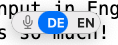
I’m working with an English external keyboard with a Mac (currently running Sonoma) hat also has a built-in German keyboard which I only use occasionally. I use dictation in both English and German. Now, my problem is that when I switch dictation from English to German, my Mac seems to think the keys jump around on my keyboard 🙂 and switches the input source to German, too. In fact, I have not found a way to have German dictation without having to switch the keyboard back to English when I want to type something again, which is pretty annoying.
I am switching dictation language not in the settings, but in the popup that appears when using the dictation shortcut. (see screenshot below). In case that matters: I have German, English "US international – PC" and "Britsh – PC" input sources installed, for the different keyboards.
So, is there a way to switch dictation to German while keeping the keyboard input in English, or is there another workaround I could use to make this preference change more streamlined?


