


Best for…
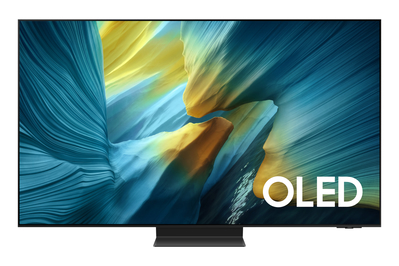
This OLED TV is blazingly bright, and its matte screen is great for sunny rooms and flashy video games. But it’s less accurate than our other picks.
Key specs
| Screen sizes | 55-inch (QN55S95F), 65-inch (QN65S95F), 77-inch (QN77S95F), 83-inch (QN83S95F) |
| Backlight type | no backlight (OLED panel) |
| Refresh rate | 165 Hz |
| Color tech | quantum dots (in the 55-, 65-, and 77-inch models only) |
| HDR formats | HDR10, HLG, HDR10+ |
| HDMI specs | four HDMI 2.1 (one eARC) |
| Smart-TV platform | Tizen OS |
| TV tuner | ATSC 1.0 |
While we’ve seen LCD TVs try their best to perform like OLED TVs for years now, the Samsung S95F Series might be the first OLED TV trying to perform like an LCD TV, at least in a couple of key performance areas. This TV is especially bright, with vivid colors and a matte screen that help it look just as good in a bright room as it does in a dark one.
This is the most room-flexible TV I’ve ever tested. Back in the day, I used to recommend that folks buy a TV for daytime viewing and a projector for nighttime viewing. Now, it’s usually a mini-LED-equipped LCD TV for day and an OLED TV for night. But the Samsung S95F throws that advice out the window.
Like all OLED TVs, the S95F is well suited for use in a dark room. Its black levels are truly black, and its self-emissive panel allows it to completely avoid issues that usually stand out on a LCD TV in a dark room, such as backlight bloom (when backlight elements are visible around bright objects against a dark background) and flashlighting (when LEDs are visible at the screen’s edges).
On the other side of that coin, the S95F can hit 2,000 nits of peak brightness (sometimes more) with HDR video, almost twice what our top pick can deliver and several hundred nits higher than what our upgrade pick offers. And thanks to the S95F’s QD-OLED panel, it has the color intensity to match that brightness, achieving 100% of the HDR color space (DCI-P3) and almost 90% of the future Rec.2020 color space.
The S95F seals the deal, however, by coming equipped with the same kind of matte screen you’ll find on Samsung’s The Frame TV. This screen finish does an impressive job of diffusing ambient light, and — combined with the TV’s high brightness — it means you can easily watch the S95F in rooms brightly lit with lamps or open windows.


This TV’s high brightness makes it great for HDR. By default, the S95F is pretty bright in all of its picture modes: It averages around 600 nits even in its accuracy-focused Filmmaker Mode with SDR video. It also tends to oversaturate color in most modes unless you go in and change the color-space selection in the Picture menu.
As a result, the picture kind of looks like HDR all the time, and it really does look awesome while playing true HDR10 content. Even movies with a colder, more subtle palette, such as The Dark Knight, are treated to an improved breadth of color tones. Animated movies like Moana 2, which feature lots of bright colors, are a visual treat.
The only drawback to the S95F’s baseline HDR performance is that it isn’t calibrated as accurately as the Sony Bravia 8 II, so in our tests some details, such as subtle gradations between the shadows and dark grays in Batman’s cape, weren’t as cleanly preserved. And no Samsung TV supports the Dolby Vision HDR format.
Gaming may just be the S95F’s strongest suit. Equipped with a native 165 Hz refresh rate and four HDMI 2.1 inputs, the S95F may be the best gaming TV of 2025. I measured an extremely low input lag of 9.6 ms with a 4K 60 Hz signal using our Leo Bodnar input lag tester, and you get even better results at 120 Hz refresh rates or higher.
The S95F is also equipped with Samsung’s Game Bar, which functions similarly to the Game Optimizer mode on the LG C5. The Game Bar shows useful specs at a glance (frames per second, HDR status, VRR status) and can even automatically zoom on a game’s mini-map. PC gamers also have access to ultrawide gaming options.
I played several games on this TV, including Night in the Woods, Spectra, and Death Stranding, and they all looked gorgeous and ran impressively well. It was astounding to see older games that I hadn’t played for over a decade pop with so much color.


The TV’s smart features work well but require some practice. Samsung’s proprietary Tizen OS smart-TV platform features dedicated hubs for streaming content, gaming content (including cloud gaming), and the TV’s “ambient” mode, which allows it to display low-light screensavers when not in use.
Doing things such as adding apps and organizing them in a row takes longer with Tizen OS in comparison with Google TV, and the automatic labeling of HDMI source devices isn’t always accurate. But at least the platform was quick and responsive on the S95F in my tests. If there’s one consistent (and justified) complaint, it’s that changing inputs smoothly requires a bit of a learning curve: The remote has no input button, and HDMI sources are automatically shuffled into one of the platform’s dedicated hubs, so your Blu-ray player, for example, ends up in the streaming hub, and your PlayStation 5 ends up in the gaming hub.
One of the biggest changes to Tizen OS in 2025 is that the TV now has a version of Samsung’s Daily Board screen. On the company’s tablets, this is a screen that turns on automatically while the device is charging. The version on the S95F turns on when the TV senses you’re nearby, showing the time and current weather at a glance. You can also use it to make notes or control smart devices through SmartThings.
It can be disconcerting to have the TV constantly turn on, even when you’re just walking through the room for a moment. But for a TV that is likely to be prominently displayed in a high-traffic, well-lit room, it’s a sensible addition. You can easily turn the function off if you don’t like it.
Flaws but not dealbreakers
This TV doesn’t support Dolby Vision. Based on feedback we’ve received, we can say that the omission of Dolby Vision, the highest-fidelity HDR format, is a dealbreaker for a lot of videophiles. This TV does support the similar HDR10+ format, but HDR10+ isn’t as widely adopted as Dolby Vision.
Black levels rise in the presence of ambient light. Just as with the Sony Bravia 8 II, the S95F’s QD-OLED layer is reflective, so a sufficient amount of ambient light can cause the black levels to rise enough that they’re brighter than the blackness directly around and behind the TV.
Older and lower-resolution content could look better. Compared with our upgrade pick, and even with our more affordable top pick, the S95F is not well equipped for upscaling sub-1080p content, and it does a fairly poor job with older, lower-bit-rate content. Edges look softer, and the TV’s naturally wide color gamut sometimes oversaturates the hues in older content, making it look unrealistic.
The matte screen can make dim, text-heavy content hard to look at. The matte finish tends to scatter light, which can obscure fine details and make text look blurry.
You can’t get native 4K broadcasts. Like our top pick, the Samsung S95F is equipped only with an ATSC 1.0 tuner, rather than the newer ATSC 3.0 (NextGenTV) tuner for decoding incoming 4K over-the-air broadcasts.
The largest size doesn’t have a QD-OLED panel. If you want an 83-inch TV, be aware that the 83-inch S95F uses a traditional WOLED panel, so the color performance is not as good.
Recommended settings
I recommend using Filmmaker Mode for both SDR and HDR video. With SDR, you may still have to lower the backlight considerably if you’re watching in a dim or dark room. If you find that you can’t change the picture mode, or the TV keeps automatically brightening, turn off AI Optimization.
Like all smart TVs, the Samsung S95F spies on what you watch. If you turned this function on during setup and want to disable it after the fact, go to Settings > Privacy Choices and turn off Viewing Information Services.


