
It’s simple enough for any kid to use. In all the most important ways, the Camp Snap 2 remains similar to the original. You can’t do much more than turn it on, frame a shot, and press the shutter button. The camera makes a noise like a mashup of a shutter firing and a motor advancing film, and the image is captured.
The flash is nice to have in dim light. If there’s not a lot of light, or if your subject is backlit, the camera has an LED flash that you can enable through the three-way off/on/flash switch. Move the switch all the way to the right, and the flash will fire whenever you take a picture; move it to the middle to shoot without flash.
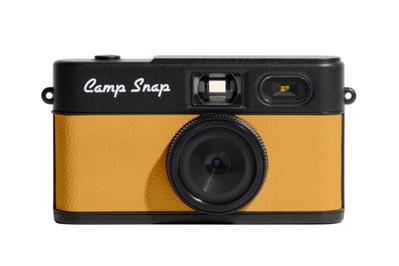
This is the best simple, inexpensive, screenless camera for children going to camp — or anyone who wants to live in the moment when taking photos.
It has useful improvements over the original Camp Snap. A tiny bit slimmer than the original, the Camp Snap 2 has a dedicated on/off switch and a lockable digital filter selection button, and it adds a 30.5mm filter thread on the lens.
Though the memory-card door has a latch, it’s also screwed shut with a mini Phillips-head screw like the ones used on eyeglasses. Using the screw is optional, but we like the idea of screwing it shut before you drop off your camper, to keep the card from getting lost.
It comes with ample storage. The included 4 GB microSD card should hold around 2,000 images. If you’re worried that might not be enough, you can swap in a larger card. (Just make sure it’s 128 GB or smaller.)
Its images look as good as or better than the original’s. The images we got from the Camp Snap 2 looked best in bright light. On a sunny day, our photos had vivid color and looked sharp. Even in the ugly light of an underground New York City subway platform, we got decent-looking portraits without flash.
It has readily accessible digital filters. The original Camp Snap required you to connect it to a computer to change its digital filters, but the Camp Snap 2 has six that you can cycle through using a dedicated button. A 10-second long-press locks you into the current filter to guard against accidentally changing it (which we did once during testing).
Standard and Black & White modes aside, it has three Vintage filters and one called Analog. The differences can be subtle, especially between the Vintage settings, which seem to lean gently toward yellow, green, and purple. We mostly used Standard for our testing, but we like that this camera makes it easier for people who want a filter to use them.


