


Best for…
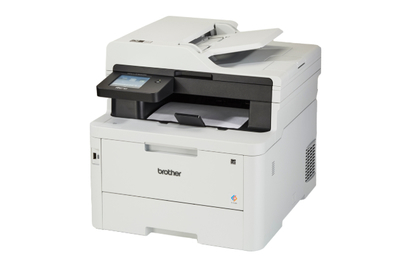
This business-class machine checks all the boxes for a busy home office or small business: It’s faster, sharper, more durable, and more secure than our other picks.
Small-business owners or those who work from home and print frequently should opt for a great color laser all-in-one like the Brother MFC-L3780CDW.
The MFC-L3780CDW is the priciest model we recommend, but it’s also faster and capable of printing clearer text and graphics than our other picks. It still ranks among the most affordable color laser printers that offer all the same productivity features and more security features than our favorite inkjet model, the Brother MFC-J4355DW.
It’s fast and prints well but falters when reproducing scans. In our tests, it averaged 28.6 ppm (against Brother’s estimate of 31 ppm), making it nearly twice as fast as the MFC-J4355DW’s 16.5 ppm.
This color laser model also prints sharp text that rivals the best inkjets we’ve tested, which may be important if you need to print a lot of legal documents. We could clearly read text down to 3.5 points in both serif and sans serif fonts, which was better than our top pick’s 4-point legibility in sans serif and 8-point legibility in serif fonts.
Its graphics are crisper, with less banding, than what you can get from an inkjet printer like the Brother MFC-J4355DW, but its colors are also flatter and less saturated. We recommend saving your toner and printing only the occasional chart or cover sheet in color rather than, say, a photo book. (If you frequently print photos, opt for a dedicated photo printer instead.)
This laser printer also struggled to reproduce beautiful-looking prints from scans, with graphics that often came out duller than the source files. For that kind of material, an inkjet like the MFC-J4355DW will do a better job.
It’s designed to go the distance. The MFC-L3780CDW spools up faster than most inkjets, and its recommended duty cycle of 4,000 pages per month — double the MFC-J4355DW’s 2,000 pages — should be plenty for even the busiest home office and could satisfy many small businesses with multiple employees. Thanks to that higher duty cycle, Brother predicts you can print thousands of pages come audit season without burning out the machine.
It’s more secure than other printers we’ve tested, inkjet and laser alike. The MFC-L3780CDW features firmware integrity and encryption protocols to ensure that the printer is less likely to be hijacked by bad actors. (That sounds absurd, but it has happened.)
It also allows for directory authentication, can hold faxes until you enter your credentials, and offers role-based access control for multiuser environments. If your work involves sensitive material, these are legitimately helpful additions.
It has an integrated NFC card reader that you can optionally use for badge authentication to better protect sensitive business information. This feature allows you to print from an NFC-compatible badge by touching it against the printer, similar to a wireless mobile payment or company-assigned printer code.
It’s cheap to operate over time. Per-page prices for the MFC-L3780CDW hover around 2.9 cents for printing in black and 14.4 cents for color, provided that you use the highest-capacity, super high yield toner cartridges. While these cartridges aren’t as good of a deal as those for our top pick inkjet, they’re comparable to those for many of the other laser printers we’ve tested. (Of course, it can’t compare to the MFC-T780DW ink tank’s fraction of a penny per page.)
The up-front cost to replace all of the toner cartridges in super high yield size is an eye-popping $615 at this writing. Opting for high yield cartridges brings the total down to $420, and standard cartridges lower it to $300, but each page costs more as a result, and you need to replace the cartridges more often.
The optional subscription may save you money and stress. Like our top pick, this printer is eligible for Brother’s Refresh EZ Print subscription program, which extends its warranty and automatically delivers replacement toner at a discount when you’re running low. Plans range from $15 per month for up to 100 pages to $100 per month for up to 1,500 pages.
But if you’re calculating running costs on a per-page basis, you’ll only save with this printer if you have high-volume printing needs, or print a lot in color. As with our top pick, the flat-rate toner subscription makes monochrome pages more expensive, but can make color pages cheaper.
Per page costs with Refresh EZ Print range from 6.6 cents to 14.9 cents, depending on the subscription tier. Extra “sets” of printed pages cost $2 for 10 to 30 pages, depending on subscription. For business tiers, Brother also throws in free drum replacements, which would normally run $190 a pop. Carefully consider your printing needs before signing up.
The interface is easy to use. The 3.5-inch color touchscreen is simple to operate and less frustrating than what you get on some competing models.
But it has one potentially significant flaw: The MFC-L3780CDW’s touchscreen has a black-background footer. Our testers with limited vision couldn’t see this part of the menu because the black bar behind it made that portion of the touchscreen disappear from their view.
Flaws but not dealbreakers
The warranty is short. Surprisingly for a business-class machine, the Brother MFC-L3780CDW’s one-year warranty isn’t as good as the three-year warranty for the company’s consumer-grade MFC-T780DW ink-tank printer. Nor is it as good as what Canon provides for its home-office machines. For its part, HP offers just a one-year warranty but plusses it up by providing on-site service within one business day.
Still, Brother offers several extended-warranty options, including repairs and replacement models. Alternatively, joining the Refresh EZ Print subscription program can extend the warranty by two years.
Its scans aren’t as good as the competition. In our testing, we observed pixelation, distortion, and muted colors in some scans, especially with color images. But we think for most people — especially for business uses — this won’t be a serious sticking point.


