Effective cluster management requires both minimizing costs and meeting your performance SLAs. As big data workloads grow more complex with varying data volumes and runtime requirements, this challenge intensifies. Previously, customers had two options to optimize this balance: use default Amazon EMR Managed Scaling behavior or use autoscaling with custom rules. Autoscaling has risks of losing shuffle data, terminating Application Masters, and slower response times. Managed scaling solved these problems but was optimized for improving job performance followed by saving costs.
Advanced Scaling for Amazon EMR addresses this challenge by giving you direct control over how your cluster scales. You can now express your optimization preference, whether you prioritize cost efficiency or job performance and EMR intelligently adapts its scaling strategy accordingly.
In this post, we discuss the benefits of Advanced Scaling for Amazon EMR on Amazon EC2 and demonstrate how it works through some example scenarios. You’ll learn when to prioritize utilization optimized settings for cost savings with conservative scaling, balanced approaches for mixed workloads, or performance optimized configurations for SLA-sensitive jobs requiring aggressive scaling.
Advanced Scaling for Amazon EMR
Since its launch in 2020, EMR Managed Scaling has helped customers automatically scale their clusters based on workload demands. Managed scaling works best when clusters are running workloads on an under-utilized cluster. As customers adopted Managed Scaling, they requested more granular control over scaling behavior—specifically, the ability to tune how aggressively or conservatively clusters scale up and down based on their unique cost and performance priorities.
Advanced Scaling responds to this feedback by building on the foundation of Managed Scaling with additional customer-facing controls, while preserving its core benefits like shuffle awareness and Application Master protection.
The Advanced Scaling capability introduces additional controls, helping you configure the desired resource utilization or performance level for your cluster using a utilization-performance slider. EMR Advanced Scaling then internally translates your intent into a tailored algorithm strategy (UtilizationPerformanceIndex), such as how quickly to scale and how much to scale, to make scaling decisions for the cluster. This helps optimize cluster resources while making sure the cluster meets the performance or resource utilization intent you’ve set.
For example, consider a cluster running multiple short-duration tasks. Previously, EMR Managed Scaling would scale up the cluster aggressively and scale it down conservatively to avoid impacting job runtimes. Although this is the right approach for SLA-sensitive workloads, it isn’t ideal if you prioritize cost efficiency over minimal delays. Now, with Advanced Scaling, you can configure scaling behavior suitable for your workload types, and EMR will apply tailored optimization to intelligently add or remove nodes from your clusters. This helps you achieve the optimal price-performance for your clusters along with increased flexibility of additional controls.
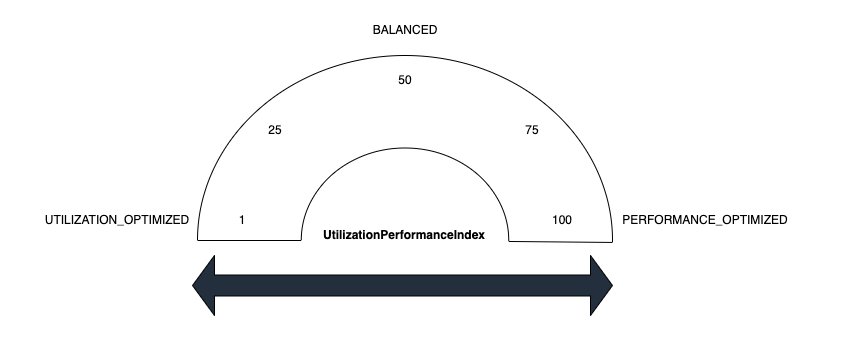
Advanced Scaling uses a UtilizationPerformanceIndex value which can be set while defining your scaling strategy to express your optimization preference. The value you set optimizes your cluster to your requirements. Supported values are 1, 25, 50, 75, and 100. If you set the index to values other than these, it results in a validation error. Scaling values map to resource-utilization strategies. The following list defines several of these:
- Utilization optimized [1] – This setting prevents resource over provisioning. Use a low value when you want to keep costs low and to prioritize efficient resource utilization. It causes the cluster to scale up less aggressively. This works well for the use case when there are regularly occurring workload spikes, and you don’t want resources to ramp up too quickly.
- Balanced [50] – This balances resource utilization and job performance. This setting is suitable for steady workloads where most stages have a stable runtime. It’s also suitable for workloads with a mix of short and long-running stages. We recommend starting with this setting if you aren’t sure which to choose.
- Performance optimized [100] – This strategy prioritizes performance. The cluster scales up aggressively to ensure that jobs complete quickly and meet performance targets. Performance optimized is suitable for service-level-agreement (SLA) sensitive workloads where fast run time is critical.
The below figure shows the UtilizationPerformanceIndex spectrum for Advanced Scaling. Values range from 1 (Utilization Optimized) on the left to 100 (Performance Optimized) on the right, with 50 representing a balanced approach. Intermediate values of 25 and 75 provide additional granularity between strategies.
Use cases and benefits
With Advanced Scaling, Amazon EMR on EC2 continuously evaluates your workload in real time – factoring in pending tasks, memory pressure, and executor demand—then automatically adjusts cluster size to match. For example, the feature enables strategic timing of scaling policies throughout the day – such as dedicating early morning hours to workload preparation, peak business hours to maximum performance, evening periods to moderate scaling for post-business processing, and overnight hours to cost-effective batch operations. This comprehensive approach allows you to fine-tune your resource allocation based on specific operational patterns, ultimately delivering an optimal balance between performance and cost-efficiency while ensuring your business needs are met across different time zones and usage patterns.
Scaling configuration
In the following sections, we walk through a range of scenarios testing Advanced Scaling against a 3 TB TPC-DS dataset, then walk you through the results across three different UtilizationPerformanceIndex values. We evaluate how Amazon EMR responds with advanced scaling policies in scenarios optimizing cluster utilization, balancing performance with utilization, and aggressive performance requirements.
Advanced Scaling is available through API. In the scenarios below, we updated existing cluster configurations by modifying UtilizationPerformanceIndex with 1, 50, and 100, to correspond to the different scaling strategies using the put-managed-scaling-policy API with an advanced scaling strategy, as seen in the following examples:
Scenario 1: Utilization optimized
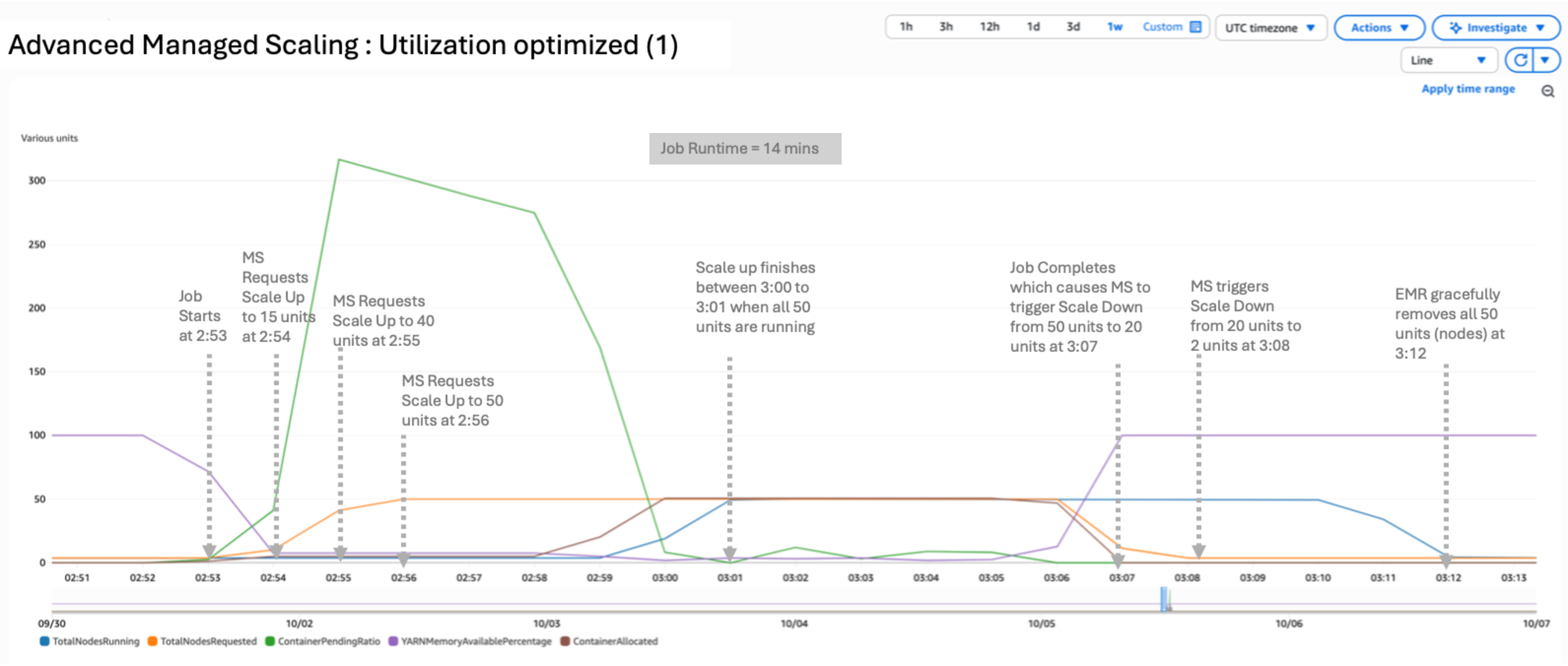
In this scenario, we used a utilization optimized configuration by setting UtilizationPerformanceIndex to 1:
The result of the test yielded a peak of 50 nodes running and 50 requested. The scale-up and scale-down process is conservative. After the job completes, it takes approximately 5 minutes to fully release the nodes, as shown in the following figure. The job completed in 14 minutes. UtilizationPerformanceIndex of 1 or 25 can be useful when the cluster is running a sequence of jobs with little to zero idle time. It can prevent frequent node churn because nodes will be available for the next set of jobs.
Scenario 2: Balanced
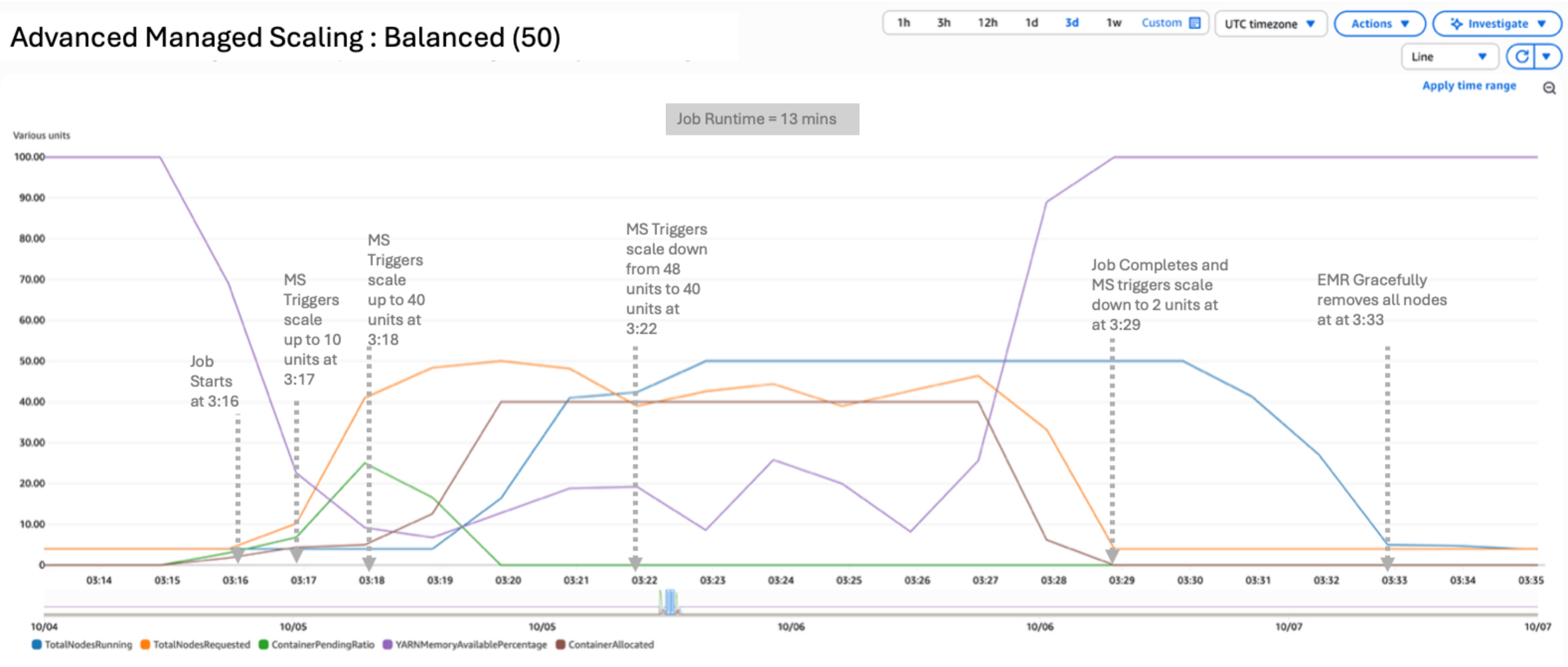
In this scenario, we used a balanced configuration by setting UtilizationPerformanceIndex to 50:
The result of the test yielded a peak of 48 nodes requested and 50 nodes running. UtilizationPerformanceIndex of 50 uses a balanced approach for scaling resources, providing a better price-performance ratio. After the job completes, EMR gracefully removes all nodes within approximately 4 minutes. The job completed in 13 minutes, as shown in the following figure.
Scenario 3: Performance optimized
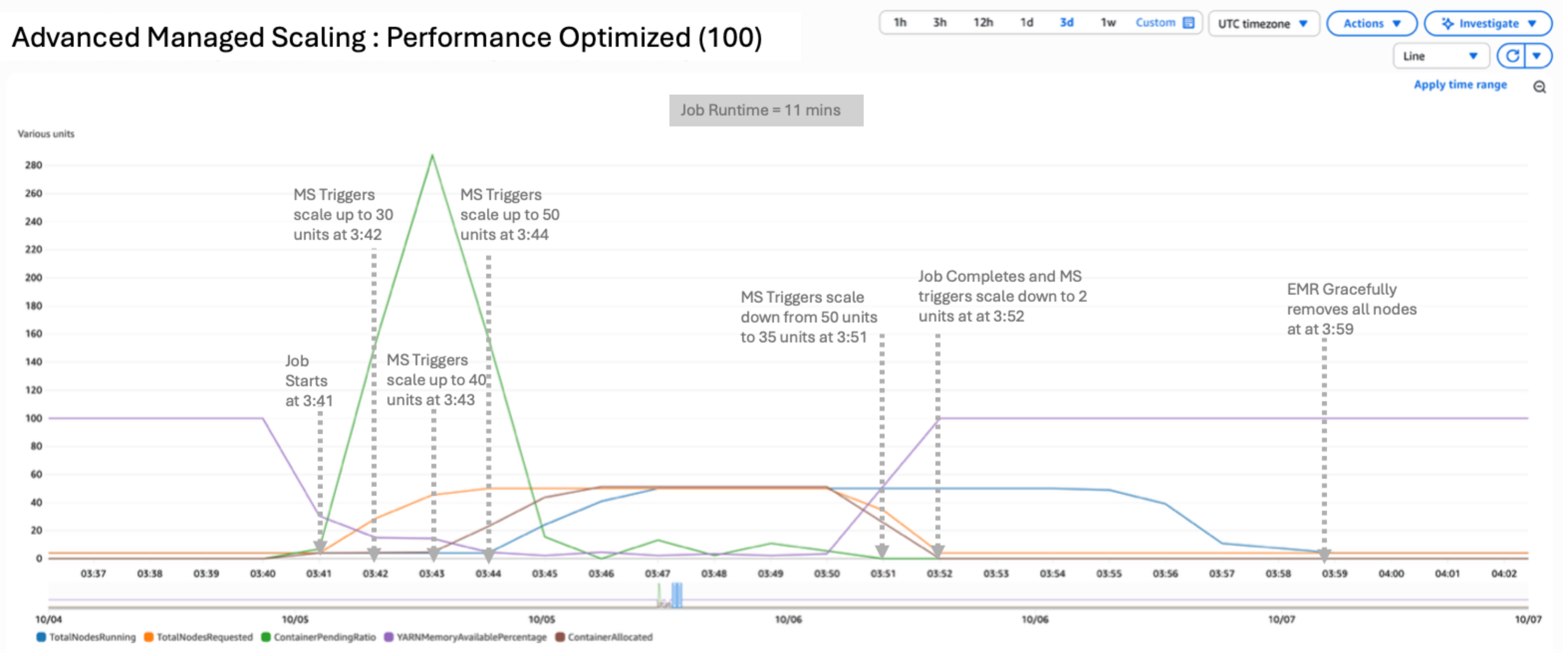
In this scenario, we used a performance optimized configuration by setting UtilizationPerformanceIndex to 100:
The result of the test yielded a peak of 50 nodes requested and 50 nodes running. UtilizationPerformanceIndex of 100 delivers the highest performance by aggressively scaling up resources reaching 50 nodes requested within 3 minutes of job start. Scale-down closely follows the requested metric, with EMR gracefully removing all nodes within approximately 7 minutes after job completion. This setting is ideal for latency-sensitive workloads that need to finish under SLA. The job completed in 11 minutes, as shown in the following figure.
Comparison
The following table summarizes the differences between these scaling methods and time taken for each.
| Scaling Method | Utilization Index | Peak Total Nodes Requested | Peak Total Nodes Running | Job Run Time (Seconds) | Cost to Run job | Use Case |
| Scenario1 – Utilization optimized | 1 | 50 | 50 | 840 | Low | Workloads with regular spikes; prioritizes cost efficiency with conservative scaling |
| Scenario 2 – Balanced | 50 | 48 | 50 | 780 | Medium | Steady workloads with mixed stage durations; recommended starting point |
| Scenario 3 – Performance Optimized | 100 | 50 | 50 | 660 | High | SLA-sensitive workloads requiring fast completion times |
Advanced Managed Scaling in Amazon EMR introduces a more nuanced approach to cluster management through the customized scaling strategies to meet your business requirements. This spectrum offers fine-grained control over how clusters respond to workload demands. At one end, with a utilization optimized configuration of 1, the system prioritizes efficient resource usage, scaling up conservatively to maintain cost-effectiveness and taking advantage of existing cluster resources. In the balanced configuration at 50, the strategy aims to strike an equilibrium between resource utilization and job performance. To meet performance SLAs, the performance optimized value of 100 showed aggressive scaling responding to increased demand for resources quickly, regardless of resource consumption. This granular control helps you fine-tune your cluster’s behavior based on your specific needs, balancing cost, efficiency, and performance.
Conclusion
Advanced Scaling for Amazon EMR on EC2 offers increased control and enhanced efficiencies. By fine-tuning your clusters’ behavior, you can achieve more cost-effective and performant big data processing. Start by experimenting with different UtilizationPerformanceIndex values and closely monitor your cluster’s performance and cost metrics. Over time, you can fine-tune the settings to find the right balance for your specific workload requirements.
To learn more about Amazon EMR Managed Scaling and Advanced Scaling, refer to our documentation. We’re excited to see how you use this new capability to enhance your big data processing on AWS, and we look forward to your feedback as we continue to evolve and improve our services.
About the authors


