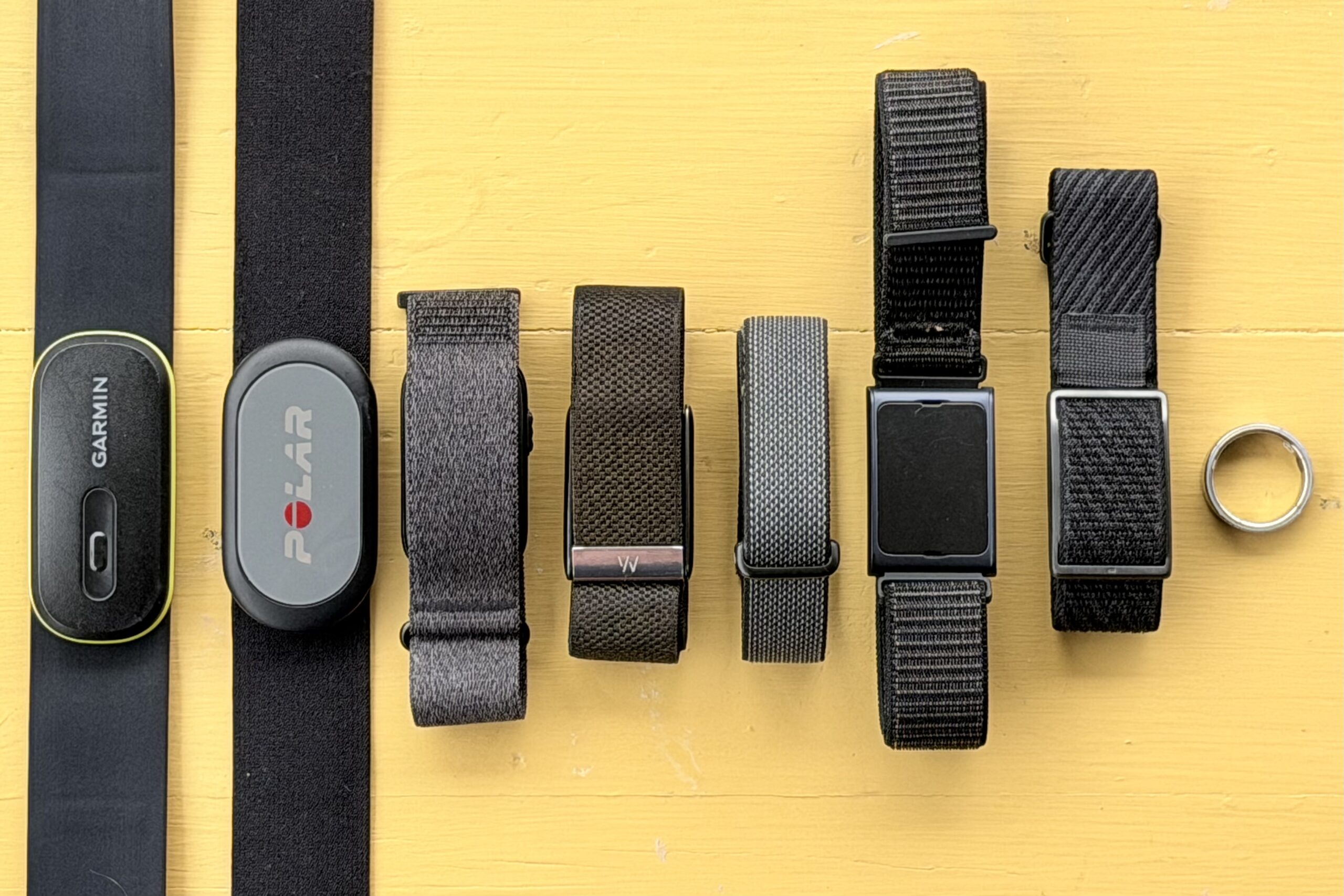
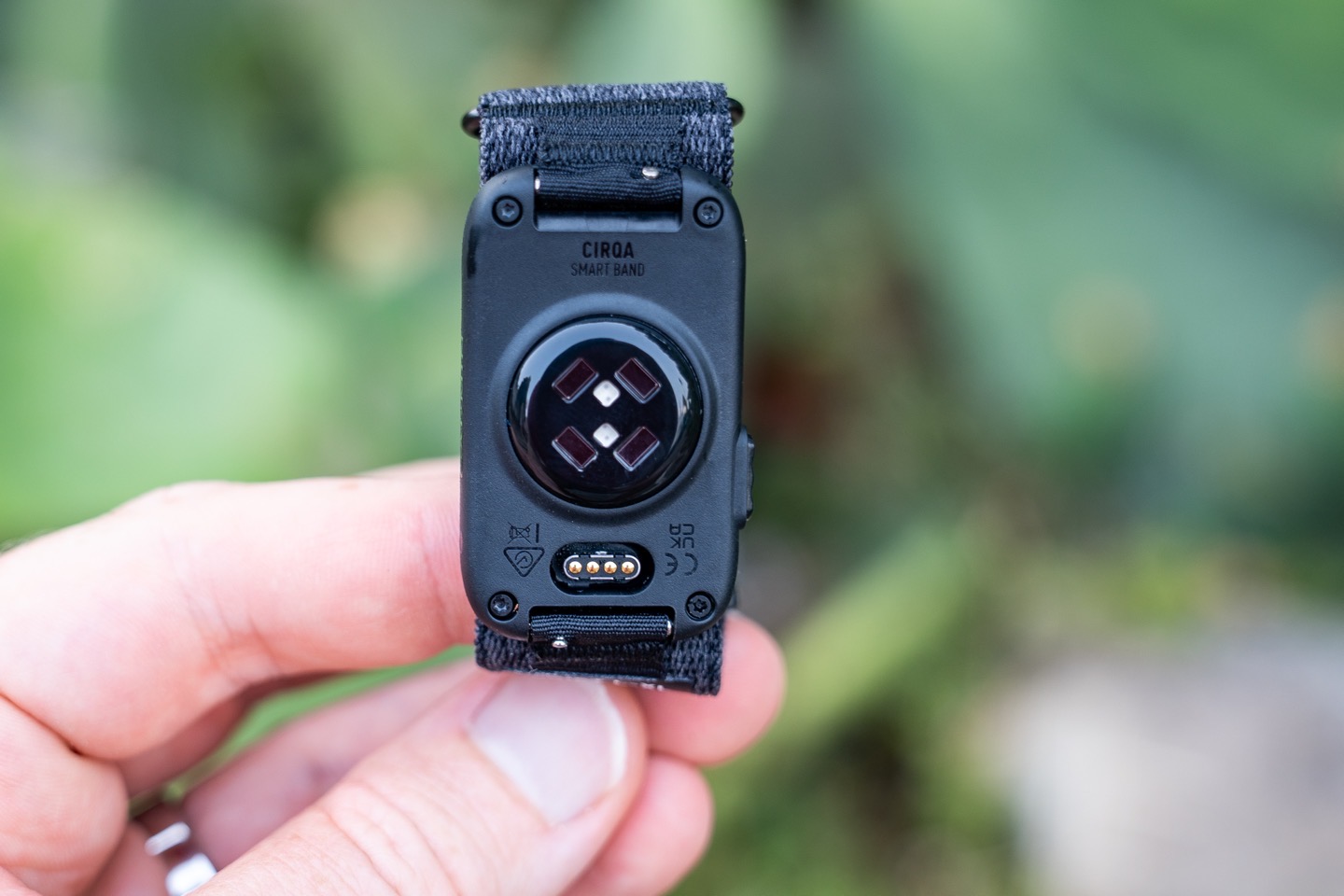
This will probably be my rabbit-hole post of 2026, diving into the accuracy of not just Garmin Cirqa, but all of the screenless wearable bands currently on the market. And not just one Cirqa band, but both wrist and bicep/arm placement, as well as multiple people. And finally, not just heart rate during workouts, but across a slate of different categories and scenarios, spanning weeks of data gathering/comparisons.
As you might surmise, data accuracy is always important in a wearable, but frankly, even more important in a screenless band. After all, a regular GPS watch can have plenty of other smartwatch/sport/navigation/etc features that might counterbalance imperfect accuracy results; however, a screenless band has ‘one job’: Getting your data right.
But here’s the thing: There are actually a few different categories of accuracy you have to look at. And honestly, sport heart rate accuracy isn’t the most important one on Cirqa. Specifically, we have the following:
1) Accuracy of heart rate during workouts
2) Accuracy of workout/activity recognition
3) Accuracy/differences of sleep data
4) Accuracy/differences of step data
5) Differences in Calories
I’m going to dive into each of these things, including talking about how important each one is. Note that as always, I’m going to show you data from numerous other devices, both trusted reference devices as well as other competitors in the space. Specifically, virtually every section compares the following:
1) Garmin Cirqa (wrist, and 2nd on bicep same arm)
2) Whoop 5.0/MG
3) Fitbit Air
4) Polar Loop (bicep)
5) Amazfit Helio (bicep)
But I’m also not going to fake-science you. Instead, I’m going to show you how to properly evaluate accuracy of wearable devices, just like I’ve been doing for 18 years. Further, I’m *NOT* going to compare dissimilar day results. Every data point is compared at the exact same time/moment. It’s ludicrous to compare data gathered in winter, to data gathered in summer, and then plot those scores on the same chart. Those are different test scenarios/difficulty levels. Seriously, stop looking at charts that do that, it’s fake-science.
I will however, show you data gathered from both wrist and bicep, but I’m being super clear in labeling on that. Ultimately, I only have so many wrists/wrist space. As always, bicep bands will do better for workouts, and wrists will do better for sleep. Always remember that.
Sound good? Let’s cook!
A Quick Note on Placement:
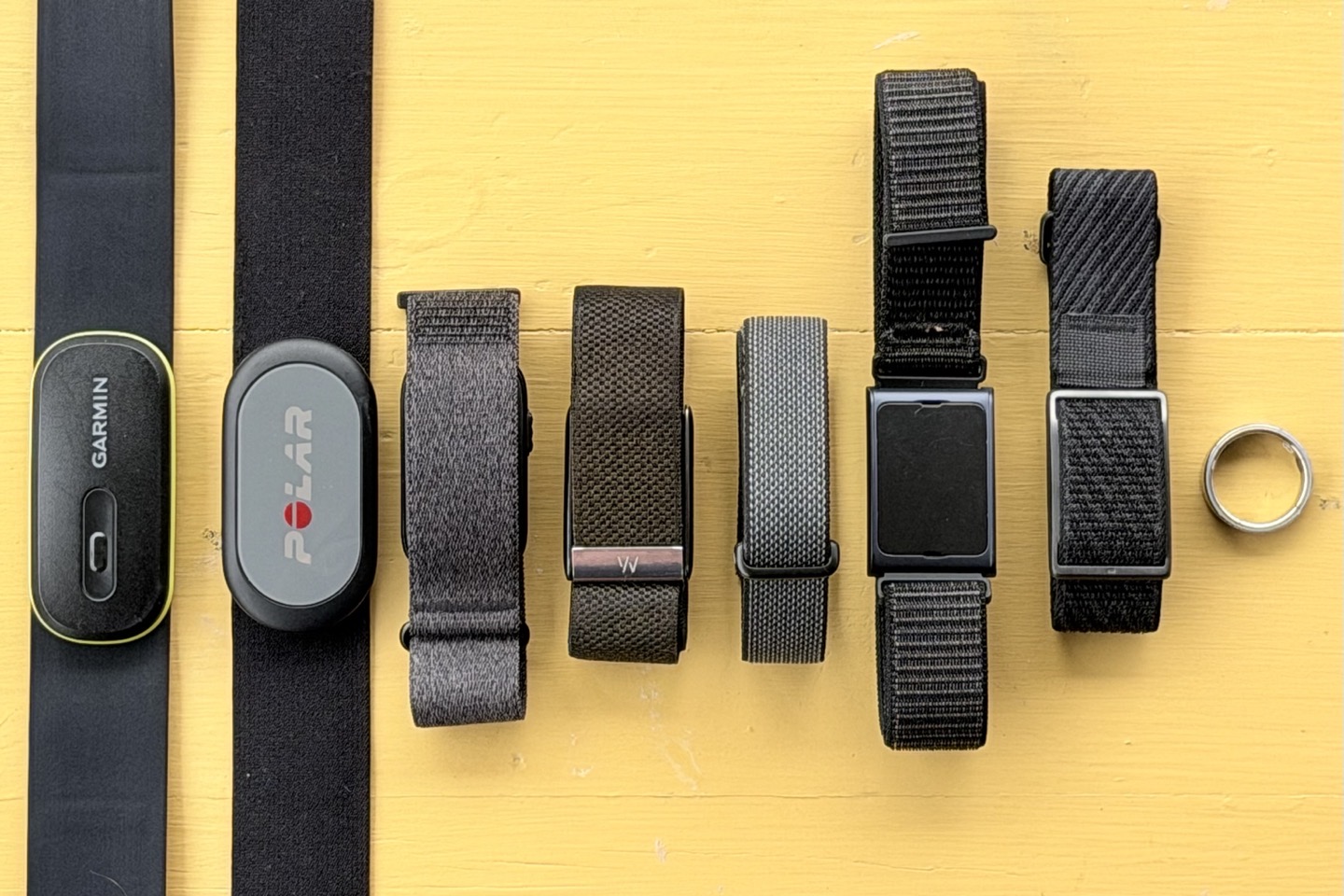
For my testing, I’ve had 7 screen-less devices on me concurrently, plus two different chest straps (alternating each workout). They are as follows:
1) Garmin Cirqa (right wrist)
2) Garmin Cirqa (right bicep)
3) Whoop 5.0/MG (left wrist)
4) Fitbit Air (left wrist)
5) Polar Loop (left bicep)
6) Amazfit Helio (left bicep)
7) Oura Ring 5 (left hand finger)
8) Chest strap for workouts: Polar H9 or Garmin HRM-600
Further, for some of my wife’s workouts/data, she’s had
1) Garmin Cirqa (one wrist)
2) Fenix 8 (other wrist)
3) Chest strap (Polar H9)
A few quick notables:
A) Generally speaking, I don’t recommend two *watches* side-by-side on the wrist, specifically because the larger watch footprint will cause the watch cases to ‘tap’ into each other, triggering cadence-lock issues for heart rate during workouts, increasing step counts, and driving both watches upwards as they press together. However, with the Fitbit Air being so small, and the Whoop also being small and flat, this hasn’t been an issue. In fact, over the last three months I’ve tested both one per wrist and two per wrist on dozens of workouts and days, and seen zero difference in accuracy. This is because they are snug, so light, and fabric, they don’t bounce against each other, and have been producing virtually identical results. This is also in line with how numerous companies in this segment will use these lighter devices for comparisons.
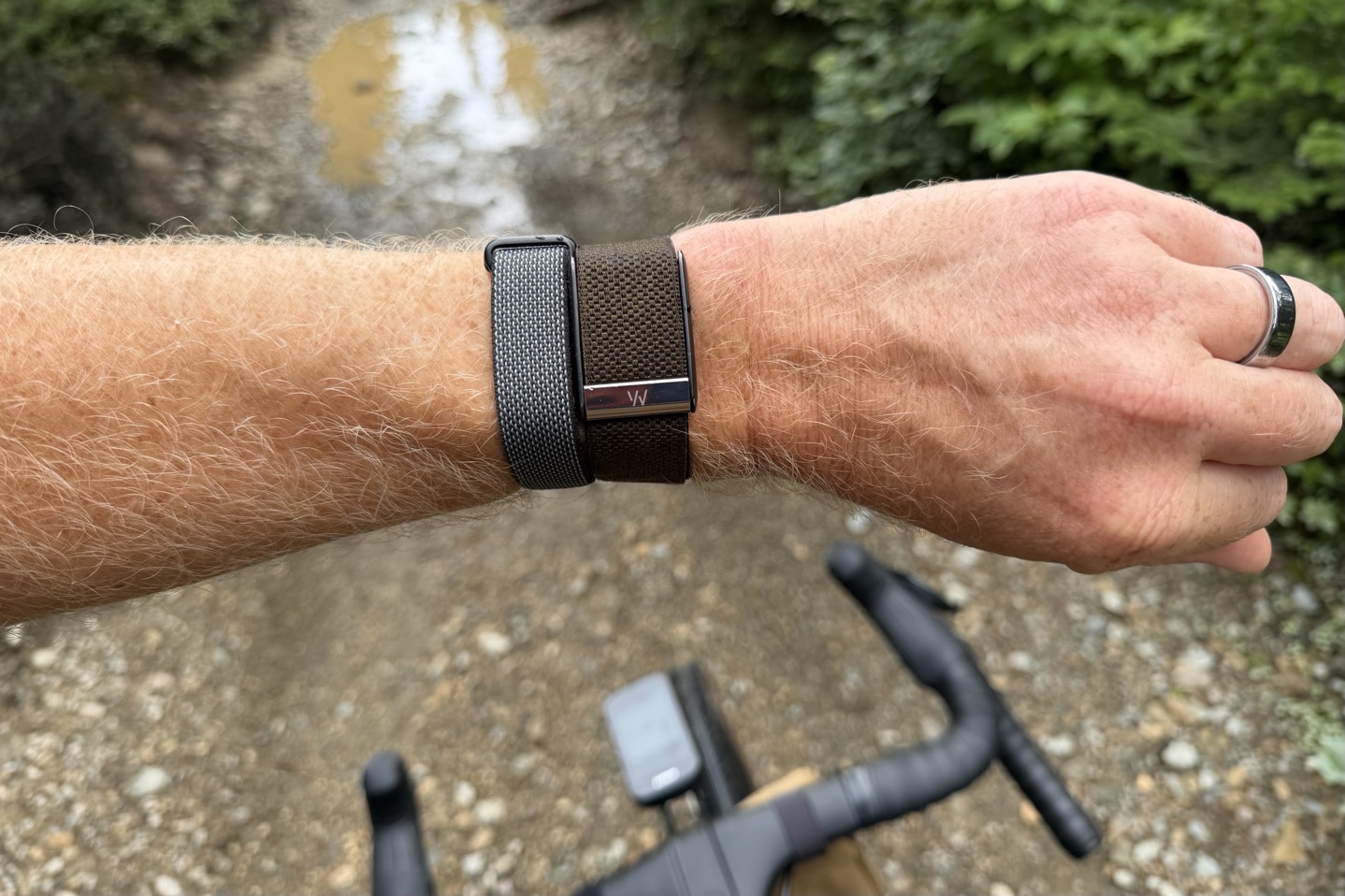
B) Meanwhile, for the left bicep, they’re separated by about 1-2cm most of the time, and then usually slightly offset from each other. These two devices are a bit larger/chunkier, and thus I ensure slightly more separation. As you’ll see, because they’re on the bicep, they have a distinct advantage in this test. Simply put, accuracy isn’t an issue here.
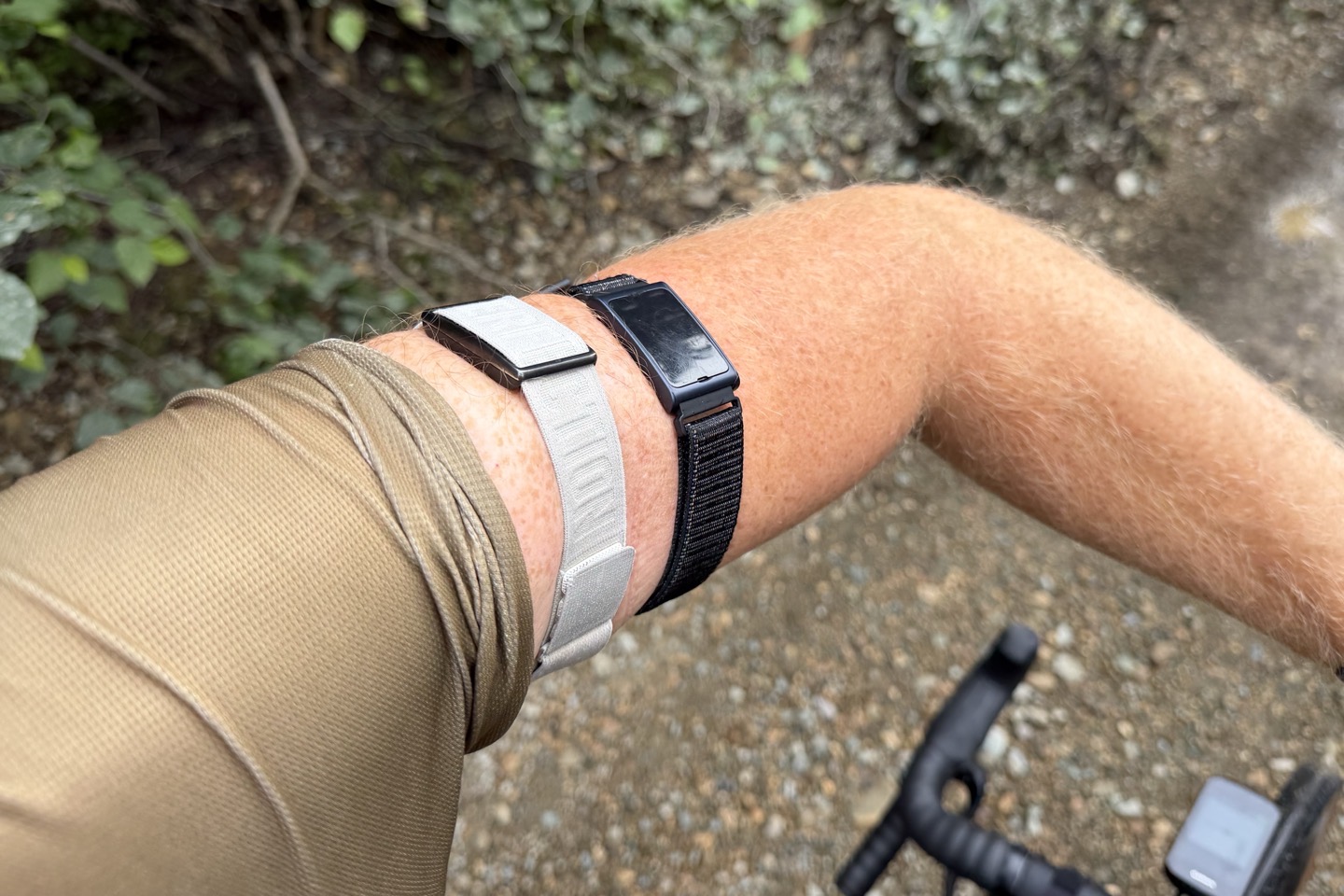
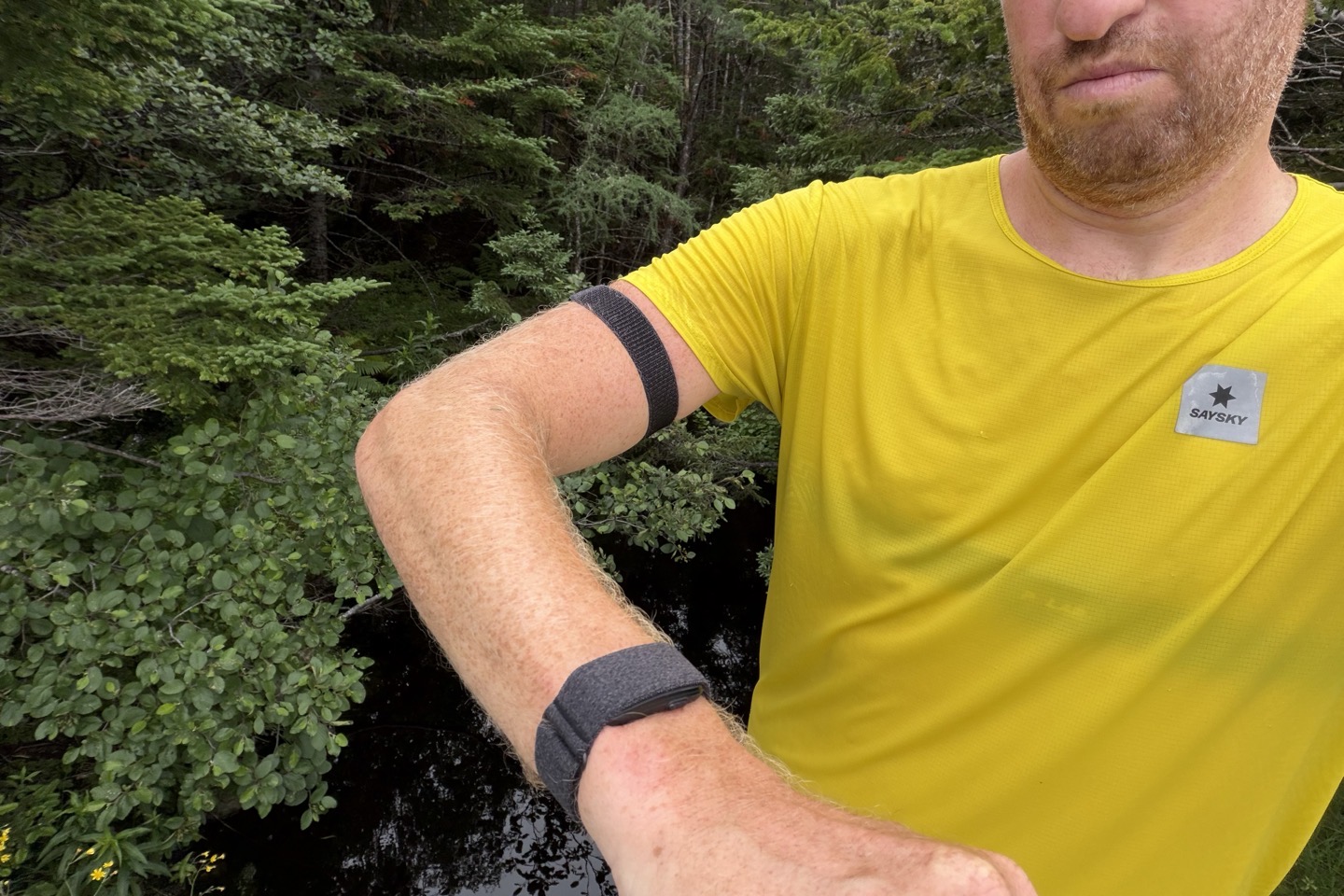
C) On the Garmin Cirqa side, I’ve got one on the right wrist, and then one on the bicep (also right side). This way they are (in theory) beating to the same drum in terms of any per-side differences. While I could try testing different body sides (left vs right), over the last decade of optical HR sensor testing, I’ve virtually never found that to make a difference on my body. Further, my general stance is if a sensor can’t work on one specific side, then that’s a sensor problem, not a me problem.
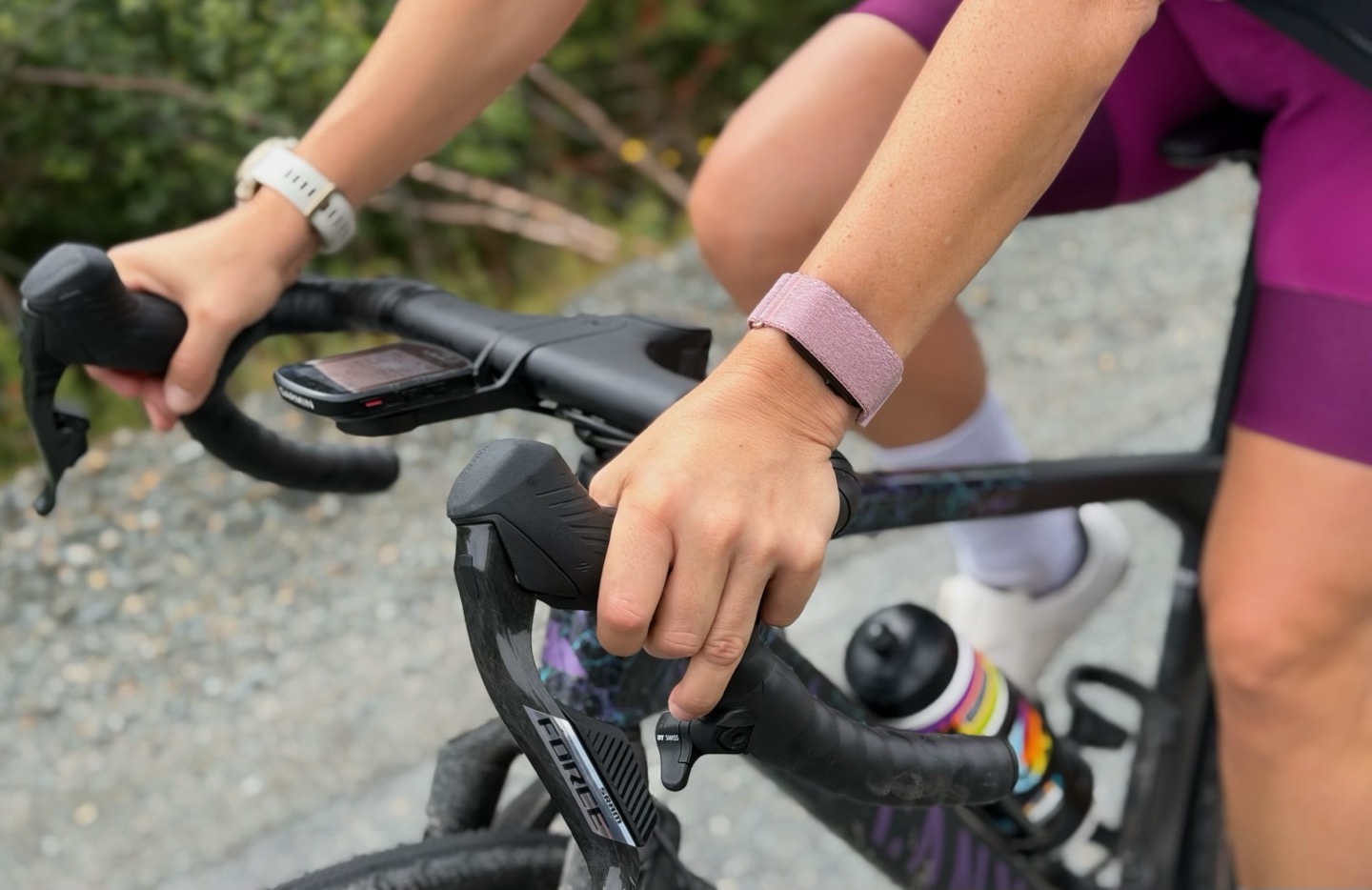
D) For my wife, you can see her singular placement here of Cirqa against her Fenix 8 (non-Pro) 43mm watch, which includes the Gen5 optical HR sensor. She is also wearing a Polar H9 chest strap.
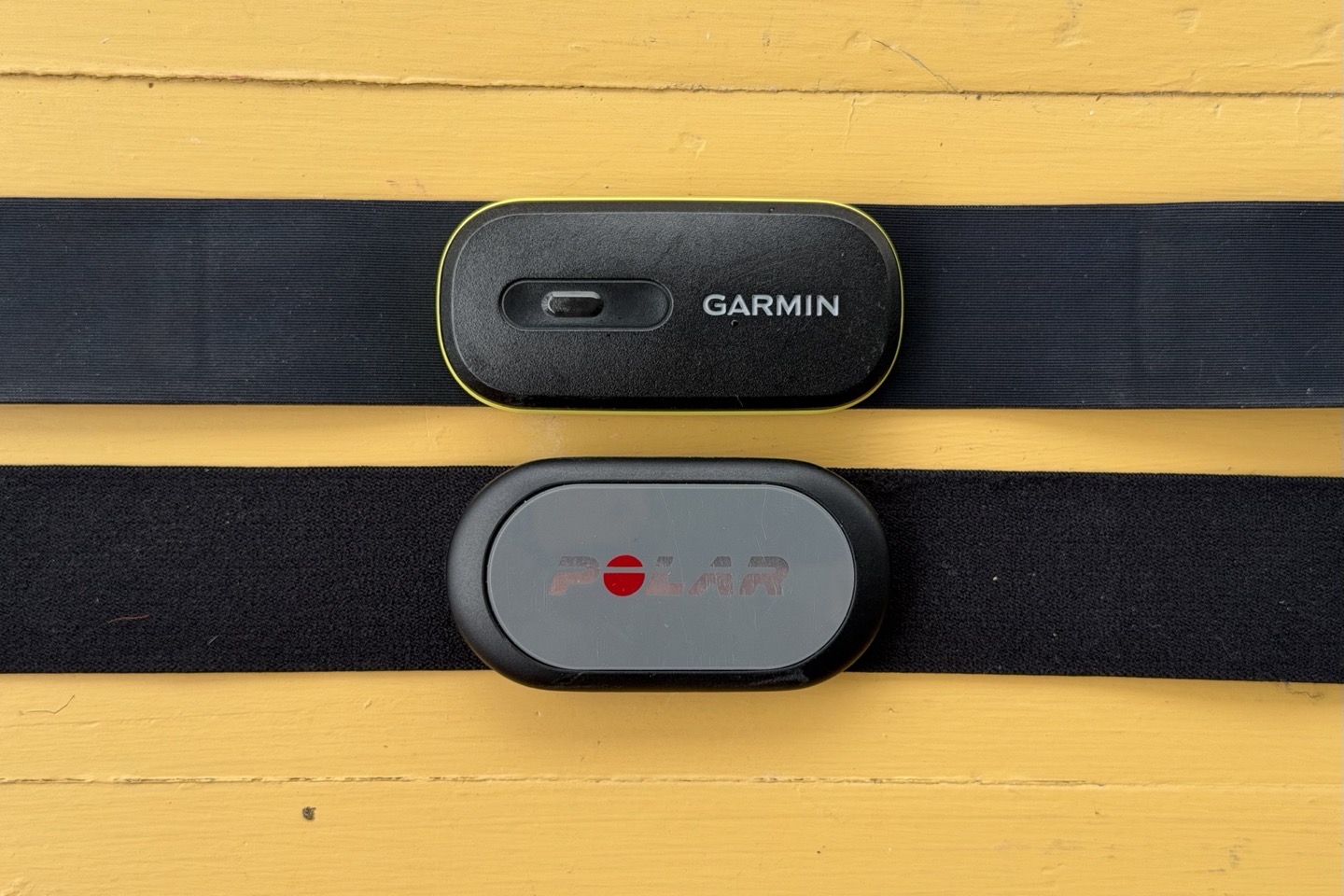
E) For the chest strap, I used both a Polar H9 as well as a Garmin HRM-600 chest strap. With many years of data on the Polar H9/H10, and more than a year on the Garmin HRM-600 (since it came out), there’s simply no meaningful difference there (including numerous dual-strap tests). Both are super accurate chest straps.
Finally, all of the data is pulled into either the DCR Analyzer (for workout data), or simply manually copied into Excel for general sleep/HR/etc data.
As you can see, I’ve attempted to make these tests as equal as possible, within the bounds of reality. Again, note that any device on the bicep will do better in workouts, and any device on the wrist will do better in sleep. The point is, I’m being super clear about where each device is, and not just comparing a Whoop bicep band to a wrist-based Garmin Cirqa band, and not overtly telling you those are in different places (as I’ve seen some do). That’s just sketchville.
Phew, let’s get geeky!
Accuracy of Heart Rate During Workouts:
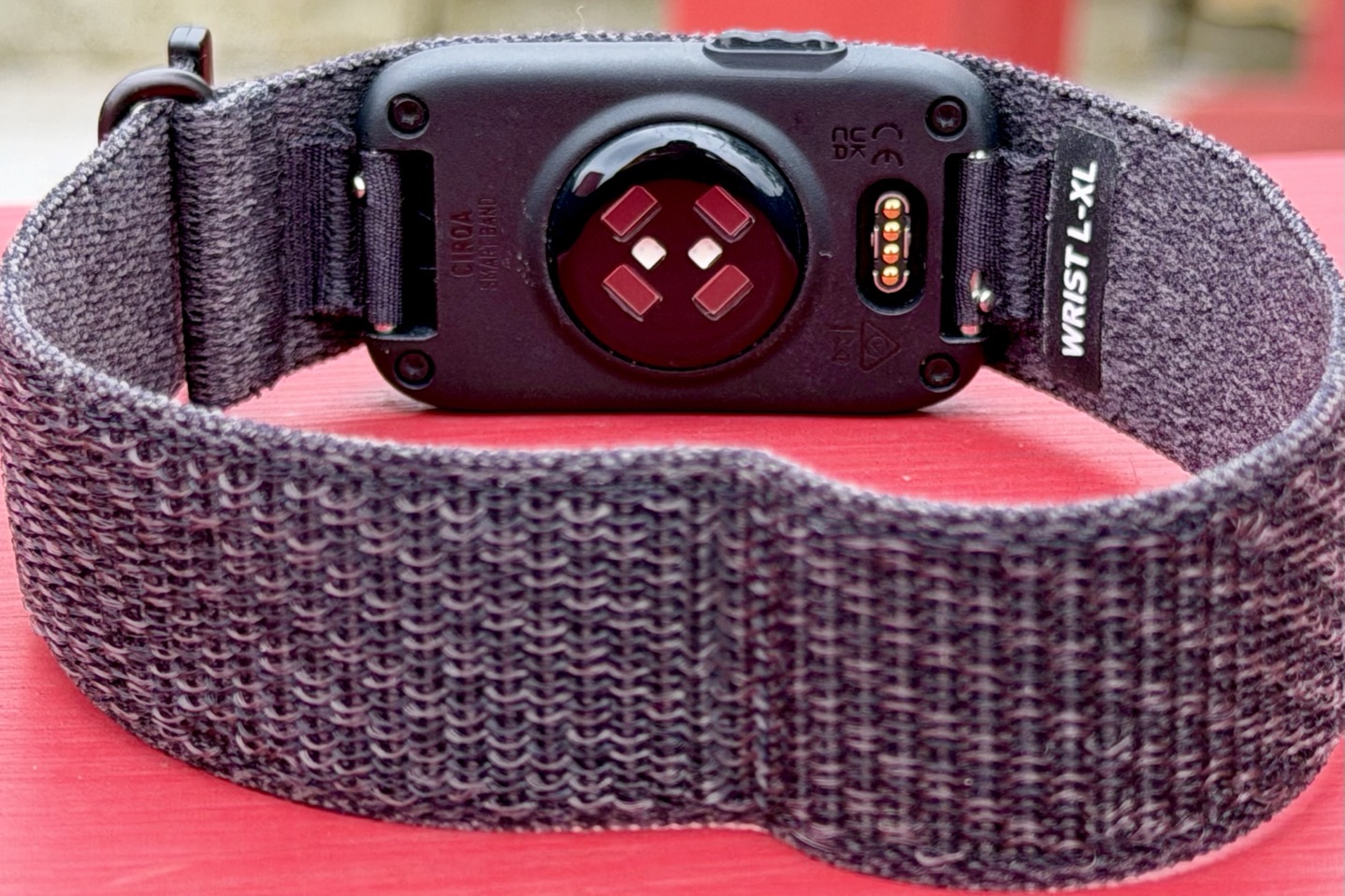
In this section I’m going to look at the heart rate accuracy during workouts. This includes a variety of workouts, and critically, a variety of temperature ranges. During this time period I have workouts from home (Spain, temps in the 90°F/32°C range), and then workouts from travel to Newfoundland, where the temps are notably colder (in the 50°F/10°C range), which can absolutely impact accuracy of wrist-based optical HR sensors in certain conditions.
As always, I’m going to compare against a bunch of different units, including two different chest straps (Polar H9 and Garmin HRM-600, which I consider pretty much equal in their accuracy).
First up, we’ve got a simple indoor trainer session (cycling) to start things off. As a general rule of thumb, if sensors can’t get indoor cycling right, you’re hosed. There are no road vibrations like that of outdoor riding to complicate matters, nor pounding signals like with running. Likewise, there’s very little wrist deflection (well, usually). Here’s how that looked (Cirqa wrist is maroon color):
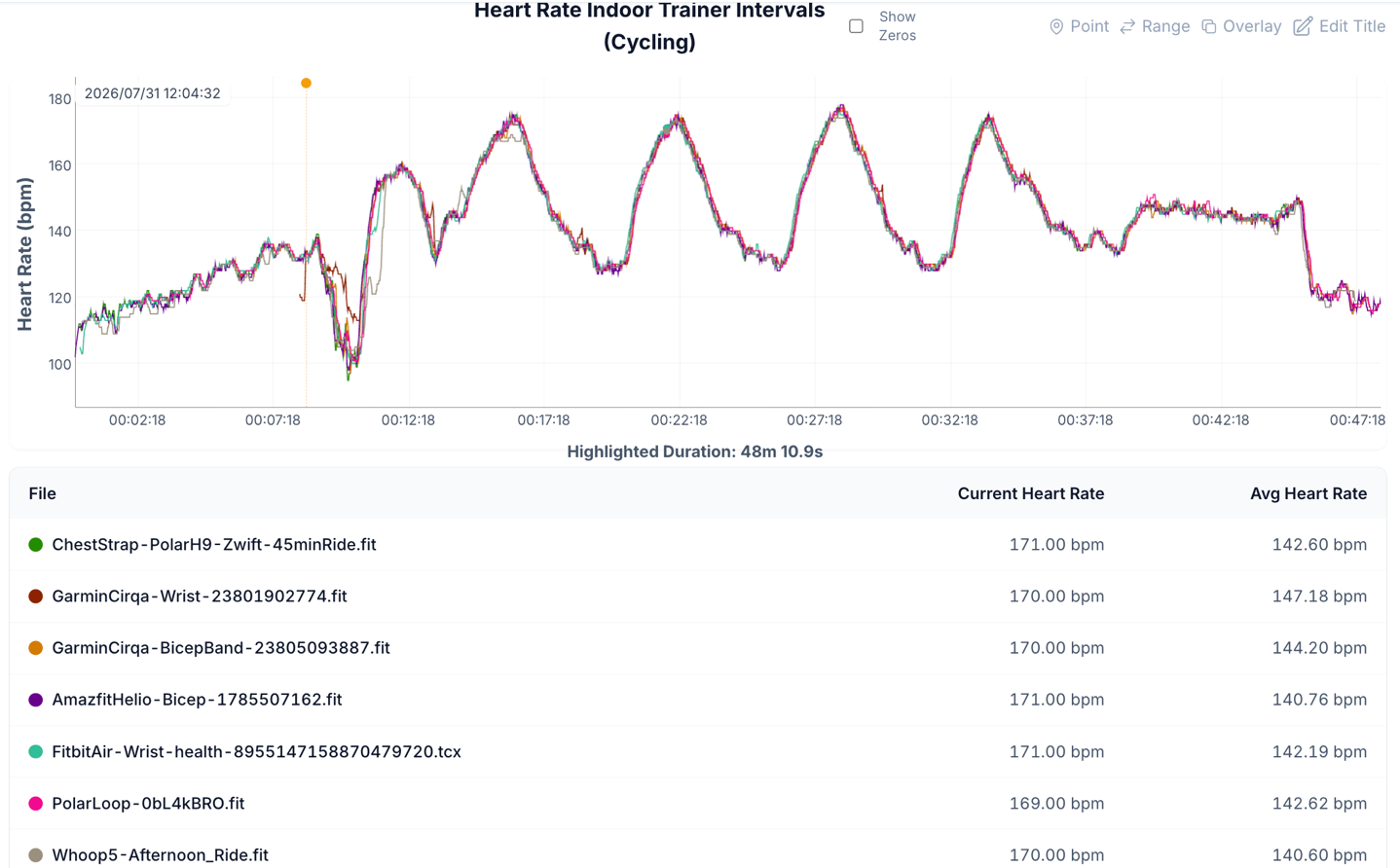
As you can see, it’s mostly really good here. No issues of concern, and it nailed all the intervals and recovery periods, as did all of its friends. The only two quibbles would be that it missed the first 7 minutes of the warm-up before auto-detect kicked in. And then it struggled for another minute or so after that. This is a good example of a workout type I’d do manually though.
Next up, we’ve got an outdoor road ride into the mountains, this one in warmer conditions in Spain (Cirqa wrist is green color):
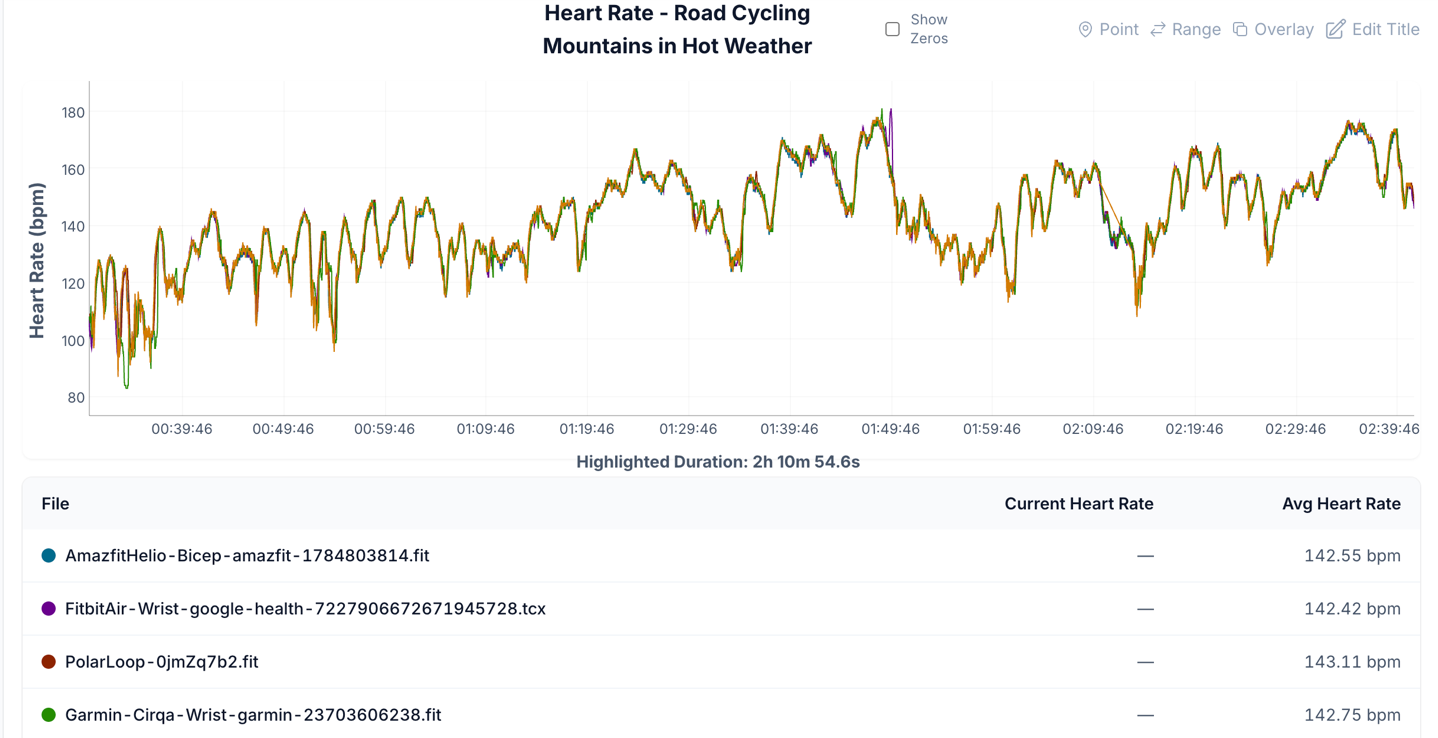
As you can see, this is absolutely spot-on perfect. Really really good, which is even more notable as I was also shooting a bunch of video on this ride too, with both wrists. Same goes for the others. For the life of me, I can’t get the Whoop band to sync that workout out on the platform, so, it skips that journey. Note below that her Cirqa hadn’t arrived yet on this specific ride, whereas mine is on my right wrist.
However, now you’ll get to see the impact of temperature on wrist-based optical HR sensors while riding in colder temps. This day was a 3-hour ride, on mixed road/gravel (roughly the middle 1hr was gravel, the other ends were mostly smooth roads). The temps were maybe at best 60°F/16°C, but there was also notable wind, rain, and general crapiness. And as a result, all wrist-based units were often wrong, including Cirqa (Cirqa wrist in maroon color):
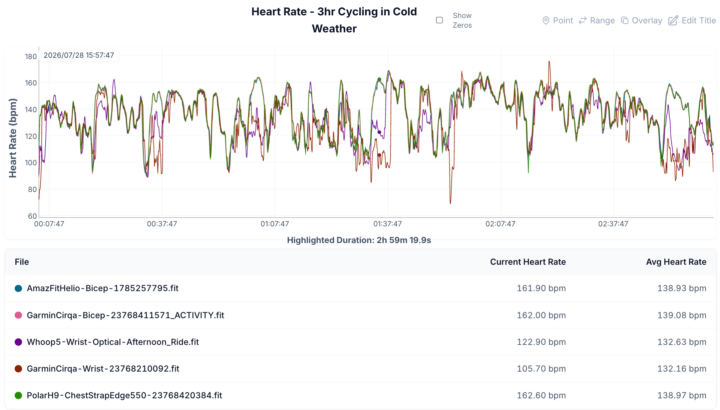
This trend continued on a different day that was also cold, showing the struggle is real for outdoor riding in cold temps.
Again, this is not a surprise, and is the same for virtually all watches while outdoor riding in cold temps. You can ‘address’ that a bit by trying to keep your wrists warmer, but the jacket I brought wasn’t really ideal for cycling, so my wrists remained exposed most of the time:
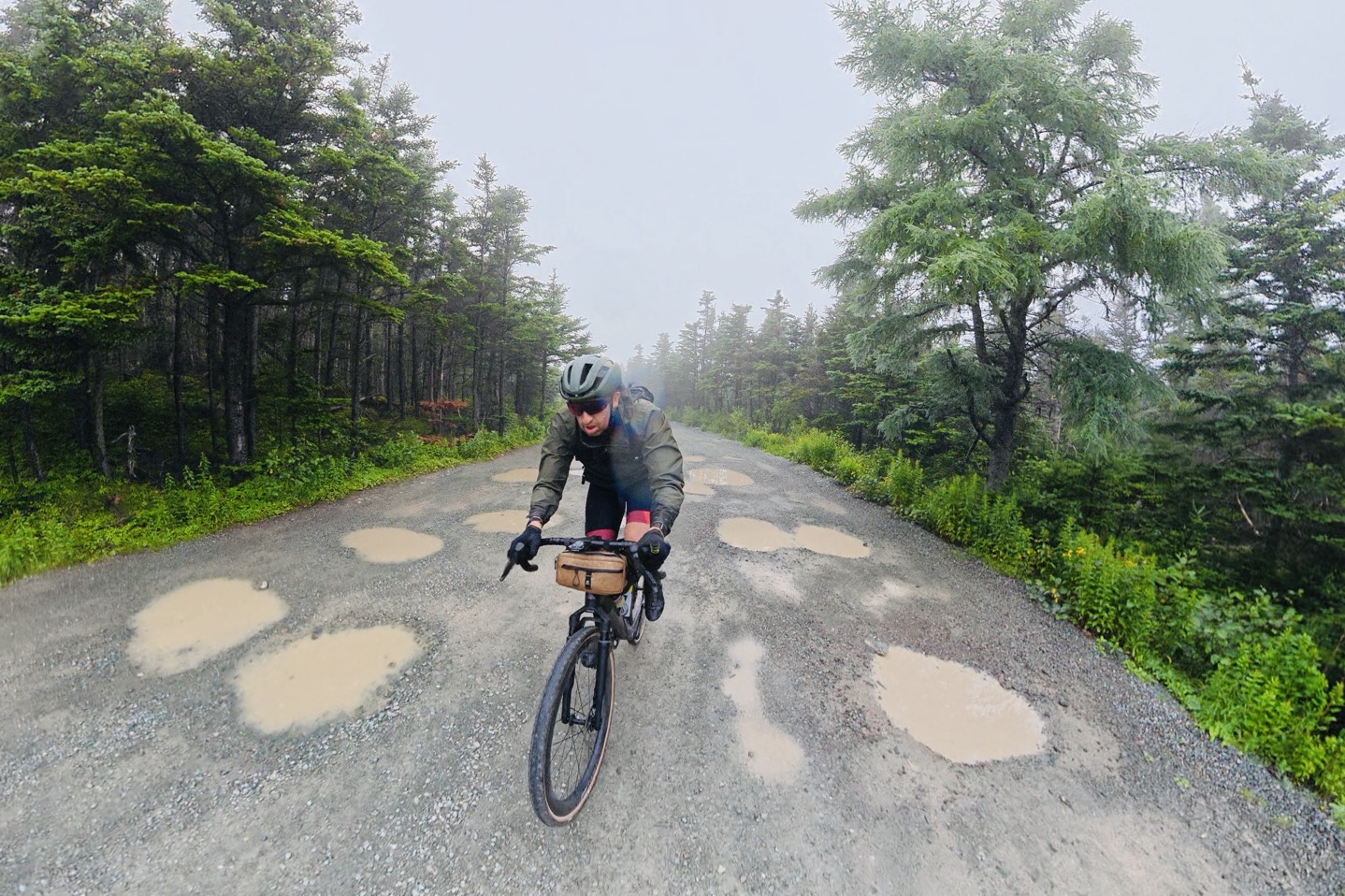
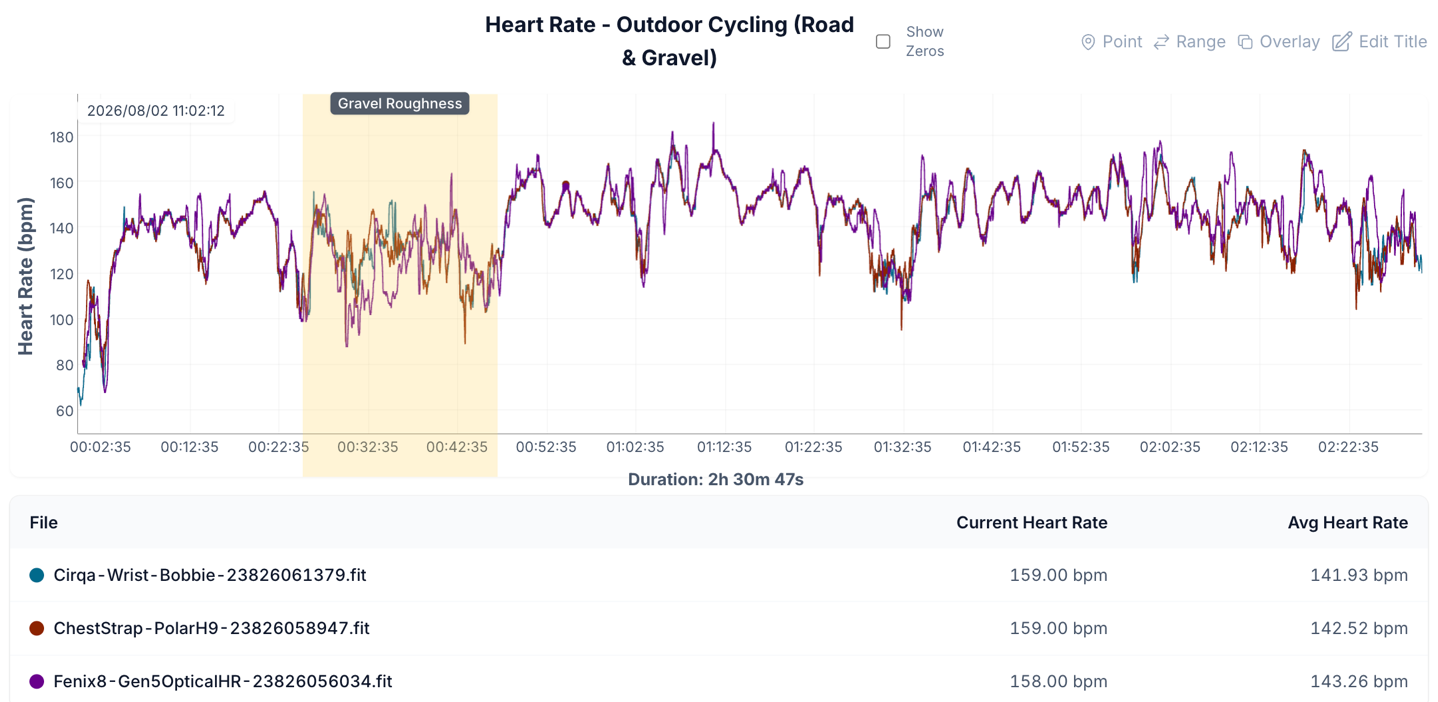
That said, a few days later in roughly the same temperatures (minus the rain), my wife had very solid results with Cirqa on a similar ride. In fact, Cirqa even beat the Fenix 8 (with Gen5 optical HR), in a very rough MTB-like section. That actually makes sense, because in massive vibrations the heavier Fenix 8 is going to bounce more on her wrist than the lighter Cirqa. Either way, solid performance here despite the temps (Cirqa wrist here in teal):
In any case, let’s shift to some running. First up, an easy steady-state run (in colder temps). Here, we can see things have no problems at all, and it’s very solid:
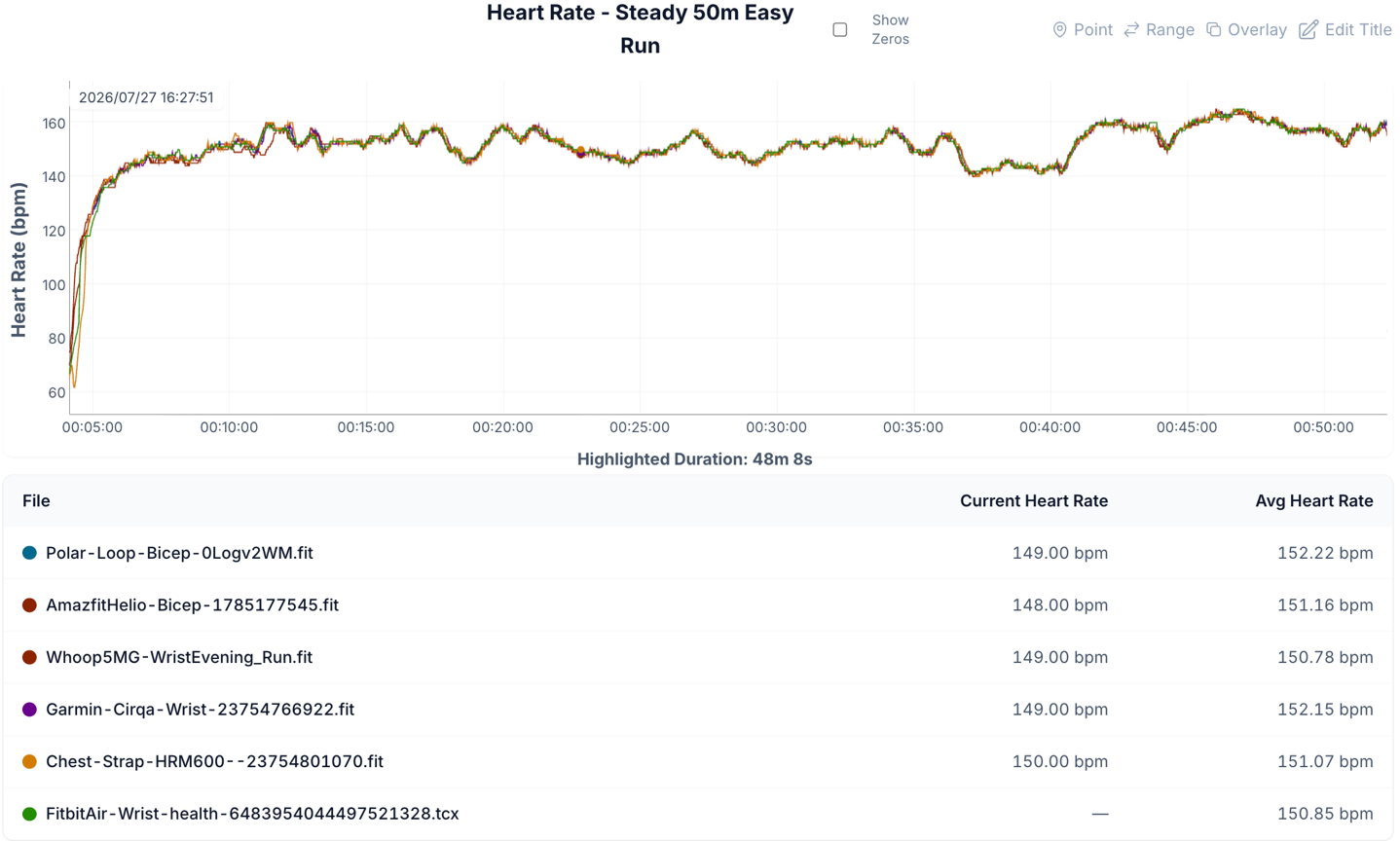
Again, I’d expect that, because…well…it’s easy and steady-state. No biggie, and it nailed it (as did everyone else).
So then, what about doing some 400m intervals? In this case, it was on a crushed/packed gravel surface, and as you can see, Cirqa on the wrist really struggled here, yet on the bicep was perfectly fine. Here’s the data set, with Cirqa wrist in bright red (Cirqa bicep in maroon, which is why it disappears into the line of perfection with others):
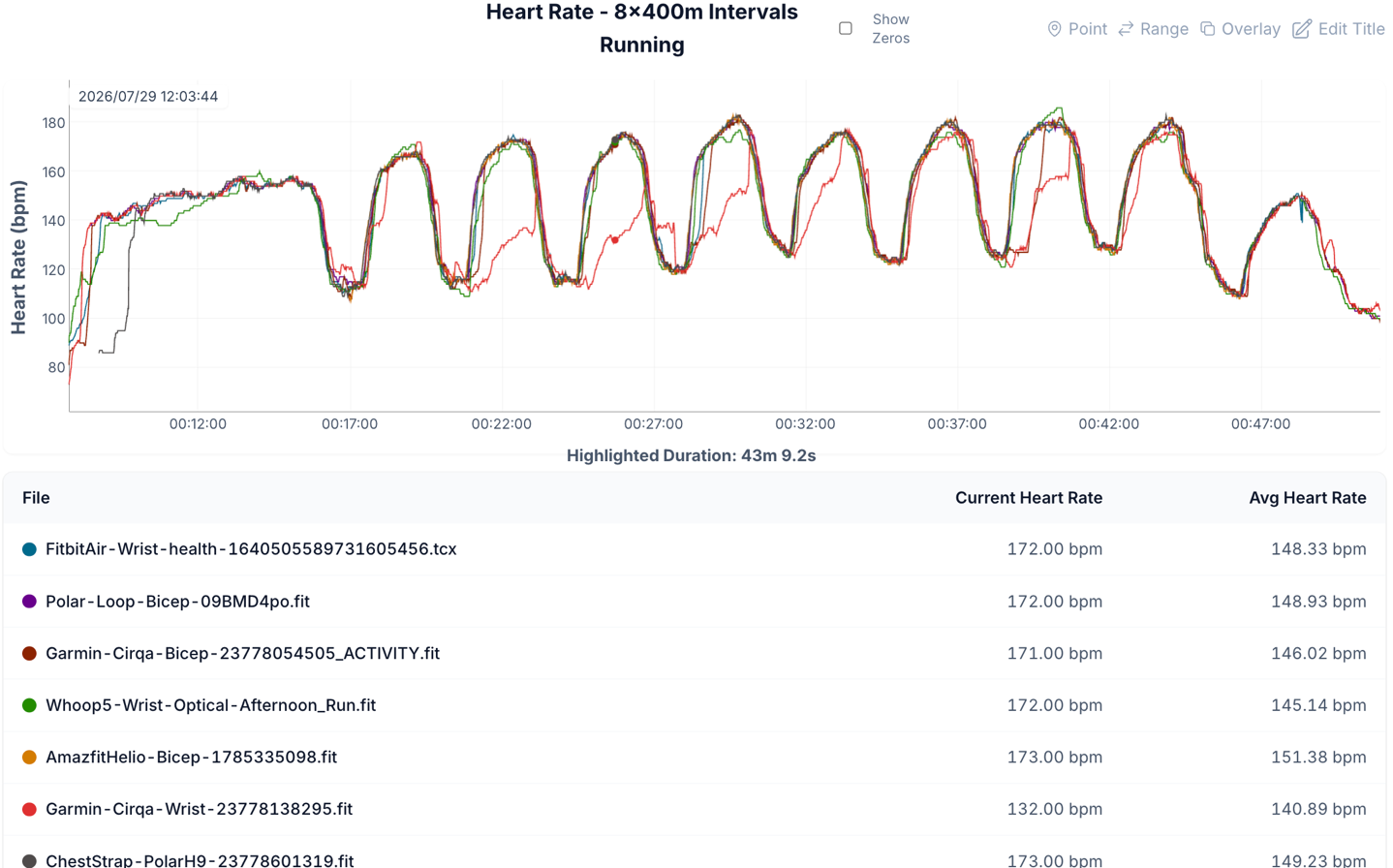
Again, while my wrists were cold, I’d have expected far better performance out of the Garmin Elevate Gen4 sensor here, so this is really surprising. In talking to Garmin about this set, they too were surprised, given that it clearly established lock during the warm-up, but then quickly fell apart during the intervals.
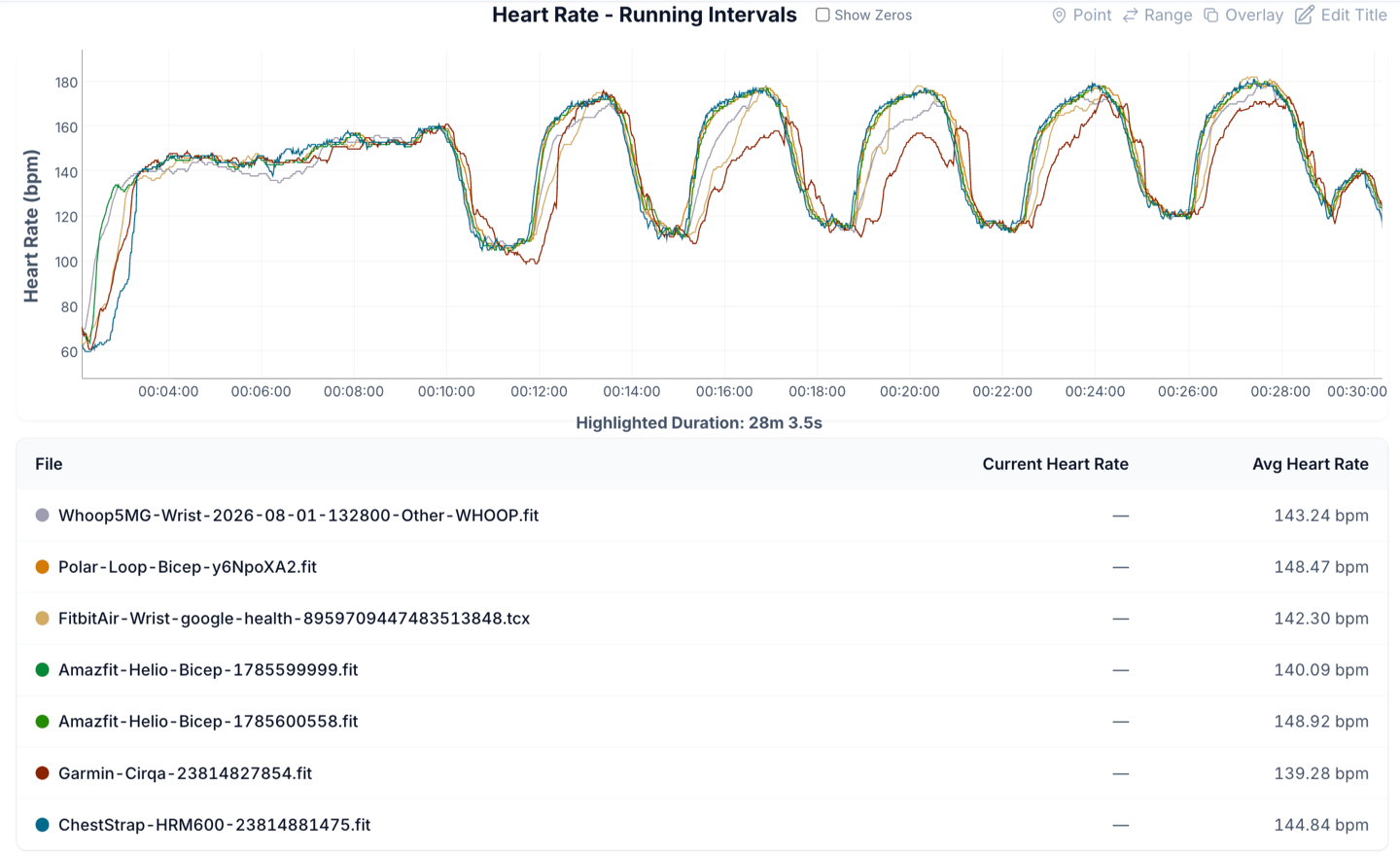
Out of curiosity, I then went out and did another shorter workout with 400m intervals, this time on a warmer day (62°F/17°C), and yet again, it really struggled here. I’m not sure what to make of this. Note the different colors, but all you need to know here is the red one is the bad one, and that’s Cirqa. That said, both the Fitbit & Whoop also struggled on the middle three intervals as well, just to a slightly lesser degree than Garmin. Also, in case you’re wondering why Amazfit has two files, it’s because it split the workout into two after the warm-up, as it often does the moment you slow down for 90 seconds. Cirqa wrist here in maroon.
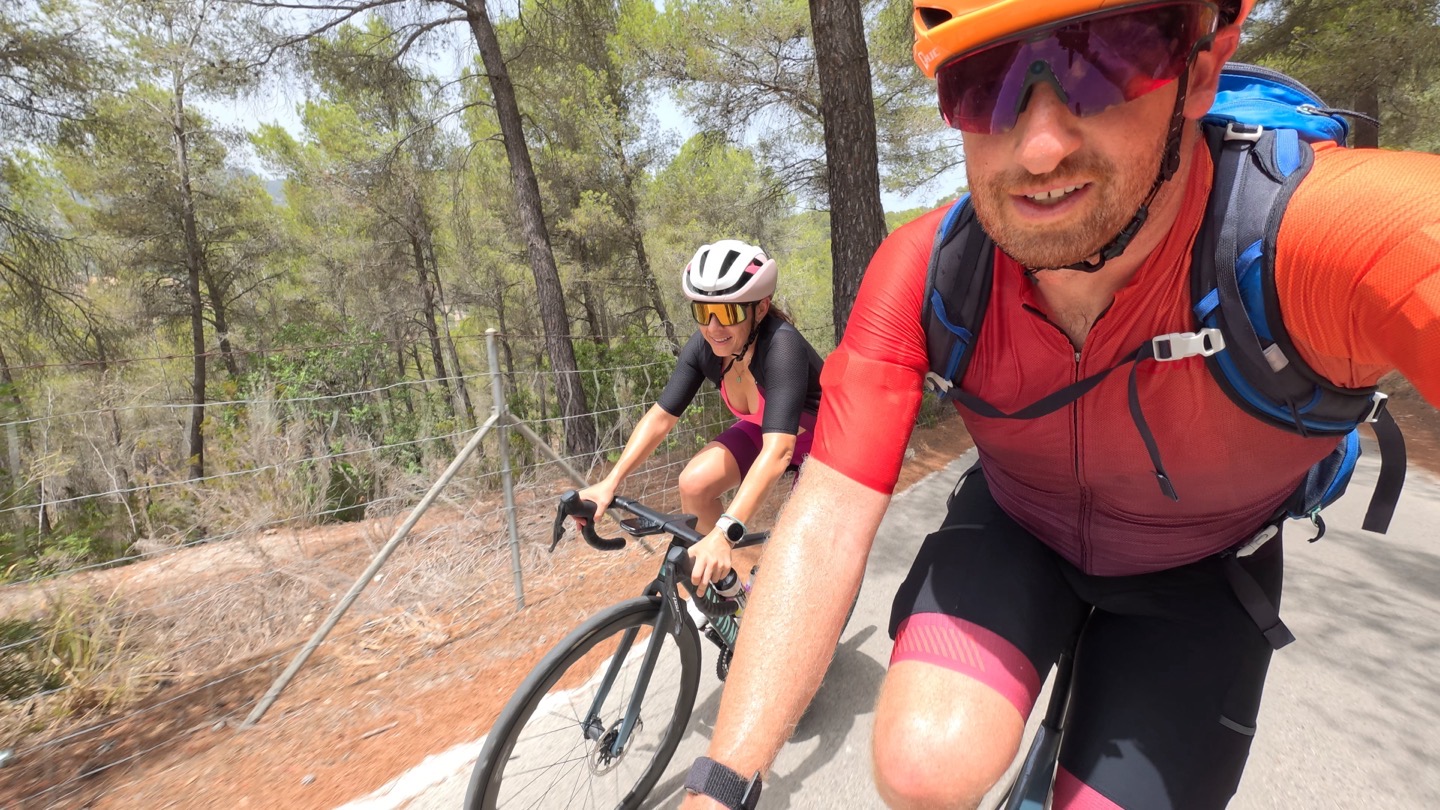
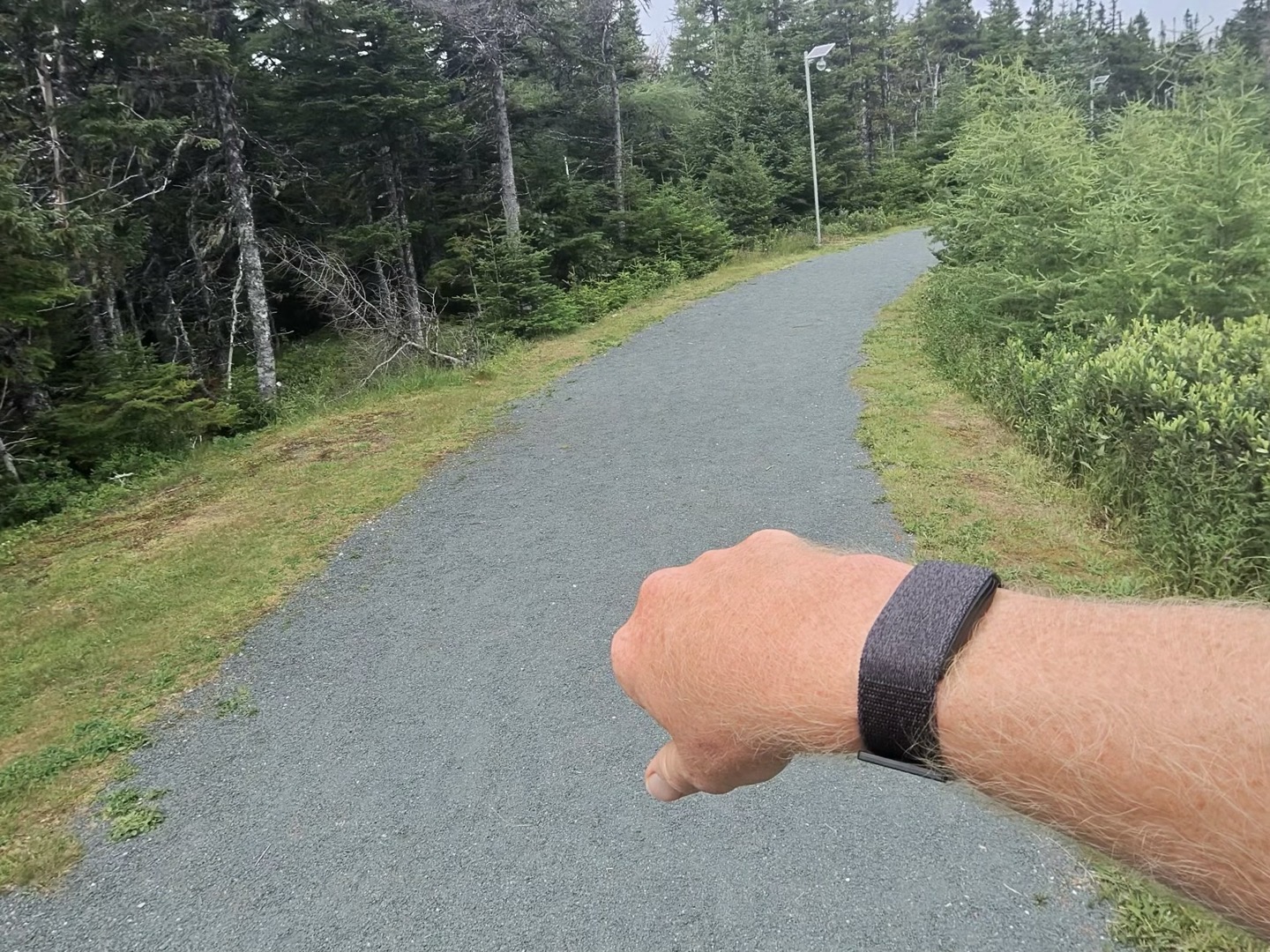
Again, the unit is nice and snug, worn perfectly per 15 years of experience wearing optical HR sensors, and also how Garmin recommends. This isn’t a me issue anymore. Here’s a shot from the above run:
So then, out of curiosity, I swapped the two units I had (moving bicep to wrist, and wrist to bicep), just to see if perhaps there’s an issue with this specific unit and vibrations. Here are those results (same temps of 64°F/18°C), Cirqa wrist in purple:
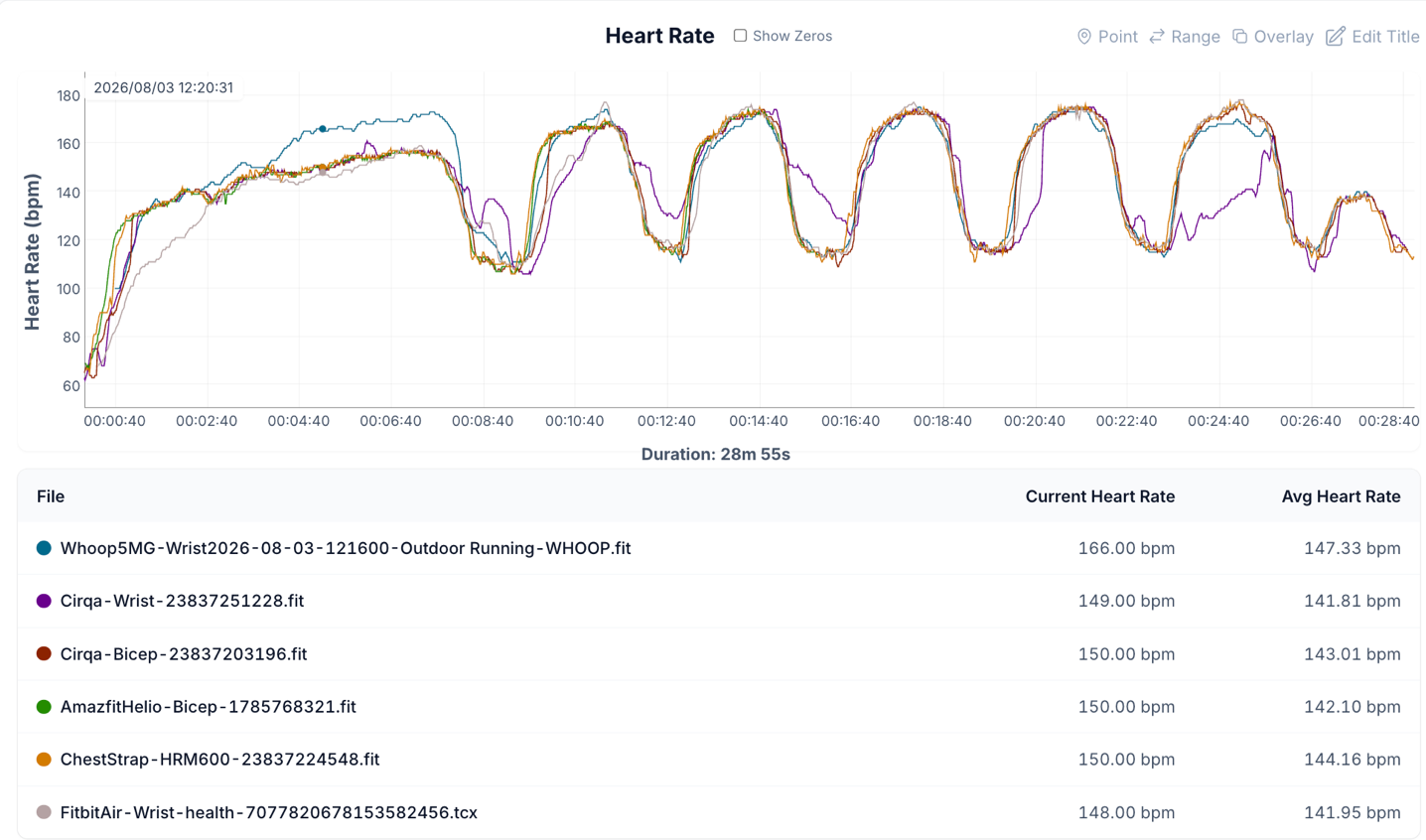
Basically, just as bad for the Cirqa wrist(and bicep still perfectly fine). Though Whoop did make its own failboat for the entire warm-up, along with a partial warm-up failboat for the Fitbit Air. Still, aside from Garmin getting the warm-up right, the wrist Cirqa only got a single interval correct (middle one).
So then, I decided to sucker someone else into doing the exact same workout. In his case, his weather is considerably warmer, about 85°F/29°C. Cirqa wrist in orange.
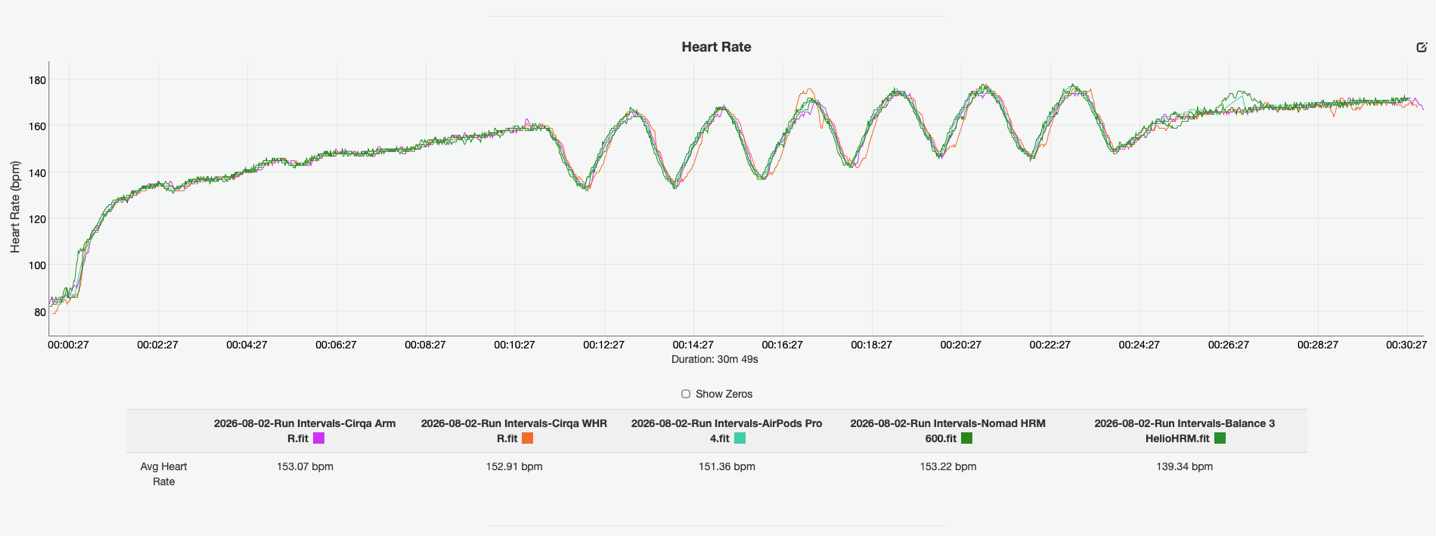
As you can see, for him, with the warmer temps, it was spot-on. One bobble briefly on the 3rd interval, but certainly not the cargo-ship-sized failboats I’m seeing. My guess is that it’s some combination of the temp+terrain+pace that’s causing this failure. I haven’t seen this consistent of a failure on a specific workout in a long-long-long time.
Finally, here’s a bit of a strength training session. In this case, Des of DesFit has provided a bunch of sets of equal testing caliber, but focused specifically on strength training. He and I follow all the same methodology, and often work together on testing devices.
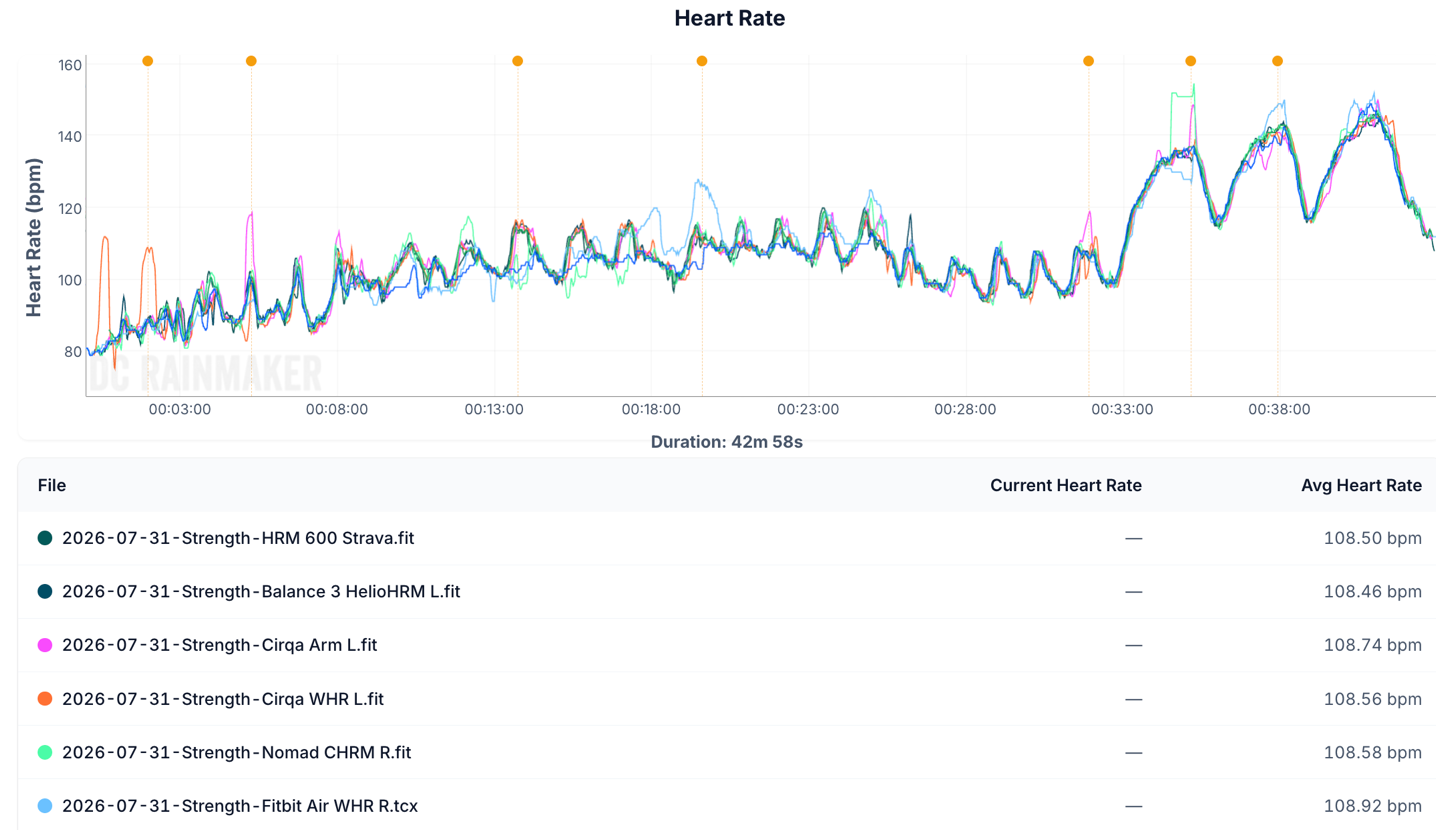
Here is a set that starts off with two sets of Lat Pulldowns (first two orange dots), and you can see the wrist Cirqa struggles at the outset of the first one, before settling down. On the 2nd set, Cirqa bicep struggles briefly, and then settles down. After that, for shoulder press, seated row, and lateral raises, things were mostly quite good for Cirqa, while Fitbit then struggled for a bit. On the whole however, given the relatively low BPM differences (at a lower intensity), these would be unlikely to have any meaningful training load or calorie implications. Cirqa wrist in orange.
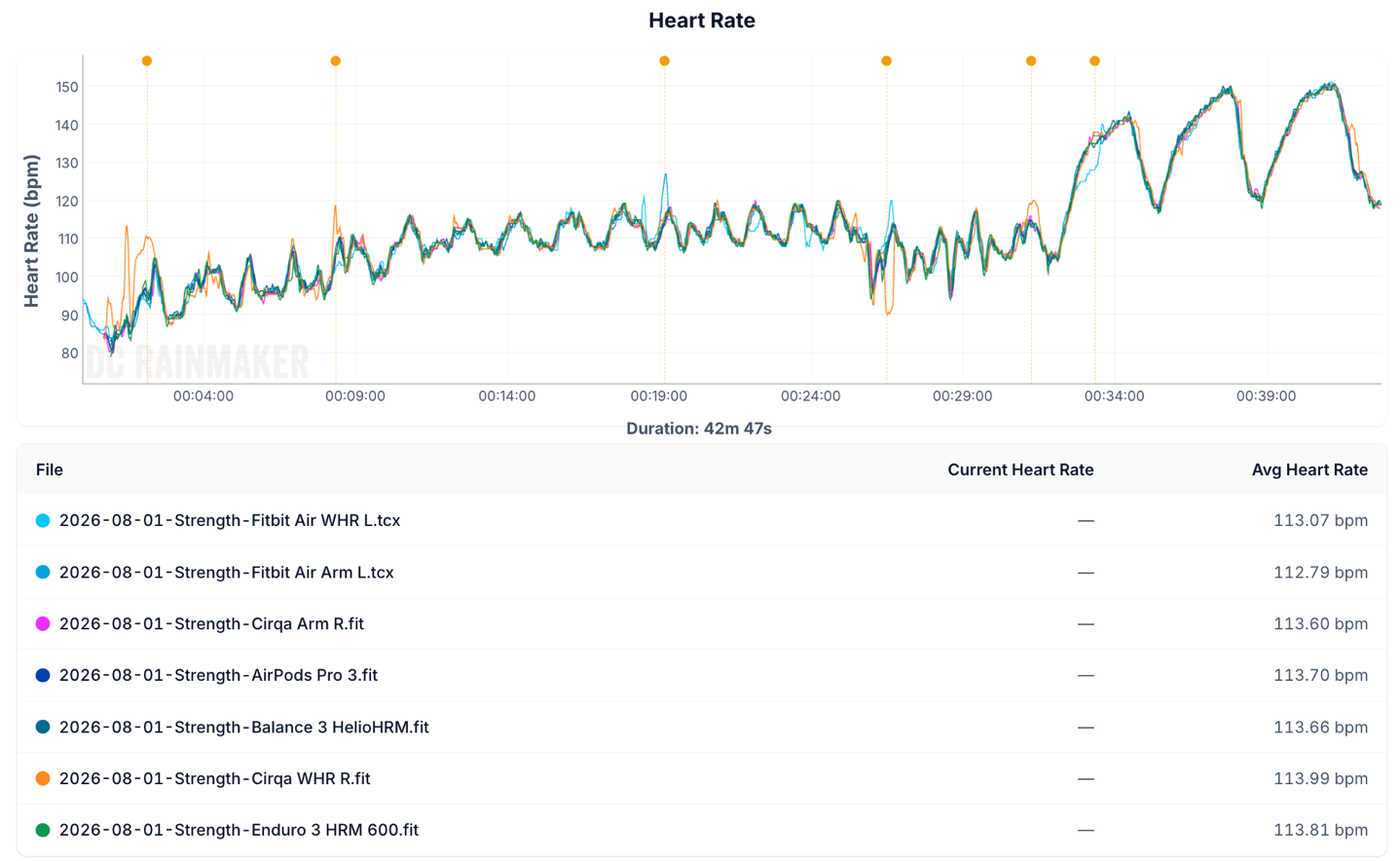
In this next set, which starts off with bench press for the first two orange dots, then arm curl (3rd dot), shoulder press (4th/5th dot), and ends with row, you can see wrist Cirqa struggles in the first few minutes, but then settles down and is mostly pretty good. Later, the Fitbit Air struggles a little in the middle briefly. The Cirqa had no issue with the row intervals at the end, while the Fitbit on the wrist lightly struggled on the first. Cirqa wrist in orange.
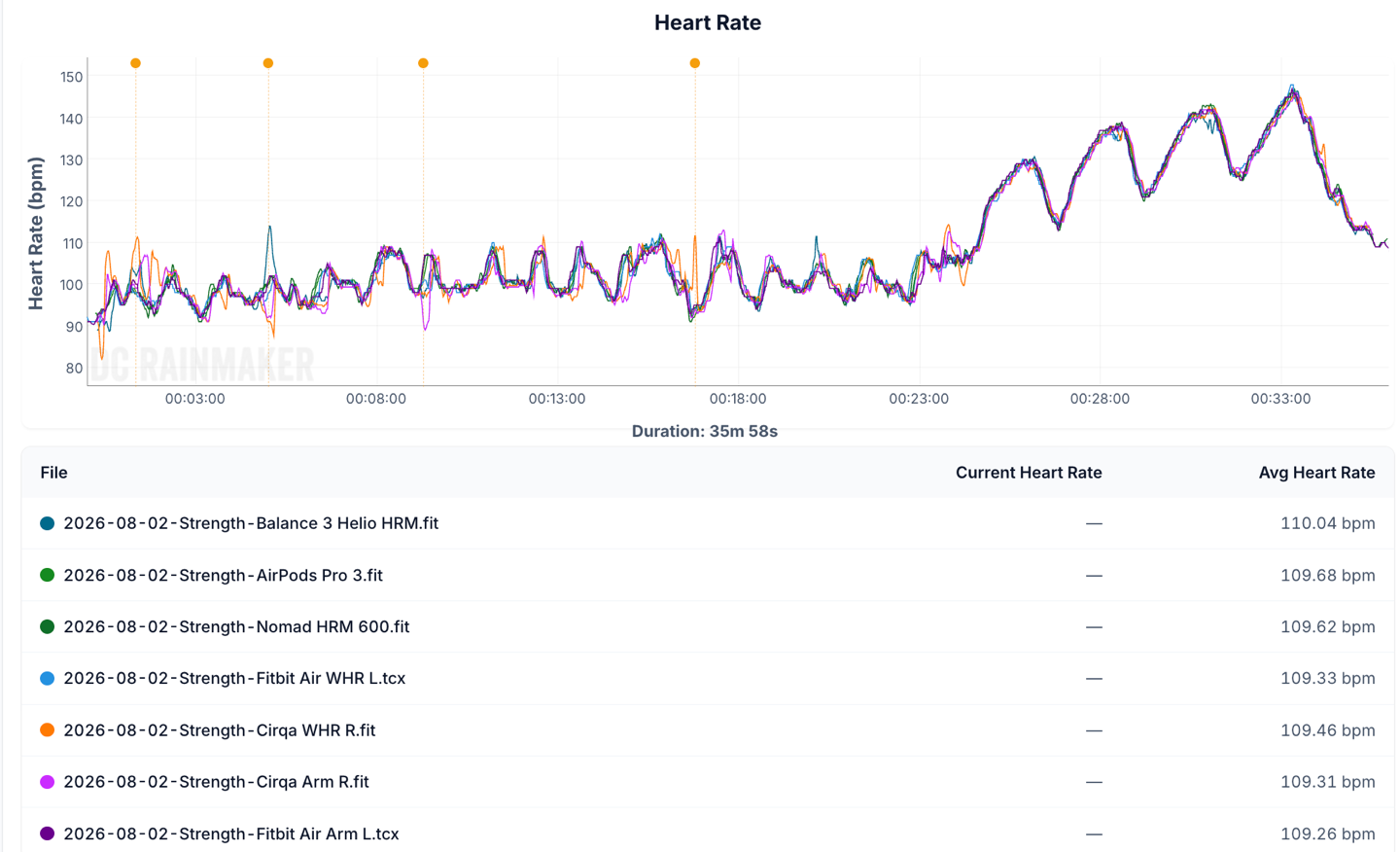
Finally, one more set of lat pulldowns, then shoulder press, then ending with seated row, here you can see Cirqa (wrist and then slightly arm band), gets off to a rough start, but quickly settles down within 2 minutes. After that, the Amazfit band yolo’s for a moment incorrectly. But beyond that, it was mostly fine/close-enough during the workout parts. That one brief moment around 16 minutes where the Cirqa wrist spikes was simply in between sets. Cirqa wrist in orange.
The general/overall look at all of his strength workouts (I have many more sets, he has even more sets) is that it was actually pretty good on the wrist, with only an occasional mistake that was sometimes meaningful, but usually not. Further, the Cirqa biceps/arm band was generally pretty strong across the board, save a few mistakes occasionally in biceps-focused movements. Again, because Garmin doesn’t really ‘reward’ strength workouts as much from a training load standpoint (which is driven entirely by higher heart rates), these occasional lower-heart rate ‘mistakes’ are far less meaningful than mistakes in running or cycling missing big intervals.
Thus, overall, where I stand for workout HR accuracy is that it’s mostly like what I see with other Garmin Gen4 sensors, which is largely pretty good, but it struggles with certain workout types or conditions. In my case, it struggled with cooler-temp outdoor cycling, especially off-road. Likewise, it really struggled for my 400m interval repeats, but was fine for Des on the same workout (he was in higher temps). For other workout types, including indoor cycling and strength, it’s largely quite good and in line with the others.
Accuracy of Workout/Activity Recognition:
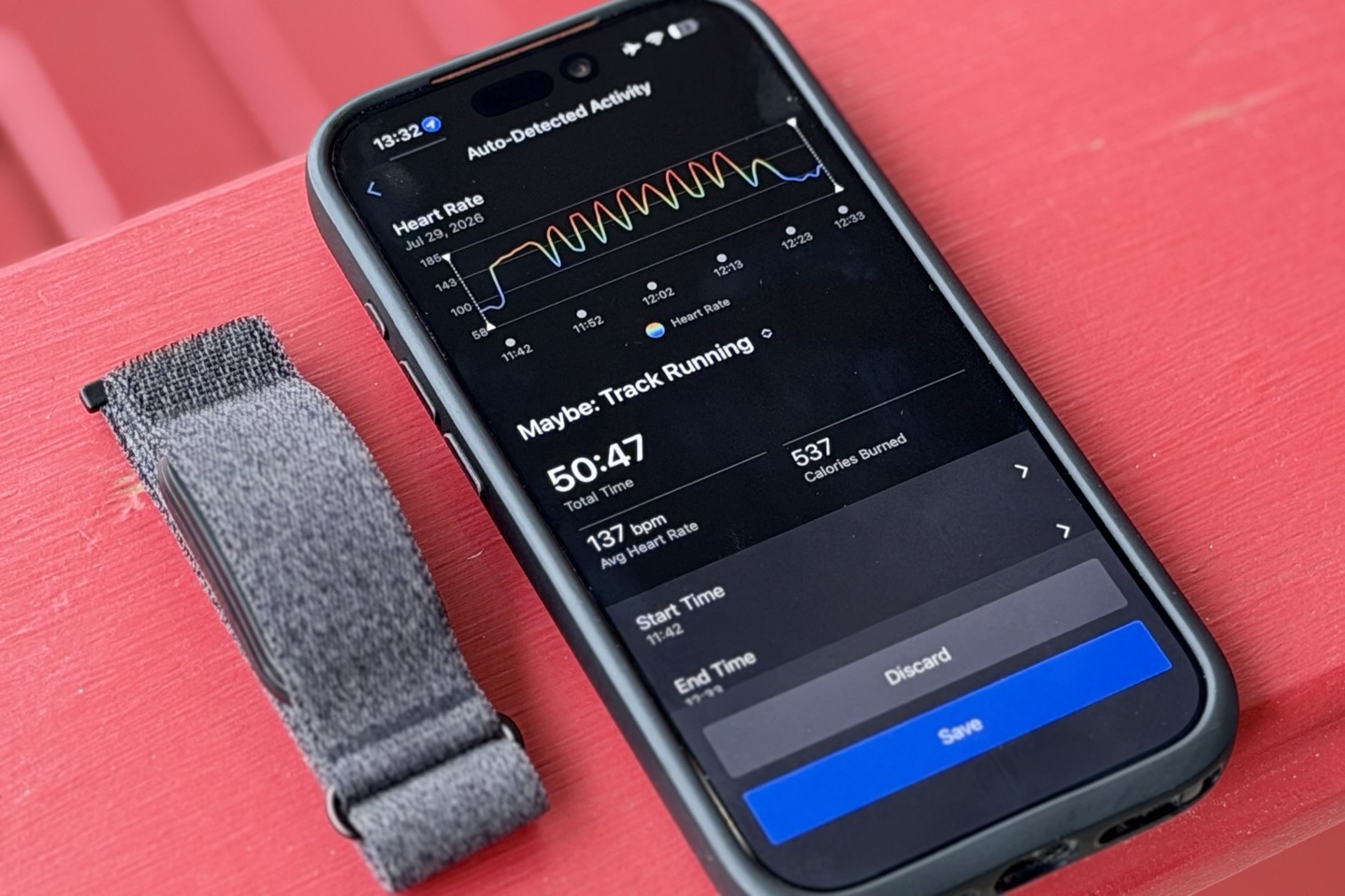
Fun fact: I’d argue this is actually the most important category for a screenless wearable. Well, to an extent. You see, you can’t have accurate heart rate on Garmin Cirqa if it doesn’t first recognize you’re working out. You see, unlike Whoop (and frankly everyone else), Garmin keeps their heart rate sensor at a lower power when not working out. For Garmin, this helps save battery. Then when it detects a workout, it gives more power to the heart rate sensor, to substantially increase accuracy during highly fluctuating (heart-rate-wise) workouts.
But here’s the (effing massive) catch: If it doesn’t detect that workout (or a portion of it), you’re left with *NO HEART RATE* data for that portion of the workout. As a result, none of your training load and recovery stats are right, they’re all missing the data. Yes, you can adjust the timeframes on the Garmin Cirqa afterwards, but this *WILL NOT* magically get your the missing heart rate data back. This is unlike Whoop (and Google, and Polar, and Amazfit), which allows you to seamlessly and endlessly adjust the times, and the full fidelity heart rate data is there.
Got it? Meaning, it’s really damn important that Garmin detects a workout upfront. Whether or not the heart rate is a few bpm off later on isn’t a much lesser deal than missing entirely.
So, let’s look at that from a few different workouts.
1) The Bike Commutes:
I did so many bike commutes, and as a general rule of thumb here, it struggled for almost all of them. Specifically, it never detected most of them. For example:
~ 70 minute cargo bike ride with kids [Detected properly by Cirqa, and Whoop/Fitbit/Amazfit]
~ 30 minute moderate intensity commute ride [Not detected by Cirqa, but detected by Whoop, Fitbit, and Amazfit]
~ 20 minute low to moderate intensity commute ride [Not detected by Cirqa, but detected by Whoop, Fitbit, and Amazfit]
~ 25 minute moderate to high intensity commute ride [Detected properly by Cirqa, and Whoop/Fitbit/Amazfit]
I did a bunch of other shorter rides, under 15 minutes (quick errands and such, usually 5-10 minutes), and none of these were detected by Cirqa, or other bands (Whoop/Fitbit/Polar) except the Amazfit Helio. The Helio band triggers auto-detect workouts for even just looking at your bike, let alone actually riding it. I think there’s a fair balance to be made here (as in, Amazfit triggers far too much/often), but on the whole Garmin needs to work on the bike commute algorithms here.
2) Road Bike Ride into the Mountains:
For this one, I had actually intended to manually start it, but totally forgot. Turns out, it handled the start side just perfectly. However, about 90 minutes into the ride, as I reached the top of the climb and turned back to descend, it basically ended the activity, assuming I was done. It skipped the last ~45 minutes, including numerous high-intensity sections and climbs upwards of 160bpm. This was, in my opinion, the most substantial ‘fail’ during all of my testing.
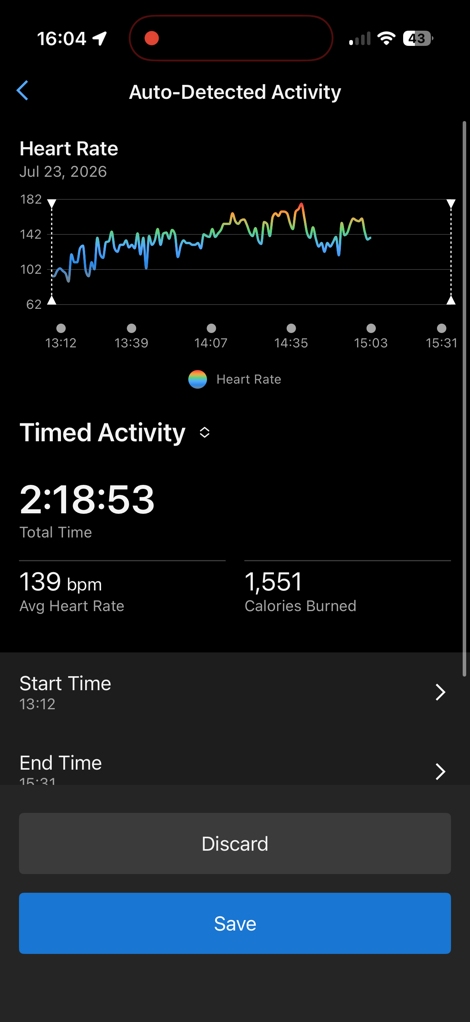
As you can see, when I went to extend it out to the finish time of 3:31PM, it didn’t have heart rate data for the extended portion. Though oddly, hours later it did show up (something that Garmin also can’t really explain). Note that for all my other ‘need-to-extend’ workouts, the HR data has remained missing.
3) Running Intervals
This detected near-perfectly for both bicep and wrist on the Garmin. It had detected about 5-6 minutes early, as I had walked to my starting point, and it ‘brought in’ that walking period. This is a notable difference to the Fitbit Air, which tends to do a good job of skipping those pre-run walk bits, especially when they are super casual.
With Garmin, it tends to include any pre-walking to a start location (even if super casual). This is easy to trim out, however.
4) Gravel Bike Ride (lower intensity, 2 hours)
This was probably one of the best auto-detects that it did. It nailed within perhaps 60 seconds, the start of the ride, and then also perfectly captured the end of the ride. Even better, is that despite us taking a number of photos along the way, getting distracted talking to some come-from-away tourists, and more, it kept it all as a single activity (Whoop and Amazfit both splintered it). That also included some easier intensity sections, descents, and so-on. So plenty of opportunities to screw up, yet, it didn’t. Kudos Garmin, on this one. (Notably, this was one of my more recent rides, see why that matters at the end of this section)
5) Indoor Trainer
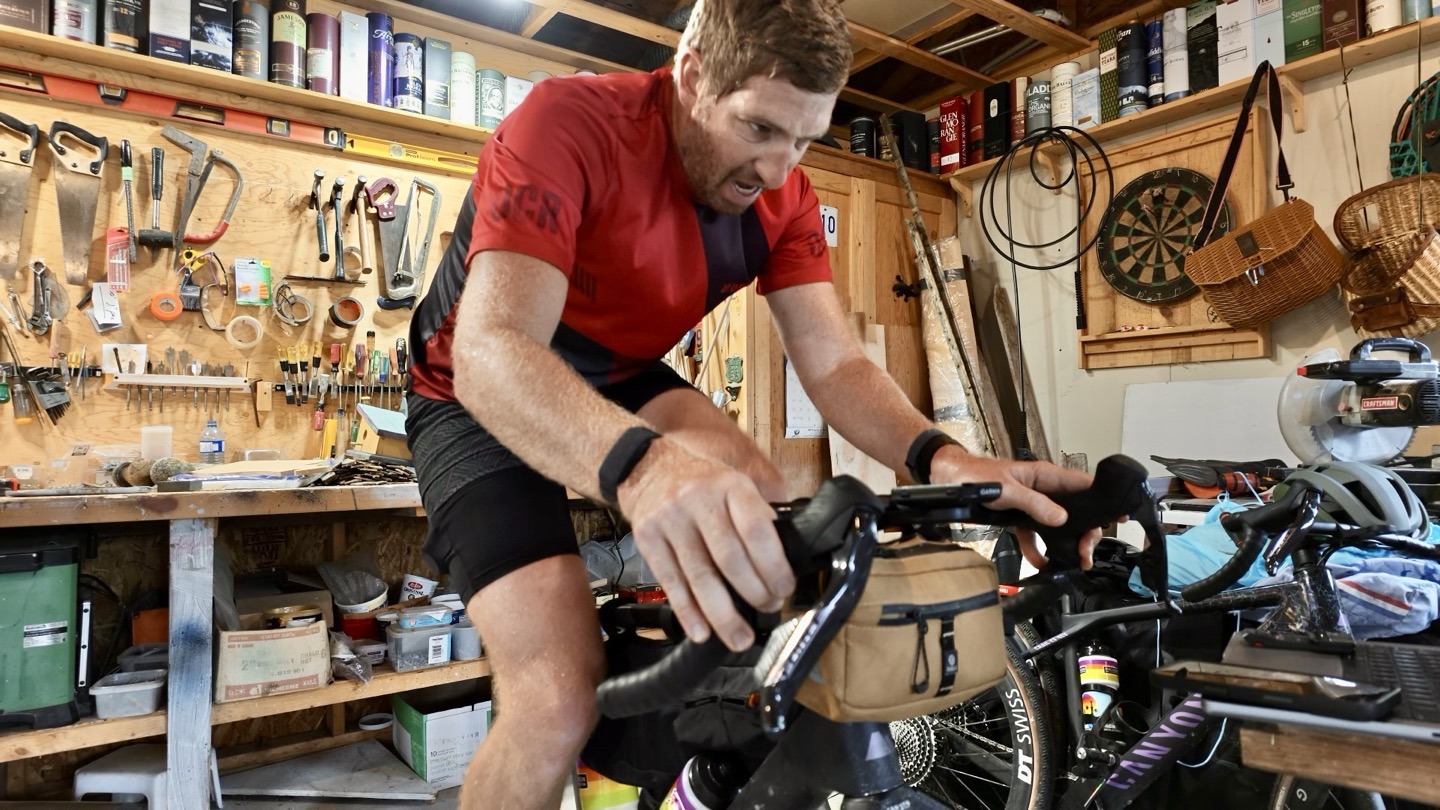
In this case, it started about 7 minutes late, due in part to my relatively easy warm-up. That’s somewhat to be expected. It then did struggle briefly for accuracy for a minute or two, but once it locked on, it was solid for the rest of the ride. In terms of ending the ride, it perfectly stuck that landing, within 60 seconds of the end of the ride.
6) Walk (1hr)
While I’ve done many shorter walks on either manual or auto, I wanted to be hyper-specific about exactly how long it took for this one. So I went for a late-night walk, at a medium pace. In this case, it took 4 minutes until it picked up the walk and started GPS and workout HR. Upon finishing, it nailed it within 60 seconds. Of course, the finish was me simply sitting down, so it was a bit easier to identify than the start, which included playing Frogger across a road. Either way, good job here.
7) Strength Sessions
For strength, as above with the accuracy bits, I had DesFit do a bunch of different proper strength sessions, and none of them picked up in Auto, either on wrist or bicep. He says that could be due to his mix of strength+HIIT, but he did note that the Fitbit Air did pick these up (identify them). Obviously, like Yoga, this would be the key category/reason to use the button. That said, equally, if Garmin supported creating activities afterward with the underlying HR data (like Whoop/Fitbit does), then this wouldn’t be an issue. Unfortunately, they don’t; you can create an activity, but no heart rate/load is assigned to it.
8) Other random activities/workouts
I’ve done a bunch of other activities that fall under the ‘walk’ category and such, and generally speaking these matched my experience for the ‘walk’ above, which is that it seems to do a reasonably good job of tracking that walk.
Likewise, I did a bunch of ‘strength’ sessions where I was moving boxes (for moving house) for hours on end, with a ton of sweat (because it was 95°F outside), and it pretty much spot-on tracked all of these painfully FML moments. This is a good example of how these heavy-box moving moments were much higher HR sustained for a longer period of time than a traditional strength workout, which might not get as high of a heart rate (sustained).
One last auto detection note:
One thing I’ll note is that Garmin has made a number of notable changes (good ones) to automatic detection over the last 10-12 days, even without any firmware updates. In talking with Garmin, there are basically three portions that handle automatic detection:
1) On-device firmware portions
2) Garmin Connect Mobile (app) portions, such as lighting up GPS and looking at that data stream
3) Backend platform pieces that analyze both of those, to tweak the final result
This is pretty much the same as any other company, though Garmin’s ability to enable/engage GPS does give them more flexibility on this front. In any case, they noted that there have been numerous changes on #2 and #3 above over the past two weeks, which explains some notable improvements in my automatic detections getting better.
That said, if I had to rank them from an automatic detection standpoint, it’d be:
1) Whoop: Excellent, with very rare/few errors
2) Fitbit Air: Almost excellent with also very rare/few errors
3) Garmin: Good and getting better, but still a bit fuzzy with lower intensity bits
4) Amazfit: Really good at detecting elevated HR, but can’t detect workout types and often prematurely ends things.
5) Polar: Barely passable (doesn’t detect types either, and often misses things)
It’ll be interesting to see how quickly Garmin can iterate here. This is an area that Fitbit has improved substantially in the ~3 months since the release of the Fitbit Air, but it’s still an area where Whoop has years of experience and fine-tuning.
Accuracy of Sleep Data:
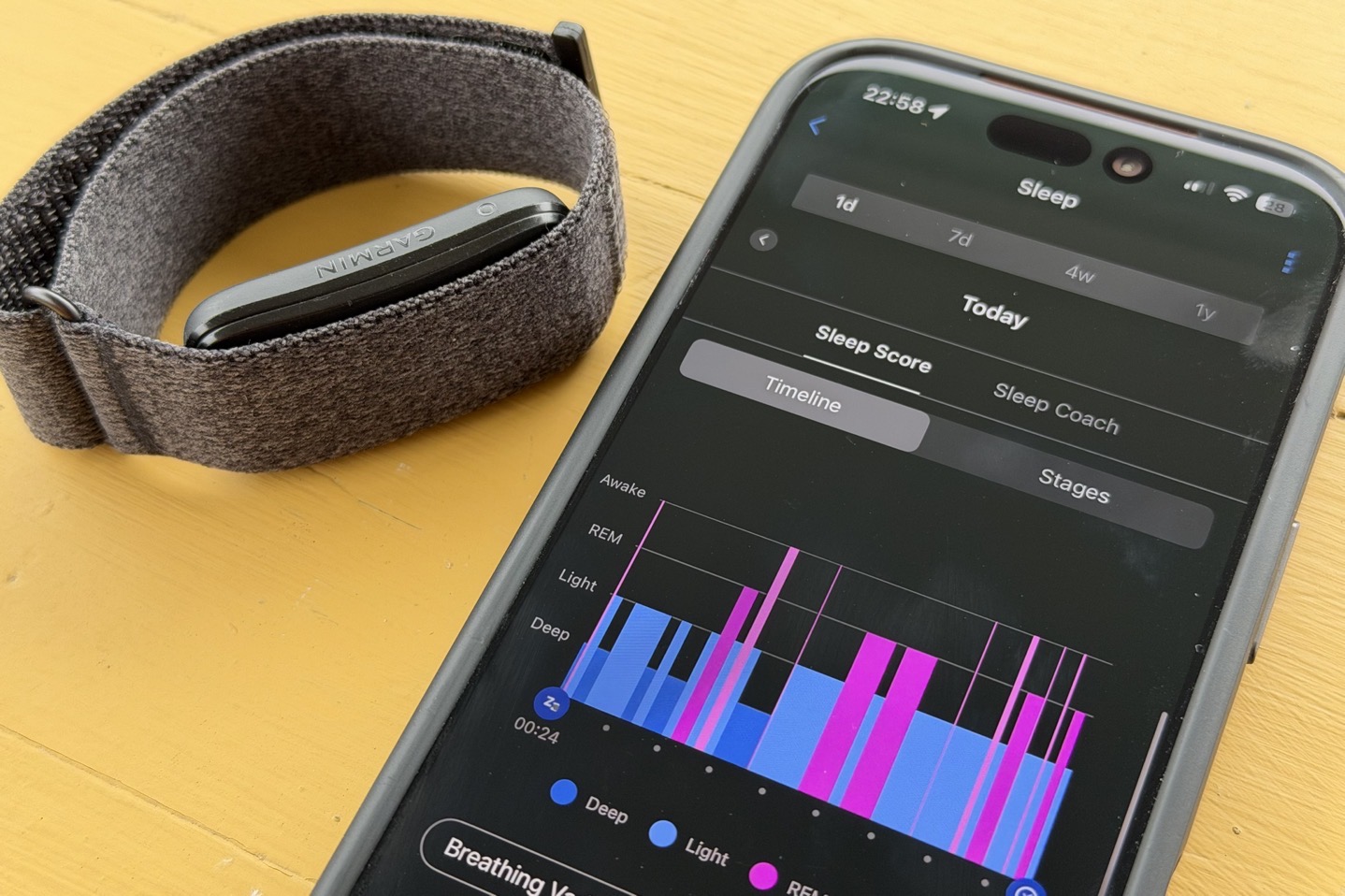
When it comes to sleep data, I’m specifically focused on two core things:
1) Times I went to sleep and woke up (and total sleep duration)
2) Heart Rate Variability (night average)
But I’m also going to show you these other two things:
3) Sleep score (for fun, all companies make up their own magical algorithms)
4) Breathing Rate (respiration rate)
Notably, you’ll see sleep phases/stages are missing there. Why? Because quite frankly, there’s no reliable or accurate way to compare sleep stages. Even so-called ‘gold standard’ devices are accurate at best ~80% of the time. And as a point of reference, we’d never use a heart rate strap that’s wrong 20% of the time as a point of reference, that’d be bonkers. Therefore, I’m not sure why we’d want to do it for sleep stages/sleep phases.
Plus, for the vast majority of scenarios, what matters here is ultimately duration of sleep (and whether you are sleeping). Yes, there’s obviously notable/meaningful benefits to being in certain sleep stages. But pretending that we can judge the accuracy of that against a pseudo-gold standard device isn’t benefiting you. It’s misleading you. So I won’t do it.
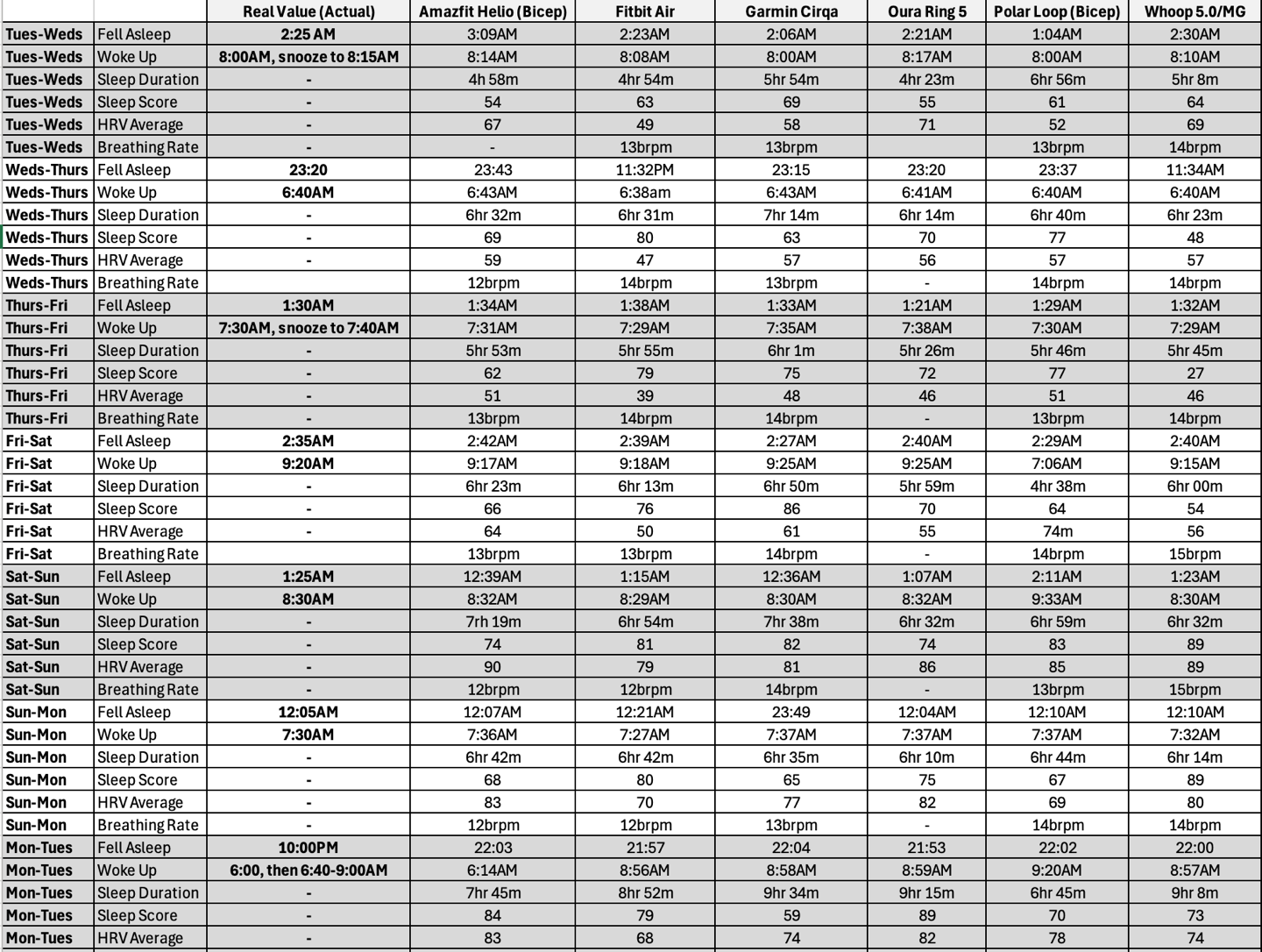
With that, let’s get into the sleep data, which is relatively simple, but obviously, a giant pile of data:
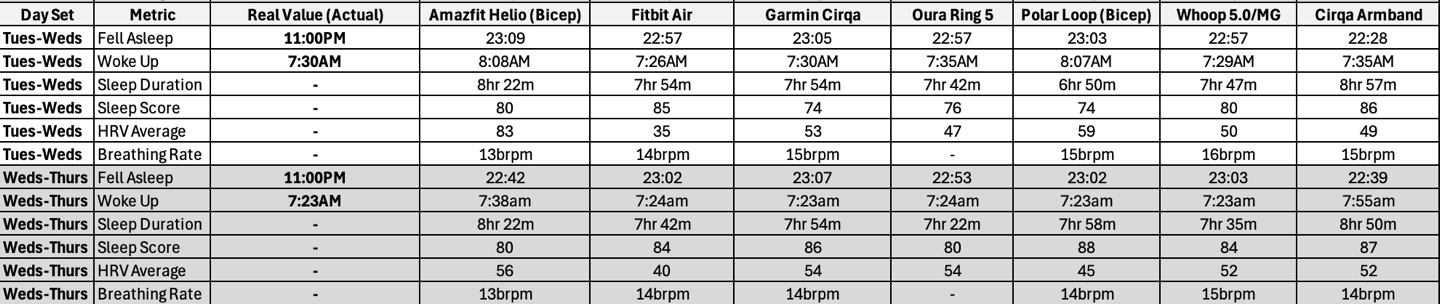
Oh, and a few more nights with the armband
Here are the key and consolidated takeaways from above:
1) Sleep times: The time I went to sleep and woke up were almost always spot-on (within a couple minutes), from not only Garmin Cirqa, but also the other wrist-worn devices. I do tend to see that bicep-worn devices are usually a bit less accurate for sleep, often including book/phone time in bed both prior to falling asleep and upon waking up. Whereas wrist-worn devices tend to be more correct there. I saw this with Cirqa, and have years of experience seeing this with Whoop.
First, the times I fell asleep. I’d argue that anything within 10 minutes of my estimate is good. I could have used 5 minutes, but realistically, my estimate could be off by a minute or two.

In the majority of cases, most devices picked these up within 5 minutes of falling asleep, with occasionally a few others pushing closer to 10 minutes.
And then, the times I woke up:

In general, most devices tended to stick the landing on wake-up times better, because it usually means I’m up and moving (walking around/etc), though sometimes I’m lazy in bed for a few minutes in the morning. Notably, with Cirqa, if you use the internal alarm (vibration alarm), it’ll automatically end your sleep at whatever time that alarm is set for, regardless of whether you hit snooze or not. The Garmin Sleep Index does the exact same thing.
Finally, here’s sleep duration. Note this is *not* ‘time in bed’, but rather, the ‘awake’ time total duration per night.
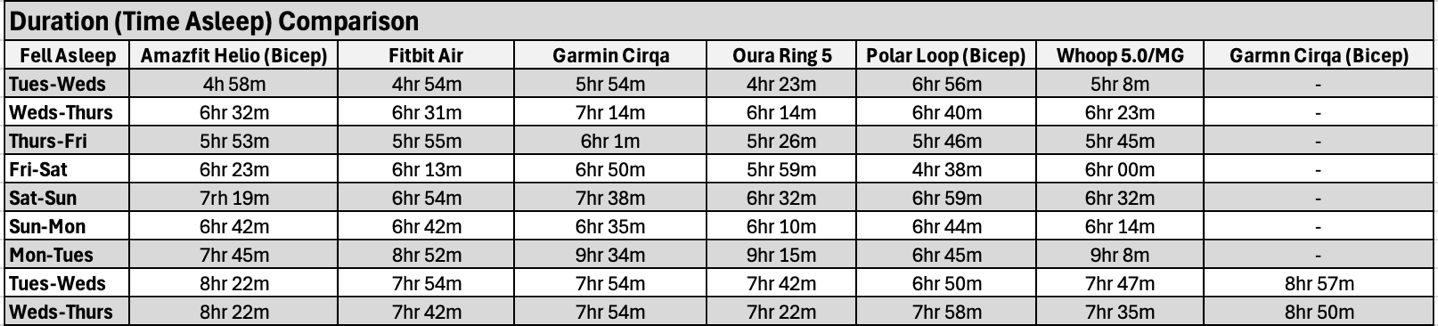
There’s obviously no reference on this, as each company assigns sleep stages differently, and since there’s no 90%+ accurate way to determine that, the amount of time per ‘asleep’ stages with any sort of pseudo-gold-standard comparison device could still be upwards of an hour off in terms of those stages and counting ‘awake’ time (which again, is crazy pants). Either way, you can see just how different some of these estimates can be, from all companies.
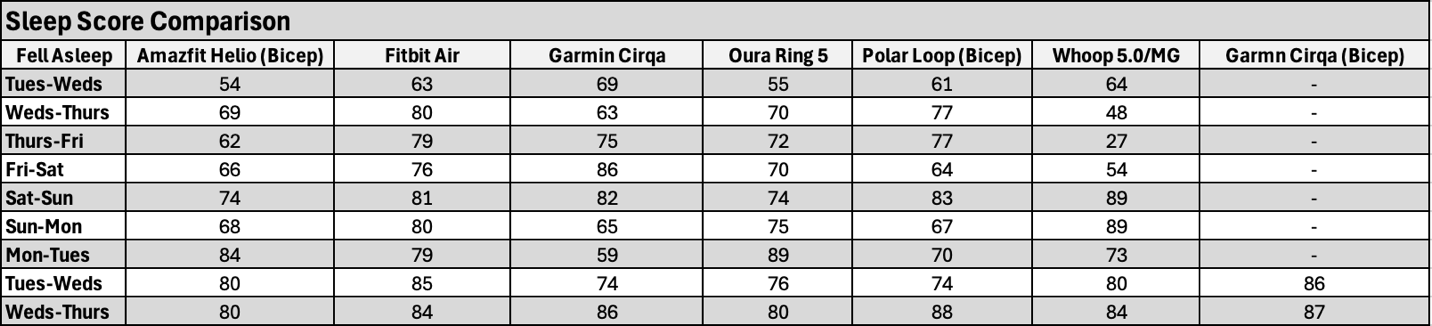
3) Sleep Scores: These all roughly trended together for the most part. Still, given that every company has different algorithms and there are no actual standards here, you see that at least once every wearable had a ‘weird’ day that just didn’t match the others. Most sleep scores are dependent on time in Deep/REM sleep, which is going to be hyper-variable.
4) HRV Data: The HRV data trended very similar to all the other devices. It’s very tricky to get really clean HRV data night after night from a Polar H10 strap (they tend to slide at night in a bed). Plus, due to the slightly different ways each company does averaging, there would be a difference here. Instead, I’m really focused on whether or not there are any outliers here.
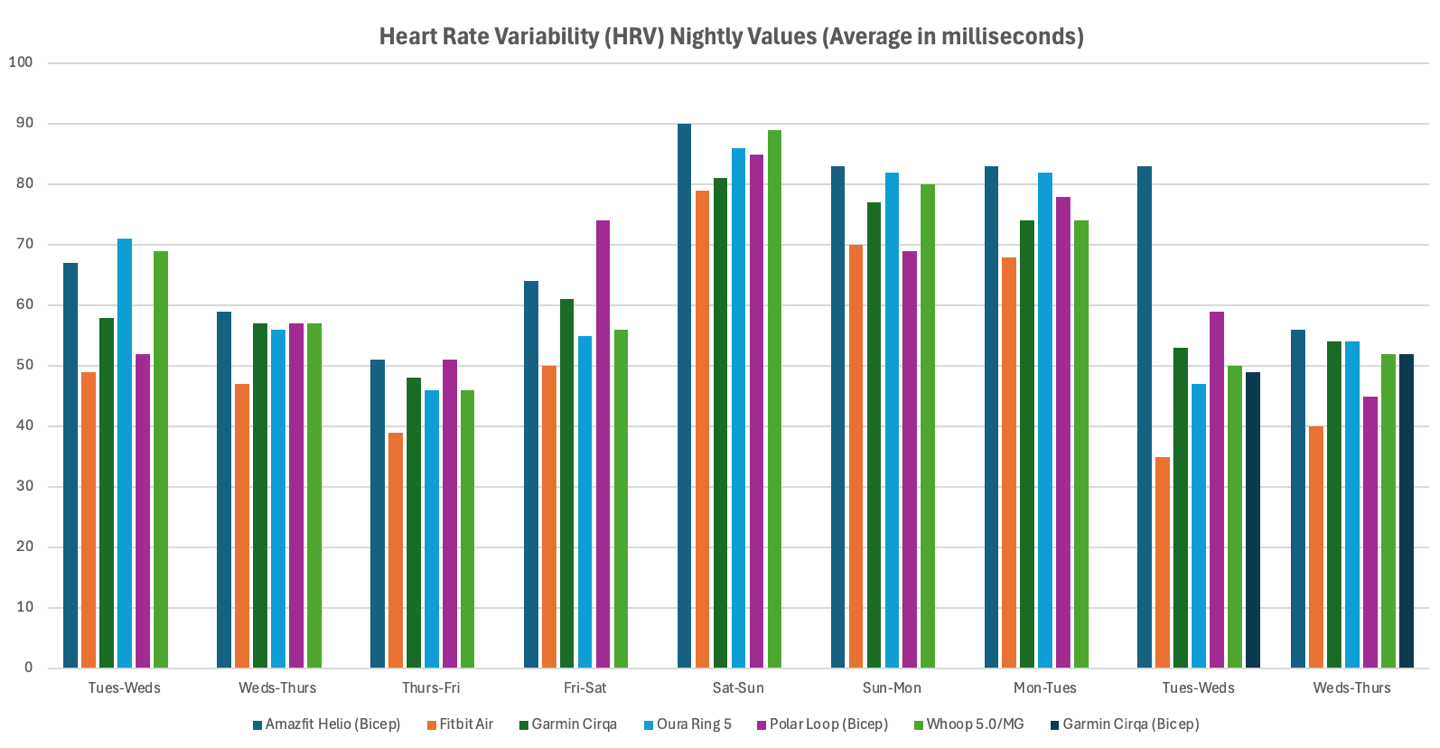
The general trend here (that I’ve seen many times over) is really that the Fitbit Air tends to be the lowest of the group, consistently, and Amazfit tends to be one of the higher ones. Everyone else is sorta just in the middle-ground of ‘similar enough’. The only positive thing with HRV scores is that as long as that device is consistent to itself, HRV scores/ranges are different per person, and thus it doesn’t matter a ton since you’re scored against your own baseline.
4) Breathing Rate: Again, there are clearly slight differences in algorithms, but for the most part everyone was within 1brpm on any given night. Nobody was crazy-pants off, or meaningfully off. In this context, there’s just no difference between 13brpm and 14brpm in terms of your health stats.
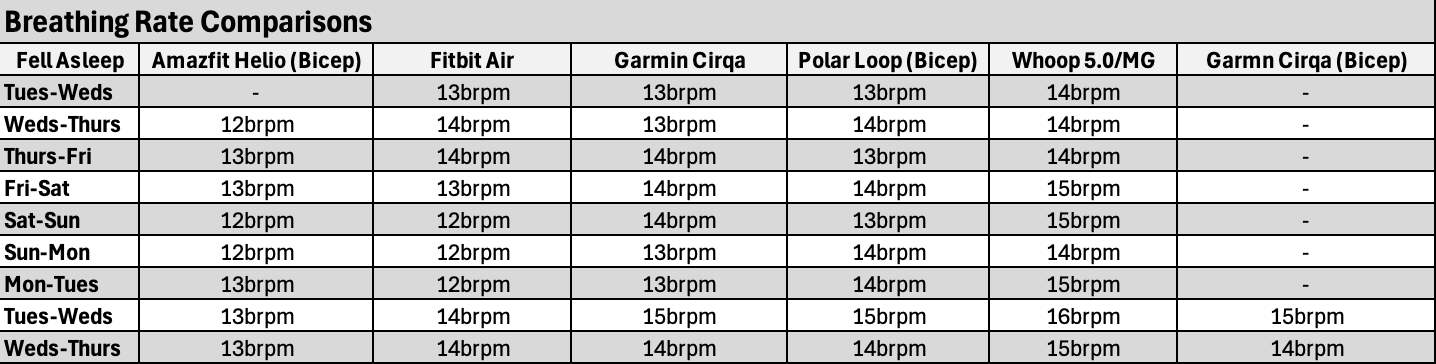
Ultimately, in 2026, there really isn’t any meaningful difference between these companies for sleep data. I know people like to think there is based on things that happened a decade ago, but when comparing the latest generations of devices from each company, I’m getting super similar results. Equally so, I can point to wrong nights from every one of these companies. I’ve got literal years of data, but can easily pick out a single slightly offset night from every single one of these companies over the last month, where a given edge-case scenario threw it for a loop.
Accuracy of Step Data:
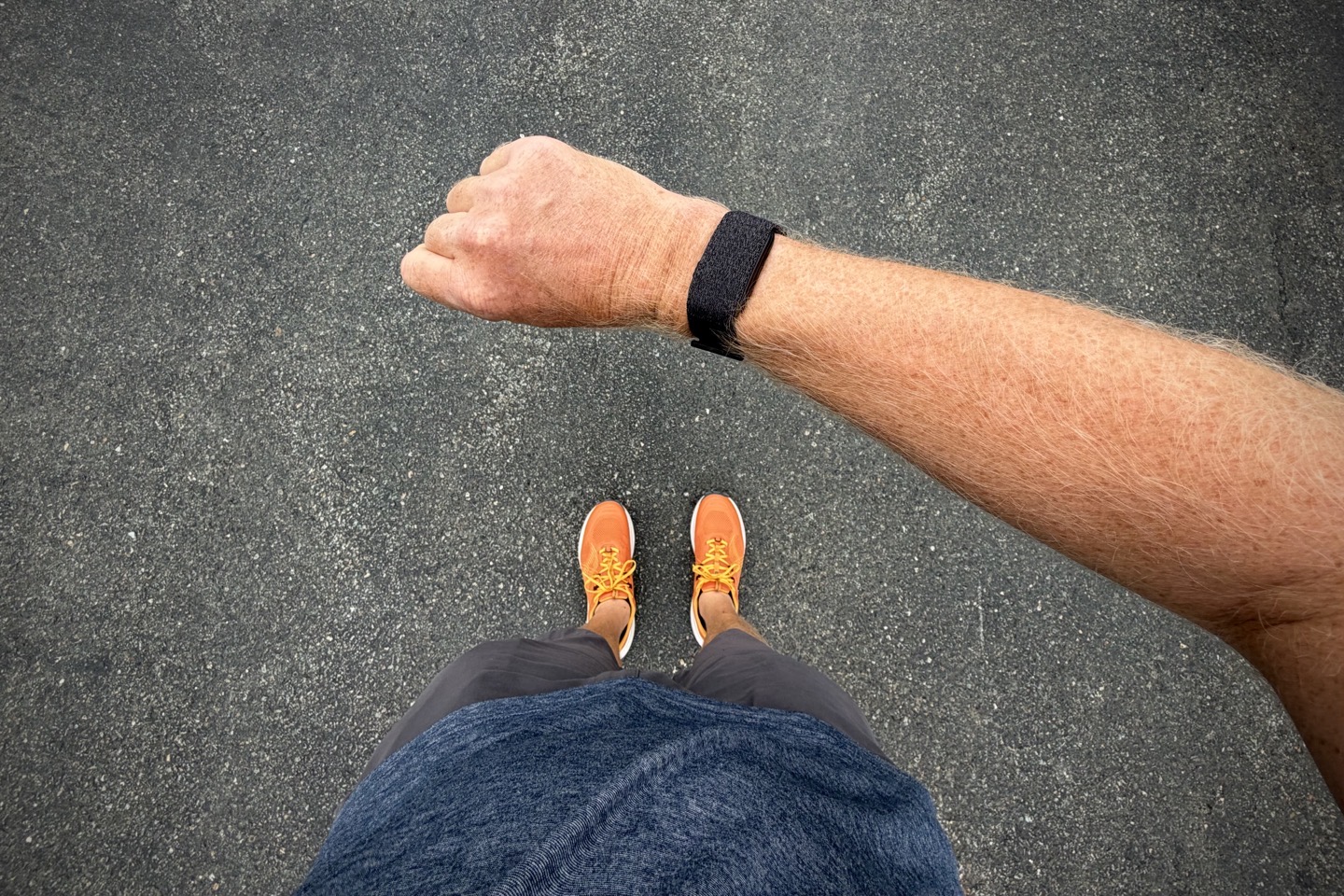
Perhaps this should be called ’differences in step data’, as determining accuracy in real-world situations is frankly quite tricky. Sure, it’s easy enough to count 500 steps and compare, and as I’ll show you, all activity monitors do that within a reasonable definition of perfectly fine. Instead, where things get tricky is navigating the wonkiness of your daily life. Washing dishes, taking a shower, pushing a shopping cart, partial steps while cutting/doing food prep, and tossing things in a garbage/compost bin half a step away. Does it count, does it not?
So instead, in this section I want to look at a simple 500-step test count, and then look at some daily total comparisons. As one who has been testing activity/step trackers for more than 15 years, the main thing here is consistency in numbers, rather than exact step counts. You’re never going to get a perfect counting of every single step (or half step), from any unit. Instead, you want mostly accurate numbers that don’t do too many crazy things (like counting while driving, or massive additions while doing dishes, etc…).
To start off, here’s a simple 500 step-count challenge. I just counted off 500 steps on pavement. Nothing fancy. I recorded the before values, then stopped and ensured everything was ‘synced’ before writing down an ‘end’ value. This was an out-and-back section of pavement, with two slight riser hills in each direction.
Fitbit Air (wrist): 500 steps (seriously, exactly spot-on)
Amazfit Helio (bicep): 505 steps
Garmin Cirqa (wrist): 509 steps
Polar Loop (bicep): 510 steps
Garmin Cirqa (bicep): 520 steps
Whoop (wrist): 530 steps
Fun but kinda useless tidbit: The Whoop band takes a *really* long time to reconcile steps, seemingly a ~10-minute interval. So you have to sit there a long time before/after to ensure it’s “caught up”. Fitbit is instant (live), Garmin is near-live, Amazfit is reasonable enough, and Polar sync takes almost as long as the walk itself. In any case, that’s that.
So, what about the entire day? Let’s look at a few days that were ‘clean’; in other words, all trackers were worn the full day, without any intermissions for charging. Here are three days’ worth that are interesting:
Day London City Tourist: This was an entire day spent with the kids on a day-trip to London during a connecting layover. So we started at the airport hotel in the morning, had a train ride to the city, London Eye, miles of walking, theatre performance, more miles of walking, a bike ride, more walking, a train, and more walking. A good variability to see how these trends emerge. Here’s those results
Day 3hr Bike & Such: This day included a lazy start, then a 3-hour gravel bike ride, some errands, and a bit of work/etc at home. Nothing crazy, but totally different activities.
Day Interval Run & Lazy: This day included basically a morning interval run (10KM), and then mostly nothing else except lounging around the house sitting and some work. Minor household things. Basically a mostly lazy day.
And thus, here are the results of those days:

As you can see, there’s about a 5-8% difference across the board for non-riding days. Yet, for riding days, we see both Amazfit and Polar substantially higher than the others. That’s because both companies ‘convert’ non-step workouts (such as cycling) into steps, using some magical equation. There’s plenty of debate to have about that practice; I’ve covered it numerous times before. TLDR: I think it’s dumb. But hey, it is what it is.
Either way, setting aside those algorithm decisions, all of these are in the same general ballpark of one another. Being off by 5-8% is not going to make or break any fitness plan here.
Calories Burned Differences:
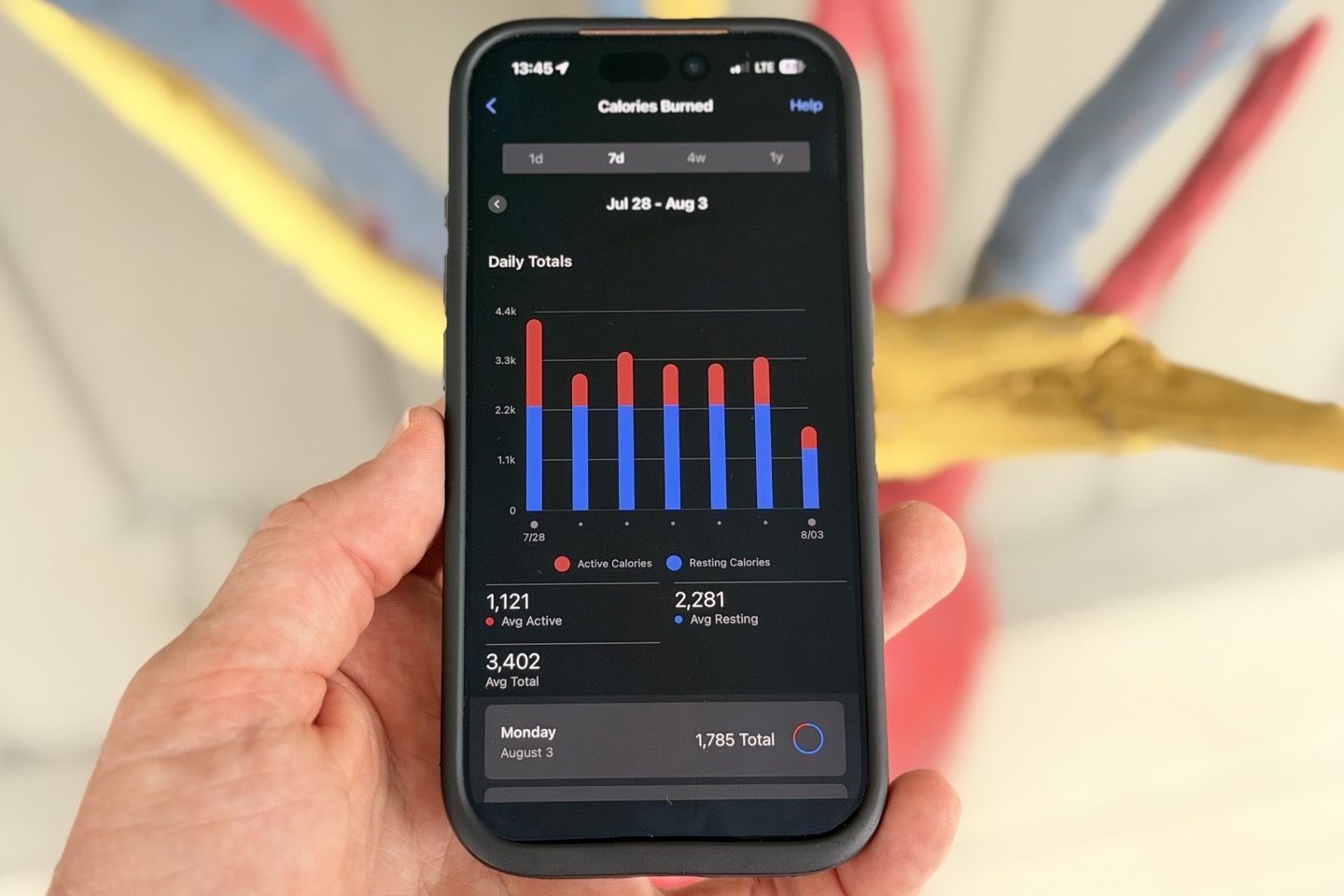
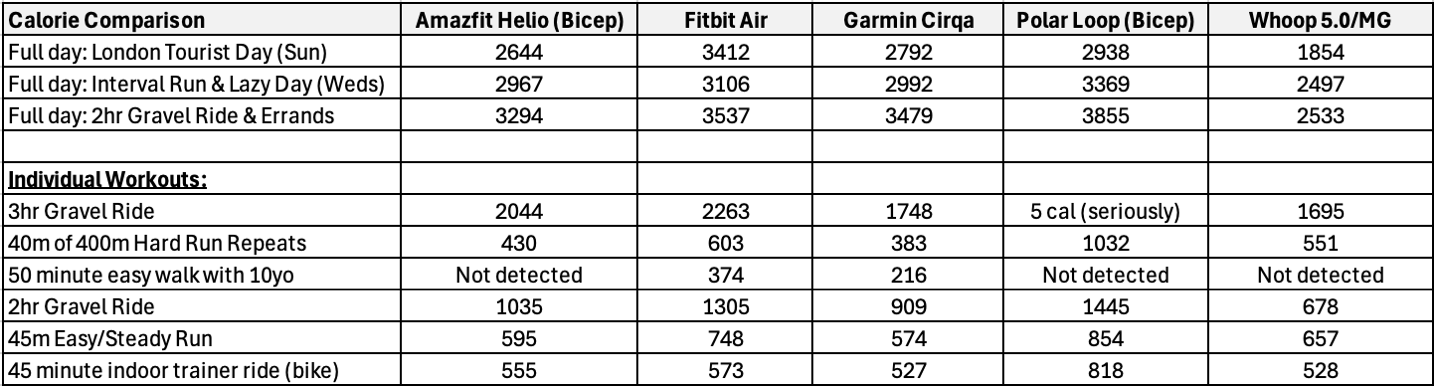
Sometimes a chart is just easier. Below are basically two charts in one:
– A chart portion showing daily totals amongst the devices. I’d caution that Oura daily calorie totals are a hot mess, especially if workouts are involved. So…yeah.
– A chart portion showing a handful of individual workouts where all devices recorded ‘evenly’ (meaning, properly captured the workout with the same rough timings).
This is pretty straightforward really, so, here ya go (note my weight is set the same in all apps):
In general, across these values in the chart and others, I find the following:
– The Garmin Cirqa tends to err on the lower side of things, because (I suspect) in some of these specific workouts (like the interval run), it substantially undershot on my heart rate. Same goes for the gravel ride that would undershoot some of the quick HR spikes.
– The Fitbit Air tends to be the higher side of things. There’s no one specific thing, just…well…that’s where it floats.
– The Polar Loop tends to be even higher, often 50% higher than anyone else. There’s no obvious reason for this, but it’s been a consistent theme here.
– The Amazfit Helio somewhat interestingly has a static value for daily baseline, that doesn’t change at all regardless of how much non-workout activity you do. Meaning, active calories only trigger for things that trigger a workout (like a run, ride, or a long walk). Otherwise, there’s no additional calories awarded for a generally busy/walkable day that doesn’t trigger a workout. Instead, it just assigns a value of 2,139c per day for my baseline ‘being alive’. Kinda weird.
– Whoop’s daily totals are supposed to include your baseline rates, and it must, but man, its total calories are just super low across the board for the rest of the day, consistently. Its per-workout totals are in the ballpark of others, however.
Ultimately, I find these values are at least ‘consistent’. As I’ve long said, trying to compare exact calories or exact steps on any given day is mostly a recipe for disappointment. The same is true for looking at these calorie values and eating just below it, hoping to lose a bit of weight (or any other variation). Instead, you should be assigning an error margin buffer to calorie burn *estimates*, and likewise, if counting calories on food, do the same there as well.
Overall Accuracy Thoughts:
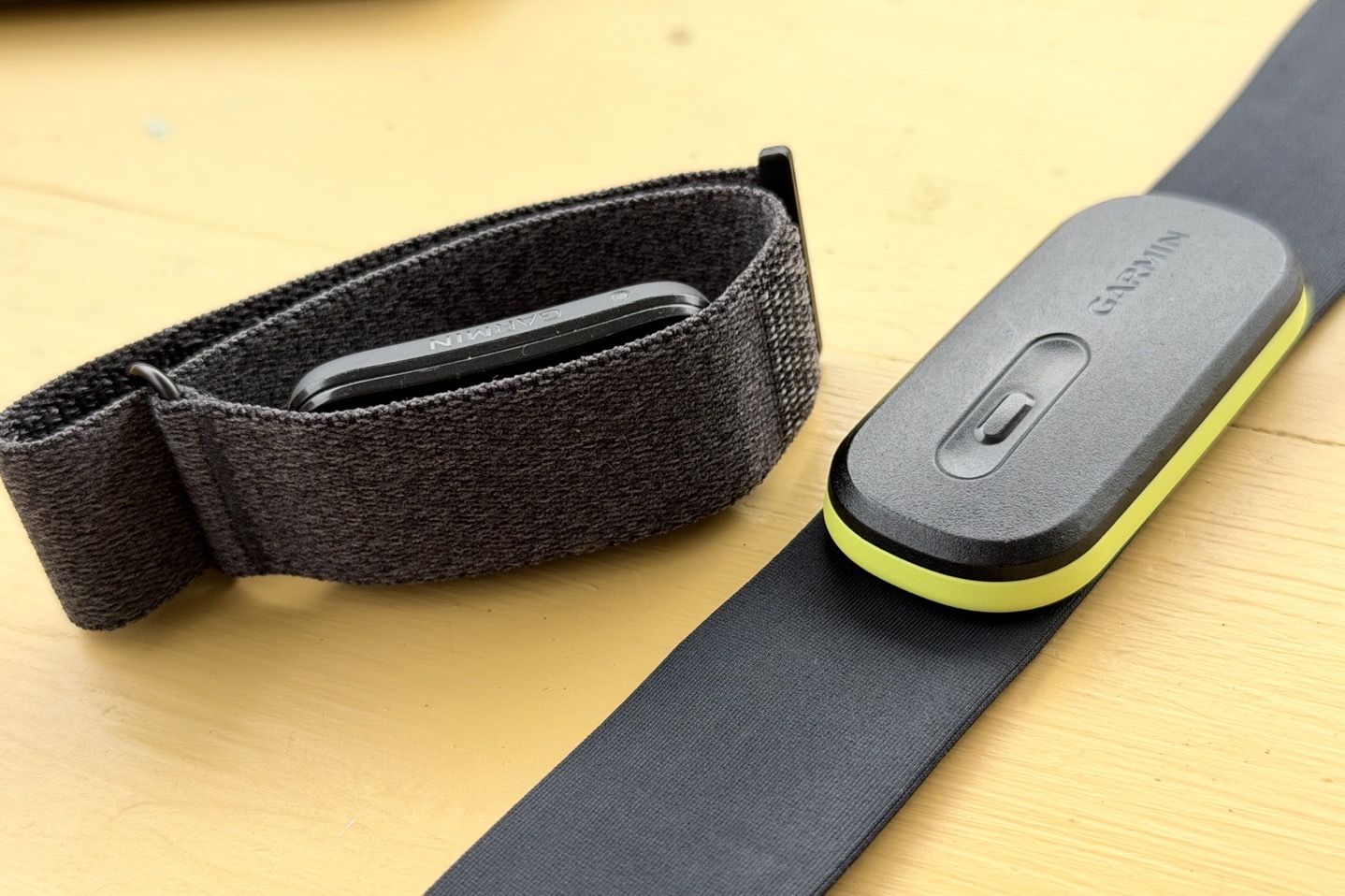
When it comes to accuracy, on the whole, things are pretty good and entirely in line with both other Garmin devices using the Gen4 sensor, as well as all of their competitors in this category. The exception here seems to be my running high-intensity intervals in cooler weather, which for whatever reason just isn’t catching for me on the wrist. Beyond that though, and more simply put: Nobody is really some top faraway leader or such. For Garmin/Fitbit/Whoop, they’re all roughly in the same bucket accuracy-wise. Each with their own quirks, as you might expect.
In the case of Garmin, while they have clearly made gains in the automatic workout detection over the past two weeks since launch, there are still some areas for improvement. And more critically, Garmin absolutely needs to figure out how to increase the heart rate fidelity, so that you can tweak those exercise times (before/after) to not be missing data (especially after). This simply isn’t an issue on Whoop or Fitbit. Beyond that, as you saw above, I had a few running interval workouts where accuracy just didn’t align with expectations (especially in cooler-temp scenarios). I don’t think that’s a Gen4 thing per se, since I’ve done gazillions of other workouts on other Garmin watches with Gen4 in identical conditions without any issue. Perhaps if I had many more weeks of data to figure out the nuances of why this specific workout keeps failing, I’d have different opinions, but that’s the cards I’m dealt.
That said, for most other categories, Garmin is right in the mix and perfectly accurate. Plus, having the ability to enable GPS behind the scenes for workouts can increase accuracy in areas like distance, which its competitors simply can’t do (especially for cycling, but also running/walking). That’s something I didn’t really touch on above, but is notable. GPS distance will virtually always beat wrist-based distance estimates in most environments.
In terms of bicep band or not, the answer is super simple (and identical to my years of testing with Whoop, as well as my year+ experience with Amazfit and Polar on the wrist and bicep band). For workouts, the bicep band will generally produce heart-rate strap level accuracy. In fact, it often exceeds it, since it’s not susceptible to various chest-strap quirks (such as dryness in cooler temps, heavy sweat artifacts in hotter temps). Inversely, for bed times, the wrist is better, as the bicep band tends to miscalculate sleep start/end points if on a phone/book. Again, all these companies are identical in this regard. Lastly, for daily usage outside of workout/sleep, it simply doesn’t matter; it’s a wash.
Hopefully this helps you figure out if the Garmin Cirqa is accurate enough for you and your needs
With that, thanks for reading!
Found This Post Useful? Support The Site!
Hopefully you found this review/post useful. At the end of the day, I’m an athlete just like you looking for the most detail possible on a new purchase – so my review is written from the standpoint of how I used the device. The reviews generally take a lot of hours to put together, so it’s a fair bit of work (and labor of love). As you probably noticed by looking below, I also take time to answer all the questions posted in the comments – and there’s quite a bit of detail in there as well.
If you’re shopping for the Garmin Cirqa (Black) or any other accessory items, please consider using the affiliate links below! As an Amazon Associate I earn from qualifying purchases. It doesn’t cost you anything extra, but your purchases help support this website a lot.
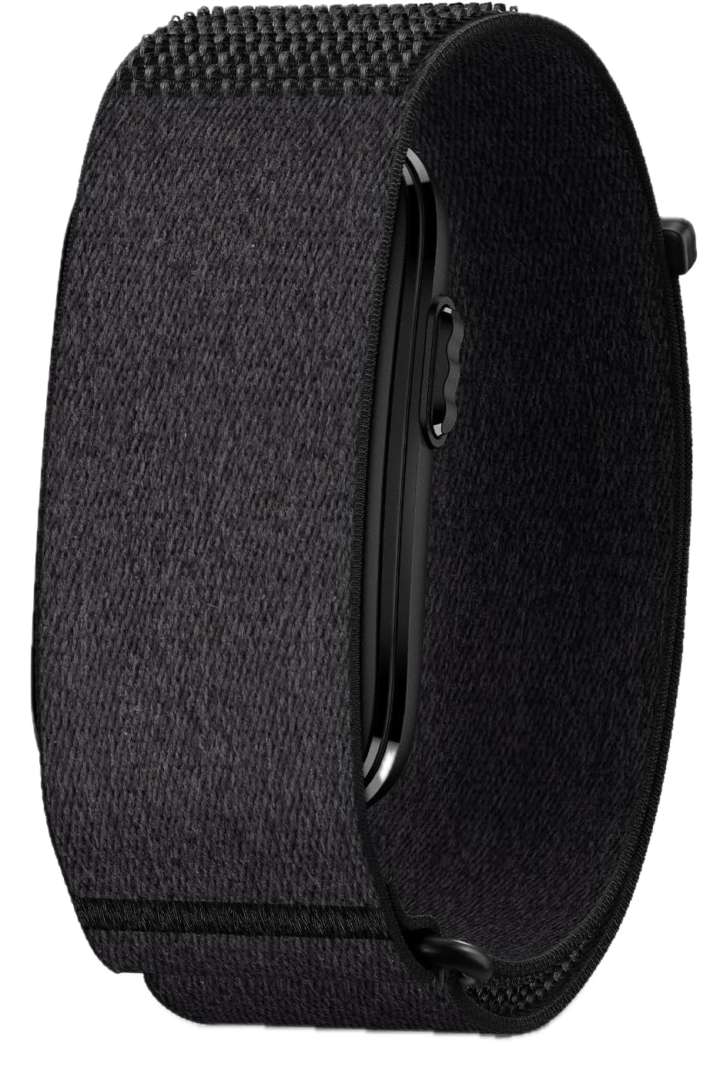
Here’s a few other variants or sibling products that are worth considering:
And of course – you can always sign-up to be a DCR Supporter! That gets you an ad-free DCR, access to the DCR Shed Talkin’ video series packed with behind the scenes tidbits…and it also makes you awesome. And being awesome is what it’s all about!
Thanks for reading! And as always, feel free to post comments or questions in the comments section below, I’ll be happy to try and answer them as quickly as possible. And lastly, if you felt this review was useful – I always appreciate feedback in the comments below. Thanks!


