This year, many data teams have added AI agents to their roadmaps. The excitement is real: an agent that turns a two-day analysis into a two-minute conversation can change how analysts and business teams work together.
But agents are only as reliable as the data foundation beneath them. Point them at raw tables or outdated metadata, and they may sound convincing while being wrong. This article outlines a practical framework for generating and deploying governed semantic views on Snowflake.
Why Agent Quality Breaks Down
Three failure patterns show up repeatedly once agents move from demo to production:
- Governance gets traded for speed. Teams under pressure to ship skip questions about data integrity and access control until an agent is already answering questions for the business.
- Duplication proliferates. Without a shared process, different teams build overlapping agents that answer the same question in subtly different – and inconsistent – ways.
- Answers are non-deterministic. The same question, asked twice, returns two different numbers. That’s worse than being reliably wrong, because nobody knows when to distrust the answer.
All three trace back to one root cause: there’s no standardized, enforced process governing how a semantic definition gets created, reviewed, versioned, and promoted. Tooling that helps you author semantic views faster doesn’t solve this by itself – speed and governance are different axes, and an organization can have plenty of one and very little of the other.
What a Semantic Layer Actually Does
Ask five teams “what is the total number of active members in Q1 2026?” without a shared semantic layer, and you may get five different numbers. Each team applies its own filters, joins its own tables, and defines “active” differently – and an LLM asked the same question with no grounding will hallucinate a sixth answer that sounds just as confident as the other five.
A semantic layer solves this by sitting between the raw warehouse and every consumer – dashboards, spreadsheets, and now AI agents – and answering three questions the same way, every time: which tables hold this data, what filters apply, and what’s the aggregation logic and grain. Snowflake’s own documentation frames this as addressing the mismatch between how business users describe data and how it’s actually stored in database schemas – for example, defining “net revenue” once, consistently, as SUM(gross_revenue * (1 - discount)), rather than leaving the calculation to be reinvented in every report.
Where This Lives in Snowflake
In Snowflake, the semantic layer is implemented as a semantic view, a schema-level object stored directly in the database that defines business metrics and models entities and their relationships, which Cortex Analyst – Snowflake’s text-to-SQL tool, can then query in natural language. Cortex Agent is the AI orchestrator that holds one or more semantic views, alongside search services and custom tools, and decides which resource answers a given question – the same architecture underpinning Snowflake CoWork(formerly Snowflake Intelligence).
Here’s what that specification looks like filled in with a real example. Below is a semantic view over a SaaS billing dataset – two logical tables (billing and customers), joined on customer ID, with three certified revenue metrics defined once:
name: SAAS_BILLING
description: Combines customer records with subscription billing details
  to support certified MRR, net MRR, and churned revenue metrics.
tables:
  - name: BILLING
    base_table: { database: FINANCE, schema: ANALYTICS, table: FCT_SAAS_BILLING }
    dimensions:
      - name: BILLING_DATE
        expr: BILLING_DATE
        data_type: DATE
      - name: PLAN_TYPE
        expr: PLAN_TYPE
        data_type: VARCHAR(20)
    facts:
      - name: MRR_AMOUNT
        expr: MRR_AMOUNT
        data_type: NUMBER(10,2)
    metrics:
      - name: TOTAL_MRR
        expr: SUM(billing.MRR_AMOUNT)
      - name: NET_MRR
        expr: SUM(billing.MRR_AMOUNT) - SUM(billing.DISCOUNT_AMOUNT)
      - name: CHURNED_REVENUE
        expr: SUM(IFF(billing.IS_ACTIVE = FALSE, billing.MRR_AMOUNT, 0))
    primary_key: { columns: [BILLING_ID] }
  - name: CUSTOMERS
    base_table: { database: FINANCE, schema: ANALYTICS, table: DIM_CUSTOMERS }
    dimensions:
      - name: COMPANY_NAME
        expr: COMPANY_NAME
        data_type: VARCHAR(100)
      - name: INDUSTRY
        expr: INDUSTRY
        data_type: VARCHAR(50)
    primary_key: { columns: [CUSTOMER_ID] }
relationships:
  - name: CUSTOMER_BILLING
    left_table: BILLING
    right_table: CUSTOMERS
    relationship_columns:
      - { left_column: CUSTOMER_ID, right_column: CUSTOMER_ID }
(Trimmed for readability – the full generated file includes every column comment and access modifier. Repo has the full semantic definition )
What’s not in question is that this object works. What is in question is: how does a semantic view like this get created in the first place?
The Two Governance Pillars Behind Every Certified Metric
Before the pipeline itself, it’s worth being precise about the two governed inputs it depends on.
- The Data Catalog: One authoritative source for business descriptions, data types, sensitivity tags (PII/PHI), sample values, and certification status for every column and table. In this implementation that’s Snowflake Horizon – tags are set at the column level or table level. The catalog contains the data type, description, synonyms, sample values etc., and a dynamic masking policy can restrict who ever sees a flagged column. A
certification_status="Certified"tag is the green light for th at column’s metadata to be used in a semantic view at all. - The Metric Inventory: A single governed home for every metric formula, with a description, business owner, source table, domain, sensitivity classification, and critically a certification status. The operative rule: each metric is defined once and reused everywhere, and “once” is gated behind an actual sign-off from a domain owner or data steward. This is what is going to solve the problem that the same metric can be answered 6 different ways across teams.
The Framework: A Governance Harness for Semantic View Generation
The core idea is simple to state: treat semantic view generation as a governed software release, not a one-off modeling exercise. In practice that means five components, each enforcing a rule that an informal process typically leaves optional. Before walking through each one, it helps to see the whole pipeline end to end, and then how that pipeline fits into the wider Snowflake architecture – the two diagrams below cover exactly that.
Governance Framework Flow Diagram
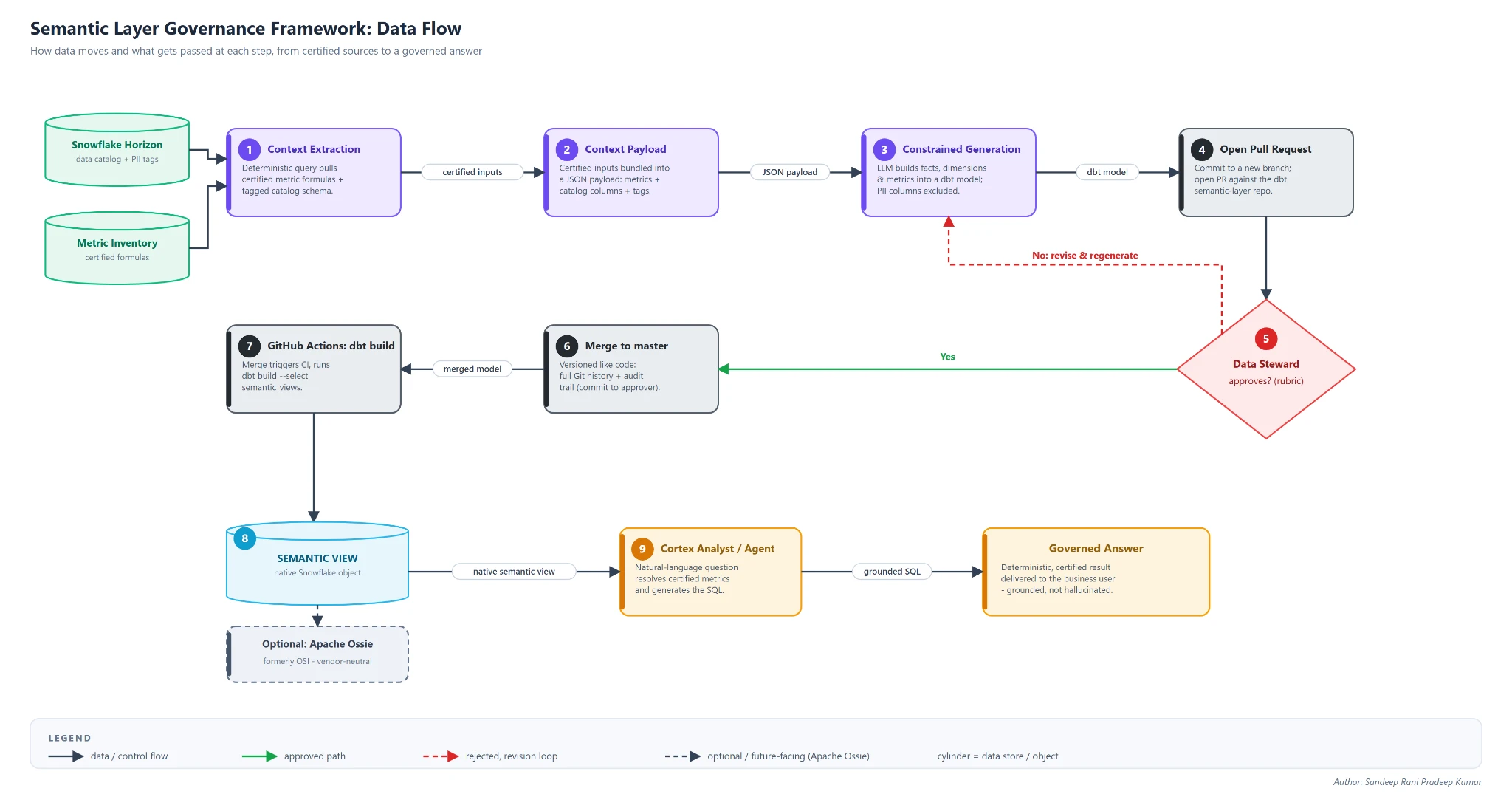
Zooming out one level: this pipeline is only the build-time half of the picture. Figure 2 shows how it fits alongside the systems that actually consume its output – Cortex Analyst, Cortex Agents, Snowflake Cowork, and the BI tools discussed later in this article.
System architecture
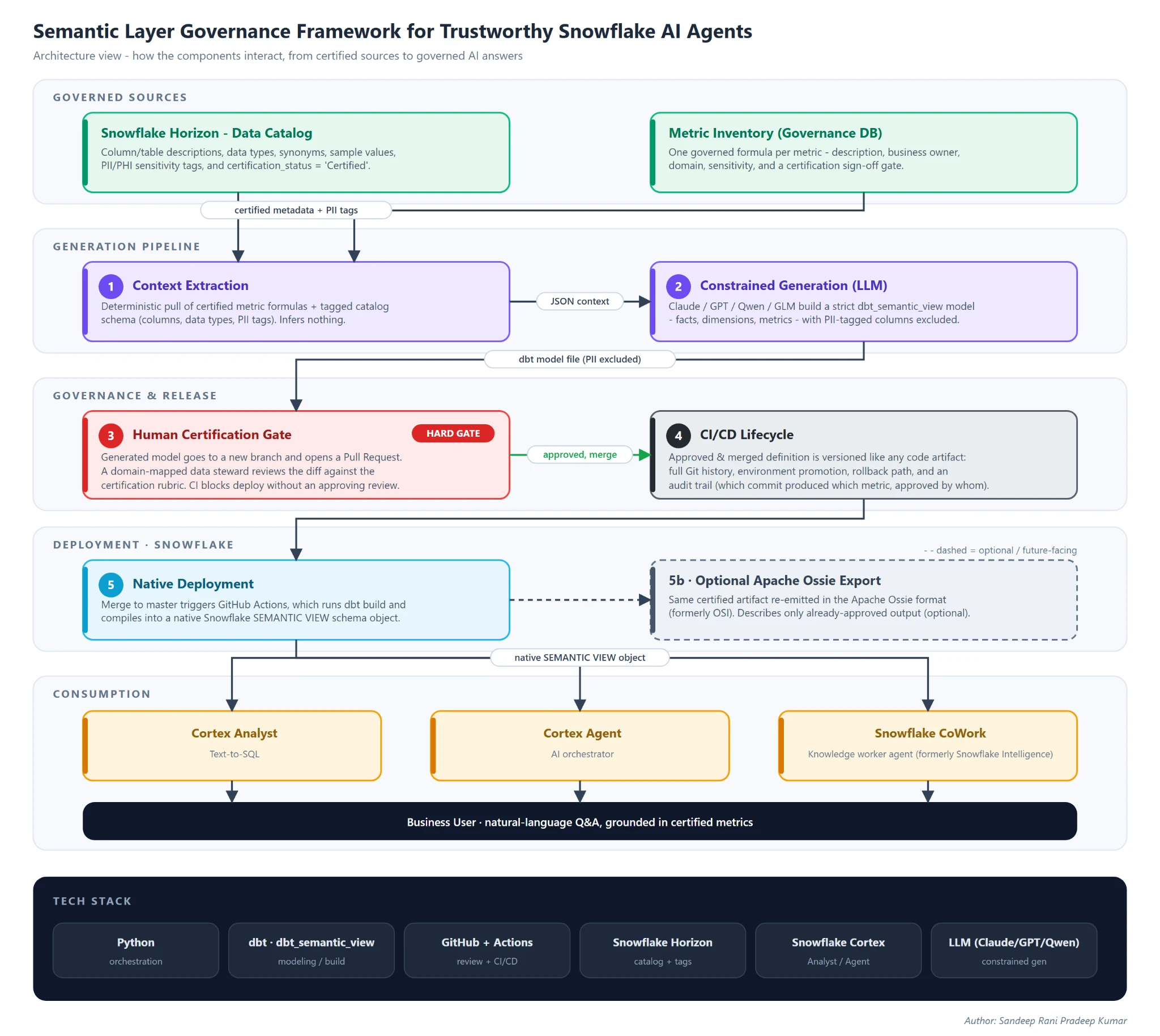
The full code for the below components breakdown is here.
An orchestration script connects to Horizon and the metric inventory and pulls, for a given domain, only certified metric formulas and tagged schema. This step is deterministic – it retrieves already-approved facts, it doesn’t infer anything:
cursor.execute(f"""
    SELECT metric_name, description, expression, base_table
    FROM GOVERNANCE_DB.SEMANTICS.METRIC_INVENTORY
    WHERE certification_status="Certified"
      AND base_table IN ({table_list})
""")
metrics = [
    {"metric_name": r[0], "description": r[1], "expression": r[2], "table": r[3]}
    for r in cursor.fetchall()
]
The process pulls schema and tag context directly from Horizon tag references.
catalog_query = f"""
    WITH physical_schema AS (
        SELECT table_schema, table_name, column_name, data_type, comment AS column_description
        FROM {database}.INFORMATION_SCHEMA.COLUMNS
        WHERE table_schema IN ({schema_list}) AND table_name IN ({table_list})
    ),
    horizon_tags AS ( {real_time_tags_cte} )
    SELECT p.table_name, p.column_name, p.data_type, p.column_description, t.tag_value AS privacy_tag
    FROM physical_schema p
    LEFT JOIN horizon_tags t
        ON p.table_name = t.table_name AND p.column_name = t.column_name
"""
This is the first structural difference from usage-inference approaches worth stating plainly: this pipeline only ever proposes definitions that trace back to a pre-approved source, rather than a definition surfaced because it was the most common pattern in someone’s query history. Popularity is a useful discovery signal; it isn’t the same claim as governance sign-off.
Component 2 – Constrained Generation
An LLM of choice (Claude, GPT, Qwen, GLM etc) converts the extracted context into a strictly formatted dbt model using the dbt_semantic_view package syntax. The key control is constraint: the system prompt fixes the output schema and clause order and requires every generated field to map to a catalog or inventory entry instead of the model’s own judgment. A trimmed version of the actual system prompt used in this pipeline:
SYSTEM_PROMPT = """You are an expert Data Engineer building dbt semantic
models for Snowflake.

You will receive a JSON context payload with:
  - metrics: certified metric definitions (metric_name, expression, table)
  - catalog: physical columns per table (table, column, data_type,
    description, tag)
  - table_descriptions: [{ table, description }]
    source table in Snowflake

Produce ONE valid dbt model file using the Snowflake-Labs dbt_semantic_view
package. Output ONLY the raw file contents. No prose, no markdown fences,
no preamble.

Required clauses, in this exact order, separated by newlines:

  {{ config(materialized='semantic_view') }}

  TABLES (
    <alias> AS {{ source('<source_name>', '<table>') }}
      [ PRIMARY KEY (<col>) ] [ COMMENT = '<description>' ]
  )

  RELATIONSHIPS (
    <relationship_name> AS <fact_alias>(<fk_col>) REFERENCES <dim_alias>
  )

  FACTS (
    <alias>.<name> AS <sql_expr> [ COMMENT = '...' ] [, ...]
  )

  DIMENSIONS (
    <alias>.<name> AS <sql_expr> [ COMMENT = '...' ] [, ...]
  )

  METRICS (
    <alias>.<name> AS <sql_expr> [ COMMENT = '...' ] [, ...]
  )

  COMMENT = '<derived semantic view description>'

PII handling: any column whose `tag` contains 'PII' (case-insensitive) MUST
be excluded from FACTS, DIMENSIONS, and METRICS.
"""
Because the extracted context includes the PII tag, the model automatically omits or masks flagged columns instead of making case-by-case judgments.
Beyond PII filtering, two controls enforce governance:
- Predictable output: Restrict the model to a strict, non-conversational format so reviewers can verify the generated code consistently and efficiently.
- Data Integrity: The model must only use the specific data provided in the input, which prevents it from “hallucinating” or inventing its own columns and formulas.
By applying this system prompt to the catalog and metric context, the pipeline automatically generates the required semantic view dbt model, replacing manual coding with verified, automated output which is probably 95% accurate.
Component 3 – Human Certification Gate
However accurate the LLM’s output usually is, production metrics can’t tolerate even a small percentage of hallucinated logic. So the generated definition is never merged automatically – it’s committed to a new branch and opened as a pull request against the semantic-layer dbt repository. The orchestrator function ties four smaller GitHub API calls together:
def open_pr_for_file(owner, repo, file_path, content, commit_message,
                      pr_title, pr_body, branch, base="master",
                      token="", draft=False) -> str:
    if not token:
        raise ValueError("GITHUB_TOKEN is required")
    base_sha = get_default_branch_sha(owner, repo, token, base=base)
    create_branch(owner, repo, base_sha, branch, token)
    put_file(owner, repo, file_path, content, commit_message, branch, token)
    return create_pr(owner, repo, pr_title, pr_body, branch, base,
                      token, draft=draft)
Each of those four calls is a small, single-purpose wrapper around the GitHub REST API – deliberately kept simple so the review trail stays legible:
# Create a new branch off the base commit
def create_branch(owner, repo, base_sha, new_branch, token) -> None:
    r = requests.post(
        f"{API}/repos/{owner}/{repo}/git/refs",
        headers=_headers(token),
        json={"ref": f"refs/heads/{new_branch}", "sha": base_sha},
        timeout=30,
    )
    _check(r)

# Look up the current file SHA, if it already exists on this branch
def get_file_sha(owner, repo, path, branch, token) -> Optional[str]:
    r = requests.get(
        f"{API}/repos/{owner}/{repo}/contents/{path}",
        headers=_headers(token), params={"ref": branch}, timeout=30,
    )
    if r.status_code == 404:
        return None
    return _check(r).get("sha")

# Commit the generated semantic view file to that branch
def put_file(owner, repo, path, content, message, branch, token) -> dict:
    payload = {
        "message": message,
        "content": base64.b64encode(content.encode("utf-8")).decode("ascii"),
        "branch": branch,
    }
    existing = get_file_sha(owner, repo, path, branch, token)
    if existing:
        payload["sha"] = existing
    r = requests.put(
        f"{API}/repos/{owner}/{repo}/contents/{path}",
        headers=_headers(token), json=payload, timeout=60,
    )
    return _check(r)

# Open the PR for the data steward to review
def create_pr(owner, repo, title, body, head, base, token,
               draft=False) -> str:
    r = requests.post(
        f"{API}/repos/{owner}/{repo}/pulls",
        headers=_headers(token),
        json={"title": title, "body": body, "head": head,
              "base": base, "draft": draft},
        timeout=30,
    )
    return _check(r)["html_url"]
A domain-mapped data steward – the named owner from the metric inventory – reviews the diff against the certification rubric defined in the next section. This is a hard gate: the CI pipeline blocks deployment without an approving review from an authorized reviewer, enforced the same way a production codebase enforces required reviewers.
Component 4 – CI/CD Lifecycle
After approval and merge, Git versions the definition like any other code artifact, preserving history, promotion workflows, and rollback capability. This is what gives the organization something ad hoc semantic-view creation structurally cannot: an audit trail answering, for any metric on any date, exactly which commit produced it and who approved it.
Component 5 – Native Deployment
Merging to the main branch triggers a GitHub Actions workflow that runs dbt build, compiling the certified model into a native Snowflake SEMANTIC VIEW object:
on:
  push:
    branches: [master]
    paths: ['semantic_models/models/semantic_views/**']
jobs:
  deploy-dbt-models:
    runs-on: ubuntu-latest
    steps:
      - uses: actions/checkout@v4
      - uses: actions/setup-python@v5
        with: { python-version: '3.10' }
      - run: pip install -r requirements.txt
      - run: dbt deps
      - run: dbt debug
      - run: dbt build --select semantic_views
From this point forward, Cortex Analyst, Cortex Agents, and Snowflake CoWork query the deployed object exactly as they would one built any other way. One implementation note: Snowflake internally represents the semantic view as YAML. Teams can deploy it directly from a YAML specification, but dbt SQL enables the human-review and CI/CD workflow described above.
Component 5b – An Optional Apache Ossie (formerly OSI) Export
Worth designing for before you need it: emit the same certified artifact a second time in Apache Ossie format, alongside the Snowflake deployment. Ossie is the vendor-neutral, Apache 2.0 spec formerly called Open Semantic Interchange (OSI), renamed when it entered the Apache Incubator in July 2026. It describes datasets, metrics, dimensions, relationships, and context so tools and agents interpret them consistently.
It fits the pipeline because Ossie’s building blocks map almost directly onto what Components 1 through 3 already extract and certify. Adding it is a serialization step on top of governance work you’ve already done, not a new governance burden.
Specifications
Below is a sneak peek (full spec here), illustrative rather than part of the reference repo since nothing consumes it yet, built against the public spec.yaml schema and mapping the same certified SAAS_BILLING fields into datasets / relationships / metrics:
version: 0.1.1
semantic_model:
  - name: saas_billing
    description: >
      Combines customer records with subscription billing details to
      support certified MRR, net MRR, and churned revenue metrics.
    ai_context: >
      Use this model to answer questions about MRR, revenue churn, and
      customer billing. "Active" means IS_ACTIVE = TRUE on the billing record.
    datasets:
      - name: billing
        source: FINANCE.ANALYTICS.FCT_SAAS_BILLING
        primary_key:
          - BILLING_ID
        fields:
          - name: billing_date
            expression:
              dialects:
                - dialect: SNOWFLAKE
                  expression: BILLING_DATE
            dimension:
              is_time: true
          - name: plan_type
            expression:
              dialects:
                - dialect: SNOWFLAKE
                  expression: PLAN_TYPE
          - name: is_active
            expression:
              dialects:
                - dialect: SNOWFLAKE
                  expression: IS_ACTIVE
          - name: mrr_amount
            expression:
              dialects:
                - dialect: SNOWFLAKE
                  expression: MRR_AMOUNT
            description: Monthly recurring revenue amount.
      - name: customers
        source: FINANCE.ANALYTICS.DIM_CUSTOMERS
        primary_key:
          - CUSTOMER_ID
        fields:
          - name: company_name
            expression:
              dialects:
                - dialect: SNOWFLAKE
                  expression: COMPANY_NAME
          - name: industry
            expression:
              dialects:
                - dialect: SNOWFLAKE
                  expression: INDUSTRY
    relationships:
      - name: customer_billing
        from: billing
        to: customers
        from_columns:
          - CUSTOMER_ID
        to_columns:
          - CUSTOMER_ID
    metrics:
      - name: churned_revenue
        expression:
          dialects:
            - dialect: SNOWFLAKE
              expression: SUM(IFF(billing.is_active = FALSE, billing.mrr_amount, 0))
        description: Revenue lost from canceled plans
        ai_context: >
          Use this when the user asks about lost, canceled, or churned
          revenue, not for questions about customer counts.
This export provides two main advantages:
- Reduced conversion work, not magic portability: The expression.dialects structure lets a metric carry engine-specific expressions in a single common artifact, which cuts conversion effort for any consumer that implements the standard. It does not make the metric automatically executable everywhere – portability still depends on each consumer supporting the relevant dialect and semantic behavior.
- AI-facing context, not a governance store: The ai_context field is for AI guidance – synonyms, examples, and usage instructions that help an agent choose the right metric. Keep ownership, certification evidence, and approval history in your authoritative governance systems (catalog, metric inventory, PR records), or in clearly defined custom extensions – not in ai_context.
Doesn’t Snowflake already do this?
No. Snowflake’s tooling solves discovery. This framework solves certification.
- Autopilot finds statistical consensus in query history. That tells you what people already do, not what’s correct, and two teams can produce two conflicting “consensus” definitions with no owner forced to reconcile them.
- Horizon Context helps agents find an existing semantic view. It doesn’t tell you whether that view was ever reviewed, by whom, or against what version history.
- Cortex Sense ranks undocumented data by relevance, popularity, and freshness, like web search. That’s a different trust model entirely.
None of this is a knock on Snowflake’s roadmap. For certified metrics, require a named approver and a versioned audit trail before release.
A generation framework has limited value when organizations can use certified artifacts only within Snowflake AI surfaces.
| Tool | Integration | Status | Metric reuse | Key limitations |
|---|---|---|---|---|
| Power BI | Power BI consuming a Snowflake semantic view directly | Unsupported | No | Power BI does not support non-native semantic models. |
| Power BI / Tableau (reverse) | Snowflake ingests .pbit/.pbix files via Semantic View Autopilot | Public Preview | Partial | Works in the opposite direction; Power BI still cannot query a live Snowflake semantic view. |
| Tableau (TDS export) | Export a semantic view as a Tableau Data Source (.tds) from Snowsight | Public Preview | Yes | Auto-assigned dimensions and measures may need manual adjustment. |
| Sigma | Sigma consuming Snowflake semantic views | Beta | Partial | Limitations around joins, unions, APIs, derived metrics, inherited semantics, and AI assistant awareness. |
| Omni | Native two-way integration with Snowflake semantic views | Available | Yes | Some documented modeling and query edge cases remain. |
| AtScale (XMLA bridge) | Expose Snowflake semantic views to Power BI and Excel via XMLA | Private Preview (announced Jun 2, 2026) | Yes | Preview feature; confirm availability and production readiness before adoption. |
Few takeaways:
- Snowflake still does not support direct Power BI consumption of semantic views, although it can ingest Power BI assets into Autopilot and a third-party XMLA bridge is in private preview.
- Support remains uneven across platforms; Omni offers a relatively direct two-way integration, Tableau provides a preview TDS export that preserves metrics, and Sigma remains in beta with notable limitations.
- Where native support is absent, teams still need to duplicate some modeling work, which open standards such as Apache Ossie aim to reduce over time.
A Certification Rubric, So “Human in the Loop” Isn’t a Slogan
The effectiveness of your review process depends entirely on the quality of the checklist used. At a minimum, every human reviewer should verify these points:
- Source tracking: Confirm that every data point clearly traces back to an official, pre-approved list or catalog.
- Protect privacy: Remove or restrict access to any column that contains sensitive personal or health information, and have a human verify that the security measure is in place.
- Formula accuracy: Verify that the math and logic in the code exactly match the official approved versions, ensuring the generated code is precise rather than just a close estimate.
- Clarify labels and naming: Define all labels and terms clearly so the AI does not confuse different metrics or concepts.
- Perform practical testing: Run at least one real-world test for every major metric and verify that the code produces correct results on actual data before finalizing it.
- Official approval: Obtain formal sign-off from the domain owners or data stewards, confirming that they agree with the final definitions.
Make these requirements a mandatory code-approval checklist so human-in-the-loop review becomes an enforceable practice, not a buzzword.
From Deployment to Answer: Cortex Analyst and Agents
Once the SAAS_BILLING semantic view is live, it can be opened directly in Cortex Analyst and queried in natural language. Cortex Analyst resolves TOTAL_MRR, groups by PLAN_TYPE, and generates SQL automatically without human-written queries or metric redefinition.
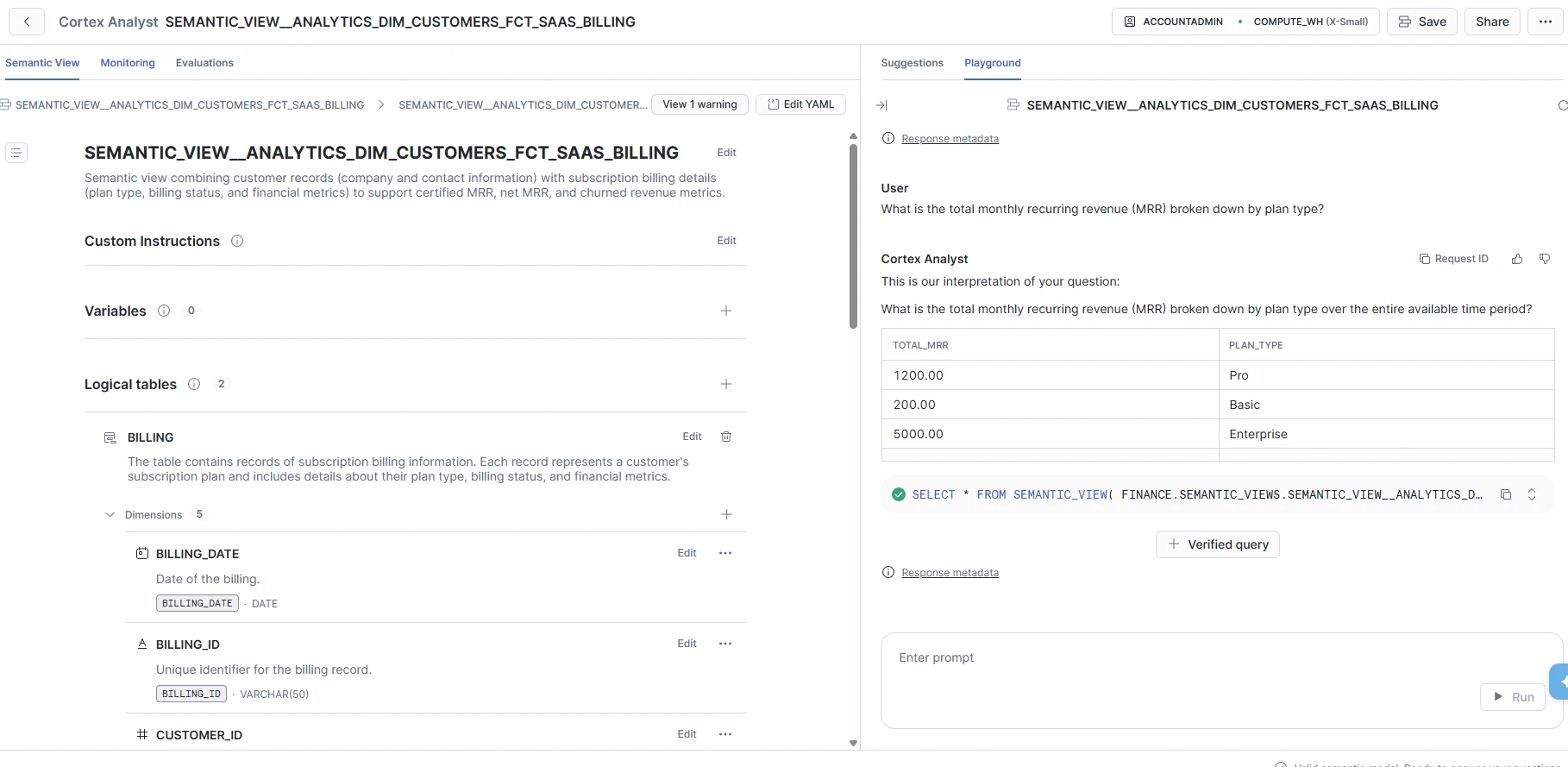
Cortex Analyst (Text-to-SQL)
From there, developers can build a Cortex Agent that uses this semantic view as one of its tools. They can attach multiple semantic views and provide orchestration instructions that specify when the agent should use each one.
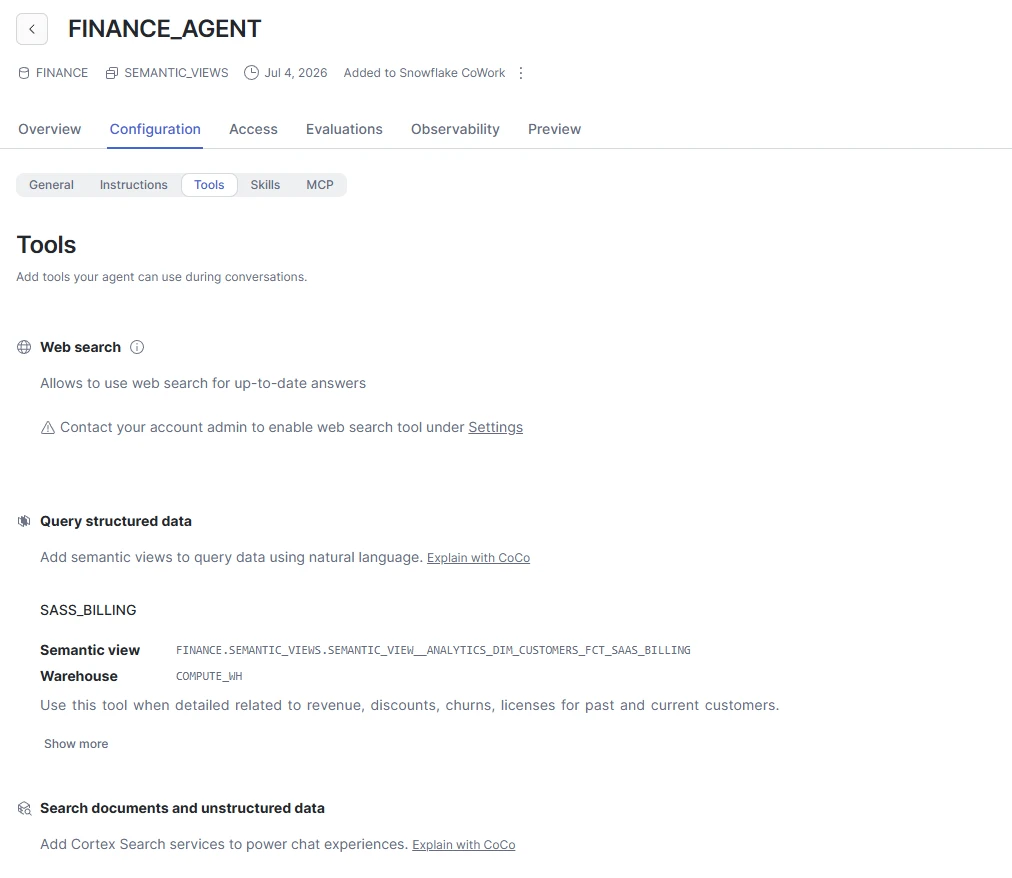
Cortex Agent
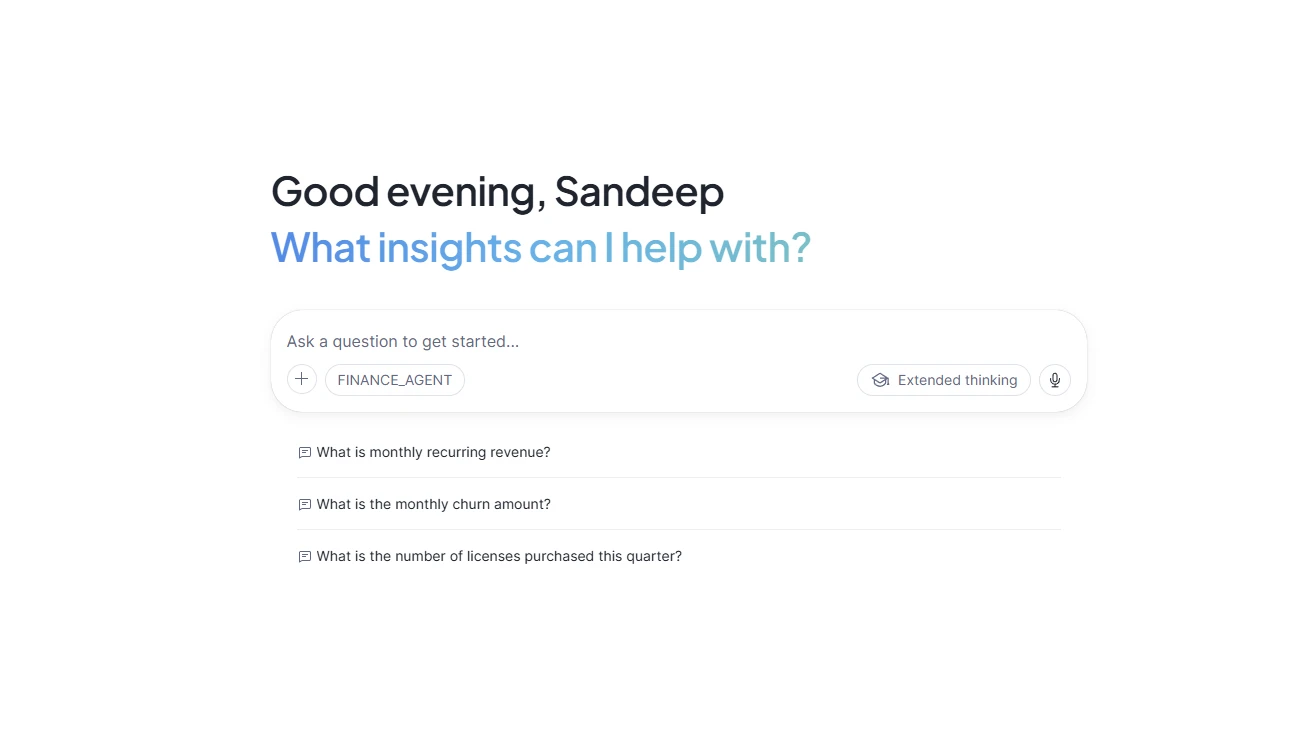
Previewed inside Snowflake CoWork (Previewed inside Snowflake Cowork) the agent presents a conversational, chat-style experience,
The following image traces exactly what happens between the user typing that question and the answer appearing on screen:
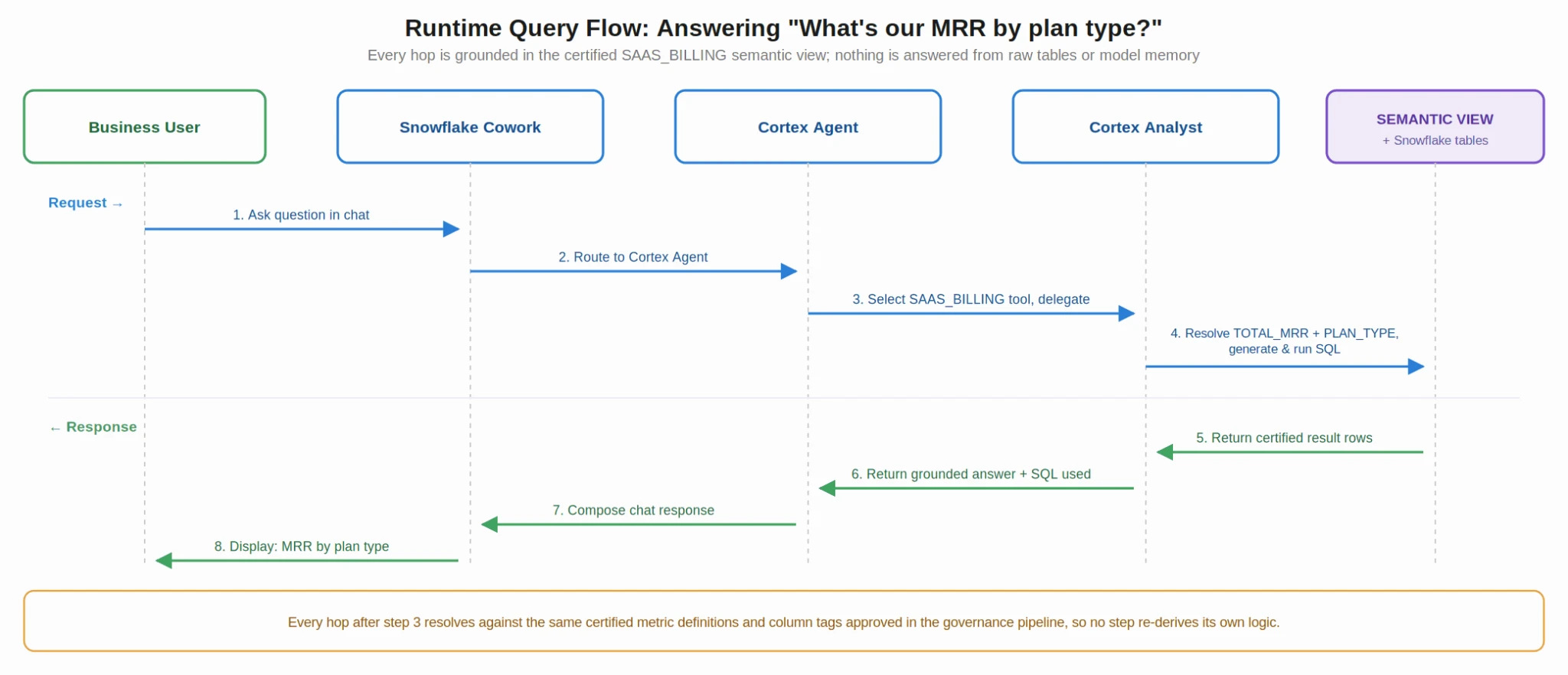
This chain grounds every answer in certified metrics and column definitions that passed the Component 3 certification gate, not in model-generated logic. That is the purpose of the pipeline: before a question reaches Cortex Analyst in Step 4, reviewers have already defined, reviewed, and versioned the meaning of “MRR” long before any user asks a question.
Conclusion
Agent quality is fundamentally a governance problem. A semantic view is only as trustworthy as the process behind it, so organizations need certified-source extraction, constrained generation, human approval, and a complete CI/CD audit trail before deployment.
Treat that process as a standard in its own right, independent of semantic-view authoring speed. Adding optional Apache Ossie export future-proofs certified artifacts, while current BI-tool limitations show why portability still matters.
Read more: Unlocking Data Insights with Snowflake Cortex Analyst
Login to continue reading and enjoy expert-curated content.


