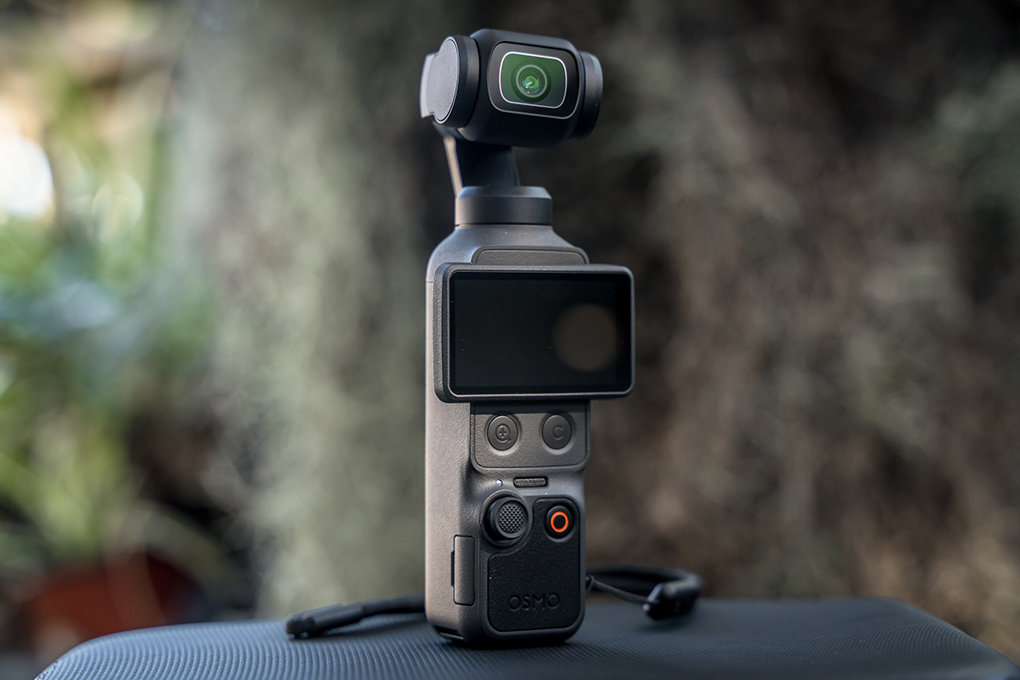
The DJI Osmo Pocket 4 might just be one of the most capable compact cameras for creators constantly on the move.
DJI has spent years building an ecosystem around content creation. It first made aerial photography more accessible with its drones, before bringing that same stabilisation technology to handheld cameras with the introduction of the Osmo Pocket.
My first experience with the series was the original Osmo Pocket. Now, four generations later, it felt like the perfect time to jump back in, see what’s changed, and find out just how far the series has come.
Highly Recommended
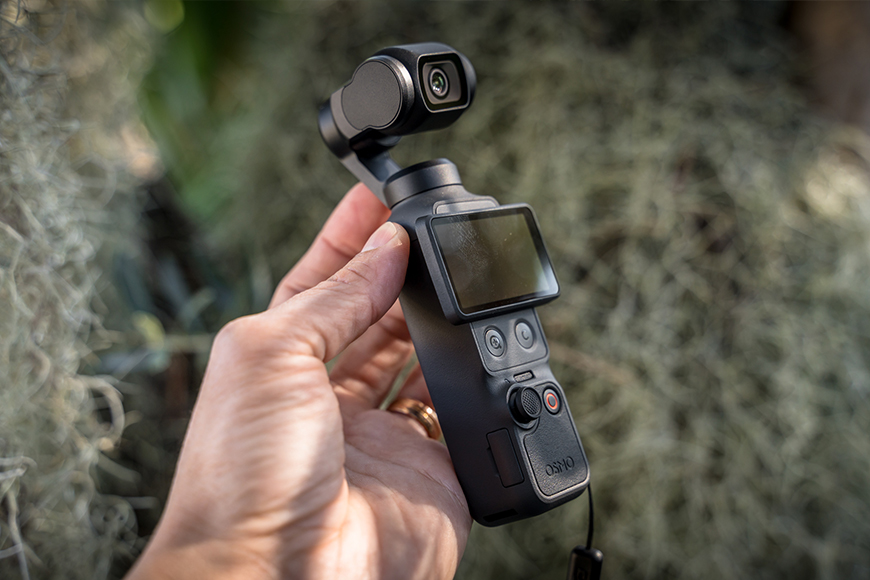

Pocket-sized powerhouse for video on the go that’s compact, smooth, and creator-friendly.
DJI has continued refining the original formula, improving the camera system, stabilisation, tracking capabilities and overall usability, while keeping the compact design that made the Osmo Pocket so appealing in the first place.
This article will take a closer look at the DJI Osmo Pocket 4, exploring what’s new, how it performs, and whether the latest generation is a worthwhile upgrade from its predecessors.
What is the DJI Osmo Pocket 4?
- Incredible stabilisation
- Responsive controls always within reach
- Lots of auto-modes
- Wide range of accessories
- Big, bright, and clear screen
- 107 GB of in-built storage
- Standing it vertical without the tripod doesn’t feel reliable
- The gimbal will always be a point of risk during sports or busy spaces
DJI Osmo Pocket 4 Specs
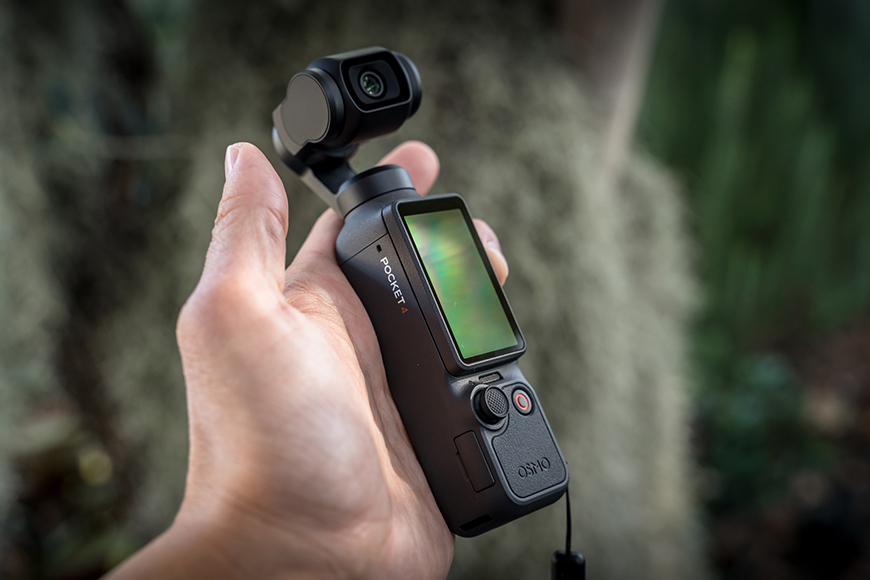
The DJI Osmo Pocket 4 is small enough to fit in your pocket, yet powerful enough to potentially replace cameras many times its size.
General
Dimensions (L×W×H):
144.2×44.4×33.5 mm (5.68 × 1.75 × 1.32″)
Weight:
190.5 g
Number of Microphones:
3
Touchscreen:
Size: 2.0 inches
Resolution: 556×314
Brightness: 1000 nits
Supported SD Cards:
microSD (up to 1 TB)
Connectivity:
Wi-Fi: 2.4 GHz / 5.1 GHz / 5.8 GHz
Bluetooth: 2.400-2.4835 GHz (BLE 5.4, BR/EDR)
Gimbal
Controllable Range:
Pan: -235° to 58°
Tilt: -120° to 70°
Roll: -45° to 45°
Mechanical Range:
Pan: -240° to 63°
Tilt: -180° to 98°
Roll: -220° to 63°
Max Controllable Speed:
180.0°/s
Angular Vibration Range:
±0.005°
Camera
Sensor:
1-inch CMOS
Lens:
Format Equivalent: 20 mm
Aperture: f/2.0
Focus Range: 0.2 m to ∞
ISO Range:
Photo: 50-12800
Video: 50-12800
Low-Light Video: 50-25600
Slow Motion: 50-12800
Electronic Shutter Speed:
Photo: 1/8000-4 s
Video (Auto): 1/8000 s to the limit of frames per second
Video (M): 1/8000-1/4 s
Max Image Size:
16:9, 7680×4320
1:1, 6144×6144
Digital Zoom:
Photo: 7680×4320, 2×
Video: 1080p, 4×; 3K, 4×; 4K, 4×
UVC & DP: 4K, 4×
Livestream: 1080p, 4×
Low Light/Slow Motion/Timelapse: Not available
Still Photography Modes:
Single Shot, Countdown (Timer), Panorama
Video Modes:
Normal, Slow Motion, Hyperlapse, Timelapse, Motionlapse, Low-Light
Max Video Bitrate:
180 Mbps
Photo Format:
JPEG/DNG/JPEG+DNG
Video Format:
MP4 (HEVC)
Built-in Storage Capacity:
107 GB of built-in storage (expansion through MicroSD)
Audio Output:
48 kHz 16-bit; AAC
Battery
Capacity:
1545 mAh
Operating Time:
Up to 240 mins
Charging Time:
18 mins to 80%
32 mins to 100%
DJI Osmo Pocket 4 Quick Features:
- 1-inch CMOS Sensor
- 4K/240fps Video Recording
- 14-Stop Dynamic Range
- 10-bit D-Log
- 3-Axis Mechanical Stabilisation
- 2-inch Rotatable OLED Touchscreen
- ActiveTrack 7.0
- Intelligent Autofocus
- Subject Lock Tracking
- Gesture Control
- 2× Lossless Zoom
- 107GB Built-in Storage
- Wi-Fi 6 High-Speed Transfer
- USB 3.1 Fast File Transfer
- OsmoAudio 4-Channel Recording
Build & Appearance
Without a doubt, the DJI Osmo Pocket 4 is a pleasure to use. It feels thoughtfully designed, with a bright, responsive screen and a premium fit and finish that gives the entire camera a polished, high-quality feel.
DJI has taken the original formula that made the Osmo Pocket so popular and refined it across the board. Larger camera sensors, a more robust construction, improved tracking capabilities and a more polished user experience all help make this feel like a much more mature product.
Even compared to the Pocket 3, the Pocket 4 introduces meaningful upgrades. These include improved dynamic range, 4K/240 fps slow motion (up from 120 fps), longer battery life, 107 GB of built-in storage, faster file transfers, and more intelligent subject tracking.
Sitting comfortably in the palm of your hand, the first thing you’ll notice is just how solid it feels. From the deliberate movements of the 3-axis mechanical gimbal, the smooth rotation of the bright touchscreen, to the precise movement of the tactile joystick, everything feels refined and purposeful.

The Osmo Pocket 4 feels solid in the hand, with a textured finish that provides extra grip and helps prevent it from slipping during use.
The compact 2-inch touchscreen features a resolution of 556 × 314 pixels and up to 1,000 nits of brightness. Despite its small size, the display remains clear and responsive, making it easy to frame shots, adjust settings and review footage while out filming. The rotating design also allows you to quickly switch between landscape and portrait orientations.
The slightly textured body and rippled rear panel provide additional grip, while maintaining a sleek and premium appearance. Even the gimbal guard feels surprisingly robust.
My memory of the original Pocket was that it always felt a little delicate, but this latest generation feels like a much more durable and confident piece of equipment.
The DJI Osmo Pocket 4 is undeniably a creator-focused ecosystem packed into something that can genuinely fit into a jacket pocket.
Software, Controls and Automation

The physical controls are all within easy reach and respond instantly. The touchscreen displays all the essential information, with settings and controls only a swipe or tap away.
The DJI Osmo Pocket 4 is packed with features, physical controls and automation. Simply rotating the screen into landscape triggers the boot-up sequence.
Hidden beneath the widescreen are two new buttons exclusive to the Pocket 4. The first is a quick zoom button, allowing you to jump to 2x with a single press, then back to 1x with another. A double press switches to 4x.
Beside it is a customisable quick function button, which supports single, double and triple press shortcuts. Each can be assigned to different functions, including Quick Capture, Switch Photo/Video, Re-centre Gimbal, Switch Gimbal Mode, and much more.
On the home screen, the bottom-left icon lets you switch between capture modes such as Photo, Video and Slo-Mo. A function icon also appears on the left, with its available tools changing depending on the selected mode.
In Video mode, for example, it provides quick access to features like Spotlight Follow, Dynamic Framing and Spin Shot.
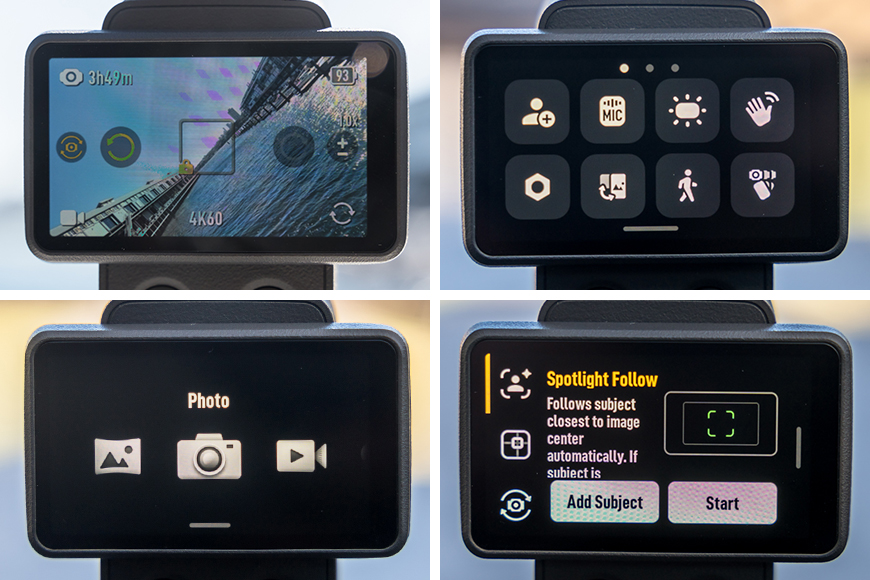
The interface of the Osmo Pocket 4 is purposeful and quick to explore.
Swipe down on the screen and you’ll find the function menu, which is also where you’ll access the device settings via the cog icon.
Unfortunately, you’ll need to tap each icon to discover what it does, as there are no labels shown initially. Once selected, however, each function includes a title and a brief description.
Thankfully, DJI has avoided giving everything overly complicated names, with most functions being fairly self-explanatory. Where needed, helpful tips and explanations are provided to guide you.
For social media creators, Portrait mode also lives within this menu. The icon wasn’t immediately obvious to me, but it offers three options: Portrait Mode, Landscape Mode, or Based on Screen Orientation, which automatically switches between the two as you rotate the display. If you prefer, the automatic screen rotation wake function can also be disabled in the Pocket 4 settings.
Do note, however, that using the screen vertically removes access to the new quick zoom and quick function buttons.
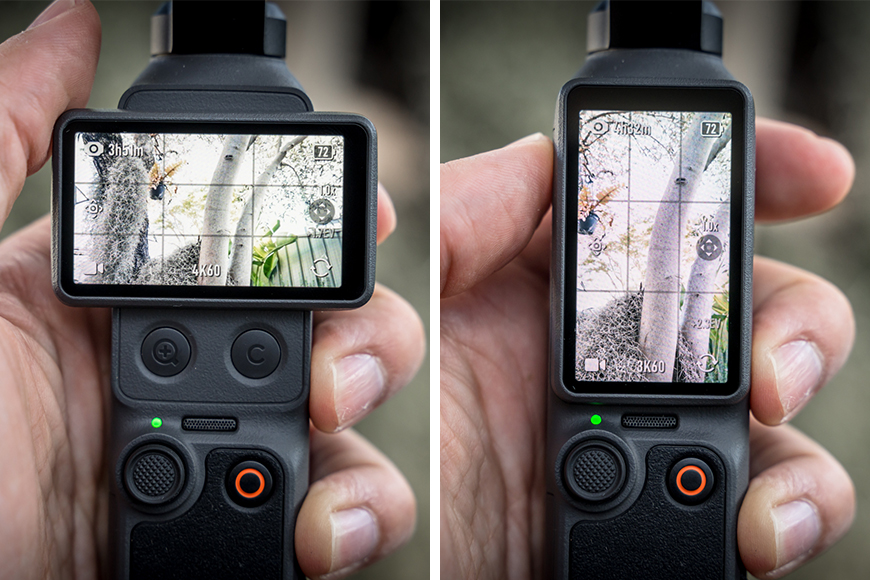
Landscape and Portrait orientation can be switched simply by rotating the Osmo Pocket 4’s screen, if that option is enabled. Alternatively, you can manually lock the camera to either orientation regardless of how the screen is positioned.
The display also keeps key shooting information visible at all times, including your current mode, remaining storage, battery level, and the joystick’s active function.
The joystick itself can be switched between zoom control and gimbal movement. This caught me out initially, and it took me a moment to realise why it wasn’t behaving as expected. Once I figured it out though, it made perfect sense.
DJI has also included a range of intelligent features to make solo filming easier. Some work automatically behind the scenes, while others can be enabled through the settings, activated with a single tap, or require a little preparation, such as selecting a tracking subject or positioning the Pocket securely before recording.
- ActiveTrack 7.0: Automatically tracks people, pets, vehicles and selected objects, even while zoomed up to 4x.
- Gesture Control: Start or stop recording, take a photo, or enable ActiveTrack with a simple hand gesture, making it ideal for filming yourself.
- Dynamic Framing: Set your preferred framing and intelligent tracking will keep your subject in position within the frame.
- Spin Shot: Rotates the gimbal left or right by either 90° or 180°, with the option to manually repeat the movement continuously.
- Subject Lock Tracking: Lock onto a subject and let the camera keep it within frame, even as it moves.
- Registered Subject Priority: The camera can prioritise a pre-selected person when multiple people enter the frame.
- Quick Capture: Powers on and begins recording almost instantly, so you’re less likely to miss the moment.
- Panorama, Timelapse, Motionlapse and SpinShot: Built-in automated shooting modes that create dynamic footage with minimal effort.
One of the standout additions is Subject Management, which allows you to register up to three people for the camera to recognise and prioritise. DJI notes that this feature is designed specifically for people, not animals or vehicles.
Interestingly, the Pocket 4 is designed to still recognise you, despite any subtle changes in your appearance, such as glasses or hats.
The biggest advantage comes when filming in busy environments or group settings. By registering your chosen subjects, the Pocket 4 can prioritise them for autofocus and tracking, helping keep the right person in frame instead of becoming distracted by others passing through the scene.
Swiping right opens the album, which can be secured with a passcode. My advice? Don’t do what I did and create one in a hurry. I promptly forgot mine, and after too many incorrect attempts, the Pocket 4 let me reset it, but in doing so wiped its internal storage.
That meant all of my initial test footage for this review disappeared. It’s been a rough couple of weeks, and this certainly didn’t help!
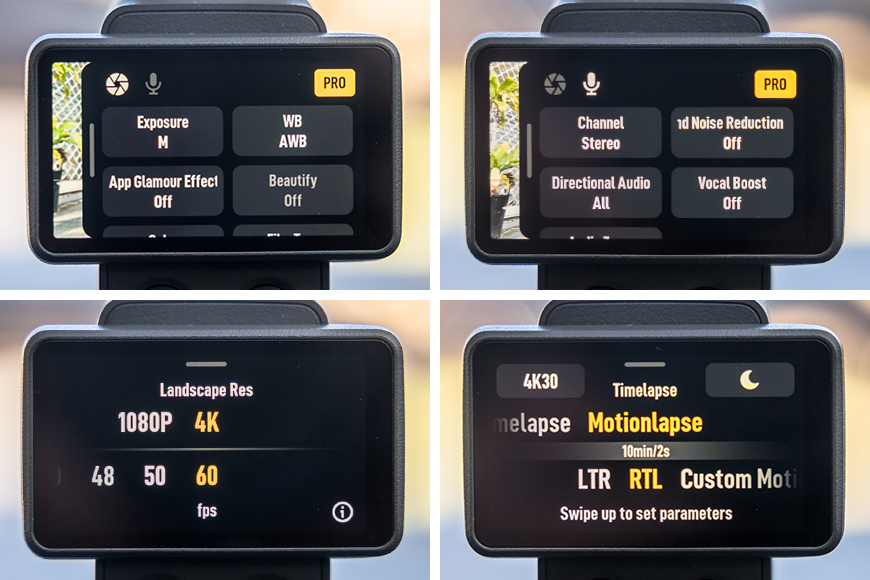
Multiple settings on the Osmo Pocket 4 can be changed on the move, with everything only a simple swipe or tap away.
Swiping left opens the camera settings, where you can leave everything in Auto or switch to Pro mode for greater control.
On each shooting mode, Pro mode unlocks manual adjustment of a variety of settings, such as shutter speed, ISO, exposure compensation, file format (eg. DNG Raw), 10bit video colour depth (Normal, D-Log, D-Log with Colour Recovery), focus modes, and white balance, along with more advanced microphone controls.
Beyond Pro mode, you’ll also find a wide range of additional aesthetic options, including Glamour Effects, Beautify mode, film tone, and Low-Light Image Enhancement. In some cases, there’s even breathing compensation!
Swiping up reveals the image and video quality settings. Depending on the shooting mode, this is where you can quickly change image resolution, video quality, capture frequency and frame rates.
I’ll cover the different image and video quality options and settings in the next section.
Capture Modes & Settings
With every new generation of DJI products, image quality continues to improve, and the Osmo Pocket 4 is no exception. It offers a wide range of capture modes, including Panorama, Photo, Video, Low-Light Video, Slow Motion and several Timelapse options.
The video above, for example, was filmed using Hyperlapse mode at 15x speed in 4K at 30fps, capturing around two and a half minutes of walking. I didn’t do any colour adjustments, smoothing, or editing afterwards. It’s straight out of camera. Imagine what you’d achieve with planning and editing!
Each capture mode includes its own selection of settings and creative tools. To give you a better idea of what’s available, I’ve listed the key options below. Many can be accessed by swiping up on the main screen, while additional Pro and Audio controls are available by swiping left.
Capture settings in Landscape Mode:
- Panorama: 180° or a 3×3 shot, and setting a timer. Pro mode allows choice of JPG or RAW, no combination available.
- Photo: SuperPhoto or Standard image, change the aspect ratio between 16:1 and 1:1, and setting a timer. Live Photo can also be enabled when using Standard image. Pro mode allows choice of JPG or RAW, no combination available.
- Video: 1080p or 4K, with fps between 24-60. Pro mode includes audio, style options and 10bit colour type, such as Normal, D-Log or D-Log + Colour Recovery.
- Low-Light Video: 1080p or 4K with fps between 24-30. Pro mode includes audio and style options.
- Slow-Motion Video: 1080p with fps between 4x(120fps) or 8x(240fps) or 4K with fps either 4x (100fps-120fps) to 8x (200fps-240fps). Pro mode includes audio and style options.
- Timelapse: 1080p or 4K, 25 or 30fps.
- Hyperlapse: Auto, x2, x5, x10, x15, x30.
- Timelapse: Crowds (10min/0.5s), Clouds (10min/2s), Sunset (1h/3s), Custom with parameters set by you, including continuous mode, limited only by storage. Screen always on or off. Pro mode includes Video + JPG/RAW option.
- Motionlapse: LTR (10 min/2s), RTL (10min/2s), and Custom Motion with parameters set by you, with intervals of 0.5s up to 1 minute, and running up to 10 hours. Screen always on or off. Pro mode includes Video + JPG/RAW option.
Capture Settings in Portrait Mode (some differ to Landscape mode):
- Panorama: 180° or a 3×3 shot, and setting a timer. Pro mode allows choice of JPG or RAW, no combination available.
- Photo: SuperPhoto or Standard image, change the aspect ratio between 9:16 and 1:1, and setting a timer. Live Photo can also be enabled when using Standard image. Pro mode allows choice of JPG or RAW, no combination available.
- Video: 1080p or 4K, with fps between 24-60. Pro mode includes audio, style options and 10-bit colour type, such as Normal, D-Log or D-Log + Colour Recovery.
- Low-Light Video: Only available in Landscape orientation. 1080p or 4K with fps between 24-30. Pro mode includes audio and style options.
- Slow-Motion Video: 1080p with fps between 4x(120fps) or 8x(240fps) or 4K with fps either 4x (100fps-120fps) to 8x (200fps-240fps). Pro mode includes audio and style options.
- Timelapse: 1080p or 3K, 25 or 30fps
- Hyperlapse: Auto, x2, x5, x10, x15, x30.
- Timelapse: Crowds (10min/0.5s), Clouds (10min/2s), Sunset (1h/3s), Custom with parameters set by you, including continuous mode, limited only by storage. Screen always on or off. Pro mode includes Video + JPG/RAW option.
- Motionlapse: LTR (10 min/2s), RTL (10min/2s), and Custom Motion with parameters set by you, with up to 4 waypoints, intervals of 0.5s up to 1 minute, and running up to 10 hours. Screen always on or off. Pro mode includes Video + JPG/RAW option.
The Style Options I mentioned above are three different aesthetic adjustments that can be done during recording on the Osmo Pocket 4.
- Beautify is an optional in-camera effect that subtly smooths skin, brightens the face and adjusts skin tone to give people a more polished appearance. The intensity can be adjusted to suit your preference, with the effect applied in real time while recording.
- Glamour Effects is an optional AI-powered beauty feature that works with the DJI Mimo app. It goes beyond the camera’s basic Beautify mode by offering more advanced facial and skin enhancements, which can be adjusted after recording before exporting your final video.
- Film Tone is an optional colour profile that gives your footage a softer, more cinematic appearance straight out of the camera. It reduces contrast and saturation for a more natural look.
The Osmo Pocket 4 includes a set of audio controls that can be tailored to suit different recording situations. Within the main device settings, you can enable a backup audio recording, which can be saved either as a second audio track within the video file or as a separate audio file.
The Pro mode settings for the video modes allows you to choose between mono, stereo or spatial audio, enable Wind Reduction, adjust the directional audio pickup to favour the front, front and rear, or both, Boost Vocal for clearer speech, and use Audio Zoom to better match the recorded sound with your zoomed-in subject.
Image Quality
It wouldn’t be an article about a camera if I didn’t provide some examples of captures. The DJI Osmo Pocket 4 produces some great quality footage from the variety of modes on offer.
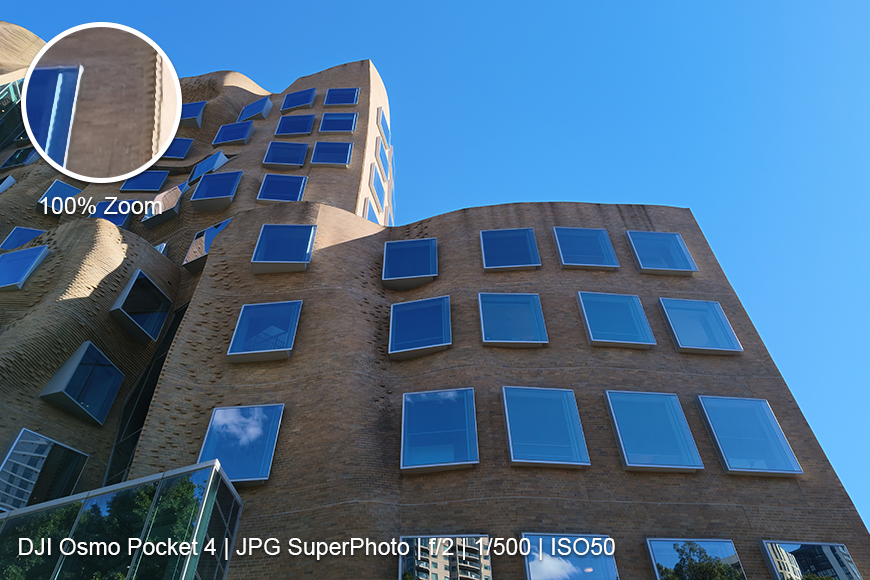
This was a JPG on Auto mode taken straight off the Osmo Pocket 4.
Move the slider sideways to view the heavily edited and the straight out of camera version.
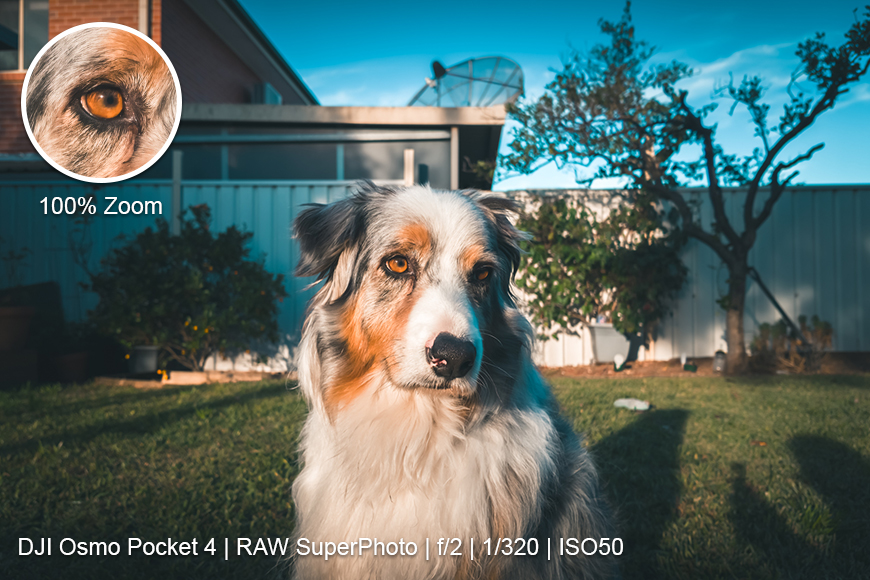

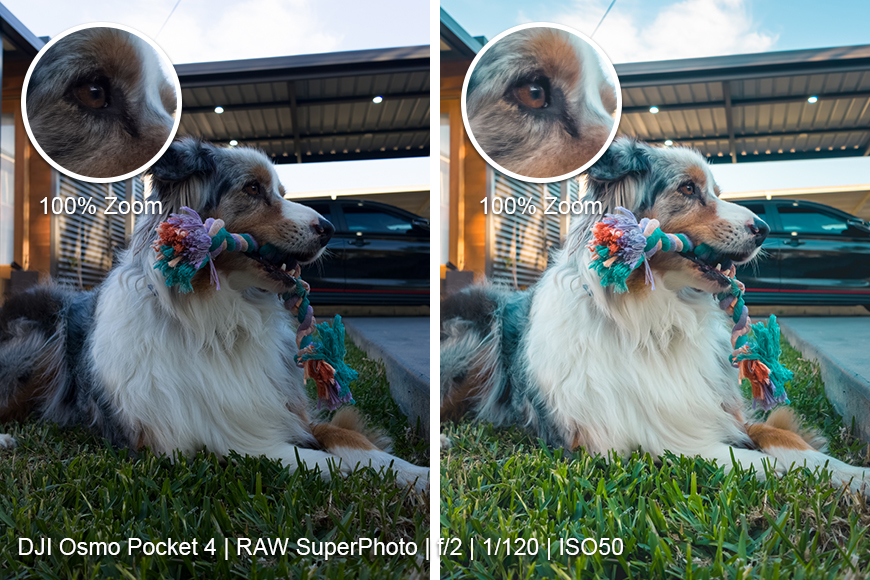
Raw straight out of the Osmo Pocket 4, and a heavy edit in Lightroom using one of my presets.
Battery Life
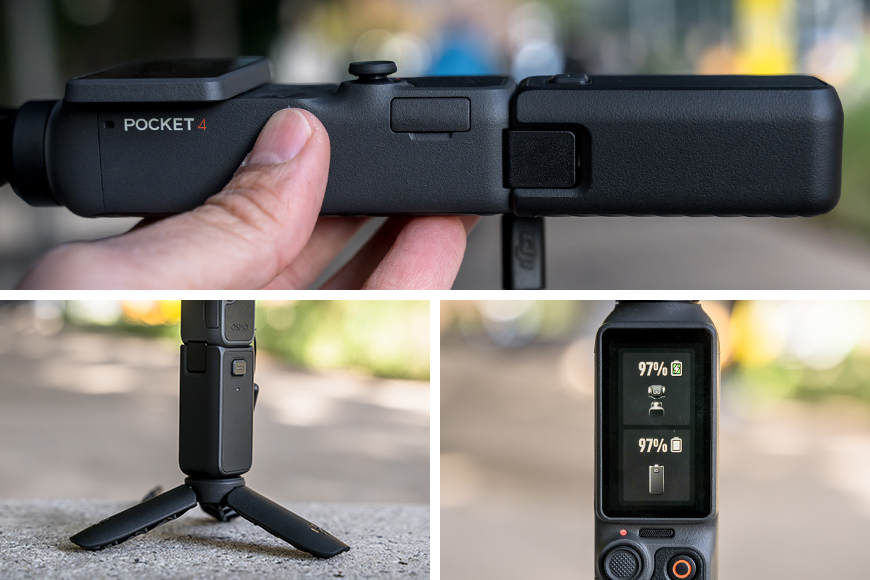
The Osmo Pocket 4 has great battery life already, but the optional Battery Handle extends that significantly, if you’re happy with the extra cost and weight.
The Osmo Pocket 4 improves on the previous generation with up to 240 minutes of battery life. That figure is based on recording at 1080p/24fps with Wi-Fi disabled and the screen turned off, so realistically, you should expect shorter runtimes when shooting at higher resolutions, higher frame rates, or using features like ActiveTrack.
Fast charging is another welcome improvement. Using DJI’s own 65W charger and a suitable USB-C cable, you can recharge the Pocket 4 to 80% in around 18 minutes, or reach a full charge in approximately 32 minutes.
If you need even more capacity, DJI also has an optional Battery Handle. I’ve been using one throughout my testing, and I can confidently say I ran out of energy long before the Pocket 4 did. Even my dog eventually stopped cooperating with my repeated requests to “sit”, “look” and “go”.
The Battery Handle does add a little extra weight, but it also makes the Pocket 4 noticeably more comfortable to hold thanks to its larger grip. It also adds a USB-C port for connecting accessories, supports hot swapping if you own multiple Battery Handles, and includes a standard 1/4-inch thread on the base for mounting to a tripod or other accessories.
Once you’re done recording, and the Pocket is powered down, the Battery Handle will automatically begin recharging it, ready for the next time you switch it on.
In addition to extending battery life, the Battery Handle can also receive firmware updates through the Osmo Pocket 4 if they’re out of sync.
Learning Curve
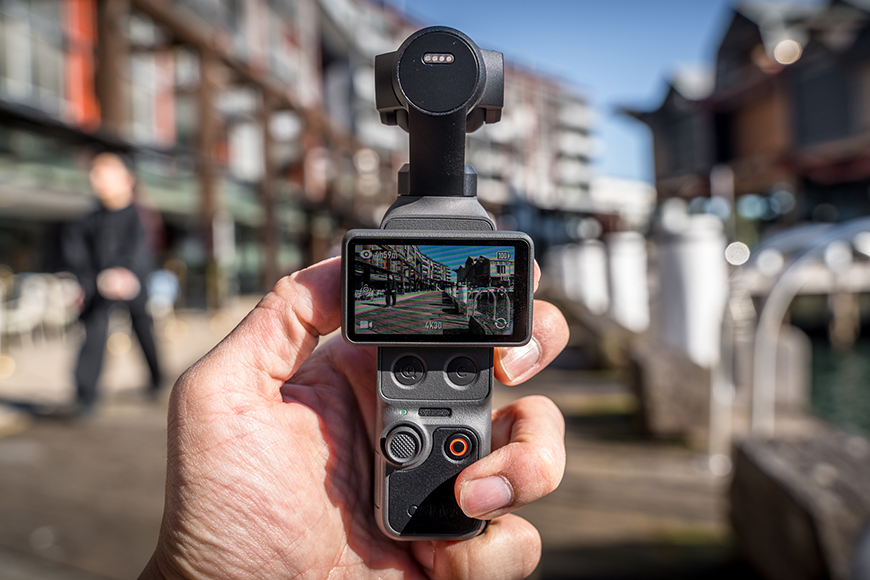
All of the footage I captured on this day was lost when I forgot the secure passcode to access my recordings; that was a hard lesson with the Osmo Pocket 4!
If you’ve never used an Osmo Pocket before, there’ll definitely be a bit of a learning curve. Even though I’d previously owned the original Pocket, I never kept up with the second or third generations, so I was effectively starting all over again with the fourth.
But also, true to my usual self, I also skipped the tutorials and guides, figuring I’d eventually work it all out. I didn’t.
I found myself repeating mistakes, missing shots, getting blurry images, forgetting to change settings, or pressing a button that caused the Pocket 4 to do something I wasn’t expecting.
So my biggest piece of advice is simple: watch the tutorials and listen to the guides available through DJI. They’ll help you get the most out of the Pocket 4 because this little camera can do an incredible amount.
For example, there’s a dedicated zoom button that quickly jumps between common zoom levels, alongside a customisable function button that can be assigned to shortcuts such as Quick Capture, Re-centre Gimbal or switching gimbal modes. They’re great features, but only if you know they’re there.
Much of the automation is also a couple of taps away, but be sure to fine-tune the capture settings before recording something at a lower spec than you’d prefer. Enable what you need, disable what you don’t, and be sure to double-check things before hitting record.
There’s a lot to learn, and it’ll take some time to understand how the different shooting modes, tracking options and gestures all work together. If you have someone willing to help by being your subject, it’s also a great way to discover the strengths and limitations of the tracking system, as well as the physical limits of the gimbal’s movement.
Every time I pick this thing up, I notice and figure out something else!
Bundles, Accessories & Compatibility
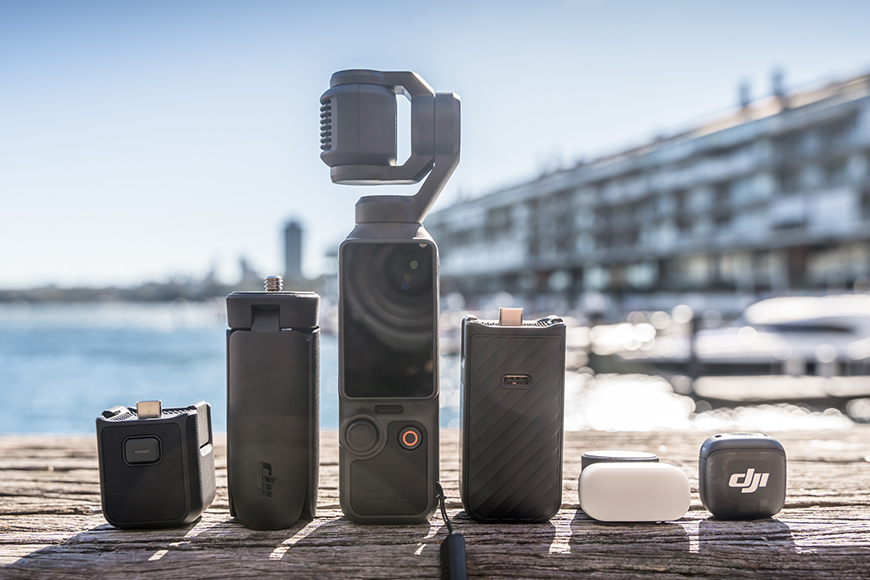
Whichever Osmo Pocket 4 bundle you choose gets you a nice selection of high-quality accessories.
The DJI Osmo Pocket 4 is available in several different bundles, allowing you to choose a setup that best matches how you plan to use it.
The Standard Combo is the simplest option, providing everything needed to start filming straight away. For creators, the Creator Combo adds useful accessories such as the Fill Light, Mini Tripod, Wide-Angle Lens, and a Carrying Bag. The Creator Combo Plus expands that kit with a Battery Handle and the Selfie Bundle adds a Black Mist filter to it.
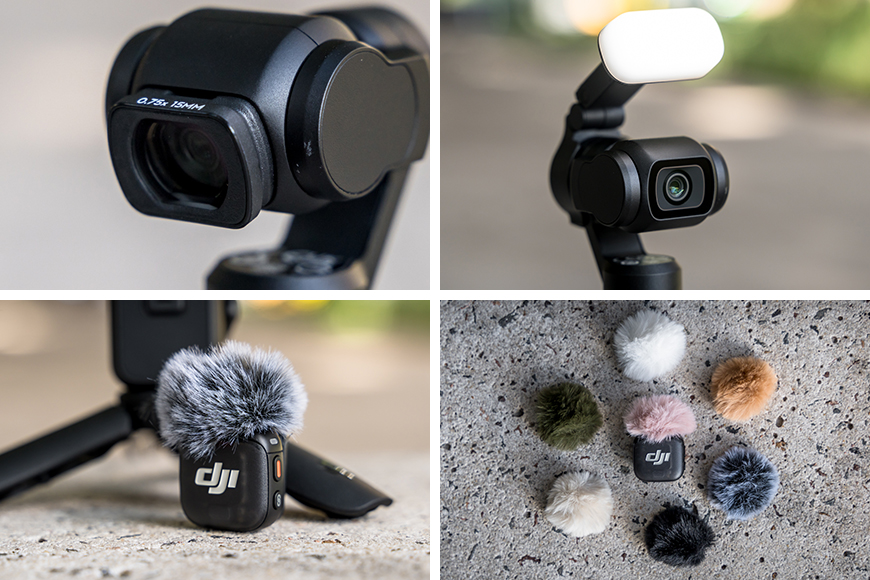
The Audio, Selfie, and Glow Bundles expand upon the Creator Combo with extra accessories. You can also dress up your Mic with extra Windshields!
Those wanting to prioritise audio can choose the Audio Combo, which now includes a DJI Mic Mini 2 transmitter (my bundle had a Mic 3 transmitter), while the Glow Portrait Combo is aimed more towards portrait and lifestyle content with the inclusion of a Fill Light and lens filter accessories.
With so many bundles available, there’s likely an option to suit both your needs and your budget. If not, every accessory can also be purchased separately, making it easy to build your own kit from scratch or expand it over time as your needs evolve.
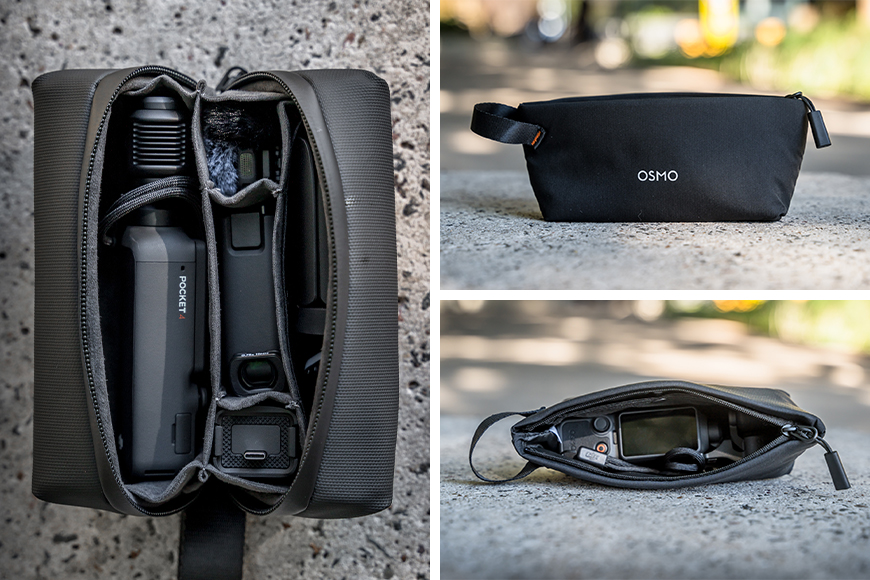
The Carrying Bag fits all of the accessories, while the included Pouch will fit the Osmo Pocket 4 with a couple of smaller items, such as the cables, Fill Light, or Mic.
Regardless of which bundle you choose, the Osmo Pocket 4 includes a soft Carrying Pouch with enough space for the camera, charging cables and a few smaller accessories.
If your kit grows, the larger Carrying Bag included with the Creator Combo, Plus and Selfie Bundle has room for almost every available accessory, with the exception of a wall charger.
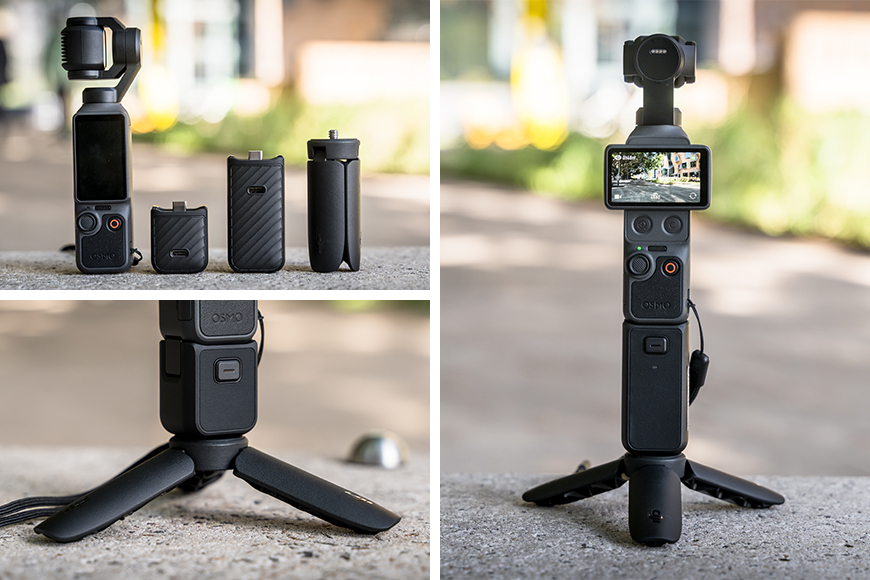
The Mini Tripod feels like a necessity with the Osmo Pocket 4, and the Battery Handle offers power expansion and a larger grip.
The Mini Tripod is particularly useful if you’re planning to shoot time lapses or record yourself hands-free with the Osmo Pocket 4. It provides a far more stable base, helping keep the camera in position while the gimbal moves automatically.
While it should be generally stable on its own, it does have a rounded base, so a gust of wind or an accidental bump can easily shift or wobble the camera, making the extra support well worth having.
If extended battery life is important, the Battery Handle, also in the Travel Bundle, is a worthwhile consideration. It not only extends the Osmo Pocket 4’s runtime while filming, but also automatically recharges the camera when it’s switched off or stored away, ensuring it’s ready for your next shoot.
The larger grip also makes the Pocket 4 more comfortable to hold during longer sessions, although it does add extra weight. Conveniently, it does have a standard 1/4-inch thread on the base too, allowing you to attach the included Mini Tripod or other compatible tripods and accessories.
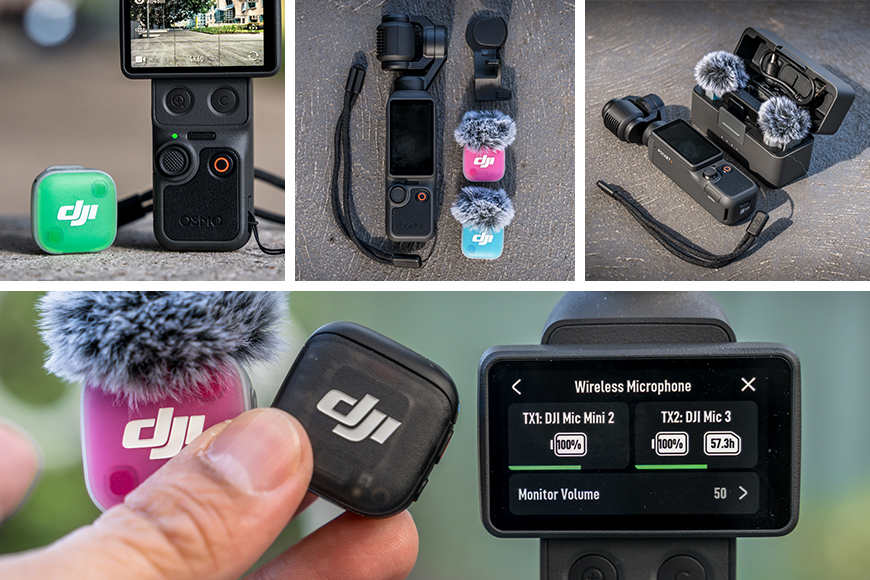
The DJI Mic Mini 2 is a great companion to the Osmo Pocket 4 as it offers a strong, reliable connection and high-quality sound.
While the Osmo Pocket 4 captures surprisingly good audio on its own, a dedicated microphone delivers a noticeable improvement. The DJI Mic Mini 2 is arguably one of the best companions for the Pocket 4.
A single transmitter is included with the Audio Bundle (mine came with a Mic 3), but if you’d like a more complete microphone kit that can also be used with smartphones, tablets, computers and other cameras, the DJI Mic Mini 2 is also available separately in its own bundle configurations.
Better still to that point, DJI’s OsmoAudio technology makes pairing a compatible DJI Mic with the Osmo Pocket 4 almost effortless. Once connected, the Pocket 4 can receive audio from up to two transmitters simultaneously, without the need for a separate receiver.
Value for Money
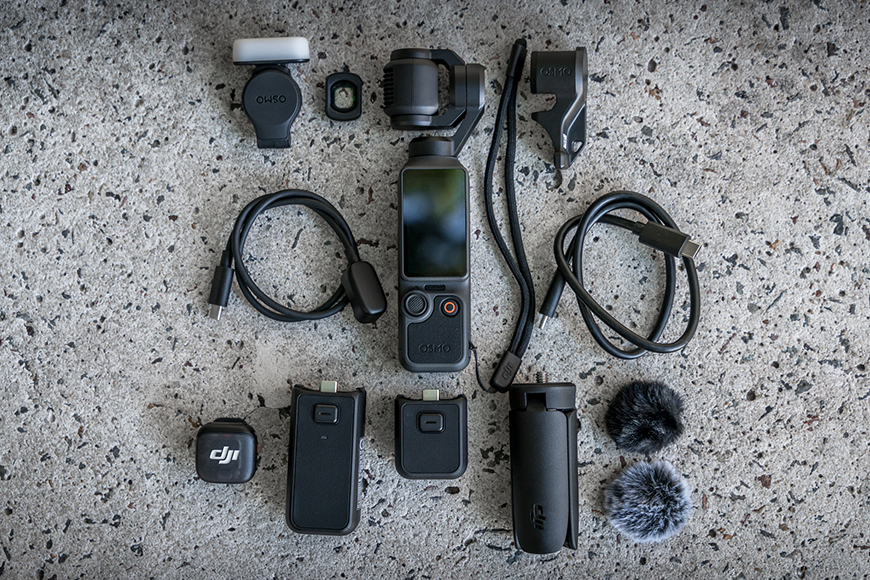
The Osmo Pocket 4 offers a lot of performance from a relatively small package, replacing larger, more expensive, and heavier gear.
Presently, depending on the bundle you choose, the DJI Osmo Pocket 4 starts from around US$600 (AU$760), increasing to roughly US$800 (AU$1,000) for the more complete creator bundles.
You’re essentially getting a compact camera, a 3-axis mechanical gimbal, intelligent tracking, built-in storage, advanced colour profiles and a creator-focused ecosystem in something that can genuinely fit into a jacket pocket.
Another way to look at the value of this combination is by considering how much gear it can replace, particularly if you’re downsizing from a larger camera setup. For travellers, that can make a real difference, especially when strict carry-on weight limits are involved.
The Osmo Pocket 4 can remove the need for a dedicated camera body, interchangeable lens, gimbal or stabiliser, spare batteries, cables and multiple chargers.
Instead, your camera kit can be reduced to the essentials: a USB-C charger and cable, plus the Osmo Pocket 4 and its accessories neatly packed into the compact Carrying Pouch. Even with the pouch holding the Pocket 4 and almost every available accessory, including the Mini Tripod and Battery Handle, the entire kit weighs just 530g.
Of course, there are still some things it can’t replicate. The biggest is the shallow depth-of-field look you get from a larger camera system with a bigger sensor and interchangeable lenses. The Pocket 4 is designed around convenience, portability and speed, while a full-size camera still offers different creative control.
Ultimately, it comes down to the type of content you’re creating and the look you’re trying to achieve.
FAQs
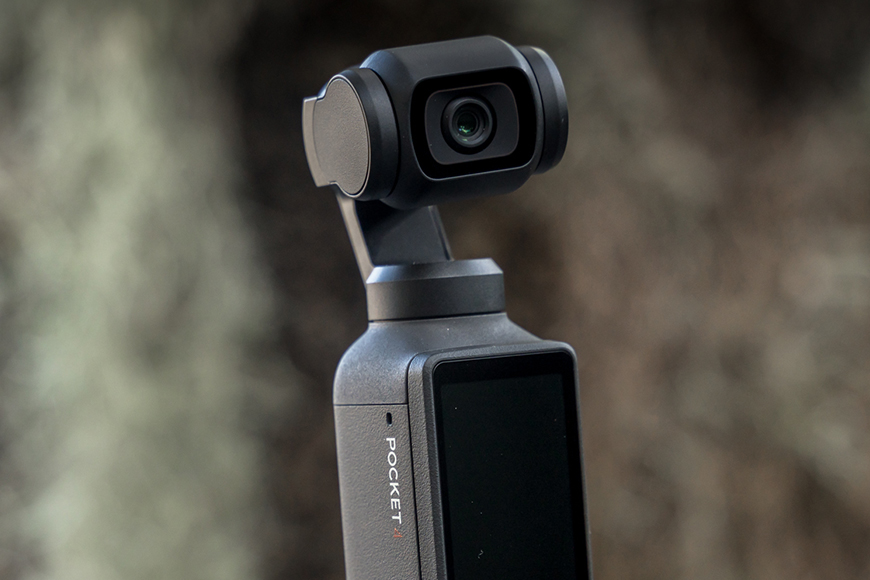
Despite being a small moving piece of hardware, the gimbal on the Osmo Pocket 4 feels surprisingly much more robust than I expected.
How fragile does the gimbal feel on the DJI Osmo Pocket 4?
It’s actually much more solid than you’d expect, and certainly feels more robust than the gimbal you’ll find on one of DJI’s drones. That said, it’s still a precision piece of equipment and probably the most vulnerable part of the camera if you’re not careful.
The Osmo Pocket 4 can stand upright on its own, but if it happens to fall over, the gimbal and camera are likely to take the impact first. While it’s reassuringly well built, the motorised gimbal arm isn’t designed to absorb hard knocks.
One tip I highly recommend is to always power the Pocket 4 off before putting it down. This allows the gimbal to fold safely into its closed position, rather than continuing to fight to stabilise itself while you’re laying it on a table or packing it away. And, please always replace the gimbal guard before packing it away!
How simple is it to connect the DJI Mic Mini 2 with the DJI Osmo Pocket 4?
Thanks to OsmoAudio, getting connected to a Mic Mini 2 transmitter is incredibly simple. Place the transmitter into pairing mode, select it through the Pocket 4’s audio settings, and you’re ready to go. Once paired, the transmitter automatically reconnects whenever both devices are powered on, removing the need for the receiver entirely. If you’re using two transmitters, both can be connected simultaneously.
The result is a setup capable of capturing crystal-clear video and audio, including your negotiations with your ever-so-demanding miniature talent about why their appearance fee has suddenly increased after spotting a gelato store further along the boardwalk.
DJI Osmo Pocket 4 or a DJI Osmo Action with a separate gimbal?
While they may share similarities stretching only as far as similar image quality and the fact that they record videos, they are designed for very different types of creators.
The Osmo Pocket 4 is the better choice if you’re looking for a compact cinematic camera, with its 3-axis mechanical gimbal delivering smooth, natural movement that’s difficult to replicate with software stabilisation alone. It’s ideal for travel videos, vlogging, family memories and everyday content where you want a more polished, cinematic look.
The DJI Osmo Action series, on the other hand, is built for adventure. Its rugged, waterproof design makes it better suited for beaches, hiking, cycling, motorsports and situations where the camera may take a few knocks. While it doesn’t provide the same gimbal-like movement or cinematic feel, it does offer electronic image stabilisation and the confidence of a camera you can take almost anywhere.
Ultimately, the Pocket 4 is the better choice for creators chasing quality and storytelling, while the Action series is the better companion for durability and unpredictable or more “at risk” environments.
DJI Osmo Pocket 4 Review | Conclusion
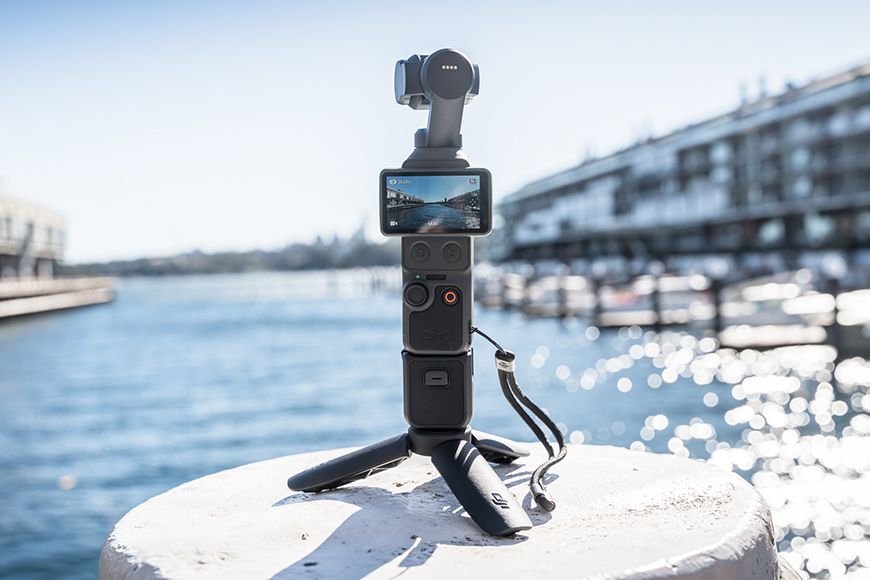
The DJI Osmo Pocket 4 is definitely an incredible kit for both creators and casual users.
The DJI Osmo Pocket 4 is an impressive evolution of something I already loved when it first appeared on the market.
It takes the simplicity of the original Osmo Pocket concept and transforms it into a far more capable creator tool. I won’t repeat all of the features I’ve covered throughout this review, but the biggest thing that stood out to me is just how much more robust and refined it feels.
While it won’t replace my full-size camera system, it delivers an incredible amount of capability in such a small package. It’s the type of camera I can throw into a small bag when heading out for the day, knowing I’ll have something capable of capturing high-quality footage without the weight and complexity of a larger setup.
For travellers, vloggers and anyone wanting to capture moments without carrying a bag full of equipment, the Osmo Pocket 4 makes a lot of sense. The built-in gimbal removes the need for additional stabilisation, the compact size makes it easy to take almost anywhere, and the fast setup means you can capture moments as they happen.
While the initial investment may seem significant, the amount of gear it can replace makes it excellent value for creators looking for a lightweight, capable and reliable camera system that’s ready whenever adventure calls.
Highly Recommended
Pocket-sized powerhouse for video on the go that’s compact, smooth, and creator-friendly.


