


Top pick
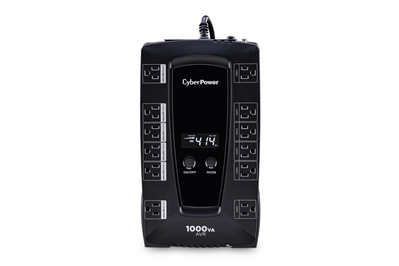
With six outlets on battery backup and 12 in total, this UPS can keep a Wi-Fi network running for up to three hours, or it can power your home-office setup long enough for you to save your work and shut down.
The CyberPower LE1000DG has premium features you’d typically find in units costing twice as much. It’s equipped with 12 surge-protected outlets — six of which are battery-backed — and offers more than double the output necessary to power a household modem, router, PC, and external hard drive. It can keep a typical household modem and router running for up to three hours. It also provides must-have features such as automatic voltage regulation, it’s easy to use, and it fits comfortably under most workstations.
It offers great battery life. The LE1000DG surpasses most models we tested in run time, keeping a modem and router running for up to three hours and a modem, router, PC, and external hard drive running for about 12 minutes in our tests. Those results aren’t far behind what we got from our upgrade pick, and they’re twice as long as what we saw with our budget pick.
It treats your devices gently. Since this UPS has automatic voltage regulation (AVR), it doesn’t need to transition from wall-outlet power to battery power as often as models lacking that feature. AVR technology provides more-reliable power to connected devices that can’t tolerate power drops, such as hard drives, and it should extend the overall life of the unit.
It has plenty of outlets. The LE1000DG has a total of 12 outlets, six of them battery-backed. Aligned in two rows, the outlets are spaced widely enough for you to fit most plugs, and four of them can accommodate even the bulkiest of plugs.
It has a compact plug. This UPS has a flat, low-profile plug that is oriented at a 45-degree angle, so it won’t block more than one wall outlet.
It’s super-powerful. In our testing, the LE1000DG achieved a higher peak power than any comparably priced competitor, and the 714 watts we recorded was just as good as some pricier units we tested. We were able to plug in a lamp, a fan, 10 halogen bulbs, and even a KitchenAid mixer set to medium power before its battery shut down.
Most people won’t be powering KitchenAid mixers on a UPS during a blackout, but our test is a good indicator that this UPS can power almost anything you need in your home office for at least a short while.
It offers ample surge protection. In our testing, the LE1000DG knocked down our 5,000-volt surges to just 544.4 volts — not quite as good as what we saw from our favorite surge protectors, which never let through more than 300 volts, but on a par with how our other UPS picks performed.
It has a user-replaceable battery. When this UPS’s battery dies, you can swap it out yourself within minutes, rather than replacing the entire unit. CyberPower sells replacement batteries for the LE1000DG, as do some third-party battery makers.
It has its own useful software. CyberPower’s PowerPanel Personal power-management software is available as a free download with all its UPS models. The utility alerts you when power outages occur and lets you manage automatic and scheduled shutdowns, track the power consumption of your UPS, and check the battery’s charge status and remaining run time.
It’s intuitive to use. This model is as easy to use as any UPS we’ve tested. Pressing a large, round button on the top powers the unit on and off, and a quick double-press toggles its audible power-outage alarm. A second button (labeled “mode”) lets you set the upper and lower power limits (the highest and lowest voltages at which the backup battery should take over) and adjust the screen brightness.
It has a screen. This UPS has a small, backlit screen on top that shows helpful information such as the remaining battery life and run time, the voltage going in and out of the unit, whether the alarm volume is turned on or off, and if there’s an overload or other error.
It’s fairly compact. The unit is about the size of a family-size box of cereal, so you can easily stash it under a desk or entertainment system. Weighing just over 14 pounds, it has a compact shape and a sturdy shell made of black plastic.
It has some convenient extra features. This UPS has a USB-B port and comes with the corresponding cable needed to connect it to your computer. This lets you use CyberPower’s software or your computer’s operating system to set up data saving, monitoring, and other functions.
It also has a ground screw, so you can attach any equipment that needs a chassis ground connection, and three network/telephone ports (one in, two out) to plug in a Wi-Fi router, modem, or any other device that requires a wired network connection. Plus, it has a circuit-reset button, which is helpful in case your connected devices draw more power than the UPS can handle.
It switches over to the battery quickly. This model has a rated transfer speed of 4 milliseconds, which is a fraction of the time it takes for a human to blink their eye. This means that if there’s an outage, it can switch your backed-up devices over to battery power before they have time to reboot.
It’s a safe buy. Costing $140 at this writing, the CyberPower LE1000DG falls well under our $300 price cap. CyberPower backs it with a three-year warranty, which is as long as any coverage we’ve seen and gives you more than enough time to see if the unit works properly and meets your needs.
Flaws but not dealbreakers
It has a modified sine-wave inverter. We’d prefer a pure sine-wave inverter, since a modified sine-wave is unsafe for some power-hungry devices and shouldn’t be used to protect sensitive audio equipment and medical devices that require pure AC power. But this is true of all our picks, since none of the models we tested with a pure sine-wave inverter performed as well in other key areas.
It’s missing some optional connectors. Unlike our upgrade pick, this model lacks USB-A and USB-C ports to charge handheld devices, coaxial connectors to hook up a cable box or modem, and a serial port to connect to a server or other peripheral device. But you can use separate adapters to plug many of these devices into a PC or the battery-backed outlets on the UPS itself.


