

Adobe today announced a beta for AI Assisted Editor, a new optional editing mode within Photoshop with a simplified, prompt-based interface for image editing. Here are the details.
Photoshop gets optional AI Assisted Editor
Adobe announced AI Assisted Editor, a new beta experience that replaces Photoshop’s detailed, intricate image-editing tools with a prompt-based interface and a simplified menu.
AI Assisted Editor can be accessed from a new toggle on Photoshop’s menu bar, which users can also choose to hide at any time from Settings.
Once the user enters AI Assisted Mode, they see a simplified interface with tools including:
Al Assisted Editor includes:
- Prompt to Edit: Transform images using natural language prompts without complex manual editing.
- Remove Background: Erase backgrounds, refine edges, and customize images in just a few clicks.
- Generative Expand: Extend image dimensions and generate content that blends naturally with your composition.
- Remove Tool: Eliminate unwanted objects and distractions while maintaining realistic image quality.
- Generative Fill: Add, replace, or remove content using simple text prompts.
- Generative Upscale: Increase image resolution while preserving sharpness and visual fidelity.
- Al Markup: Annotate images to communicate edits visually and generate more precise results.
The Markup tool is particularly interesting for users who are new to image editing or for experienced users working on a rough concept or needing to quickly sketch out a tweak. With it, users can just roughly draw, or click on any region of the image, and add a natural-language instructions such as “Add more clouds,” “change this shoe,” or “Add a banner with the text ON SALE NOW.”
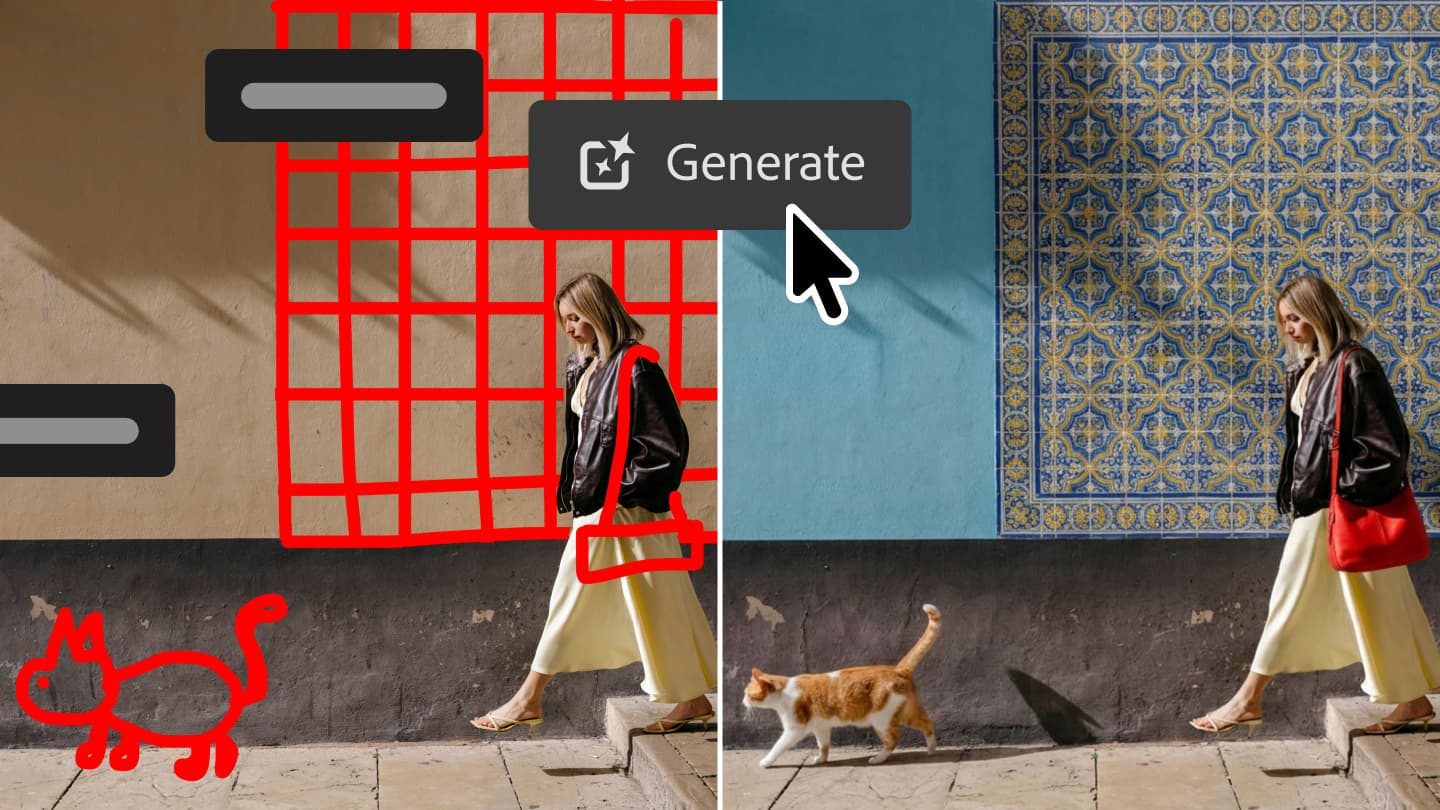
Adobe Firefly will then make the adjustments, and users can further tweak the results either in AI Assisted Edit mode or by continuing to the traditional Pro Editor.
Other tidbits included in today’s announcement
In addition to the new, optional AI Assisted Editor beta, Photoshop added support for prompt-based masked edits, which let users roughly select just the portion of the image they want Firefly Image 5 to edit.
Adobe says this addresses much of the criticism of the current prompt-based editor, which can occasionally reduce image quality or generate results that aren’t always globally aligned with the lighting or angle of the subject being edited.
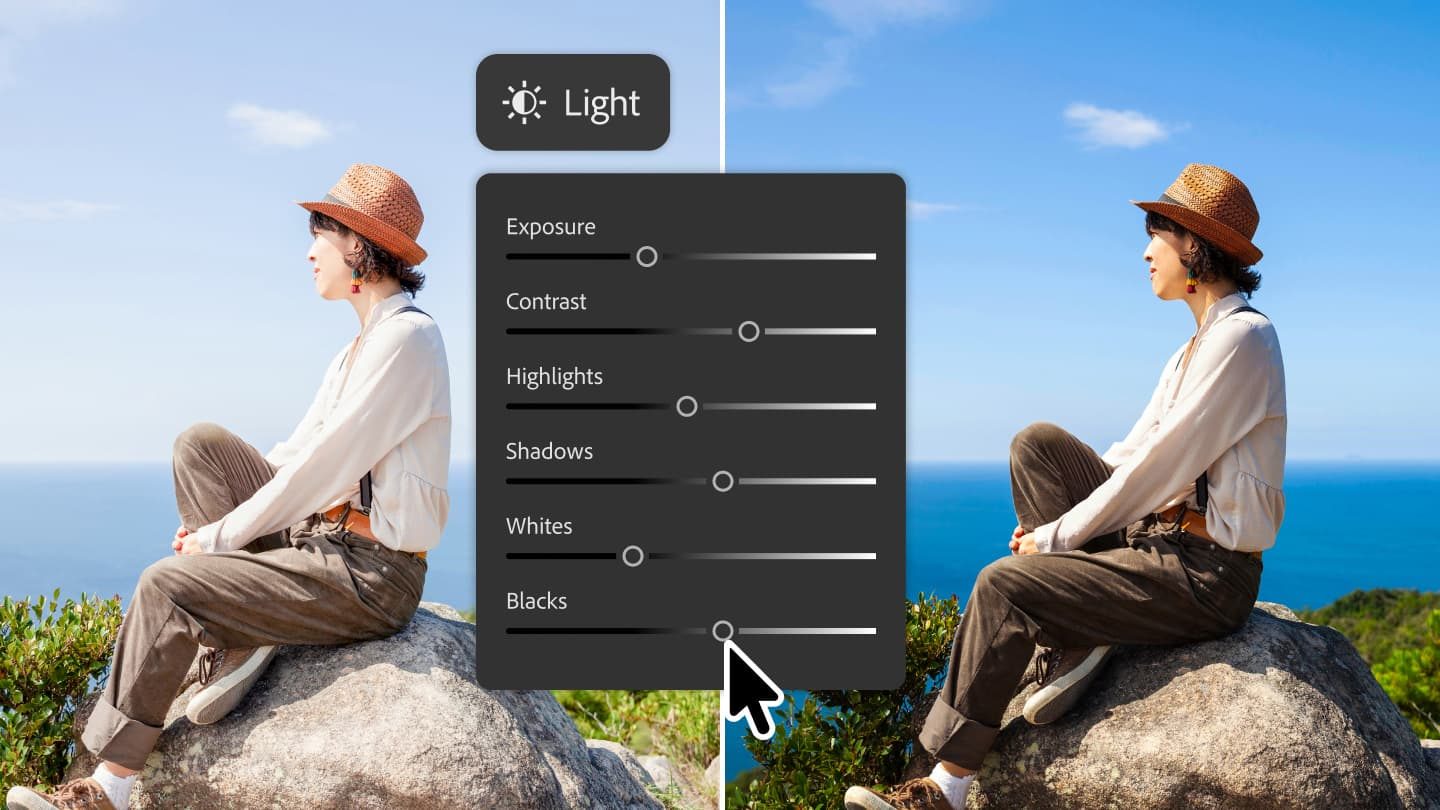
Another new feature making its way to Photoshop today is a new non-destructive layer tool for light adjustments. That includes adjustments for Exposure, Contrast, Highlights, Shadows, Whites, and Blacks, “so you get Camera Raw-level results without ever leaving your Photoshop layers workflow,” says Adobe.
One new tool that is the complete opposite of mask-based editing tools is “Prompt to Edit,” which allows the user to write a prompt to change the entire image, rather than just a segment.
For instance, a user might want to turn a day shot into a night shot, or a rainy shot into a sunny shot, and this tool lets them do exactly that.
This new tool supports FLUX 2 pro, FLUX Context Pro, Gemini 3.1 (with Nano Banana 2), Gemini 3 (with Nano Banana Pro), Gemini 2.5 (with Nano Banana), GPT Image 2, and Adobe’s own model, and it creates a new layer with two variations of the edited image.
Finally, Adobe announced two other features designed to offer users “more control, fewer interruptions:”
- Dynamic Text, Shapes and Paths extends Photoshop’s Dynamic Text to any custom shape or path, allowing text to adapt automatically along curves and freeform layouts so you keep your formatting without manual rework.
- Stock Panel Integration puts more than 900 million Adobe Stock assets right inside Photoshop in a dockable panel, so you can easily discover, preview, and use assets without leaving your workflow.
AI Assisted Editor is available in beta today, while the other tools will be generally available starting today.
Worth checking out on Amazon


FTC: We use income earning auto affiliate links. More.


