Key Takeaways
- The Precisely Data Integrity Suite captures both static lineage (from metadata definitions) and operational lineage (from runtime execution), giving teams a complete picture of how data moves.
- Lineage is automatically stitched across connected sources into a unified, column-level graph, tracing data end-to-end from origin through transformation to consumption.
- When lineage connects to data quality rules, the Business Glossary, and sensitivity classifications, it becomes a foundation for governance and compliance, not just a catalog artifact.
A dashboard shows a number that doesn’t look right. A regulator asks for proof of where a data point came from. A pipeline breaks in the middle of the night. Every one of these moments ends with the same question: where did this data come from?
The Precisely Data Integrity Suite answers this question automatically by incorporating two distinct lineage approaches:
- Static lineage, derived from metadata definitions
- Operational lineage, retrieved from the native telemetry logs that data platforms maintain, and from runtime events emitted by orchestrators integrated with OpenLineage.
Here’s how each approach works, and what it means for your teams that rely on them.
Static Lineage: Derived from Metadata
Some lineage questions can be readily answered from the metadata definition alone. For example, Tableau knows which tables feed its dashboards, and Azure Data Factory knows what its pipelines read and write. Static lineage captures exactly that.
Static lineage works by connecting to the source and extracting the built-in metadata, including:
- Pipeline definitions
- Views
- Stored procedures
When you catalog a connection, the Data Integrity Suite queries the source, reads those definitions and transformation relationships, and stores them in the catalog as a normalized lineage graph.
This approach doesn’t require running any production workloads. Static lineage can capture lineage from older sources that were never set up with any kind of runtime observability.
Operational Lineage: Captured from Execution
Some lineage questions can be answered only at runtime. For example, when a dbt model transforms data between Snowflake tables, there’s no DDL to harvest from Snowflake itself. But when the dbt job runs, Snowflake records the actual query that it executed in its query history.
Operational lineage is captured from the Snowflake ACCESS_HISTORY view and the Databricks system.access.column_lineage system table, both of which update as the queries execute.
Operational lineage also takes in the runtime events emitted by orchestrators integrated with OpenLineage, capturing actual reads and writes as workloads run. This integration broadens lineage tracking beyond natively supported sources in Data Integrity Suite. Any external tool or orchestrator capable of emitting OpenLineage events can contribute to the same lineage graph.
Both static and operational lineage operate at the field and column level, not just at the dataset or table level. This granularity makes a huge difference: knowing which specific output column in a report traces back to a particular source column is far more actionable than knowing which tables are involved.
To explore how OpenLineage integration works in depth — including supported orchestrators, configuration, and catalog mapping — see our blog: OpenLineage Integration: Bridging Open Standards with the Precisely Data Integrity Suite
How Lineage Gets Built: From Fragments to Flow
In the Data Integrity Suite, lineage is built by harvesting metadata from each connected source and then stitching those pieces into a unified view.
Most lineage collection begins with source-level cataloging. Users configure connections, and for each source, the Data Integrity Suite harvests static and/or operational lineage at the field and column level and persists this as lineage within the Data Catalog.
At this stage, lineage exists as independent fragments. Each source knows its own world. A Tableau workbook knows its data sources. Snowflake knows its query history. But neither knows about the other yet.
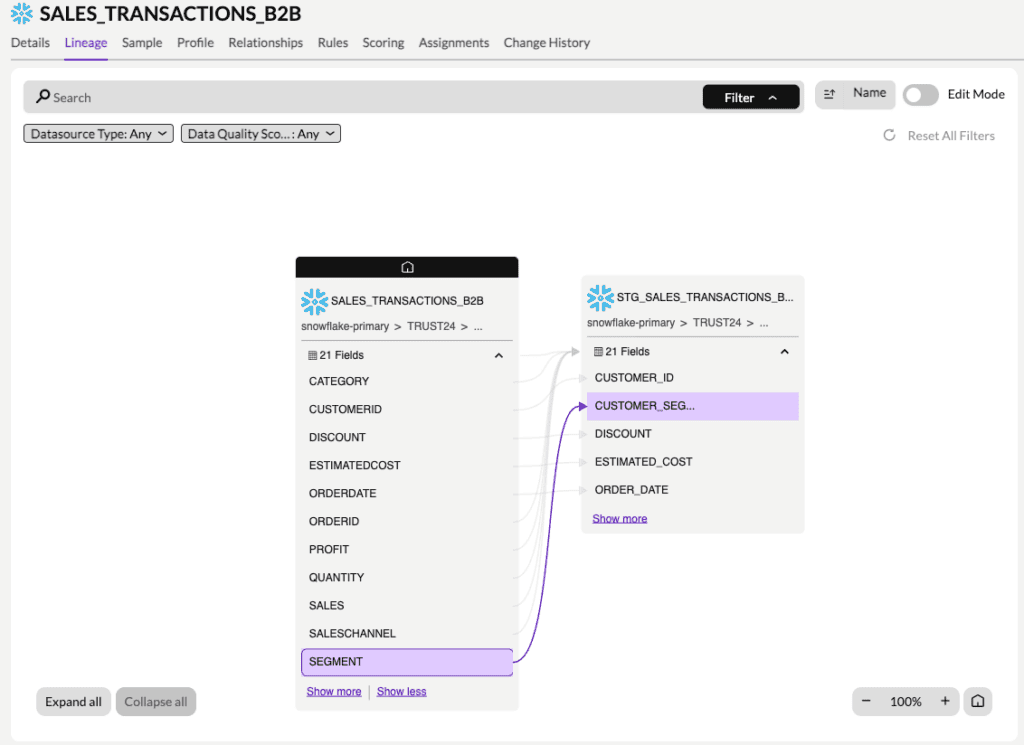
Here’s an example of lineage within a Snowflake source in the Data Integrity Suite, showing column-level lineage from SALES_TRANSACTIONS_B2B table to STG_SALES_TRANSACTIONS_B2B view:
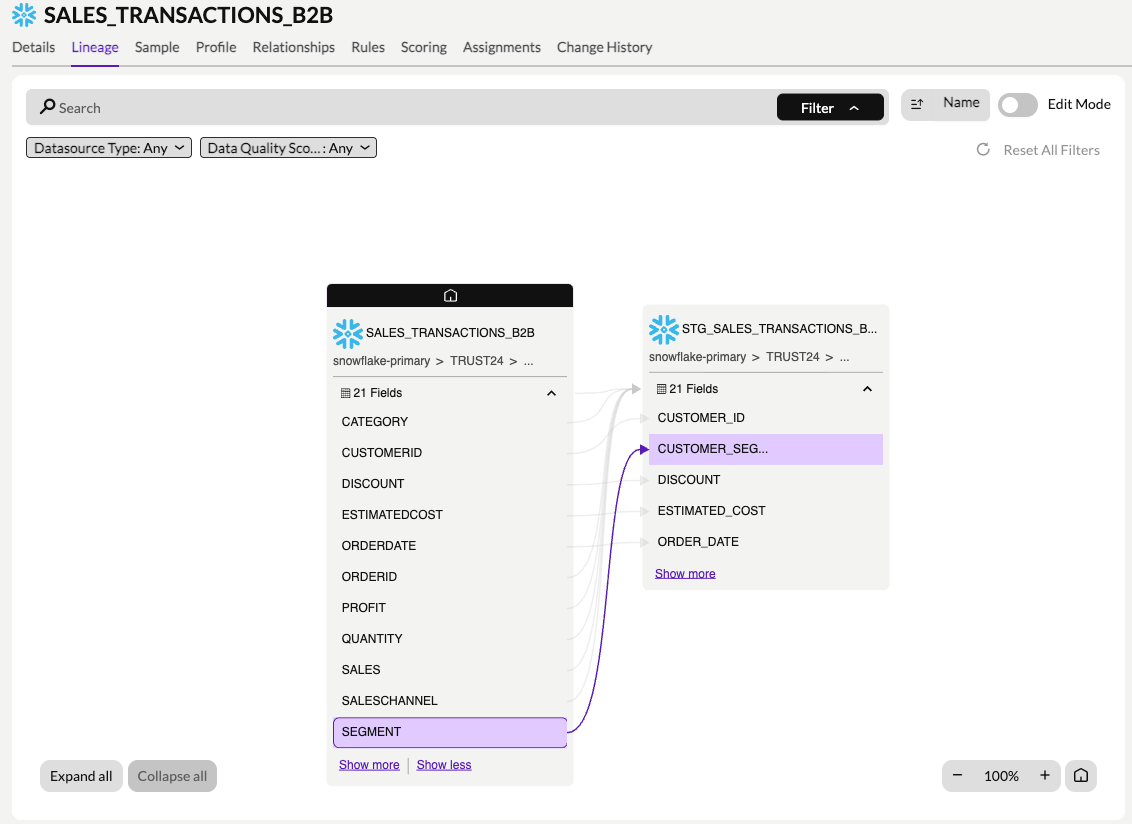
Column-level data lineage in the Precisely Data Integrity Suite — SALES_TRANSACTIONS_B2B to STG_SALES_TRANSACTIONS_B2B.
When the Data Integrity Suite encounters a reference to an asset that hasn’t been cataloged yet, it creates a placeholder that holds the lineage relationship open. When that asset is eventually cataloged, the placeholder resolves. The two fragments connect and the lineage graph grows.
As more sources are cataloged, more connections form. What started as isolated islands becomes a continuous, end-to-end lineage map from origin through transformation, transformation through consumption.
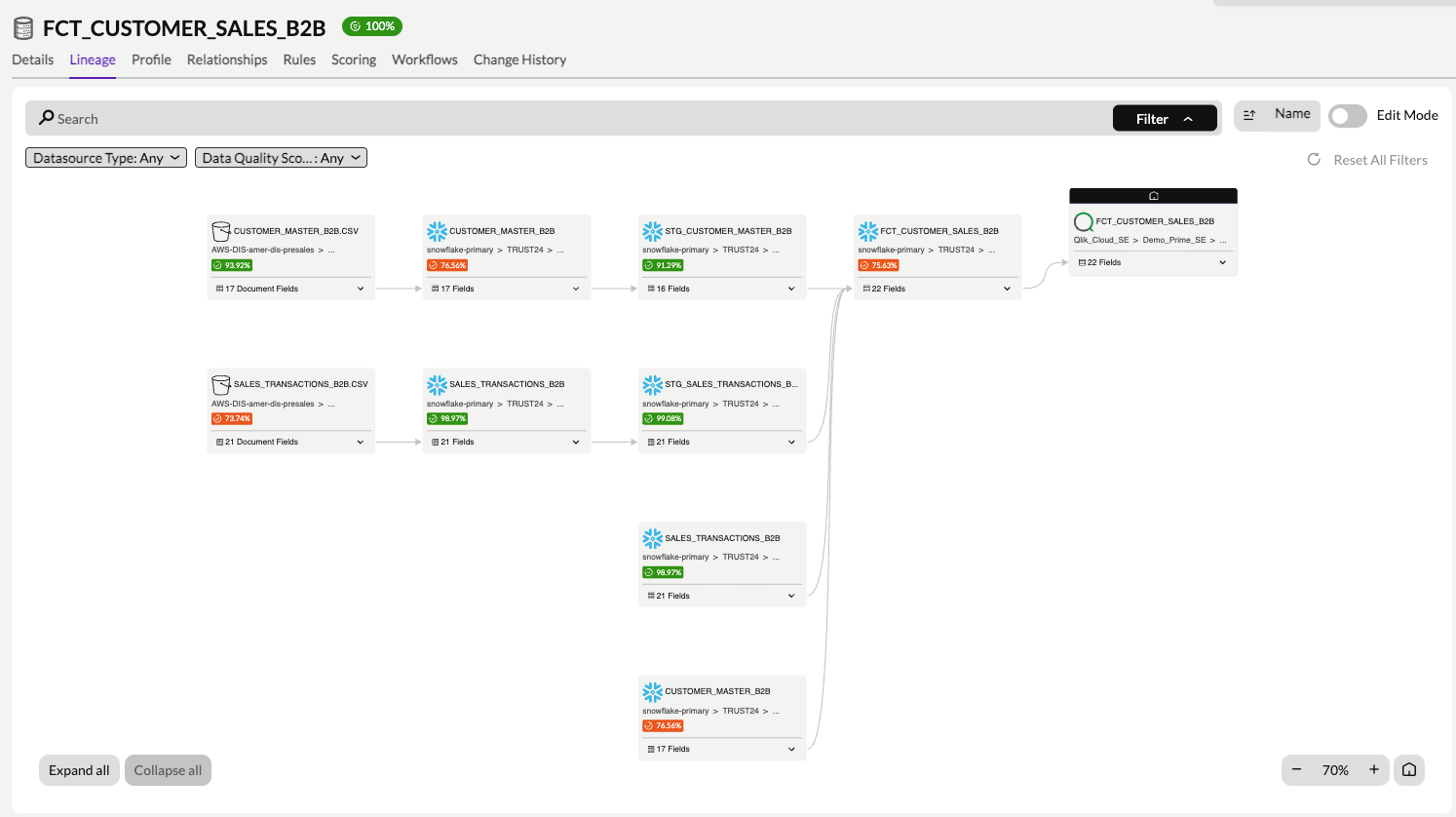
End-to-end data lineage in the Precisely Data Integrity Suite — AWS S3 through Snowflake to Qlik Cloud.
The example above displays a unified lineage view from AWS S3 through Snowflake to Qlik Cloud. It shows:
- Field and column-level lineage
- Transformation logic within the individual source systems
- Data movement across pipelines and processes
- End-to-end lineage stitched across every connected system
It’s generated automatically and kept current as your environment changes.
Lineage Across the Data Integrity Suite
Lineage becomes more powerful when it connects to the rest of the platform. Within the Data Integrity Suite, when a data quality rule fails, you can trace lineage upstream from the failing column to identify which source system or pipeline introduced the anomaly. On the other hand, impact analysis can be done using the same lineage graph to answer, “What breaks if I change this?” before any change is made.
Business terms only have value if they connect to real data. The Business Glossary defines what governed terms like “Net Revenue” or “Active Customer” mean across your organization, and lineage enables you to trace those terms all the way down to the physical columns that produce or consume them.
That same traceability is applicable to data sensitivity. A column tagged as sensitive at the source can be traced forward through the transformation and dashboard that inherits it. This gives your compliance teams, including those governed by financial-services and privacy regulation, a clear view of where the regulated or sensitive data lives and travels across the platform.
Why Automated Data Lineage Matters for Governance and Trust
You shouldn’t be required to do a manual investigation every time something breaks or an audit shows up. The Precisely Data Integrity Suite gives you that answer automatically, across your BI tools, ETL pipelines, databases, and cloud platforms, and keeps it current as your environment changes.
Static lineage captures what’s defined while operational lineage captures what actually ran. Together, they close the gap between intent and reality, and the column-level lineage makes that picture accurate enough to act on. When lineage connects to data quality rules, the Business Glossary, and sensitivity classifications, it stops being a catalog artifact and becomes a foundation for governance and trust.
To see automated data lineage in action, explore the Data Integrity Suite and request a demo.
The post From Fragments to Flow: How the Precisely Data Integrity Suite Builds Data Lineage appeared first on Precisely.


