
The following devices are helpful for people who want to continue to live independently but are concerned about security or may need to be monitored a bit more closely. Whatever devices you decide on, older adults and caregivers should have a discussion in advance about what devices will be installed, what information they can collect, and who will have access to them and control of them.
Home security system
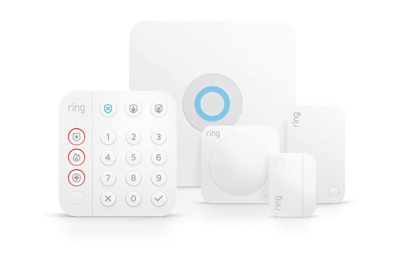
This DIY security system works with a comprehensive variety of add-on devices, can be customized to your needs, and is especially easy to install and use.
How it helps: Home security systems provide more than just protection from break-ins, as these DIY systems also work with a wide array of helpful devices that make it easier to keep tabs on your home overall. Such systems include relatively inconspicuous sensors that let you know when a door or window has been left open. Security cameras notify you when visitors of any sort come, and they also record when deliveries arrive. Some systems offer other helpful add-on devices, such as water-leak sensors, glass-break sensors, and panic buttons. Conveniently, the systems also allow you to manage all of these devices using a single smartphone app (instead of juggling several).
We strongly recommend adding a professional monitoring plan to a security system so that in the event of an alarm, a live person from a call center will alert you directly — and if you’re unreachable, they’ll notify anyone else you’ve deemed an emergency contact. The call center can also contact the police or fire department if there’s a need, or if no one can be reached.
Why it’s a pick: The Ring Alarm system can support almost every type of security add-on you can imagine, including a few options for door and window sensors, smoke and carbon monoxide detectors, and several kinds of hardwired and battery-operated doorbells and cameras. If you want something more advanced, the Ring Alarm Pro system can also improve Wi-Fi coverage in your home and includes emergency internet backup (for a fee) and up to 24 additional hours of backup power (via battery packs) in case of an outage. It also offers the biggest bang for your buck when it comes to professional monitoring ($20 per month or $200 per year).


Another option to consider: If you aren’t ready for a whole-house system, the Aqara Door and Window Sensor is an easy-to-use, inexpensive alternative. These devices can keep tabs on doors, windows, and drawers. For instance, a sensor on a door can send smartphone alerts whenever someone enters or leaves, or if the door has been left open too long. The sensors do require the use of a plug-in device called an Aqara Hub, but it can support up to 128 sensors and also adds smart-home support so that you can pair it with other devices around the house.
Smart video doorbell
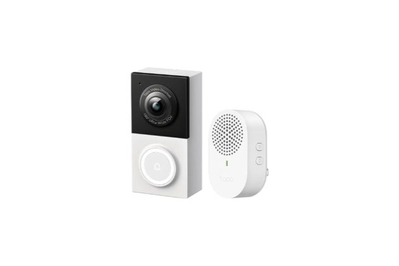
This hardwired doorbell produces sharp 2K images, gives you options for free and paid video storage, and can distinguish between people, animals, cars, and packages.
How it helps: A smart doorbell camera allows you to screen whoever comes to the door, from anywhere in the world, regardless of whether the visitor even rings the bell. When someone rings the bell, you hear it at home but also receive a smartphone notification, which allows you to view in real time who is at your door. But even if someone drops by just to deliver a package, motion sensors will still detect them and alert you. From there, you can opt to answer the door remotely or just keep a record of who is coming and going — and how long they hang around.
“Video doorbells are great, especially if [the person living with them is] having mobility challenges,” said William Dale, MD, PhD, professor and chair of supportive care medicine at the Center for Cancer and Aging at City of Hope. “Maybe the house is a little big for them, or they have to be in a far part of the house, and getting all the way to the doors becomes a challenge.”
Why it’s a pick: The TP-Link Tapo D130 Wired Video Doorbell delivers a clear 2K image and can distinguish whether the action happening in front of it is due to a person, animal, vehicle, package, or general motion. It even comes with a plug-in chime that you can place in any outlet anywhere in the house. It’s easy to use, and it’s also great for someone on a budget, because the hardware costs less than $50 and recordings can be stored to a microSD card for free. Or you can pay for cloud-based storage, starting at $3.50 per month for one camera, so you never have to worry about someone stealing the card or a power outage affecting your storage.
Another option to consider: If you don’t have existing doorbell wiring, the TP-Link Tapo D225 is an excellent battery-operated 2K doorbell camera with many of the same features as the hardwired D130. At 5.91 by 1.97 by 1.52 inches, it’s much more chunky than the D130. That’s due to the internal battery, which lasts about four months, depending on how much activity it captures.
Smart indoor cameras
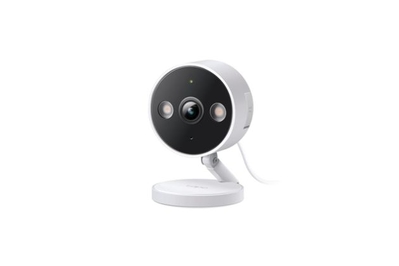
This camera detects a wide variety of motion and sounds, has great image quality, and works with or without a subscription.
How it helps: An indoor camera provides peace of mind when you’re not home, whether you want to monitor your property or your pet. For caregivers, it allows you to remotely monitor home visits and movement, as well as whether a person is taking their medicine. And for families, it also allows you to monitor the level of care your loved one is receiving.
“I have a lot of families with cameras,” said Vikki Levine, director of client services at Ezra Home Care. “In a positive way, it’s affecting the caliber of work that our caregivers are doing. They’re not getting away with sitting on their phone, because I’ll know about it faster than fast.”
All the experts we spoke with were adamant that installing indoor security cameras needs to be a decision made between you, your loved one, and any outside help. “Transparency should be obvious. Nobody likes to be monitored without knowing,” said City of Hope’s Dale. “These kinds of things have to be really carefully thought about rather than just assumed that it’s okay.” Talk to the person living with the camera about why it’s important, how it works, and how you can use it to communicate, since most cameras come equipped with a speaker and microphone.


Why it’s a pick: The TP-Link Tapo 2K QHD Security Camera Indoor/Outdoor C120 can distinguish between people, pets, vehicles, and general motion, but it’s also inexpensive to run. You can opt to use a microSD card and record 24/7 footage or just motion-activated events. It also supports cloud storage, so you never have to worry about accessing content if someone pulls the card or the plug; a Tapo Care plan starts at $3.50 per month for one camera and increases to $7 for two, $10.50 for three, and $12 for up to 10.
Another option to consider: The Tapo C120 supports Alexa and Google Home but not Apple Home. If Apple Home is your preferred ecosystem, or if you want to use Apple HomeKit Secure Video (a free video-storage service that comes with paid iCloud plans starting at $1 per camera), we recommend the Eufy Indoor Cam C120. The Eufy camera has some of the same features as the TP-Link Tapo model but is a bit more expensive.
Smart locks
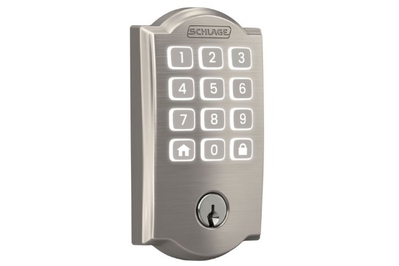
This simple smart lock, which is easy to install and operate, lets you know when it has been locked or unlocked, and you can trigger it with a code or through an app.
How it helps: From a security perspective, smart locks are especially handy because there are no keys to lose, and you can be notified whenever someone triggers the lock. You can also check the status of locks using your voice or an app, and you can program them to automatically lock after a set period, when you leave or arrive home, and at a set time every night.
Jessica Guthrie, a caregiver and advocate in Fredericksburg, Virginia, said that smart locks help her care for her 77-year-old mom, allowing her to let in home-health aides whether she’s home or out of the house. “It sounds really simple. And I can also lock the door from afar,” she said. “All of that has been so critical.”


Why it’s a pick: The Schlage Arrive Smart WiFi Deadbolt doesn’t have some of the bells and whistles of other smart locks, which we think makes it ideal for this purpose. The Arrive is about as easy as it gets to set up and use. It has top-tier hardware, plus built-in smarts that allow you to lock and unlock the door remotely, as well as to check whether the door has been left open. And if you or a loved one ever forgets or misplaces a key, you can use an app to unlock the door.
Another option to consider: The Yale Approach Lock with Wi-Fi + Keypad adds smarts to your existing lock, replacing the thumb turn of your deadbolt with a mechanized one that can trigger the lock. It should work with nearly any existing single-cylinder deadbolt, and it comes with a wireless keypad for the outside of the door. To use the remote-control features, you need to plug the included Wi-Fi hub into any wall outlet.
Water-leak sensors
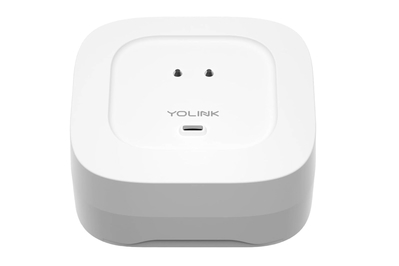
This water-leak sensor is simple to set up and use. It responds quickly to water with a loud (87 dB) siren and rapid smartphone alerts.
How it helps: About one in 67 US households each year files an insurance claim related to water-damage incidents, according to the Insurance Information Institute. Leaks often happen in hard-to-notice and even harder-to-reach areas, such as under a sink, behind the washing machine, or from the water heater in the basement. Smart water-leak sensors can help by sending you a smartphone alert the instant they detect water. The best models have a loud alarm and the ability to integrate with smart-home platforms so that you can receive smart alerts. We also prefer when alerts can be silenced in the app, so you don’t need to physically access the detector (or wade through water) to stop an alarm.
Why it’s a pick: The YoLink Water Leak Sensor 4 requires the YoLink Hub, which you can buy separately or as part of a bundle with multiple sensors. The YoLink leak sensor is one of the few to have both top- and bottom-mounted sensor probes, which make it more versatile — in our tests, both sensing methods detected water within two seconds. If water touches probes on the sensor, it sends a signal to the hub, which emits an 87-decibel alarm and also sends a smartphone alert so you can take care of the issue.
YoLink also sends a smartphone alert when the sensor has gone offline, which is very useful — after all, a sensor that can’t send alerts isn’t so useful. It also has an off timer in the app to ensure that the sensor won’t keep beeping endlessly after it detects water. If you don’t want to purchase a hub, or if you prefer Google Home compatibility, we recommend the Kidde Water Leak + Freeze Detector.


