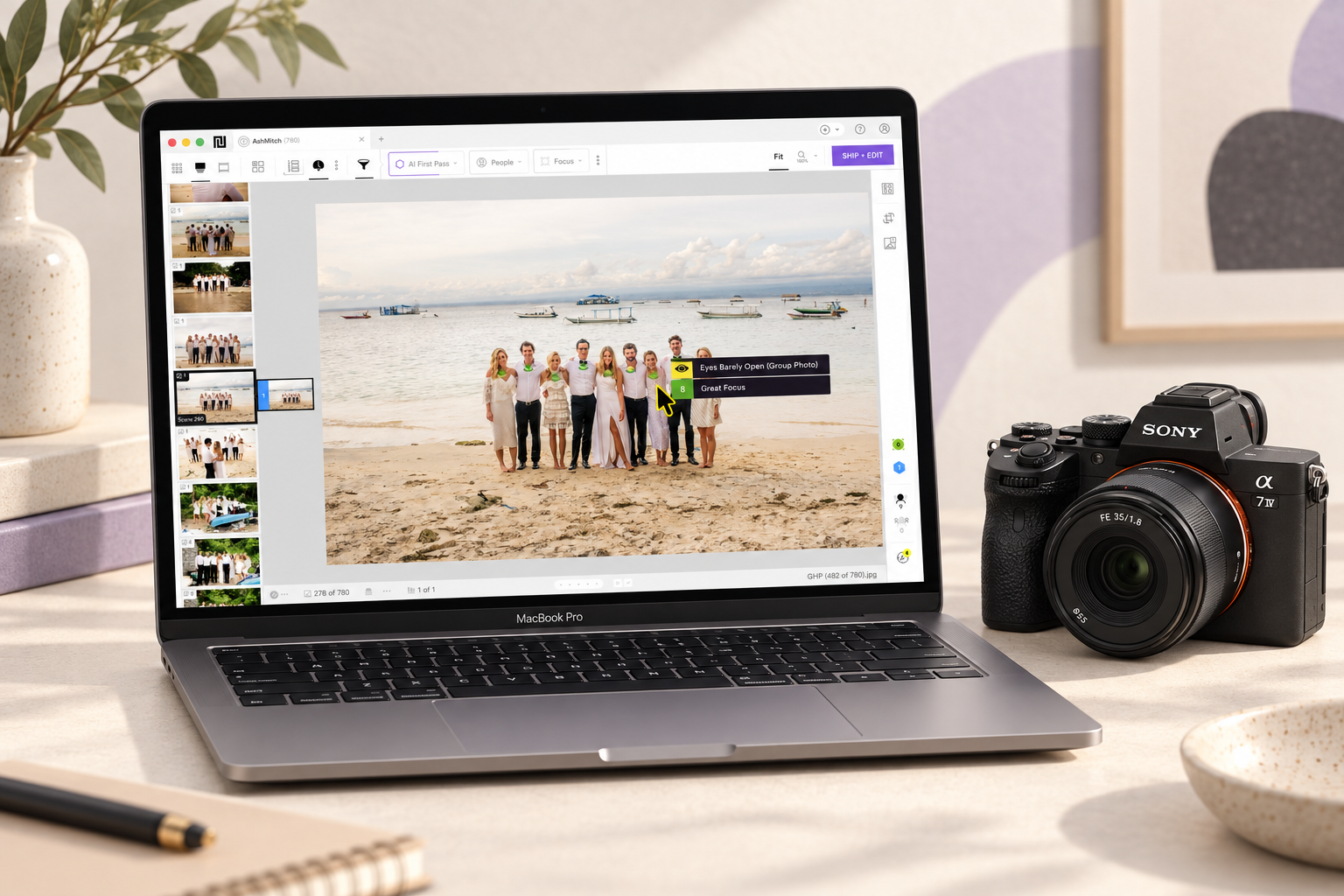
Narrative is widely considered one of the best AI post-production apps available for photographers drowning in high-volume deliverables.
Instead of stripping away your artistic edge, it acts as a helping hand with all the tedious culling and batch editing work so you can focus more on being creative or managing your photography business.
Highly Recommended
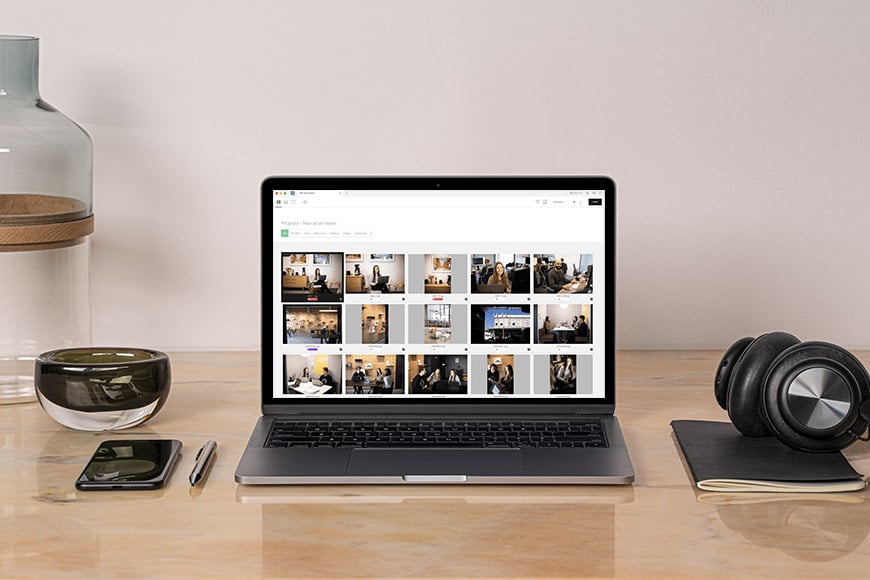

Lightning fast, intuitive and fun way to halve the time of your image culling and editing workflow.
Use code SHOTKIT10 to save 10%
To test the latest build, I imported a 1,582-image wedding gallery I second shot with my son in law into Narrative Select + Edit.
Let’s take a closer look at what Narrative actually is and how it could help stop you from pulling your hair out this wedding season.
What is Narrative Select + Edit?
- Very fast, painless RAW import
- AI First Pass analysed 1,582 wedding images in just over three minutes
- Scene View makes burst-heavy wedding culls much easier
- Close-Ups Panel is excellent for group shots and blink-checking
- People Filter is useful for coverage checks and client follow-up requests
- AI editing provides a strong starting point without removing creative control
- Smooth handoff to Lightroom Classic
- Particularly well suited to high-volume wedding photography
- AI First Pass progress should be visible without hovering over the button
- Processing is demanding even on powerful computers
- AI results still need a human check for creative images, difficult light, obscured faces, panoramas, and critical-focus decisions
- Direct shipping to Photoshop and Capture One is Mac-only
- Limited control over which catalogues train Personal AI Presets
Narrative is a desktop workflow app for photographers.
It combines AI-assisted culling with AI editing, then sends your selected images to Lightroom Classic, Photoshop, or Capture One.
The appeal is obvious: rather than manually zooming into thousands of RAW files to check focus, blinks, and near-duplicate burst shots, you let Narrative organise the wedding first.
Then you can make the final decisions from a much more useful starting point.
It isn’t designed to replace a photographer’s judgment, but rather, it helps to remove the parts of the workflow that are repetitive, tiring, and easy to overthink after several hours at a screen.
Testing Narrative

Screenshot
For this Narrative review, I tested the software on a 1,582-image compressed RAW wedding gallery, shot on Sony a7 III and a7 IV bodies.
A wedding is an ideal test for this kind of software. You have burst sequences, group portraits, changing light, fast movement and genuinely important moments that cannot be repeated. It’s also the type of job where a slow, manual cull can consume an entire day.
Narrative’s import speed is one of its immediate strengths. It’s built around getting photographers into the selection process quickly, rather than making them wait for a conventional catalogue workflow to catch up.
AI First Pass analysed the full wedding gallery in just over three minutes.
It then grouped similar frames into scenes and ranked the images within each scene.
This is the key distinction: Narrative is not trying to declare one image universally “good” or “bad”. Instead, it’s comparing near-identical frames from the same moment and helping surface the strongest technical candidates first.
That makes far more sense in real wedding work.
A technically imperfect image can still be the right image if it captures the emotion of a speech, a reaction, or the split-second chaos of a dance floor.
Conversely, a technically perfect image can be the weaker storytelling choice. Narrative gives you useful evidence like focus and whether eyes are open, but it leaves the final decision with the photographer.
AI First Pass and Scene View

AI First Pass is most useful when you’re dealing with burst-mode-heavy wedding work.
With most cameras these days shooting upwards of 10fps, this is a really useful feature for saving time. Instead of checking every frame in a sequence at 100% magnification, you can begin with the images Narrative has ranked highest, then review the nearby alternatives only when needed.
Scene View helps make that process more visual, and is perhaps my favourite feature overall since it’s such a useful way to find the best pictures from a selection of very similar ones.

It groups photographs by moment, so a sequence of confetti, a family formal, a first dance or a series of similar portrait poses can be reviewed as a set rather than as a flat timeline of files.
Scene View is especially valuable for weddings, where the time saved comes less from having the software make selections for you and more from eliminating needless comparisons between similar photos.
First Pass processing is undoubtedly fast, but its progress is not immediately obvious unless you hover over the relevant button.
Not a deal-breaker, but a clearer progress indicator would definitely make the experience more reassuring on larger wedding jobs.
Close-Ups Panel and People Filter

The Close-Ups Panel is one of Narrative’s best features for wedding photographers.
Rather than repeatedly zooming into a large group shot and scanning from face to face, it displays detected faces together.
This makes it far easier to spot a blink, soft focus or awkward expression before a file reaches Lightroom.
The People Filter is also pretty neat – it can help check that you have enough coverage of key people, including the couple, parents, speakers and bridal party. It could be especially useful when a client asks whether you captured a particular guest.
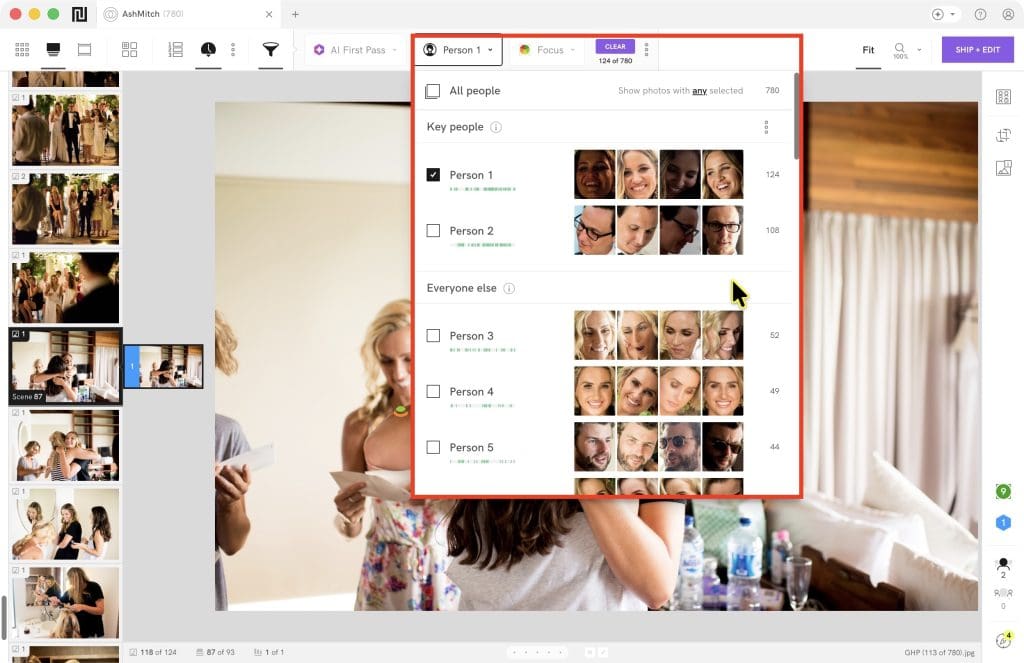
Neither feature removes the need to review critical photographs.
Obscured faces, profiles, fast movement, difficult backlighting and shallow depth of field can still confuse any automated assessment, but they substantially reduce the amount of repetitive inspection required.
AI Editing and Lightroom Workflow
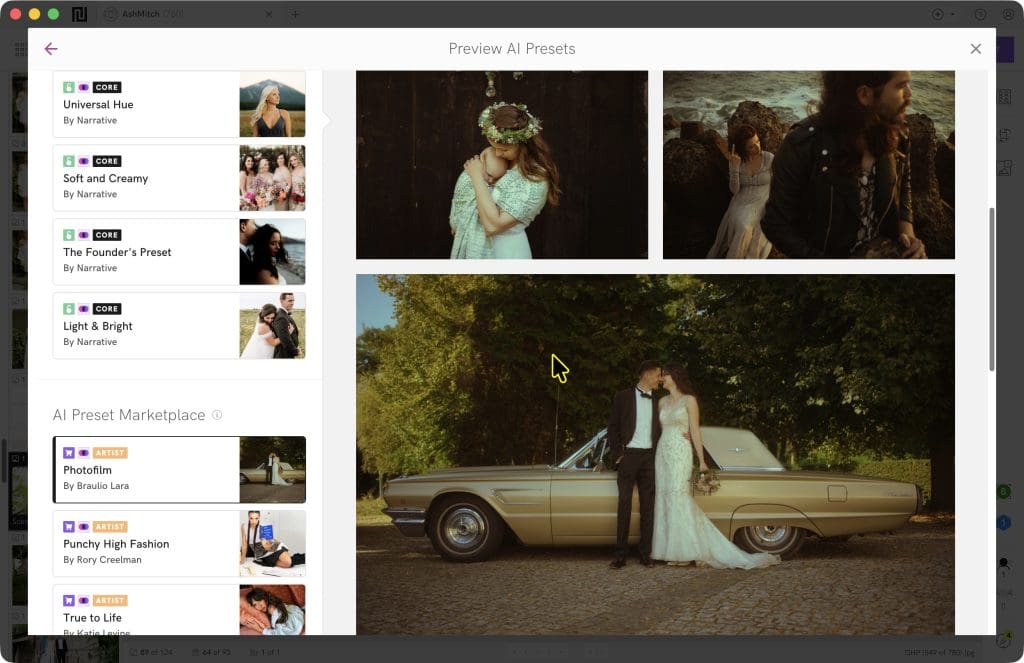
Narrative’s editing workflow is designed as a starting point, not a replacement for finishing a wedding image.
You can ship selected files to Lightroom Classic or Lightroom CC with a Core, Artist or Personal AI Preset applied.
The benefit is that the files arrive with a consistent base edit, allowing you to spend your time on the photographs that need creative judgement rather than repeating the same exposure, white balance and tonal corrections hundreds of times.
A Personal AI Preset is the more compelling option for wedding photographers with an established editing style.
Narrative analyses previously edited Lightroom files and learns from the corrections you make over time.
However, it needs a meaningful, consistent body of past work to produce useful results, so newer photographers may get more immediate value from Core or Artist presets.
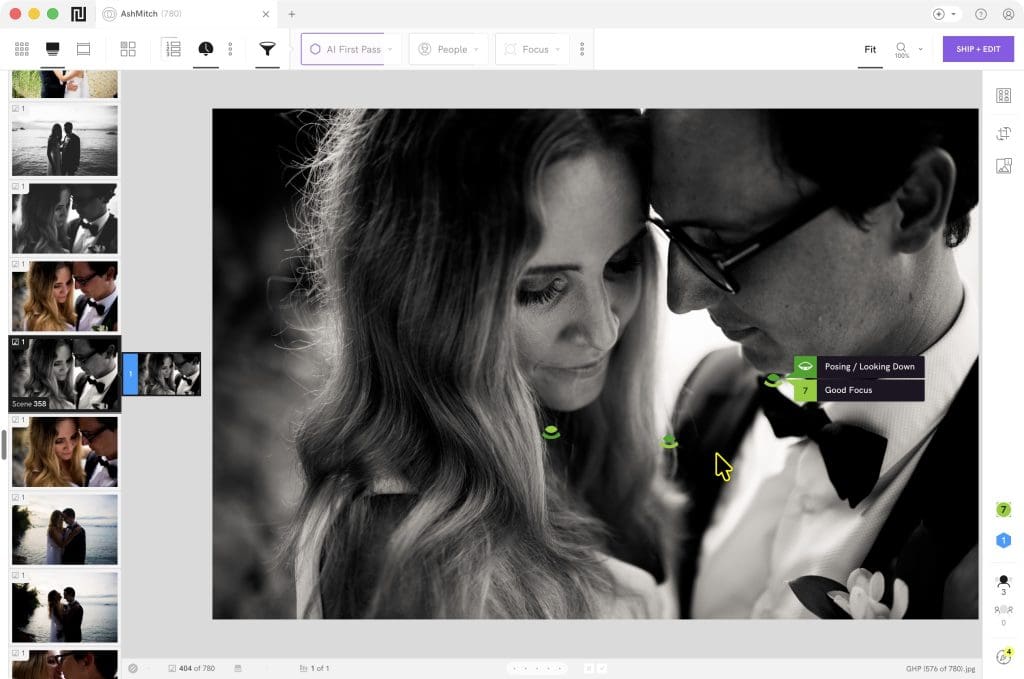
As with culling, the best approach is to treat AI editing as a strong first pass.
You’ll still need to review images with unusual light, mixed colour temperatures, creative crops, panoramas, subtle skin tones or deliberately unconventional exposure before delivery.
Personally, I like to heavily underexpose photos taken outside during daylight hours to preserve highlights and get the most out of my Sony files.
In these cases, there were a few false negatives, with the software assuming the dark photos were duds.
If you haven’t established your own personal style yet, don’t have enough RAW images with which to train your Personal AI Preset, or perhaps just want to experiment with a fresh look, there’s a selection of AI Presets offered by Narrative and their partner photographers.

Some of them are free to try, while others are available to purchase in the Marketplace.
Exporting to Lightroom, Photoshop and Capture One
Narrative fits neatly into a Lightroom-led wedding workflow. Once the cull is complete, selected images and their ratings can be shipped into Lightroom, with AI edits applied where required.
It also supports sending files to Photoshop Camera Raw and Capture One.
One thing to note: direct shipping to Photoshop and Capture One is currently a Mac-only feature, while the main Narrative application and Lightroom workflow are available on both Mac and Windows.
Narrative Pricing
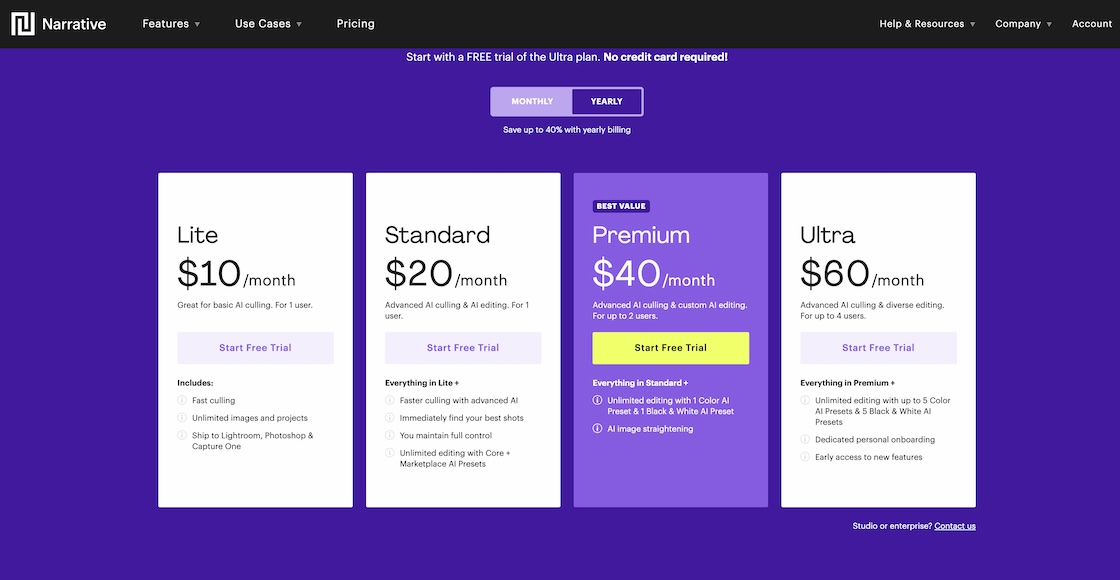
Narrative has four main subscription tiers. At the time of writing, its annual-billing prices (in USD) are:
Lite: $10/month
Standard: $20/month
Premium: $40/month
Ultra: $60/month
Every plan includes unlimited projects and images, with no per-image charge.
Lite is for photographers who want the basic culling workflow.
Standard adds advanced AI culling and unlimited Core AI Presets, plus access to purchased Artist AI Presets.
Premium includes one Personal AI Preset for colour and one for black and white, while Ultra supports up to five of each and is better suited to higher-volume photographers or teams.
Premium also includes two users and Ultra includes four, which may make those plans more economical for studios sharing the subscription.
Is Narrative Worth It?

Narrative is one of the most polished AI-assisted workflow tools available to high-volume wedding photographers.
Its biggest strength is that it does not force you to hand over creative decisions.
It makes technical checks, burst comparisons and repetitive batch adjustments faster, while keeping the photographer in control of what makes the final gallery.
For wedding photographers who spend hours every week culling RAW files, that can make a substantial difference to turnaround times and workload.
It’s not a substitute for taste, judgement or a final quality check, but it certainly is an extremely capable assistant!
If you’re tempted to give it a go to help speed through your culling and edits, use this code to get a 10% discount: SHOTKIT10
Highly Recommended
Lightning fast, intuitive and fun way to halve the time of your image culling and editing workflow.
Use code SHOTKIT10 to save 10%


