If you already edit articles in Microsoft 365 Word, check its similarity checker before buying a Copyscape replacement. It can point you to matching online passages while you work on the draft. For an occasional article, that may cover the job you need done.
For a dedicated publishing tool, I’d start with Originality.ai. Copyleaks deserves a closer look when you need to investigate material copied across languages, although that feature requires its much more expensive Pro plan. These are three different reasons to switch; checking a few English-language drafts more cheaply usually isn’t one of them.
| Alternative | When I’d consider it | Cost and main restriction |
|---|---|---|
| Microsoft Word | Reviewing a draft in Word when your account already has Similarity. | No extra tool subscription in that situation. Access depends on your Word account; don’t assume free Word includes it. |
| Originality.ai | Regular article checks with reports you can send to another editor or writer. | Pro: $14.95/month. Monthly credits expire; additional seats cost extra. |
| Copyleaks | Multilingual publishing, especially investigating translated source material. | Personal: $16.99/month. Cross-language detection is listed under Pro at $99.99/month. |
USD, monthly billing, before tax. Sources: Microsoft, Originality.ai and Copyleaks. Checked September 20, 2026.
I’ve spent 20 years building sites and counselling clients. For this shortlist, I’m interested in what happens when an editor receives a draft: can they find the matching source, understand the passage and send useful feedback to the writer? I’ve compared documented features, prices and restrictions here. I haven’t run a detection benchmark, so the order doesn’t claim that one tool catches more copying than another.
1. Microsoft Word: check what you already have
A separate subscription is hard to justify for occasional checks if the editor you already use can show you the source. That makes Word the first option I’d investigate for someone whose articles already arrive as Word documents.
In Word, open Home → Editor → Similarity → Check for similarity. Microsoft’s instructions describe a result that identifies matching passages and links to online sources. You can review each passage and insert a citation from the same pane. The support page applies to Word for Microsoft 365 on Windows and Mac. Microsoft explains the steps here.
Imagine a contributor sends you a draft about email marketing. A paragraph closely follows an article the writer used during research. Seeing that source beside the draft gives you something specific to discuss: whether the wording needs attribution, whether a direct quotation would be appropriate, or whether the writer needs to develop the explanation themselves.
The recommendation depends on having access already. If Similarity isn’t available in your account, don’t buy Microsoft 365 solely on the assumption that it will appear. Confirm eligibility for your plan first. This also isn’t a documented replacement for a publishing queue, a website-wide check or continuing alerts about copies of your published pages.
Word earns its place because reviewing one document where you already edit it can be enough. Once you need to collect and pass around a separate report for every commissioned article, the next option becomes more relevant.
2. Originality.ai: for a regular flow of articles
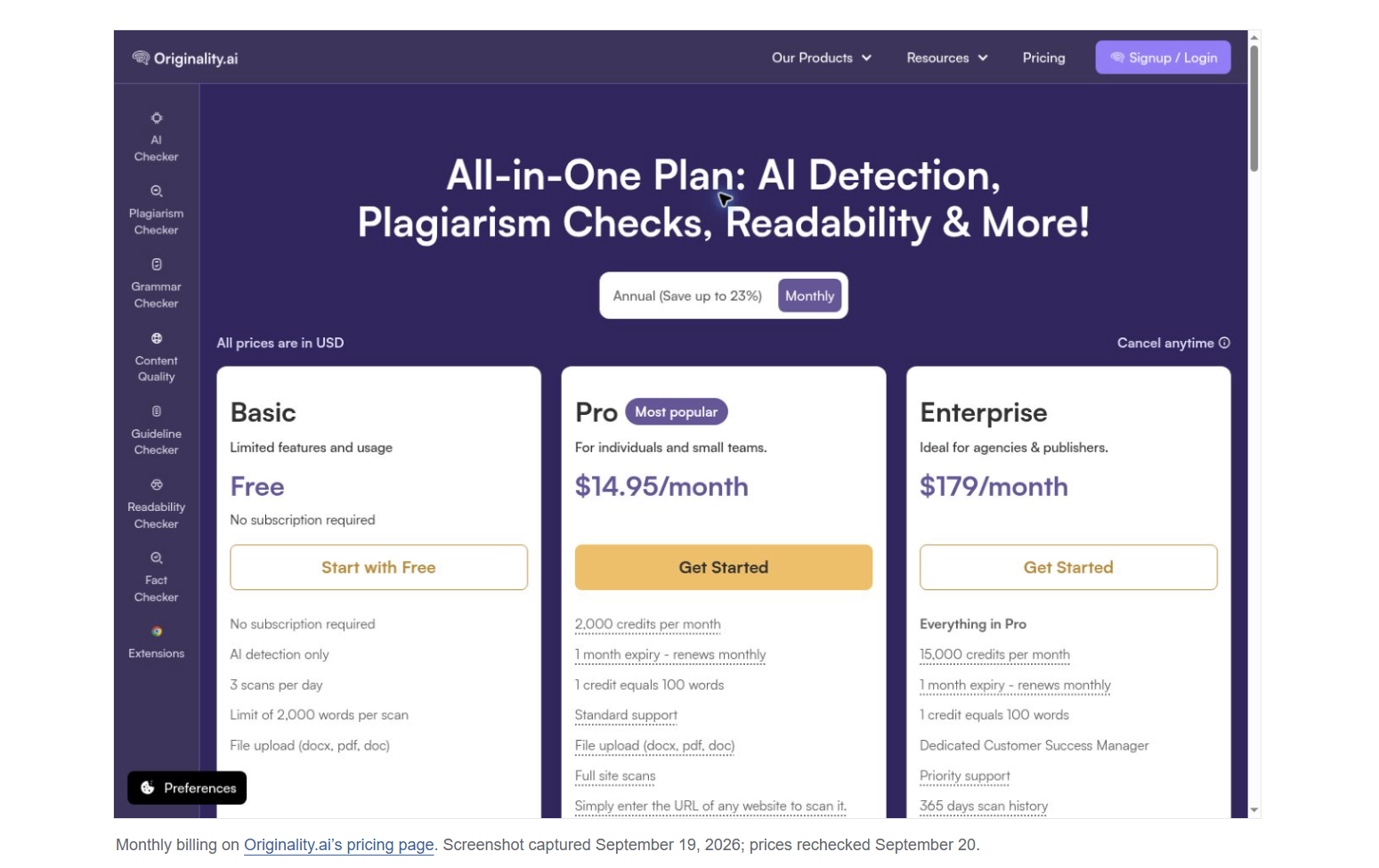
Originality.ai is the dedicated option I’d start with when checking drafts is a recurring editorial task. Its published plan includes shareable reports and URL or full-site scans. Those features suit an editor who needs to return source evidence to a contributor, then keep the result with the article’s other production notes.
For example, an editor handling several commissioned articles can send the writer a report and ask about a specific passage. The useful part is having evidence that both people can inspect. A message saying “your score is too high” gives the writer much less to work with.
Pro supplies 2,000 monthly credits, with one credit covering 100 words. Its free Basic plan is for AI detection only, so it doesn’t replace a paid plagiarism check. Unused subscription credits expire each month. An additional Pro seat costs $9.95 monthly, which matters if several editors need their own access.
There’s also a content-use decision to make before uploading confidential work. Originality.ai’s privacy policy says submitted scan text may be used for training and that users can opt out. Check that setting and your organization’s requirements before submitting an unpublished client draft. A plagiarism result and the service’s handling of the submitted text are separate questions.
I wouldn’t switch merely to get batch checking or an API. Copyscape Premium already offers both. Originality.ai’s case rests on whether its reporting and editing workflow fit your publication, with enough monthly use to make the subscription sensible. The worked example below shows where its price starts to compete with Copyscape’s usage charges.
3. Copyleaks: when the source may be in another language
Copyleaks has the most distinct specialist reason for inclusion: you may publish in one language while a contributor researches in another. Checking a Spanish draft against Spanish pages and checking it for material translated from an English source are different jobs.
Copyleaks advertises plagiarism checking in more than 100 languages. Its product documentation says a normal scan compares content in the submitted language. Cross-language detection extends the search to other languages. Its API documentation currently lists nine supported input languages and more than 30 result languages, so check the direction you need as well as the headline language count.
The plan restriction changes the buying decision. Personal includes 100 credits a month; translated-source detection is listed under Pro, which includes 1,000 credits and 25 seats. The current pricing matrix puts those features in different tiers. An individual checking ordinary same-language drafts has a much weaker reason to pay for Pro than a publication working across languages.
For a concrete trial, use a source passage you have permission to test, translate it into your publication’s language and see whether the report identifies that known source. Repeat with a genuinely original passage. This gives you a way to assess the exact language pair you need before paying for a capability described by a broad coverage number.
Cross-language scanning can also use more credits. Copyleaks’ API documentation charges separately for the original-language scan and each additional language selected. On that model, a 1,500-word document costs six credits for the base scan and another six for each extra language. That is an API billing example; confirm the allowance and estimated charge in the consumer product before treating Pro’s advertised word capacity as translated-source capacity.
What the same publishing workload costs
Suppose you check 50 articles a month, each exactly 1,500 words long, once before publication. That is 75,000 submitted words. Holding the document length and number of passes constant makes the different pricing units easier to compare.
| Service or plan | What one 1,500-word check uses | What the base plan covers |
|---|---|---|
| Word Similarity | No separately listed per-scan charge for an account with access. | An included feature to check first. Microsoft’s cited support page doesn’t give a monthly scanning allowance. |
| Copyscape Premium | $0.16 in usage charges | Pay from prepaid credit; no subscription assumed. |
| Originality.ai Pro | 15 credits for plagiarism checking | 133 complete drafts from 2,000 credits |
| Copyleaks Personal | 6 credits for a standard check | 16 complete drafts from 100 credits |
| Copyleaks Pro | 6 credits for a standard check | 166 complete drafts from 1,000 credits |
SEW calculations from Copyscape, Originality.ai and Copyleaks published rates. Plagiarism checking only; one operator; no repeat checks, additional languages, private-index fees or top-ups. Complete-draft counts round down and leave small credit balances.
Copyscape charges three cents for the first 200 words and one cent for each additional 100 words or part of 100. Our 1,500-word article therefore costs 16 cents: three cents plus 13 cents. Fifty such checks use $8 of credit. That is credit consumed, not necessarily the amount you must deposit at checkout.
At this document length, Originality.ai’s monthly subscription first becomes cheaper than Copyscape’s usage charges on the 94th check: $14.95 against $15.04. Both remain within the allowances used here. If you publish ten articles a month, though, Copyscape consumes just $1.60. Buying a separate subscription would need to solve a workflow problem that the lower usage bill doesn’t.
Copyleaks Personal’s allowance doesn’t cover the 50-article example. You would need extra credits or another plan. Top-ups are offered, but their unit price wasn’t available on the public pricing page, so this comparison doesn’t invent a total for them. Pro covers that volume of standard checks, but its main reason for making this shortlist remains the language capability.
Count checks as well as articles. If an editor scans all 50 drafts again after revision, the modeled workload becomes 100 checks. Copyscape would consume $16; Originality.ai would use 1,500 credits. If you also enable AI detection or other paid checks, recalculate using the charge for that combination.
The post 3 Copyscape alternatives worth considering before you switch appeared first on Search Engine Watch.


