


Top pick
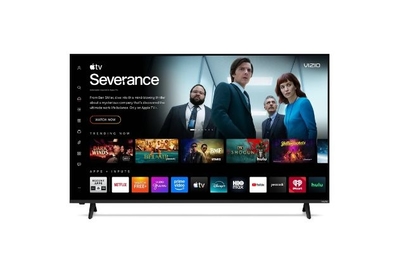
This TV achieves higher brightness and better color saturation than many budget 4K models, for about half the price. But it does cut some corners in build and sound quality.
Key specs
| Screen sizes | 43-inch (VQM43C), 50-inch (VQM50C), 55-inch (VQM55C), 65-inch (VQM65C), 75-inch (VQM75C), 85-inch (VQM85C) |
| Backlight type | mini-LED with full-array local dimming |
| Refresh rate | 60 Hz |
| Color technology | quantum dots |
| HDR formats | HDR10, HDR10+, HLG, Dolby Vision |
| HDMI connections | three HDMI 2.1 (one eARC) |
| Smart-TV platform | Vizio OS |
| TV tuner | ATSC 1.0 |
If you’d told me a few years ago that I could get a 75-inch 4K TV equipped with mini-LED backlighting and quantum-dot color for $500, I’d have said, “Yeah, and I’m the Queen of England.” Well, someone needs to pour me a cup of tea because that TV now exists — and we’ve crowned it the best budget 4K TV of 2026.
Vizio used to reign supreme in the budget TV category, but in recent years the company has lost ground to TCL, Hisense, Roku, and Amazon. The Mini LED Quantum Series marks the company’s return. This TV is available in 43-, 50-, 55-, 65-, 75-, and 85-inch screen sizes at prices so low, it genuinely shocked me.
Potential buyers should be aware, however, that one likely reason this TV is so affordable is that Vizio’s parent company, Walmart, is banking on you connecting a Walmart account and using things like your purchase history to inform the ads you see on the Vizio OS. Data is a valuable commodity these days. While every smart TV does this to a degree, Walmart’s position as a big-box retailer makes the situation somewhat different than Google or Roku TV (Amazon’s Fire TV OS presents a similar quandary).
This TV provides advanced tech for a lot less money. The best performing TVs are OLED TVs, and that’s been true since at least one English queen ago. But LCD TVs have managed to keep pace through judicious use of technologies like mini-LED backlighting, local dimming, and quantum dots, all of which effectively imitate the naturally high contrast and vivid color of OLED TVs.
But those technologies are often reserved for the more premium LCD/LED TVs, while the cheap doorbusters omit some or all of them and tend to look ghastly.
The Vizio Mini LED Quantum (true to its name) wields those advanced technologies to great effect, and it’s also notably brighter than almost any TV we’ve tested in this price bracket. We measured around 1,000 nits of peak brightness.
It’s bright enough for daytime use and accurate enough for critical viewing. Unlike OLED TVs, all LCD TVs use a backlight to function, and that backlight can make or break the picture quality. Backlight-related abilities like local dimming (where groups of LEDs can be dimmed or boosted depending on what’s playing on the TV) are greatly improved by having smaller (or mini) LEDs, which is why the two technologies are so important, even in budget TVs.
The Vizio Mini LED Quantum Series gets much brighter than the average TV in this price range: For example, the 75-inch VQM75C I tested peaked at a little over 1,000 nits of brightness, while last year’s top pick (and our current runner-up, the TCL QM6K) only manages around 600 nits.
This makes for a big difference when you’re using the TV in a well-lit space. I found movies, TV shows, and video games easy enough to see while the Vizio was in its Bright picture mode, even with my window shades open and lights on in the room. It also means the newest movies and TV shows (most of which are available in high dynamic range while streaming) look excellent. This level of brightness is traditionally something you’d have to pay a lot more money for.
If you prefer more critical dim- or dark-room viewing, this TV is also quite accurate in its Calibrated or Calibrated Dark picture mode. Objective testing revealed that my VQM75C was fairly well-calibrated out of the box, and it maintained that accuracy during HDR10 and Dolby Vision playback, as well. (See what we mean by “accurate.”) The series supports the HDR10, HDR10+, Dolby Vision, and HLG formats.
During testing, I found that the local dimming isn’t as aggressive or robust as I’ve seen on some TVs. As a result, while shadows look dark when most of the screen is dark, they brighten up a lot when the content around them is brighter. (In nerd speak: We saw less consistency in black-level efficacy across scenes of varying brightness levels; I measured 0.041 nits at 10 APL and 0.121 nits at 50 APL.) The TCL QM6K’s black levels looked more consistently dark, regardless of how bright the rest of the screen was.


This TV’s higher brightness helps it achieve even better colors. Testing revealed that Vizio’s latest TV is quite adept when it comes to color production: While it produced marginally less color than our runner-up in the standard HD color space (Rec 709), about 93%, the Vizio’s higher brightness helped it render more color in the HDR color spaces, DCI-P3 and Rec 2020) — achieving 86% and 62%, respectively.
I noticed the Vizio’s color improvements while playing certain video games and watching newer 4K Blu-ray discs with lots of vivid colors, like the Marvel movies.
Vizio OS runs really smoothly for the price. One issue we see in a lot of TVs in this price range is that the smart-TV software (like Google or Roku) is sluggish or slow to load things because the TV doesn’t have good enough processing. It’s been awhile since I’ve used the Vizio OS, and I was impressed with how snappy and responsive it is on this TV.
When you boot up the TV, the home screen loads very quickly, and the layout is easy to navigate, with familiar app rows, sections for different kinds of content, and a few ads sprinkled in, much like you find on other streaming platforms. The home screen pushes Vizio’s “WatchFree+” free streaming content rather than showing you a list of content you’ve already been watching (like our favorite platform, Google TV, does). But organizational quibbles aside, this TV’s software is refreshingly snappy for a budget model.


Even though this TV’s refresh rate is limited, it’s still great for gaming. Using our 4K Leo Bodnar input lag tester, I measured an average input lag of 9.8 milliseconds with the TV’s Game mode enabled. Anything less than 10 ms is an awesome result, especially in this price range, and I had no problem playing Resident Evil Requiem on an Xbox Series X or Baldur’s Gate 3 on a PlayStation 5.
I also set my Xbox to 1080p resolution and was able to try the games in 120 Hz mode, one of this TV’s few special gaming features. This Vizio has a native 60 Hz panel refresh rate, one concession it makes to keep costs down (for reference, the TCL QM6K has a 144 Hz native refresh rate). But it allows for 120 Hz operation if a game is set to a maximum resolution of 1080p. I found that the extra speed helped a bit during a tense gunfight, but the step down in resolution — and thus, detail and sharpness — isn’t something I’d normally abide on a 75-inch TV. But this feature might be more useful at the smaller screen sizes.
The Vizio Mini LED Quantum Series also doesn’t have a “game bar” like a lot of modern smart TVs do, so you can’t do things like check FPS or set a custom onscreen cursor, but I didn’t find myself missing those features at all.
Flaws but not dealbreakers
You have to connect a Walmart account to access the built-in streaming features. As of mid-March, new Vizio TVs require you to connect a Walmart account during initial setup. On paper, this isn’t that different from signing into a Google TV with a Google account or a Roku TV with a Roku account, but in practice it may feel slightly more invasive than you want to deal with.
Walmart has taken full ownership of the Vizio OS software. If you have a Vizio account, you’ll be prompted to either merge it with your Walmart account or delete it entirely. You’ll also have to agree to send your “Activity Data,” which sends Walmart information about your “clicks, commands, settings, impressions,” et cetera. You’ll then be asked to enable Automatic Content Recognition (ACR), which screenshots what you’re watching and sends the data off to, presumably, Walmart, but you can refuse ACR and still access the Vizio OS. (Again, these are things that every smart TV does on some level.)
The major difference here when compared with our other smart TV picks is that Walmart is an international retailer. If you have a Walmart account, it’s likely to have your phone number, geolocation data, purchase history, and so on — and while I haven’t seen this happen personally, I’m willing to bet that recommended content and homepage advertisements will be informed by all of that purchasing data. I’ve also received more emails from Vizio since setting up this TV than any other TV I’ve ever tested.
If that’s got you spooked, there’s good news: You can keep the TV offline, and you won’t have to worry about the data of it all. You won’t be able to use the smart TV features, but this TV is so affordable that you could buy the fanciest standalone media streaming device on the market and you’d still come out ahead, budget-wise.
You can only buy this TV at Walmart or Sam’s Club. It’s a bit inconvenient that you won’t find this TV at more retailers, but them’s the breaks.
The screen is quite reflective. This TV is a lot brighter than the average TV in this price range, which makes it a better choice for more brightly lit rooms. The glossy screen finish further aids the TV’s apparent brightness, but it also easily reflects light sources.
The TV is bright enough that the reflections aren’t too noticeable while watching brighter content like news or sports, but it can be annoying if you’re trying to watch a movie during the day with background lights on.
The speakers are just average. Another reason the Vizio Mini LED Quantum Series is cheaper than the competition is that it isn’t trying to do anything special with sound: You get the standard dual 10-watt speakers here. Our runner-up has better audio quality, but it’s also quite a bit pricier.
Recommended settings
The Vizio Mini LED Quantum Series looks best in the Calibrated Dark picture mode, though that mode also limits brightness to about 250 nits, which isn’t really bright enough for comfortable daytime viewing. The Calibrated mode jumps up to around 1,000 nits.
If you’re watching content in HDR (whether in HDR10 or Dolby Vision), this TV continues to use the same picture modes that you get for SDR. Both of the Calibrated picture modes are accurate, with Calibrated Dark meant for dark rooms and Calibrated meant for brighter rooms. In both SDR and HDR, you should keep the Mini LED Zone Control feature (which controls local dimming) set to “Standard.”
You can keep ACR off by opting not to agree to share “Viewing Data” during setup, but if you agree to it and want to turn it off later, you’ll need to manage permissions in your Walmart account.


