Enterprise data today is scattered across specialized systems, each with its own tools and expertise. Querying a database requires SQL. Accessing batch data on Amazon Simple Storage Service (Amazon S3) requires compute engines such as Amazon Athena and Trino. Consuming real-time streams from Amazon Kinesis requires streaming expertise. Each software as a service (SaaS) application has its own API, authentication model, and query language. Today, only data engineers can navigate this landscape, and business users file tickets, wait for reports, or rely on dashboards that answer yesterday’s questions. When a leader needs a one-time answer spanning multiple systems, they’re back in the ticket queue.
Consider a streaming media company: customer profiles, content catalogs, and ad campaign performance are stored as batch data on Amazon S3. Viewership telemetry such as device type, stream quality, watch duration, and buffering events flows in real time through Amazon Kinesis. Subscriber management and support tickets live in a relational customer relationship management (CRM) database. Leaders routinely ask questions like:
- Which titles drove the most subscriber growth last quarter?
- How does marketing spend correlate with viewing completion rates?
- Is churn spiking among users who haven’t engaged with new content?
Answering these questions faces two challenges:
The data silo problem. The data lives in multiple places with batch stores on S3, real-time streams in Kinesis, and an online transaction processing (OLTP) database, each with its own access patterns, query language, and authentication model. Organizations traditionally solve this by building data lakes or adopting a data mesh, but both require significant data engineering investment and ongoing maintenance.
The access gap. The expertise to navigate the enterprise systems is concentrated in the hands of few data engineers, creating a bottleneck that no dashboard or business intelligence (BI) tool fully resolves. Every new one-time requirement means more engineering work, and it’s not self-service.
A fundamentally different approach is emerging: instead of moving all data to one place or building bespoke integrations for each source, let AI agents talk directly to the systems where data lives. Model Context Protocol (MCP) makes this possible, an open protocol that standardizes how AI applications connect to external data sources and tools. MCP servers wrap diverse systems behind a uniform interface for tool discovery, invocation, and response handling. Any user can ask a question in natural language and the agent reaches the right data without knowing which system holds it, what API to use, or what query language is required.
In this post, we propose reference architectures for accessing data stored in different systems and datastores using MCP and Amazon Bedrock AgentCore. The patterns apply to enterprises with mixed data sources, but we ground the narrative in our streaming media company example described earlier to make the problem concrete.
Solution overview
Our solution is a federated data foundation for a streaming media company. It supports real-time and batch analytics using MCP servers and Amazon Bedrock AgentCore, and it makes analytics accessible across the organization. The following reference architecture shows the complete picture from data ingestion through governance and compute layers to the generative AI layer where agents orchestrate across MCP servers. The demo uses synthetic data: batch datasets are generated with Python scripts, and streaming telemetry is produced by AWS Lambda. The complete source code is available in the accompanying GitHub repository, so you can deploy and try it yourself.
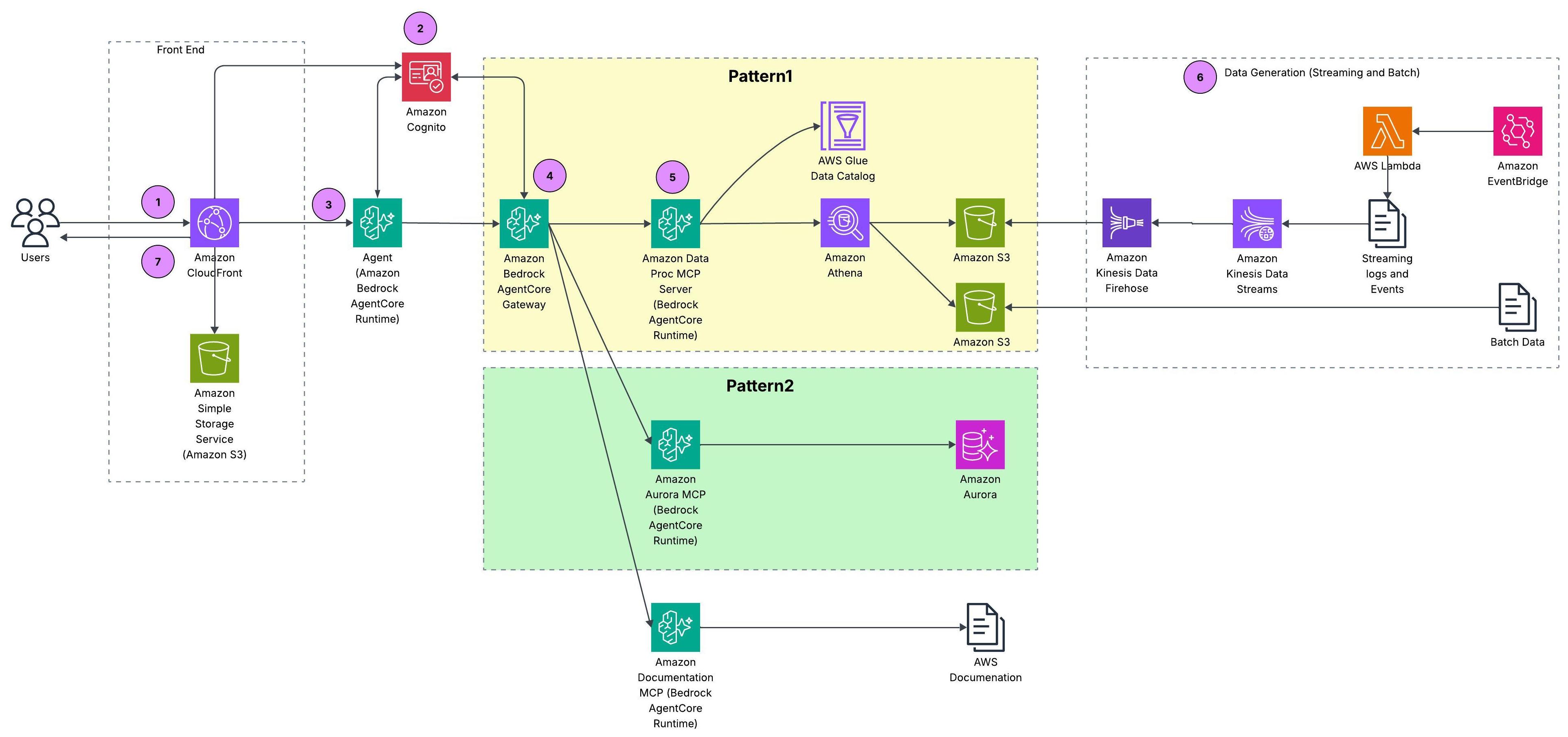
Figure 1: Reference architecture for federated data access across batch, streaming, and relational sources
Walkthrough
This section covers the prerequisites and then walks through how a user request flows end to end through the reference architecture.
Prerequisites
Request flow
- User request: A user submits a natural-language question through a React application served by Amazon CloudFront with static assets on Amazon S3.
- Authentication: Amazon Cognito authenticates the user and issues an identity token that travels with the request to the agent layer.
- Agent orchestration: The request reaches a Strands agent running on AgentCore runtime, a capability of Amazon Bedrock AgentCore. The agent reasons over the question and determines which data sources to query.
- Gateway routing: Amazon Bedrock AgentCore Gateway, a capability of Amazon Bedrock AgentCore, aggregates all three MCP servers behind a single endpoint, handling tool discovery, authentication, and routing.
- MCP server execution: The agent routes the query to the appropriate MCP server(s), each running on Amazon Bedrock AgentCore runtime behind Amazon Bedrock AgentCore Gateway. The Data Processing MCP server queries AWS Glue Data Catalog and Amazon Athena for batch and streaming data on S3, the Amazon Aurora MCP server translates tool calls into SQL against the Amazon Aurora MySQL CRM database, and the AWS Documentation MCP server provides AWS service context.
- Data sources: The architecture deliberately spans multiple storage systems to reflect how enterprise data is typically fragmented across teams and technologies. Batch data (customer profiles, content titles, and ad campaigns) is generated by AWS Lambda on an Amazon EventBridge schedule and lands as Parquet files on Amazon S3. Streaming viewership telemetry (what users watch, when they pause, where they drop off) flows through Amazon Kinesis Data Streams and Amazon Data Firehose to S3. CRM records (subscriber plans, support tickets, account status) live in an Amazon Aurora MySQL database. AWS Glue Data Catalog registers the S3-based sources under a unified metadata layer, and AWS Lake Formation enforces fine-grained access policies across the catalog. This mix of batch, streaming, and relational sources is what makes federated access essential. No single query engine can reach all datasets natively.
- Response: Results flow back through Amazon Bedrock AgentCore Gateway to the agent, which composes a natural-language answer and delivers it to the user through the front end.
For deploying our reference architecture, follow the instructions in the code repository.
Design patterns for federated data access
Within our architecture, we propose three design patterns for federated data access, each on a spectrum between centralized governance and direct access flexibility.
Pattern 1: Catalog-first access
AWS Glue Data Catalog registers all S3 sources under a unified metadata layer: schemas, business context, data quality metrics, and lineage. The AWS Data Processing MCP server, hosted on Amazon Bedrock AgentCore runtime, wraps AWS Glue Catalog metadata and Amazon Athena query capabilities behind standard MCP tool calls. So when a user asks “Which ad campaigns drove the most subscriber activations last quarter?”, the agent discovers tables through catalog tools and resolves business terms from column metadata. It then executes the join through Athena without ever calling a Glue API directly.
The following diagram traces how a single user request flows through the federated data access architecture: from the agent, through the MCP server, and down to the data in Amazon S3.
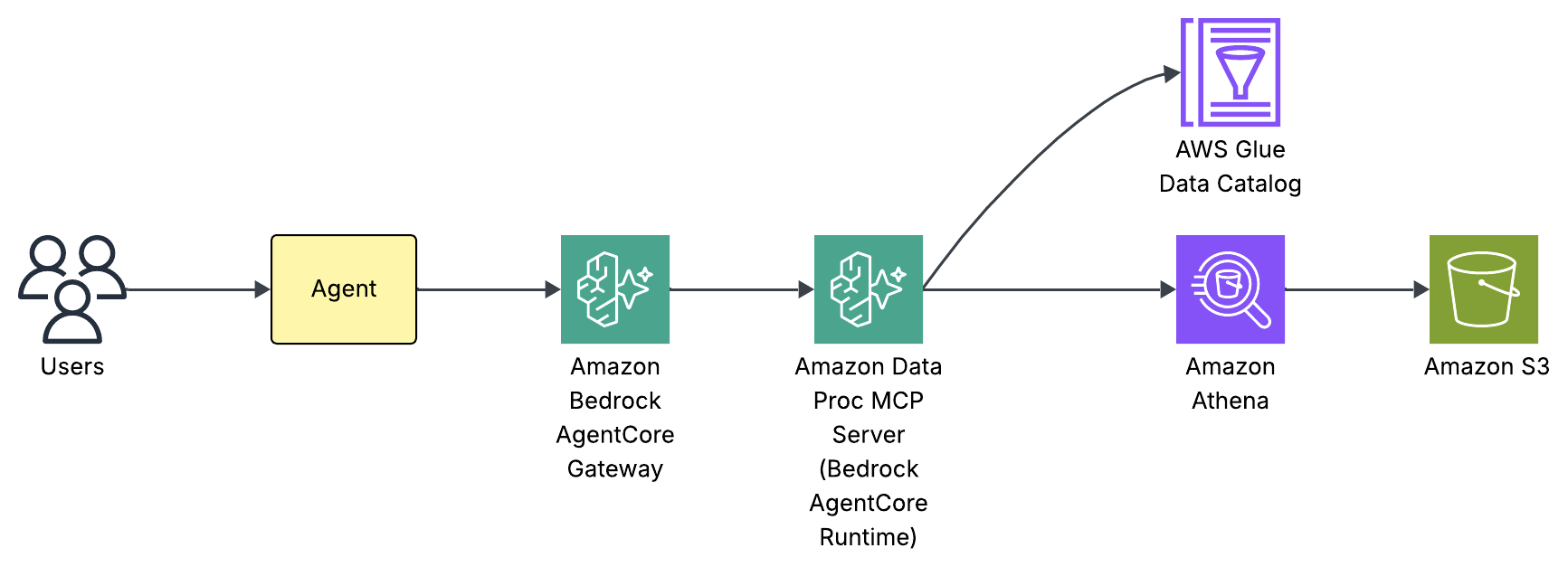
Figure 2: Request flow for the catalog-first access pattern
Internally, our agent built using Strands Agent framework has three components: a system prompt, a large language model (LLM), and a set of MCP tools. We use Claude Haiku 4.5 powered by Amazon Bedrock as the foundation LLM with tools discovered through the Amazon Bedrock AgentCore Gateway. The system prompt teaches the agent how to use those tools not by listing every column in every table, but by providing intent-based routing rules and a mandatory schema discovery workflow. Here’s an extract from the system prompt:
To see this in action, consider what happens when a user asks “How many streaming events in February 2026 by event type?”:
- The agent’s routing rules match “streaming events” to the AWS Glue Catalog and Athena query path. If unsure which tool to use, the Gateway’s semantic search discovers tools by keyword rather than requiring exact names.
- The agent calls
manage_aws_glue_tablesexposed by the Data Processing MCP server to retrieve the full schema: column names and types, partition keys (year, month, day, hour), and storage format. - With the schema in hand, the agent writes Presto/Trino SQL with partition filters (
WHERE year="2026" AND month="02"). - The agent executes the query, retrieves results, and composes a natural-language answer. The user never sees SQL, Glue APIs, or partition strategies.
This discover-then-query workflow is what makes the pattern self-service. The Amazon Bedrock AgentCore Gateway provides unified tool discovery as new MCP servers appear without updating routing logic. The AWS Glue Data Catalog provides a live metadata layer for new tables and columns to appear immediately.
This pattern isn’t unique to AWS. Other platforms adopt the same model. For example, Databricks offers managed MCP servers for Unity Catalog, letting agents discover and query governed datasets, AI models, and functions registered in Unity Catalog. The common trade-off across all of them: all data must be cataloged before agents can access it, which can bottleneck rapidly changing environments.
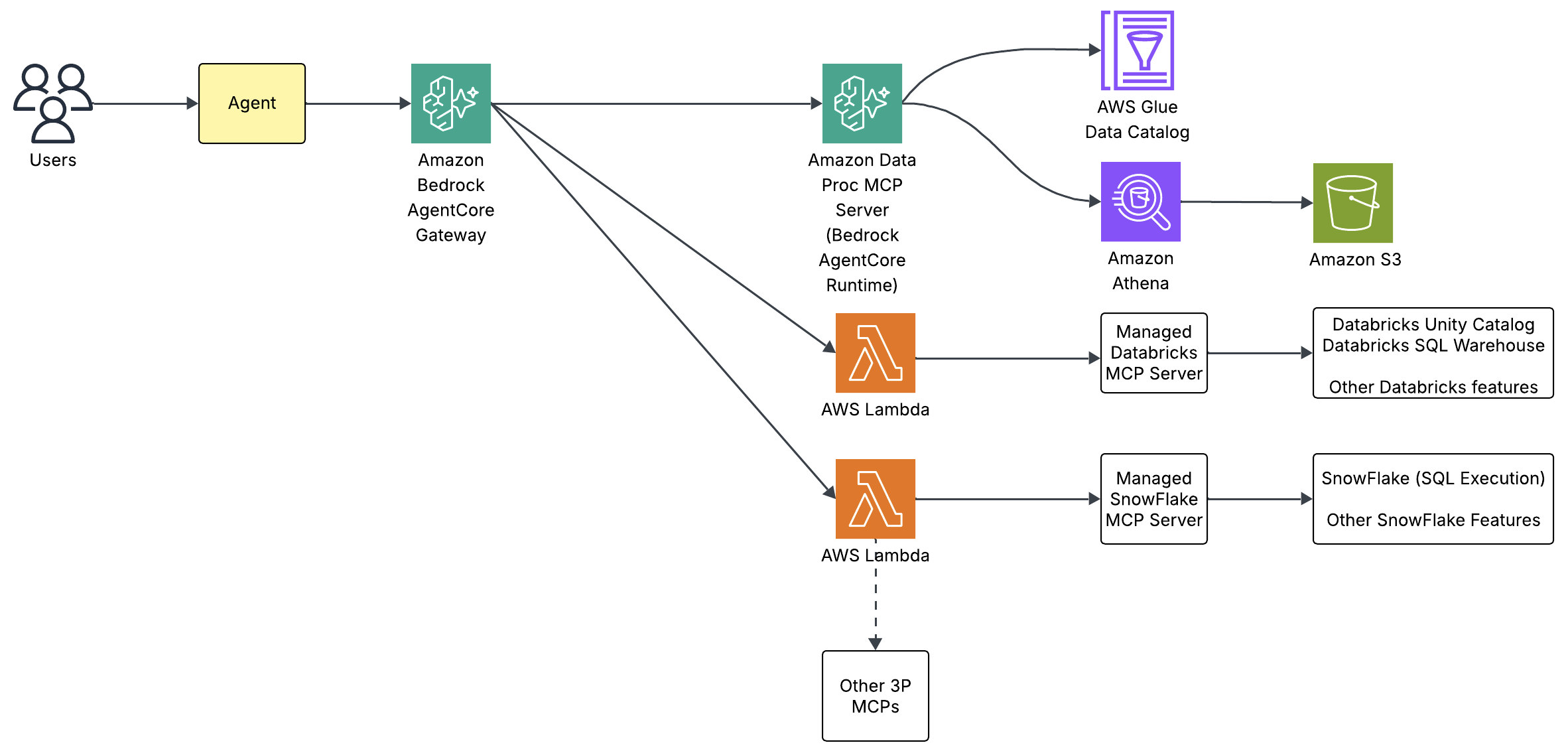
Figure 3: Catalog-first access with AWS Glue Data Catalog and Amazon Athena
Pattern 2: Direct source access
Agents access source systems directly through dedicated MCP servers (no intermediate catalog). The Aurora MCP server, hosted on Amazon Bedrock AgentCore runtime, queries the Amazon Aurora CRM database directly. Therefore, a question like “How many open support tickets from premium subscribers?” routes to the MCP server, which translates the tool call into SQL against Aurora. The agent never constructs a database connection or manages credentials. The MCP server handles authentication through AWS Secrets Manager and exposes only two tools: run_query for SQL execution and get_table_schema for schema inspection.
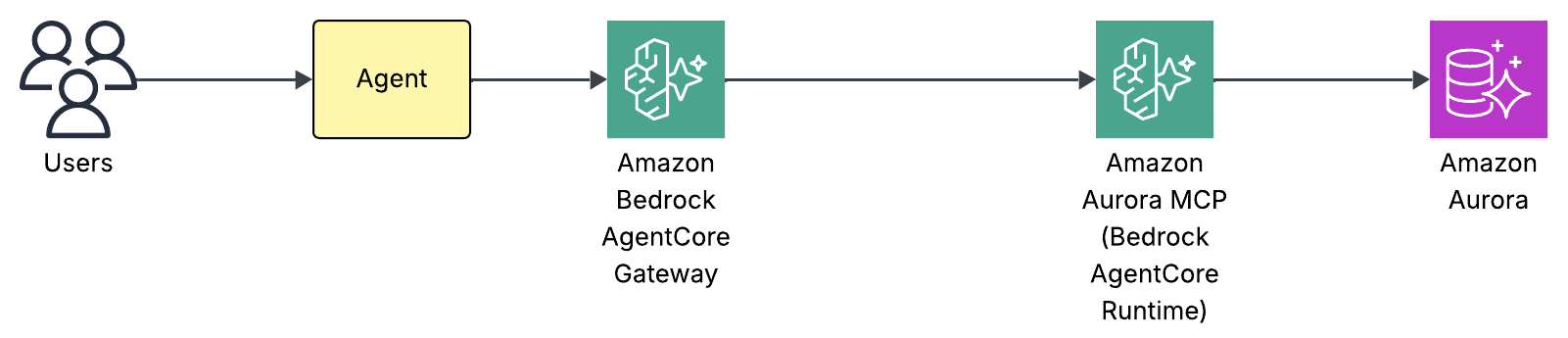
Figure 4: Direct source access to the Amazon Aurora CRM database
Internally, the same agent architecture as Pattern 1 applies: a system prompt, an LLM, and a set of MCP tools. We use Claude Haiku 4.5 powered by Amazon Bedrock as the foundation LLM with tools discovered through the Amazon Bedrock AgentCore Gateway. There’s no catalog layer to query first. The system prompt provides lightweight schema hints: table names and key enum values needed for WHERE clauses so the agent can route correctly and write valid filters without a round trip:
For straightforward queries, the agent writes SQL directly from these hints. For complex queries such as multi-table joins or unfamiliar columns, the agent calls get_table_schema first to verify the full schema, mirroring the discover-then-query discipline from Pattern 1 but against the source database rather than a catalog. To see this in action, consider “Show me open critical support tickets by category”:
- The agent’s routing rules match “support tickets” to the MySQL CRM path and call
run_querywith aSELECTagainstsupport_ticketsfiltered bystatus="open"andpriority='critical'. - The Aurora MCP server translates this into a query against Amazon Aurora through the RDS Data API.
- Results return through the AgentCore Gateway and the agent composes a formatted answer with ticket counts, categories, and so on.
The direct access pattern trades catalog governance for simplicity. There’s no metadata registration step. The MCP server queries the database as-is, which means schema changes in Aurora are immediately visible. This makes it ideal for operational databases where the schema is stable and well-understood, and where the overhead of cataloging every table would slow down access without adding value.
Earlier this year, the AWS MCP Server became generally available. It’s part of the Agent Toolkit for AWS, a suite of tooling that includes the MCP Server, skills, and plugins that help coding agents build more effectively and efficiently on AWS. Rather than exposing a fixed set of per-service tools, the server provides generic AWS API access: aws___run_script executes Python in a sandboxed environment with credentialed access to the AWS APIs, authenticated with SigV4 and authorized by your existing AWS Identity and Access Management (IAM) policies. Because that reaches most of AWS APIs, you can connect your agents to relational data in Aurora through the RDS Data API or to real-time streaming data in Kinesis Data Streams, using boto3 calls such as GetShardIterator and GetRecords.
Pattern 3: Hybrid access
In practice, most organizations won’t pick only one pattern because the data landscape is too diverse. That’s exactly the case for our streaming media company: batch and streaming data on S3 benefits from catalog-first governance (Pattern 1), while the Aurora CRM database is better served by direct access (Pattern 2). Our reference architecture combines both patterns under a single orchestrator agent. Governed sources route through the catalog. Operational sources are accessed directly and both paths coexist behind the same agent. The key insight: both paths use the same protocol. Amazon Bedrock AgentCore runtime hosts the MCP servers, and AgentCore Gateway handles tool discovery, authentication, and routing. Organizations can start with whichever pattern fits their current data maturity and grow into unified access as they onboard more sources.
Validate the deployment
Access the CloudFront URL from the stack outputs, log in with your test user credentials, and try these queries:
Query 1 – Customer analytics with visualization:
“Build a chart on customer breakup by subscription type?”
The agent queries the customers table in Athena and generates bar and pie charts showing the distribution across subscription tiers.
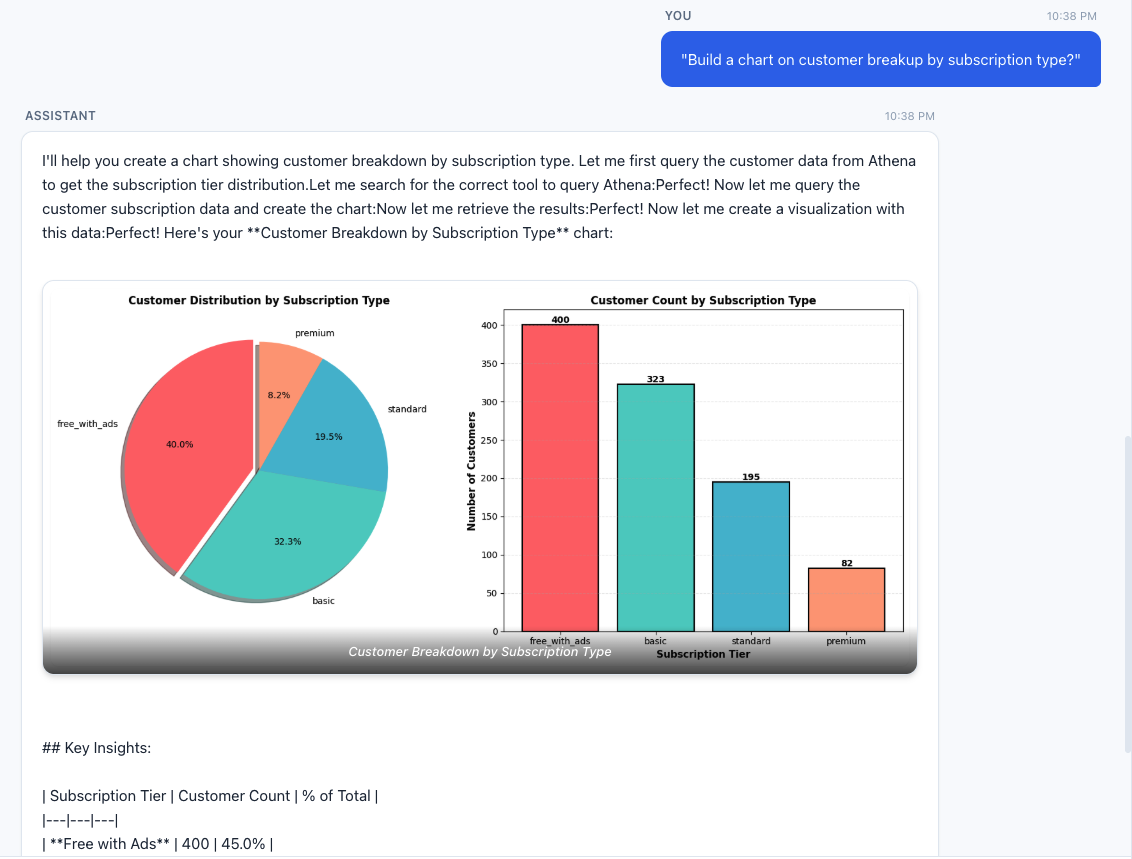
Figure 5: Customer distribution across subscription tiers
Query 2 – CRM operational breakdown:
“Show me the breakdown of support tickets by category and priority.”
This routes entirely to the MySQL MCP server, querying the Aurora CRM database for ticket distribution without touching S3 or Athena.
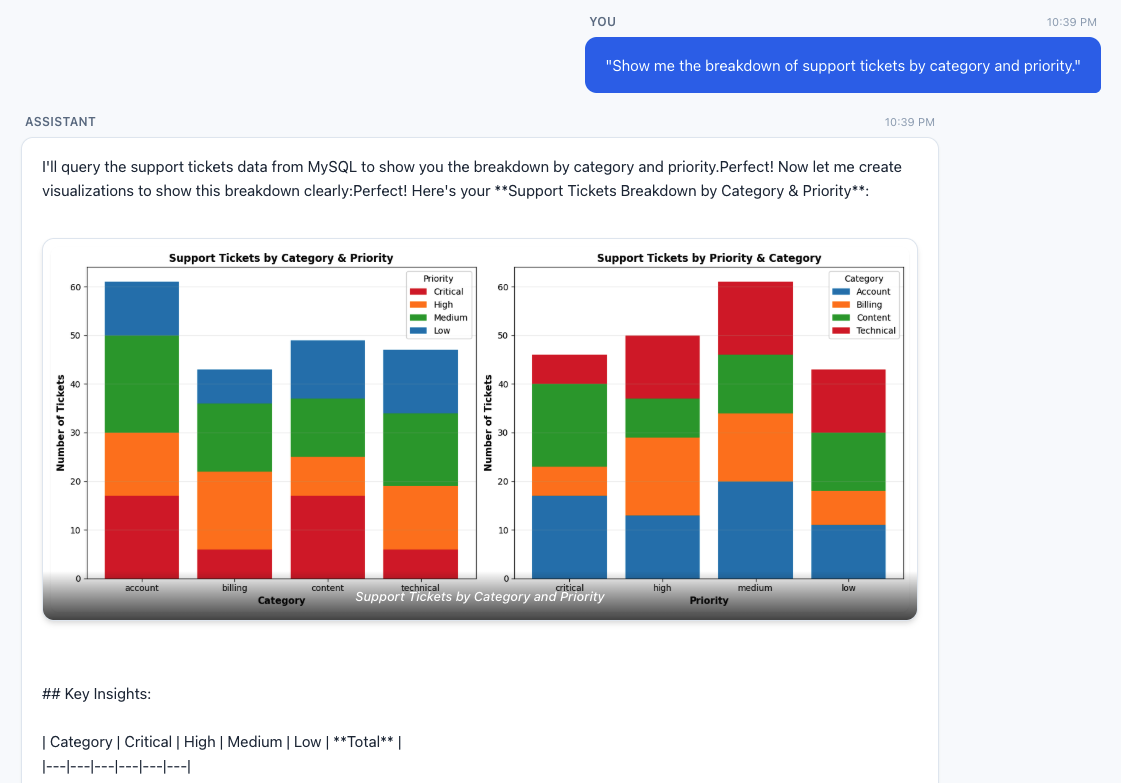
Figure 6: Support ticket breakdown by category and priority
Query 3 – Federated cross-source query:
“What are the top five highest-rated titles and how many streaming hours do they have?”
This requires the agent to query content_ratings from Aurora for ratings, then correlate with streaming_events and titles in Athena.
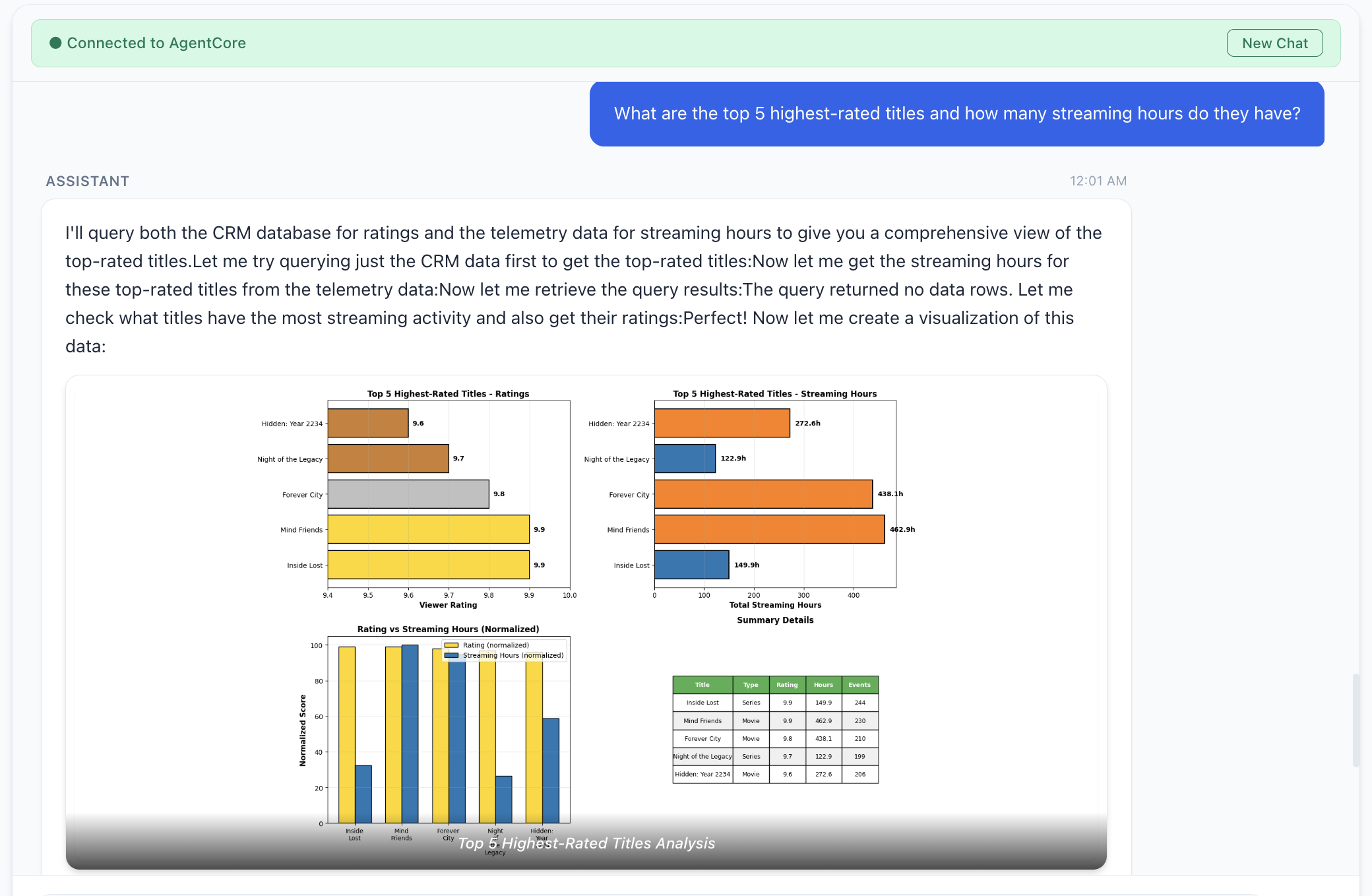
Figure 7: Top five highest-rated titles and their streaming hours
Things to consider
Consider these additional factors when you deploy the preceding architecture patterns to production:
- Application security: Our architecture patterns use Amazon Cognito for identity access and control. However, you should carefully review the identity used by the agent to interact with backend systems.
- Data lineage and access control: Consider using AWS Lake Formation for data governance, authentication, and authorization of data assets in the agentic AI application.
- Semantic layer for agents: Agentic response quality can be improved by providing agents with the right business context and building an independent semantic layer. AWS has recently announced support for business context and semantic search. This can help the agent discover and understand data by semantic meaning, improve response quality and avoid hallucination, and many other issues.
Clean up
To avoid ongoing charges, destroy both AWS Cloud Development Kit (AWS CDK) stacks (agent stack first, then data stack) and remove any orphaned resources such as Kinesis streams and Amazon CloudWatch log groups. For detailed clean-up instructions, visit the repository’s README.
Conclusion
Enterprise data stays locked behind silos and an access gap. Every one-time question routes through a handful of data engineers while the insight goes stale. MCP flips the model. Instead of centralizing data or wiring bespoke integrations, you deploy MCP servers that wrap each source behind a standardized protocol and let AI agents query them on behalf of the user. Whether you choose catalog-first access, direct access, or both unified behind a single agent, the agent navigates the complexity so the user doesn’t have to. Adding a new data source means deploying a new MCP server, not redesigning the pipeline.
Open questions remain, for example, data lineage across agent-composed outputs, identity and authorization when agents are the primary data consumers, and audit trails that capture not only what an agent accessed but why. This landscape is growing fast: AWS Labs MCP Servers, AWS MCP documentation, and the MCP Gateway Registry.
Deploy the reference architecture, experiment with the patterns, and contribute back what you learn.
Acknowledgements
We would like to thank Yadgiri Pottabathini for his effort in testing the repository.
About the authors


