
Google sent an email to some searchers notifying them that changes are coming to how to control your saved history and personalization within Google Search. Google added that “You’ll see this change in your Google Account in the next few days.”
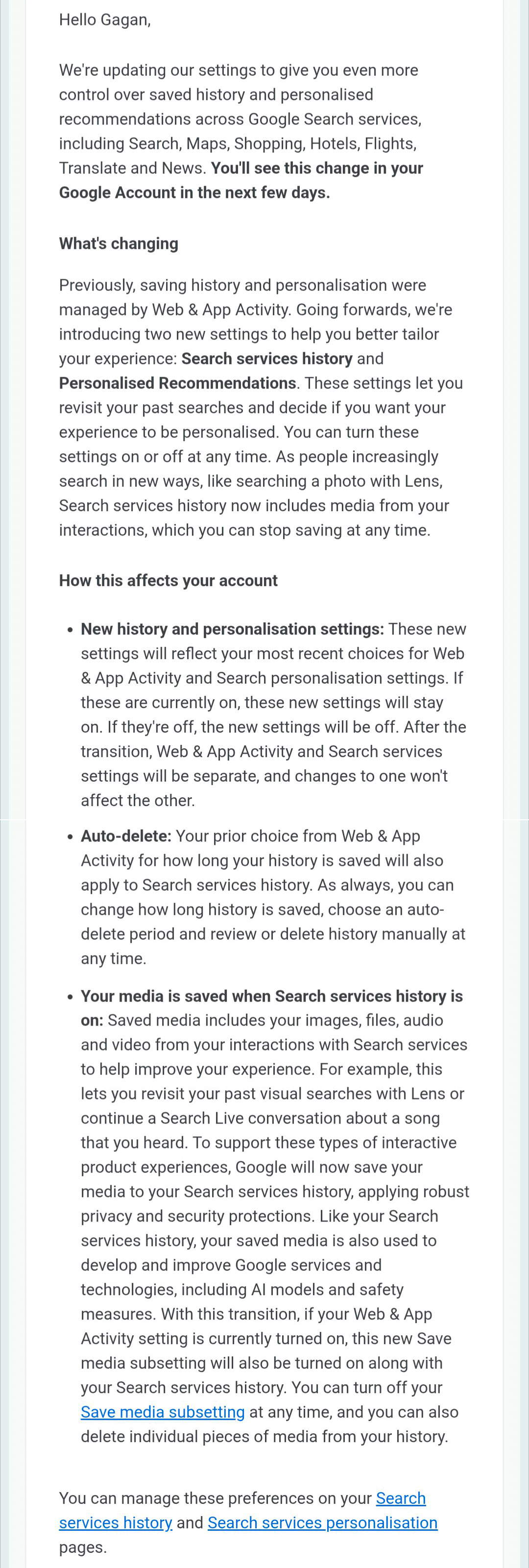
Gagan Ghotra posted the email he received on X, I did not get this email yet, which reads:
Previously, saving history and personalization were managed by Web & App Activity. Going forward, we’re introducing two new settings to help you better tailor your experience: Search services history and Personalized Recommendations. These settings let you revisit your past searches and decide if you want your experience to be personalized. You can turn these settings on or off at any time.
How this affects your account
- New history and personalization settings: These new settings will reflect your most recent choices for Web & App Activity and Search personalization settings. If these are currently on, these new settings will stay on. If they’re off, the new settings will be off. After the transition, Web & App Activity and Search services settings will be separate, and changes to one won’t affect the other.
- Auto-delete: Your prior choice from Web & App Activity for how long your history is saved will also apply to Search services history. As always, you can change how long history is saved, choose an auto-delete period and review or delete history manually at any time.
- Your media is saved when Search services history is on: Saved media includes your images, files, audio and video from your interactions with Search services to help improve your experience. For example, this lets you revisit your past visual searches with Lens or continue a Search Live conversation about a song that you heard. To support these types of interactive product experiences, Google will now save your media to your Search services history, applying robust privacy and security protections. Like your Search services history, your saved media is also used to develop and improve Google services and technologies, including Al models and safety measures. With this transition, if your Web & App Activity setting is currently turned on, this new Save media subsetting will also be turned on along with your Search services history. You can turn off your Save media subsetting at any time, and you can also delete individual pieces of media from your history.
Here is a screenshot of the email:
Maybe it is rolling out now?
From what I’ve seen in the account personalization settings, it’s the menus and the ability to turn off certain account personalizations that have changed.https://t.co/LZCPNyUPyc
It wasn’t called that here: Search Services Personalization
See screenshots pic.twitter.com/wswLIsyHTx— Damien Andell (@AndellDam) June 9, 2026
Forum discussion at X.


