For people who access most of their music using a phone or tablet — and that’s a lot of us these days — it may make more sense to build an open system around the wireless protocol already incorporated into your mobile device, such as AirPlay or Google Cast.
This approach allows for much greater flexibility in product selection and doesn’t tie you exclusively to one hardware manufacturer. It also means you have one less app to worry about, since you’ll likely use the primary music or podcast app on your phone or tablet to control the experience.
But you have to put more thought into the components you purchase because they need to be compatible with whatever wireless protocol you’re using to broadcast your music and synchronize it between devices.
What does this look like in practice? How do you stream to those speakers? How do you add and remove zones of audio and control their volumes individually? That depends on which smartphone or tablet you use as your music source.
The biggest potential downside to the open approach is that you won’t be able to ditch iOS for Android (or vice versa) as easily down the road. At least not without giving up a lot of the multiroom audio functionality you’ve built. If that concerns you, there are other methods for building an open system, and we’ll talk about that, too.
For iOS users


Top pick
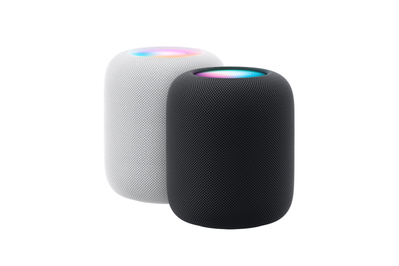
This speaker sounds good and responds well to voice commands, but it’s suited only for iOS users, and its connection options are limited.
If you do most of your music listening via iPhone or iPad, using AirPlay for multiroom audio is pretty much a no-brainer. (The same is true if you store all your music on a Mac.) As such, you should shop for wireless speakers and other audio products that support the AirPlay 2 communication protocol.
There are a lot of AirPlay-compatible devices. In fact, most of the speakers we recommend in this article have AirPlay support. AirPlay is also integrated into most network-capable AV receivers, as well as lots of TVs, soundbars, and media streamers.
So, as mentioned previously, you could have a different brand of speaker, soundbar, stereo system, or AV receiver in every room and still enjoy a seamless and wholly customizable listening experience throughout the home.
AirPlay has evolved into a great multiroom audio platform. While AirPlay was originally a one-to-one protocol — similar to Bluetooth, except that it relied on Wi-Fi — since the advent of AirPlay 2 in 2018, the system has continued to improve in terms of multiroom functionality, to the point where we find it to be the easiest to use, the most seamless, and the most reliable of all the multiroom protocols we’ve tested.
Say you’re listening to a song in Qobuz or Apple Music, or perhaps the latest episode of The Wirecutter Show or Audio Unleashed in the Podcast app, and you decide you’d like to broadcast it to one or more AirPlay-compatible speakers or devices around the home. You’ll see an AirPlay logo somewhere near the bottom of the app that allows you to bring up a list of such devices, and engaging them is as simple as checking the radio button beside the device(s) of interest. Or, conversely, you could swipe down from the top-right corner of the screen to open the iOS Control Center and select or add zones there.
Via either route, if you only select one speaker or device, your iPhone will control its volume directly. Add a second, though, and you’ll start to see individual volume sliders for each speaker. It’s simple, elegant, and intuitive, and there’s very little to figure out. You don’t have to remember which screen or tab that functionality is buried under in a separate app. It simply works.
When it comes to picking the best speakers for your AirPlay system, it largely depends on your needs and budget. Despite the fact that we’ve soured on Sonos as an ecosystem, the company still makes great speakers that all support AirPlay. You’d only have to dip into the Sonos app for initial setup and perhaps occasional maintenance.
The Era 100 or 300, for example, would be great additions to any AirPlay system in rooms where speakers don’t normally sound very good — like, for example, a bathroom or kitchen. The company’s Trueplay tuning functionality, its proprietary form of room correction, can tame a harsh-sounding space in just a few minutes by having you wave your phone around in the air while it listens to test tones.
For a living room, something like the Bluesound Pulse M might be a good fit due to its design, its elegant touch-sensitive controls, and its inherently more-refined sound. You’ll still need to dip into the BluOS app to toggle certain features you may want, but other than that, the Pulse M functions just like any other AirPlay-compatible device.
For rooms where you want Siri voice control without having to talk to your iPhone or Apple Watch, we really like the HomePod, even if it’s expensive for the sound quality and connectivity it delivers.
Using AirPlay as your multiroom wireless system also opens up the possibility of adding speakers from luxury brands that don’t have multiroom ecosystems of their own, such as KEF, Bang & Olufsen, Bowers & Wilkins, and more.
And as of the release of iOS 18, AirPlay now features support for Dolby Atmos spatial audio. At the time of this writing, the only compatible device we can confirm is the HomePod, but the company teases the addition of other compatible third-party devices at some undetermined point. We don’t know for sure that the Sonos Era 300 will be one of those compatible devices, but we’d be surprised if it isn’t.
You’re pretty much married to the iOS ecosystem. While you aren’t locked to a single company, you are locked to Apple’s protocol. If you decide to switch to an Android phone or tablet, it will hugely affect your system’s capabilities and user-friendliness.
You’ll also miss out on a feature of some closed multiroom wireless music systems: the ability to easily stream audio from physical source devices around the home. That could be a consideration if you want to share the output of your turntable to multiple zones at once. There are workarounds, such as the AirChord 2 app, but that requires third-party dongles to work and we haven’t tested it yet, so proceed with caution.
For Android users


Top pick
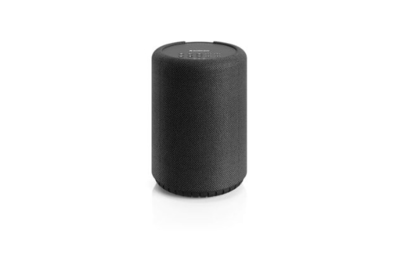
This versatile tabletop speaker supports multiple Wi-Fi protocols, sounds good, and has top-panel buttons and an auxiliary input.
Like AirPlay, Google’s Cast communication protocol is integrated into a lot of products from different manufacturers, including TVs, projectors, soundbars, and tabletop speakers. Look for products with Chromecast built in.
Many of the speakers we recommend elsewhere in this article have Google Cast built in, and we also like the Audio Pro A10 MkII W. This versatile tabletop speaker supports Google Cast, AirPlay, Bluetooth, and Linkplay (more on that below), and it has an auxiliary input to physically connect an audio player. We appreciate its inclusion of top-panel buttons for play/pause, volume, power, source, and Bluetooth, plus four presets to directly launch your favorite streaming channels. But it does not have built-in voice control.
The sound quality is good overall. Our listening panel found this speaker to be a bit brighter than the Denon and WiiM speakers we tested at the same time, with more emphasis on the higher frequencies — which may or may not be a plus depending on your personal preference.
While Google Cast works well for one-to-one wireless transmission, it’s not as seamless and intuitive for multiroom audio as AirPlay is. We think Android users will be best served by using the Google Home app only for the initial setup of speakers and the creation of speaker groups or zones. Then they should just employ the Cast technology directly through their favorite music streaming apps.
That could mean using Spotify Connect or Tidal Connect. Both protocols allow you to stream music from the Spotify or Tidal app directly to a device, effectively making your mobile device a remote control. And although neither supports multiroom functionality directly, we found that both apps recognized speaker groups that we set up through Google Home. That’s also true of the Cast buttons within Qobuz and even the Apple Music app on Android devices.
This approach was more intuitive, less fiddly, and simpler overall. It’s still less refined and less customizable than AirPlay, since you have to rely on preset speaker groups created in Google Home. You might, for example, create a Party group that includes speakers in areas where you regularly entertain, a Morning group for speakers in rooms you occupy during your morning routine, etc. But you can’t change which speakers are playing in the group without stopping playback completely and choosing a new group. Having some form of voice control in the mix — using, perhaps, the Nest Audio speakers — makes it much easier to navigate.
What’s more, you won’t be able to run concurrent streams in different zones from the same streaming service, which is something that a closed system like Sonos will allow you to do.
For people who want a more open ecosystem that isn’t tied to their phone’s OS


Top pick
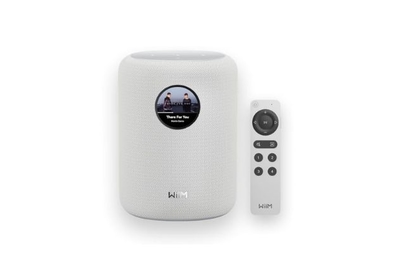
This tabletop Wi-Fi speaker sounds great and has a helpful touchscreen display and remote control. It supports Linkplay, Google Cast, and Bluetooth, but not AirPlay.
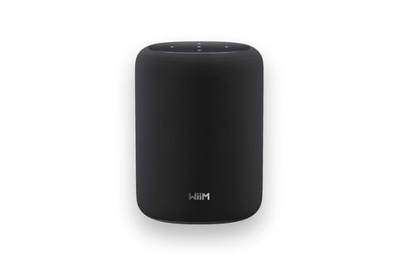
This tabletop speaker sounds just as good as the pricier WiiM Sound, but it omits the touchscreen display and remote control.
What if you don’t want to lock yourself into either iOS or Android, but you don’t want a closed multiroom music system, either? There are ways to build an open but platform-agnostic multiroom system.
One popular alternative that we’ve tested comes in the form of an operating system called Linkplay. This system comes from the company that also owns the WiiM brand of electronics. Linkplay isn’t exclusive to WiiM, though. It’s also found in audio components from Arylic, OSD Audio, Andover, and many others. Each company pretty much uses its own reskinned version of the Linkplay app for iOS or Android.
Many of these products are music streamers or amplifiers with streaming capabilities built in. Most of them will communicate with one another to form an open multiroom audio system. What else you need to buy will depend on the product, of course. With the WiiM Amp — which we recommend in our guide to affordable stereo amplifiers — you’ll need a pair of passive speakers, perhaps one of our favorite bookshelf speakers.
We also recommend the WiiM Pro Plus in our guide to music streamers, and for that you’d need to add your own amp and speakers or a pair of powered speakers.
This approach is good if you already have speakers or stereo systems that you want to integrate into a multiroom system. Not only does this path end up being a more flexible solution, but many of these Linkplay products also have Google Cast and/or AirPlay built in, adding some nice redundancy. Also, many of these products fall on the more affordable end of the price spectrum.
The number of compatible tabletop speakers is growing but still somewhat limited. If your heart is set on using all-in-one tabletop speakers, we ranked the WiiM Sound and WiiM Sound Lite very highly against the competition, regardless of price. Both fared well in sound quality, in part due to WiiM’s excellent RoomFit room-tuning software, which adjusts the sound to suit the room. Both have auxiliary inputs to connect audio sources, as well as LAN ports for a wired network connection. The WiiM Sound speaker adds a touchscreen display and a USB-C–rechargeable remote control.
The remote is such an unusual inclusion that we questioned its necessity at first, but it turned out to be a handy way to access a feature that’s included with many multiroom wireless speaker systems: presets that allow you to jump straight to a preferred playlist or radio station (or even a connected device).
The value proposition of the WiiM Sound Lite is interesting. As best we can tell, it’s exactly the same speaker as the WiiM Sound, just without the touchscreen and physical remote control. And it usually costs about $70 less.
That makes the Lite version a great single-speaker option if you’re uninterested in the added features. Or, since both models also support stereo pairing, the Lite version makes a great second speaker to get the sound quality of a traditional stereo system without paying for the redundancy of two touchscreens and two remotes.
The WiiM Home app is pretty easy and intuitive to use. The app has a clean layout that makes it easy to browse streaming services, set up favorite channels, add new devices, and launch playback to multiple Linkplay devices on your network. It even works well with turntable integration, which isn’t a given for these types of systems.
It’s not as intuitive as AirPlay or a closed system when it comes to setting up audio zones and moving music around the house, but since many Linkplay-compatible devices also support AirPlay or Google Cast, you can move seamlessly between wireless protocols depending on your needs.
The openness of the Linkplay ecosystem doesn’t always go in both directions. In previous tests, we really liked Audio Pro’s A10 MKII WiiM Edition speaker, both for its flexibility and its sound quality. So we made a point of testing the newer A10 MkII W — which, despite the “W,” has no WiiM affiliation. We were curious how the dropping of the WiiM partnership might affect the speaker’s compatibility within the Linkplay ecosystem. The Audio Pro app looks like a reskinned version of the WiiM Home app; however, whereas the WiiM Home app found the A10 MkII W and added it to the list of available speakers, we couldn’t get the Audio Pro app to add any of the WiiM products we tested.
So just be aware that, with this approach, two-way compatibility between different Linkplay components is not guaranteed.
This article was edited by Adrienne Maxwell and Grant Clauser.


