
Do you want to start a blog or online store? Then you’ll need a website. But did you know you’ll also need web hosting to get your website online? There are many aspects to web hosting, and you might not be sure what it entails. You have to choose a host, a hosting type, and many other things. That’s why we wrote this guide, to help you understand what it is and pick the right host for your site!
Key takeaways
- Web hosting makes your website accessible online, requiring you to choose a host and type of hosting.
- Decide between fully-hosted and self-hosted options based on your control and data ownership preferences.
- When picking a host, consider server location, storage space, audience size, and additional services offered.
- Understand the different types of hosting: shared, dedicated, and VPS hosting to find what suits your needs.
- Specialized hosting plans exist for WordPress.org sites, which come optimized and may include support for security and updates.
What is web hosting?
Let’s start with the basics. Web hosting is a service that makes sure your website is accessible through the internet. The pages and files that your website consists of live on a server. Whenever someone visits your website, that server sends over the necessary ‘files’ to display your site to the site visitors. This server is owned by a web hosting company, and you can rent space to store your website files on a server that meets your needs. Without web hosting, your website simply can not exist.
It’s also good to know that, although it doesn’t have a direct effect, your choice of hosting impacts your SEO. Reliable hosting improves the security, speed and uptime of your website. All factors that tell search engines that your website is trustworthy and a good option to show to their users. Upgrading your hosting plan or switching to a new hosting company can therefore improve your site performance, just make sure to choose reliability and your website’s needs over low prices.
So, where do you start? By looking at web hosts or hosting companies. These companies provide servers and internet connectivity in a data center. In other words, they provide space for your website’s data, so it can exist and other people can find it.
Fully-hosted versus self-hosted
The first choice you have to make when picking the right host for your site is whether you want to create a fully-hosted or self-hosted website. The difference is pretty self-explanatory. Fully hosted means every site on the platform is hosted on its own servers. These companies take care of all the hosting stuff for you, such as Shopify and WordPress.com.
Self-hosted, on the other hand, means you’ll have to arrange hosting yourself. A good example is WordPress.org. Now, you might be thinking: why would I want to do everything myself? And while it’s true that self-hosting is extra work, it also means you own all the data yourself. Plus, you get access to the full codebase and can choose your own hosting company.
How to choose a hosting company
These days, there are thousands of companies to choose from. They all have their own benefits and hosting plans. So, how do you pick the right host for your site? What should you focus on? First, it’s important to take a couple of things into account.
Server location
As those real estate TV shows always say: location is everything. It’s not necessarily everything when it comes to hosting, but it is important. Where your host’s servers are located is an important factor in your site’s speed. Why? The smaller the distance between your audience and your server, the faster your website is. For example, if your audience is located in the US but your host is based on the other side of the world, that could slow down your site for visitors, which is something you want to avoid.
Storage space
Second, consider what kind of website you want to create. This impacts how much storage space you need to acquire. For example, a small blog needs far fewer resources than a big online shop with thousands of products. Consider how many pages your site will have and how much content it will have. If you already know you want to build a large website with many large images and videos, you’ll need to look at hosting plans with more storage space.
How big is your audience?
We know this is a hard one to answer. But you might already have an idea of the number of page views you want to reach. Take this number into account when deciding on a hosting company and plan. Because every time someone views a page on your site, it adds to the amount of bandwidth you use. In other words, all the texts and images on that page need to be downloaded onto each visitor’s computer before they can be displayed in their web browser.
Other services offered
A final consideration is the need for other services related to your website. Many hosting companies offer additional services, such as email hosting, SSL certificates, automated website backups, and website builders. The website plan you choose should provide the services you need to get you up and running, preferably beyond basic hosting. For example, choosing a hosting plan that comes with a website builder helps you create your website right away.
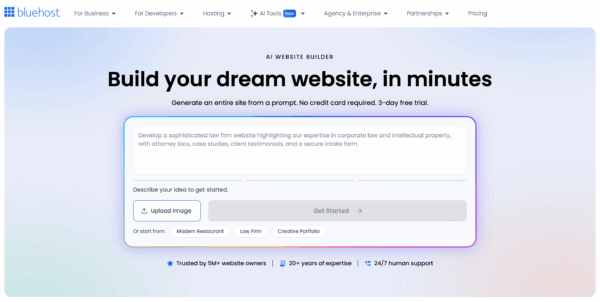
Bluehost has recently launched an AI Website Builder. You answer a few questions, and it generates your website for you. It lets you make changes through chat, and you see changes in real time, no coding or design skills needed. Just describe what you want. Hosting and a domain are included, and human support is available if needed. Ideal if you’re setting up a website for your small business and want it to go live quickly. If your website is a bit more complex, for example, when you want to create a membership portal, this might not be the best option.
In addition to server location, storage space, and the number of visitors, there are tons of other factors that determine your ideal hosting company. That’s why we compiled a couple of additional questions you could ask yourself (and a hosting company) when picking the right host for your site.
- Do I need help or support setting things up?
- Does the company offer live chat and phone support, and do they respond quickly?
- What happens if my site gets hacked or goes down in the middle of the night? Will they help?
- What is my budget?
- Do I need the ability to add more websites?
- Does this hosting company have good reviews?
- And, for higher-end packages, what type of hardware, like SSD storage, CPUs, and memory chips, do I need for my site?
Different types of hosting
Finally, let’s look at the different types of hosting. In this guide, we’ll focus on the three most common ones: shared hosting, dedicated hosting, and VPS hosting. But there are lots of other options out there.
Shared hosting
Shared hosting means you share the same server resources with multiple customers. These server resources determine how much space, bandwidth, mailboxes, etc., you have available. It also means there will be resource limits on each hosting package. Don’t worry, sharing resources doesn’t mean other customers can see or access your data. Shared hosting is probably the cheapest option, but it might not be the best choice if you expect to need a lot of server space and bandwidth.
Dedicated hosting
Dedicated hosting does exactly what it says on the tin. You’ll get a dedicated, fully allocated hardware server for your use only. This means you’re not sharing the server with other customers. Instead, you’ll have your own personal server with its own processors, hard disks, and memory. This makes dedicated hosting an interesting choice for bigger sites, such as large online shops or corporate sites.
VPS hosting
VPS hosting stands for Virtual Private Server. A VPS is a virtual machine on a physical server that is divided into different sections. You get your own space on this server, with access to a certain amount of resources, like memory and processors. Unlike with shared hosting, these resources are for your use only. Additionally, you can optimize your VPS server to your own preferences. For example, you can determine which software runs on it and adjust the settings to your liking, just like with dedicated hosting.
Hosting plans for WordPress.org sites
If you’re planning to create a WordPress.org website, then we’ve got good news for you. There are tons of hosting companies that offer hosting plans specifically for WordPress.org sites. The benefit? The plans are completely optimized for WordPress-based websites. Usually, they already have WordPress installed, so you don’t have to take care of that anymore. Sometimes they also offer security and update services. This means you don’t have to worry about your site’s security or updating WordPress and the plugins you have installed.
To help you out, here is a list of WordPress hosting companies.
Conclusion
Now you know all the basics about hosting companies, hosting plans, and the different types of hosting. Still, it’s good to consider which factors are important to you before choosing a hosting company and plan. Because your site’s hosting can impact factors like site speed and the amount of content you can host.
If you want more information about hosting, we recommend checking out our Technical SEO course. The course dives into considerations when choosing a host, as well as practical tips for making your site easy for search engines to find. And much more!
FAQ
It’s possible, but it’s going to depend on your setup and where you’re moving to. Luckily, most hosts offer great support. Typically, they’ll guide you through all the processes you need to go through. These processes are, for example, moving your files, your database, and maybe some configuration info.
When you’re choosing your host, it’s worth getting in touch with their support team to see what kinds of services they offer and how much they can help you with that.
Oh, that’s tricky! There are lots of tools on the internet to help you pick a hosting provider, but it’s a bit of a minefield. We recommend checking out yoast.com/hosting.
But really, do your own research. Get a feel for what your budget is, what kind of features you might need, and talk to the support people. Many of these companies and websites also offer live chat.
It’s good that you’re thinking about bandwidth beforehand, but don’t let it dictate your choice. Instead, research how much different hosting companies charge for their different packages, and how the prices change as you need to scale. Maybe you can start off small and upgrade later. Again, shop around, review pricing and packages, and talk to support staff.



