


Best for…
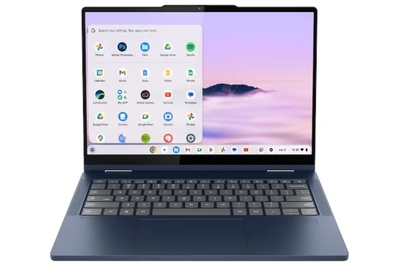
This Chromebook has a 360-degree hinge that allows you to flip the touchscreen around to use it as a tablet or in any mode in between. It is fast and has long battery life, but it’s expensive and a bit heavy.
Recommended configuration
| Processor: | Intel Core 3 N55 | Screen: | 14-inch 1920×1200 touch |
| Memory: | 8 GB | Weight: | 3.31 pounds |
| Storage: | 128 GB or 256 GB UFS | Tested battery life: | 11 hours |
If you want a Chromebook with a 360-degree hinge, get the Lenovo Chromebook Plus 2-in-1 14″, either the (83LN0004US) or the (83LN0006US) model. Like our top pick, it offers fast performance, a responsive keyboard, and a reliable trackpad, plus it has a taller aspect-ratio touchscreen, longer battery life, and a fingerprint reader. But it’s expensive when it’s not on sale — Lenovo raised the price from $580 to $680 — and we wish it were lighter to make it more convenient to use in tablet mode.
The battery will last through a full day of work or classes. In our testing, the Chromebook Plus 2-in-1 14″ lasted 11 hours on a charge — about an hour longer than our top pick, and long enough for most people’s needs.
It has a tall, glossy touchscreen and surprisingly good speakers. The 14-inch 1920×1200 touchscreen has a taller 16:10 aspect ratio that’s particularly convenient for browsing, though the glossy surface is reflective. In addition, we found the upward-facing speakers to be unexpectedly competent, and much better than our top pick’s speakers.
You can use it as a tablet, but it’s heavy. The Chromebook Plus 2-in-1 14″ has a 360-degree hinge, so you can flip the screen around and use it in tablet or tent mode. But due to its weight, this Chromebook is difficult to hold in tablet mode. I was able to open the lid with one hand, but the tight hinge made the action more difficult than it should have been.
Ruthie Darling/NYT Wirecutter
Like our top pick, the Chromebook Plus 2-in-1 14″ has a convenient mix of ports, including a microSD slot that our top pick lacks. This model also has a fingerprint reader on the palmrest for convenient logins, and it has guaranteed update support through June 2035.
Flaws but not dealbreakers
It’s expensive. In previous years, mid-range Chromebooks typically cost between $400 and $600, and a price tag of more than $600 was a marker of a more premium Chromebook. But Lenovo raised the price on this model from $580 to $680, likely as a result of AI-related component price increases. It’s a great option if you spot it on sale, but its full price is quite high for a mid-range Chromebook.
It’s a bit heavy for a 14-inch laptop, and for a tablet, it’s very heavy. The Chromebook Plus 2-in-1 14″ is about the same size as our top pick, so it’s compact enough to use on the go. But at 3.31 pounds, it’s especially heavy to hold in tablet mode.
Its 5-megapixel webcam is fine, but it could be better. Despite being higher resolution than that of our top pick, the webcam produces a similar image — it’s passable, without any weird tints or unflattering shadows, but it’s not superb. We appreciate that it has a convenient privacy shutter to block it when you’re not using it.


