


Top pick
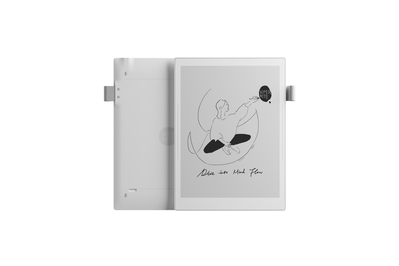
This E Ink tablet covers all the bases, offering a smooth writing feel, a sophisticated notes app, a built-in Kindle app, and a robust drawing app. The stylus, sold separately, starts at $65.
Ratta’s 10.7-inch Supernote A5 X2 Manta offers the best combination of writing feel, drawing tools, and e-reader capabilities. It’s also one of the most versatile and customizable notebooks we tested.
It has a pleasant pen-on-notepad feel — once you get used to it. The screen has some give, like a phone with several screen-protector layers on its display. Some of our testers described the writing experience as “gummy” when they wrote heavy-handedly.
But in our experience, once you get accustomed to the friction, working on the Manta feels intuitive and comfortable. Testers enjoyed writing on this digital notebook when they used a lighter touch, equating it to writing with a felt-tipped pen. Only the reMarkable notebooks we tested, which have a more textured surface that more closely resembles paper, rivaled the Manta’s writing experience.
The stylus mirrors a true writing experience. The pen options, starting at $65, might also convince you that you’re writing with a real pen. The three choices, including one made by Lamy, look and feel like fancy pens and come in several sleeve colors. Ratta says the ceramic nib on the pens never needs replacing — though we will be long-term testing to find out.
You can create your own stylus. It’s the only digital notebook we’ve found that lets you retrofit a traditional pen for use on the digital page. To do so, you simply buy a $49 ceramic nib refill and slide it into your pen body of choice. Many (but not all) pens are compatible; we were able to easily swap it into one of our pen picks, the Pilot Precise V5 RT.
The writing features are robust. More than any other digital notebook we tested, the Manta provides ways to make your notes more searchable. You can link to other notebooks or to external websites within a note, create a table of contents, or add keywords for searching within your notebooks. Searching within handwritten notes works well — a critical feature when you have hundreds of pages of notes. Unlike with most competing digital notebooks, you can import your own templates into the Manta, which is handy if you have a particular layout you use frequently for, say, meeting notes.
The Kindle and drawing apps are useful enough. The Manta’s built-in Kindle app works just like Amazon’s Kindle app for mobile devices. But unlike reading on a dedicated Kindle device, you might notice some laggy page turns, and you can’t annotate directly on ebook pages.
The Atelier drawing app boasts multiple drawing tools, 16 levels of grayscale shades, a zoom function, and other features lacking in the writing-focused apps of similar devices. During testing, the app made doodling while waiting in doctor’s offices more enjoyable.
Sidebars and gestures offer helpful shortcuts. The fully featured Manta has shortcuts to prevent you from getting lost in menus. On the left and right sides of the bezel are bars that you can tap or swipe to access recent or pinned documents, open apps like email and Kindle, or use editing tools like the lasso eraser.
Its syncing and sharing options are more flexible than our other picks. The Manta can create and export to Word document and text formats or export to PDF or PNG files. The reMarkable Paper Pure can export to PDF, PNG, SVG, or plain text; the Kindle Scribe can export notebooks as PDF or converted TXT files.
And unlike with the reMarkable Paper Pure, you can automatically sync files to Dropbox, Google Drive, or OneDrive, with the Manta so you’re not stuck in one ecosystem — and you don’t need a subscription.
Its modular design makes upgrading a snap. The Manta features a modular design, with a user-replaceable battery, motherboard, and a microSD card slot to expand the storage capacity from an already generous 32 GB to up to 2 TB. We were able to easily swap out the battery during testing. The Amazon Kindle Scribe (2025), reMarkable Paper Pro, and reMarkable Paper Pro Move — which aren’t modular — max out at 64 GB of storage capacity.
Flaws but not dealbreakers
It does not have built-in lighting. This is, one might say, by design, to further the immersive paperlike experience. But it also means it doesn’t work well in dimly lit situations.
The sidebars aren’t always responsive. It can take a few swipes or taps for the Manta to register your input.
The calendar and email apps could be better. You might not even use these apps if your goal is distraction-free writing, but if you do want these features, they could use a bit more work before they’re as good as the apps on your phone. The email app’s font size is nonadjustable and very small, for example, and calendar events require typing rather than writing.


