


Top pick
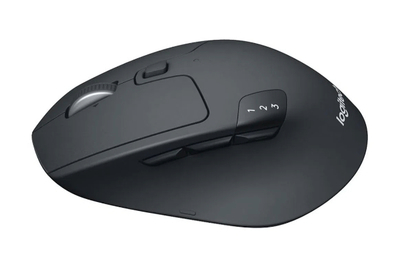
The M720 Triathlon is comfortable for people with a wide range of hand sizes, and it has six programmable buttons and a long battery life.
The Logitech M720 Triathlon Multi-Device has been our top pick since 2016 because, unlike most wireless mice we’ve tested, it’s comfortable for people with a variety of hand sizes and grip styles. The M720 Triathlon can pair with — and quickly switch between — three devices via Bluetooth, or it can connect with its included USB dongle. It also has six programmable buttons that you can customize using the Logi Options+ software, and it has a scroll wheel that toggles between ratcheted and smooth scrolling. Logitech claims that the Triathlon’s battery can last for two years.
The M720 Triathlon is a comfortable size for most hand sizes and grip styles. In all of our panel tests over the years, our panelists of all hand sizes have rated the M720 Triathlon among the most comfortable. Our panelists enjoyed the M720 Triathlon’s supportive back arch — which measures about 2 inches and slopes down toward the front of the mouse — and its grippy, non-sweaty surface.
It has a plethora of easy-to-reach buttons. Alongside an application switcher button and a Bluetooth device toggle, the M720 Triathlon has six programmable buttons that can be customized using the Logi Options+ software. (You can also track battery life using Options+.) If you don’t need the extra customization, though, the M720 Triathlon still works without the software.


The customizable Actions Ring is super useful. Within Logi Options+, you can customize a ring of shortcuts to your most frequently used actions and set that ring to any button you like. The Actions Ring supports eight shortcuts — including volume adjustment, copy and paste, launching apps and websites, and taking screenshots — but you can also build folders of up to nine sub-bubbles for a total of 72 shortcuts. Options+ also supports app-specific shortcuts for Photoshop, Lightroom, and Premiere Pro. I’ve never found similar features like Gestures or Smart Actions particularly useful, but I used the Actions Ring so much that I was sad to swap back to a mouse that didn’t have it.


With both dongle and Bluetooth support, the M720 Triathlon will work for any setup. Our pick comes with a 2.4 GHz wireless Unifying Receiver, and it can also pair with up to three devices via Bluetooth. You can also store its USB dongle in the bottom of the Triathlon when you’re not using it.
The M720 Triathlon’s battery lasts a very long time. Logitech claims that the M720 Triathlon’s single AA battery will last for two years. Although we can’t precisely test that estimate, long-term testing by several Wirecutter staffers has indicated that this estimate is accurate. We also like that the AA battery is easy to replace when it wears out.
Flaws but not dealbreakers
Logitech’s Options+ software can be confusing and unintuitive. Many of our testers struggled to remap buttons and change the pointer speed using the Options+ software — it’s very easy to end up trapped in the app settings menu, rather than in the mouse settings.
Some panel testers disliked this mouse’s click sound. One tester said the M720 would be her favorite if it weren’t for how loud it was. Other testers, however, loved the M720’s crisp auditory feedback. If you prefer a silent mouse, consider the Logitech M650 or M650L instead.
Our pick is contoured for right-handed use, like most mice. If you need a left-handed mouse, we have recommendations in Other wireless mice worth considering.
The M720 Triathlon doesn’t work on glass. If you need a mouse that does, consider the Logitech MX Master 4, discussed below, or the Logitech MX Anywhere 3S.


