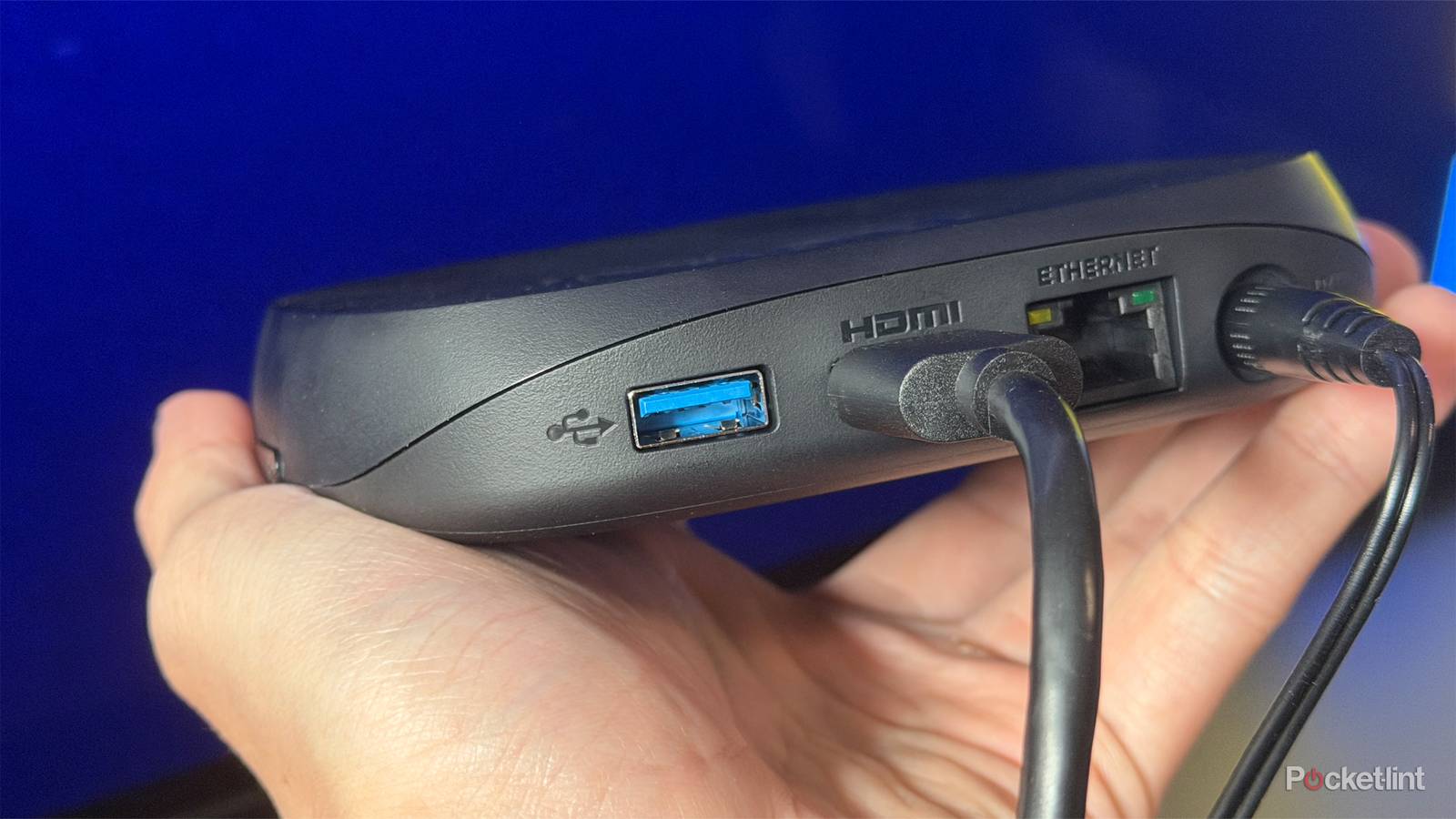
I want to preface this by saying that I quite like my Roku Ultra. When I first picked it up earlier this year, my main goal was simply to test out Roku OS. It had been a while since I’d last used a Roku device (the last one I owned was a Roku Premiere), and I wanted to see how Roku’s current experience compared to my Fire TV Stick 4K Max, which had long been my go-to streaming device.
A few months later, the Roku Ultra has become my de facto main streamer for several reasons. A big part of that is The Roku Channel and its extensive library of free content, but I’ve also come to appreciate features like its user-friendly interface, Headphone Mode through the Roku app, the lost-remote finder, and, perhaps surprisingly, the USB port on the back.
Because the Roku Ultra is a set-top streaming box rather than a compact streaming stick like the 4K Max, it includes both an Ethernet port and a USB port. Admittedly, I was pretty disappointed to discover that the Ethernet port is limited to 10/100 speeds rather than Gigabit Ethernet, so I didn’t even bother to use it. The USB port, on the other hand, initially seemed like a great addition. I was able to connect both a portable hard drive and an SSD to it, and use the Roku Media Player app to watch movies and TV shows I had stored on them.
That versatility got me thinking: if the Roku Ultra’s USB port could handle a 2TB SSD, surely it could handle the Gigabit USB-to-Ethernet adapter I have as well. Unfortunately, things didn’t go as I hoped.
You can’t upgrade the Ethernet port on the Roku Ultra
My USB-to-Ethernet adapter has met its match

Recently, I picked up a UGREEN USB-to-Ethernet adapter on Amazon for just $12. My plan was simple: use it with devices that are stuck with slower 10/100 Ethernet ports and upgrade them to get a faster wired connection that far exceeds 100 Mbps.
I’d already used the adapter with my LG TV’s USB 2.0 port, and it worked great, so I assumed I’d be able to do the same thing with my Roku Ultra since it also has a USB 2.0 port. Unfortunately, things didn’t go as planned.
When I plugged the adapter into the Roku Ultra and connected an Ethernet cable, it looked like everything was working. The adapter’s lights turned on, suggesting it was receiving power and detecting a connection. But when I opened the network settings on the Roku Ultra, it wouldn’t let me configure a wired network connection using the adapter.
Instead, my Roku Ultra kept telling me that the Ethernet port was empty — which was technically true, since I wasn’t using the device’s built-in Ethernet port. After doing a bit more digging, I came across a Roku support page covering Ethernet adapters and discovered the reason: the Roku Ultra simply doesn’t support them.
…while you can use your Roku Ultra’s USB port to connect external storage devices to watch local media, you can’t use it to increase its Ethernet speeds, which is a huge bummer.
What’s particularly puzzling is that Roku does support USB-to-Ethernet adapters on some of its other devices. According to the company, compatible models include the Roku Express, Roku Express 4K, and Roku Streambar. All of those devices are much older than the Roku Ultra, yet for some reason, they can use Ethernet adapters, while Roku’s flagship streaming box cannot.
So, unfortunately, while you can use your Roku Ultra’s USB port to connect external storage devices to watch local media, you can’t use it to increase its Ethernet speeds, which is a huge bummer.
It’s time for 10/100 Ethernet to become a thing of the past
Gigabit is ready and able

Without a doubt, one of my biggest frustrations with smart TVs and streaming devices is the continued reliance on 10/100 Ethernet ports when Gigabit Ethernet has been around for years, performs significantly better, and is already included on plenty of other devices.
For reference, a 10/100 Ethernet port tops out at 100 Mbps. That means even if you’re paying for much faster internet, your device can never exceed that speed over a wired connection. In fact, on many devices, Wi-Fi ends up being faster. On both my LG TV and Roku Ultra, I’ve found that Wi-Fi can easily deliver speeds double those of the built-in Ethernet port.
That’s why Gigabit USB-to-Ethernet adapters can be so useful. They let you bypass a device’s limited 10/100 Ethernet port and achieve much faster wired speeds without replacing the device entirely. There are some caveats, of course. Even if you buy a Gigabit Ethernet adapter, you won’t necessarily get full Gigabit speeds. Most smart TVs, for example, only have USB 2.0 ports, which don’t provide enough bandwidth to support a full 1 Gbps connection. In practice, speeds usually top out at around 420 Mbps, but that’s still more than four times faster than a standard 10/100 Ethernet port.
…faster networking simply makes devices feel more responsive. Apps download quicker, media libraries load faster, and navigating around the interface just feels snappier.
At this point, though, I think it’s long past time for 10/100 Ethernet to become a thing of the past. Gigabit Ethernet is already available on devices like the Google TV Streamer and Apple TV 4K, and it’s time for smart TV manufacturers and streaming device makers to make it the standard.
While 100 Mbps is technically enough for most streaming services, the higher bandwidth Gigabit offers can make a real difference for cloud gaming and streaming high-bitrate 4K content from a media server, like Plex or Jellyfin. Beyond that, faster networking simply makes devices feel more responsive. Apps download quicker, media libraries load faster, and navigating around the interface just feels snappier.
So my message to Roku, smart TV makers, and major players in streaming like Amazon is simple: stop cutting corners by using 10/100 Ethernet and finally make the jump to Gigabit.

- Dimensions
-
4.9 x 5.0 x 1.0 inches
- Connective Technology
-
Bluetooth® streaming, 802.11ax dual-band MIMO Wi-Fi 6 (2.4 GHz / 5 GHz), 10/100 Base-T Ethernet
- Brand
-
Roku


