
Ask any teacher what actually eats their time, and it’s rarely the hours in front of students. It’s everything that happens before and after: building a quiz from scratch on a Sunday night, formatting flashcards for that same unit the next day, then doing it all again for the next lesson.
Edcafe AI claims it can shrink that entire cycle into one workspace by handling planning, creating, saving, assigning, and assessing classroom materials instead of making you bounce between a slide tool, a quiz generator, a grading app, and a shared drive. I tested it to see whether that promise holds up.
In this Edcafe AI review, I’ll show you how it worked, where it impressed me, and where I think it still falls short. I’ll finish the article by comparing it to my top three alternatives (MagicSchool, Khanmigo, and Quizlet). By the end, you’ll know which tool is right for you.
Verdict
Edcafe AI combines lesson planning, quizzes, flashcards, chatbots, and grading in one classroom workspace. It saves teachers time and offers a simple way to plan, create, and assess lessons in one place.
Pros and Cons
- Combine lesson planning, quiz and flashcard creation, chatbots, and grading in one workspace instead of switching between several different apps.
- Turn a topic, an uploaded file, a webpage, or even a YouTube video into a quiz in seconds.
- Assign work to students through a QR code or link so they can get started without creating their own account.
- Build custom chatbots trained on your own teaching materials so they respond the way you would.
- Supports 40+ languages, which makes it especially useful for ESL and multilingual classrooms.
- An analytics dashboard and downloadable reports help you spot learning gaps without manually compiling spreadsheets.
- Gives teachers control by letting them review AI generated materials before they reach students.
- Built by Inknoe, an EdTech company with over a decade of classroom experience rather than a brand new startup with no track record.
- Complies with SOC 2, GDPR, FERPA, and COPPA, which can make it easier for schools to approve for use.
- Organizes everything into a searchable folder library, so materials can be reused and updated instead of rebuilt from scratch each term.
- Long term student progress tracking is more limited than what you would get with a dedicated LMS.
- While Edcafe has collaborative features, there’s no built in way for teachers to collaborate live when they plan or teach a class together.
- Presentation themes and design variety feel basic compared to dedicated slide tools.
- It’s a newer platform, so there’s less evidence from real classroom use than with older tools.
- AI generated materials still need teacher review and editing, so think of them as a starting point rather than a finished product.
What is Edcafe AI?
Edcafe AI is an AI platform made for K–12 teachers. Rather than acting as just another text generator, it supports the full teaching cycle: plan, create, save, assign, and assess, all in one workspace.
Who Built It
Edcafe AI comes from Inknoe, an EdTech company with over a decade of experience building classroom tools before Edcafe AI launched. That background matters since a lot of AI tools for teachers showed up practically overnight once generative AI took off, so it makes you wonder whether they understand how a real classroom actually runs. Inknoe’s history in education software gives Edcafe AI a bit more credibility than a tool built by a team with no classroom experience.
The Teaching Cycle: Plan, Create, Save, Assign, Assess
Many AI tools stop at content generation. You ask for a quiz, you get a quiz, and then you’re on your own to distribute it, collect responses, and grade it. Edcafe’s whole pitch is that content generation alone doesn’t support teaching as a complete process.
So instead, the platform is built around five stages:
- Teachers plan lessons aligned to their curriculum.
- Create interactive materials like quizzes, flashcards, chatbots, and slide decks.
- Save everything into an organized folder library.
- Assign the material to students through a link or QR code.
- Assess the results through a dashboard that tracks submissions and flags learning gaps.
Everything stays in one place, so you can easily find and reuse a lesson you created months ago.
Generic AI Chatbots vs Edcafe AI
The biggest difference between Edcafe AI and asking a general AI chatbot for a lesson plan is that Edcafe’s outputs are built to be used directly with students. A quiz generated in Edcafe AI already comes with a shareable link or QR code, automated grading, and a results dashboard. A quiz written by a general purpose chatbot is just text you still have to format, publish, and grade yourself.
Edcafe AI also includes classroom focused features like age appropriate content, teacher review of AI feedback, and FERPA and COPPA compliance. Those are not things you get from a general AI assistant, no matter how capable it is.
Who is Edcafe AI Best For?
Here’s who Edcafe AI is best for:
- Classroom teachers who want to stop switching between a slide tool, a quiz app, a grading tool, and a shared drive, and would rather manage all of it from one workspace.
- ESL and multilingual teachers who need materials available in 40+ languages.
- Teachers across different subjects (history, math, language arts, science, and more) who want to turn a topic, a document, or a webpage into a ready to use activity quickly.
- Schools and districts that need software with documented compliance around student data, including SOC 2, GDPR, FERPA, and COPPA.
- New teachers who do not yet have a personal bank of materials built up and need a faster way to produce classroom content.
- Teachers who want interactive tools like chatbots and quizzes rather than static worksheets or slide decks.
- Substitute teachers who need to generate usable materials on short notice.
Edcafe AI Key Features
Here are Edcafe AI’s key features:
- Lesson Plan Generator: Creates lesson plans aligned to your curriculum and grade level, which you can edit before saving to your library.
- Quiz Builder: Turns a topic, an uploaded file, a webpage link, or a YouTube video into a quiz, with support for up 40+ languages.
- Flashcard Generator: Creates study sets from your material so students can review key terms and concepts on their own.
- Custom Chatbots: Lets you build a chatbot trained on your teaching materials so students have a 24/7 teaching assistant.
- Reading Activities: Generates passages, vocabulary lists, and comprehension questions to support literacy and language learning.
- Assignment Grader: Grades student work automatically, with AI generated feedback that a teacher reviews before it’s sent back to the student.
- Slide Deck Generator: Builds presentations with images added based on your topic and grade level.
- Centralized Library: Stores every quiz, chatbot, flashcard set, and lesson plan in organized folders you can search and reuse.
- Analytics Dashboard: Tracks student submissions and engagement, and lets you pull performance insights in simple terms rather than digging through raw data.
- Assign Without Accounts: Students can access assigned work through a link or QR code without needing to create their own login.
How to Use Edcafe AI
Here’s how to use Edcafe AI to create a quiz in minutes and monitor student performance:
- Create an Account
- Create a New Activity
- Choose What to Create
- Choose Your Input Source
- Choose the Question Type & Number of Questions
- Generate the Questions
- Customize the Activity
- Save Your Quiz
- Assign to Students
- Generate a QR Code
- Monitor & Grade
Step 1: Create an Account
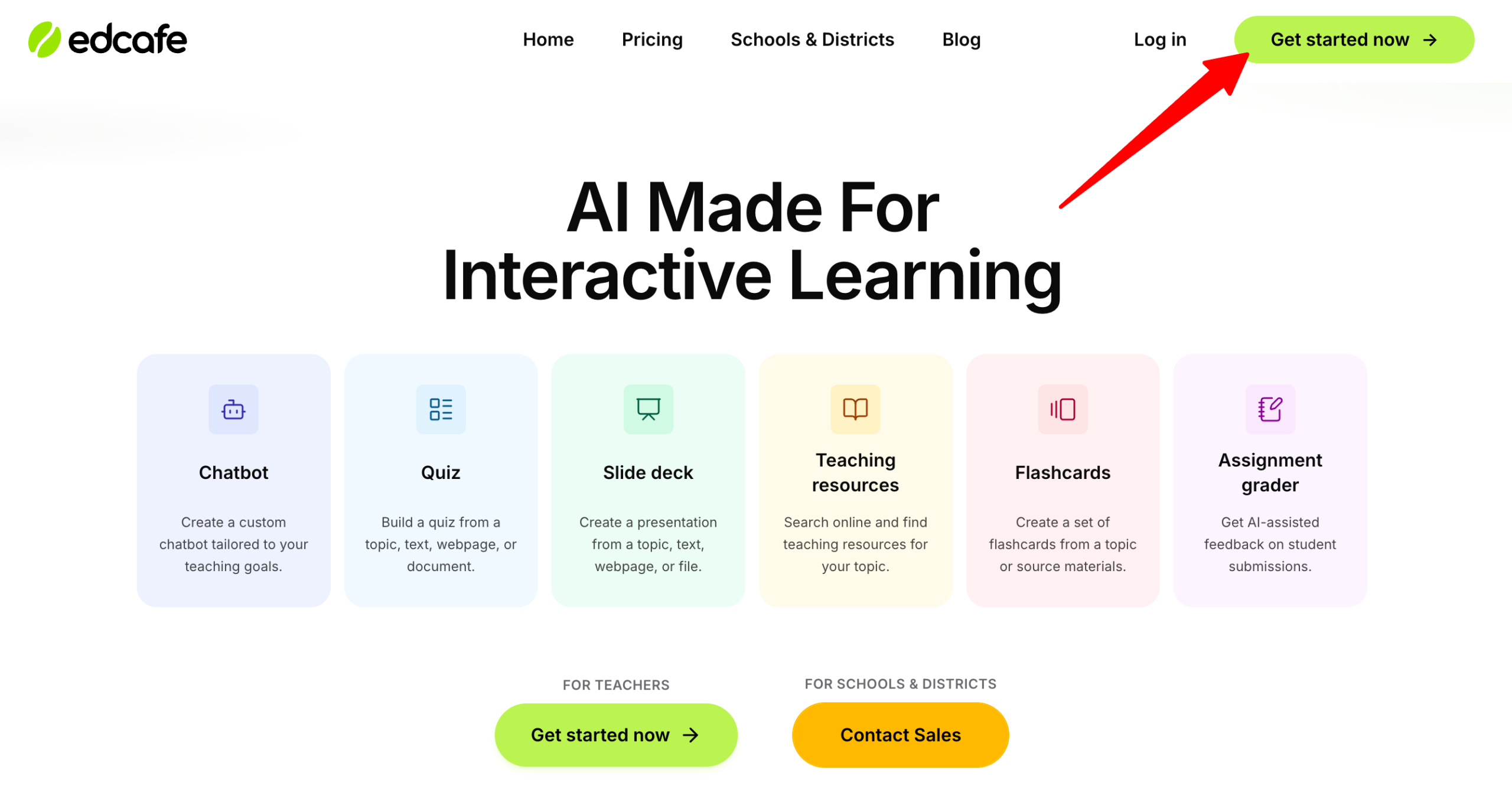
Start by going to edcafe.ai and creating a teacher account by clicking “Get started now.”
Step 2: Create a New Activity
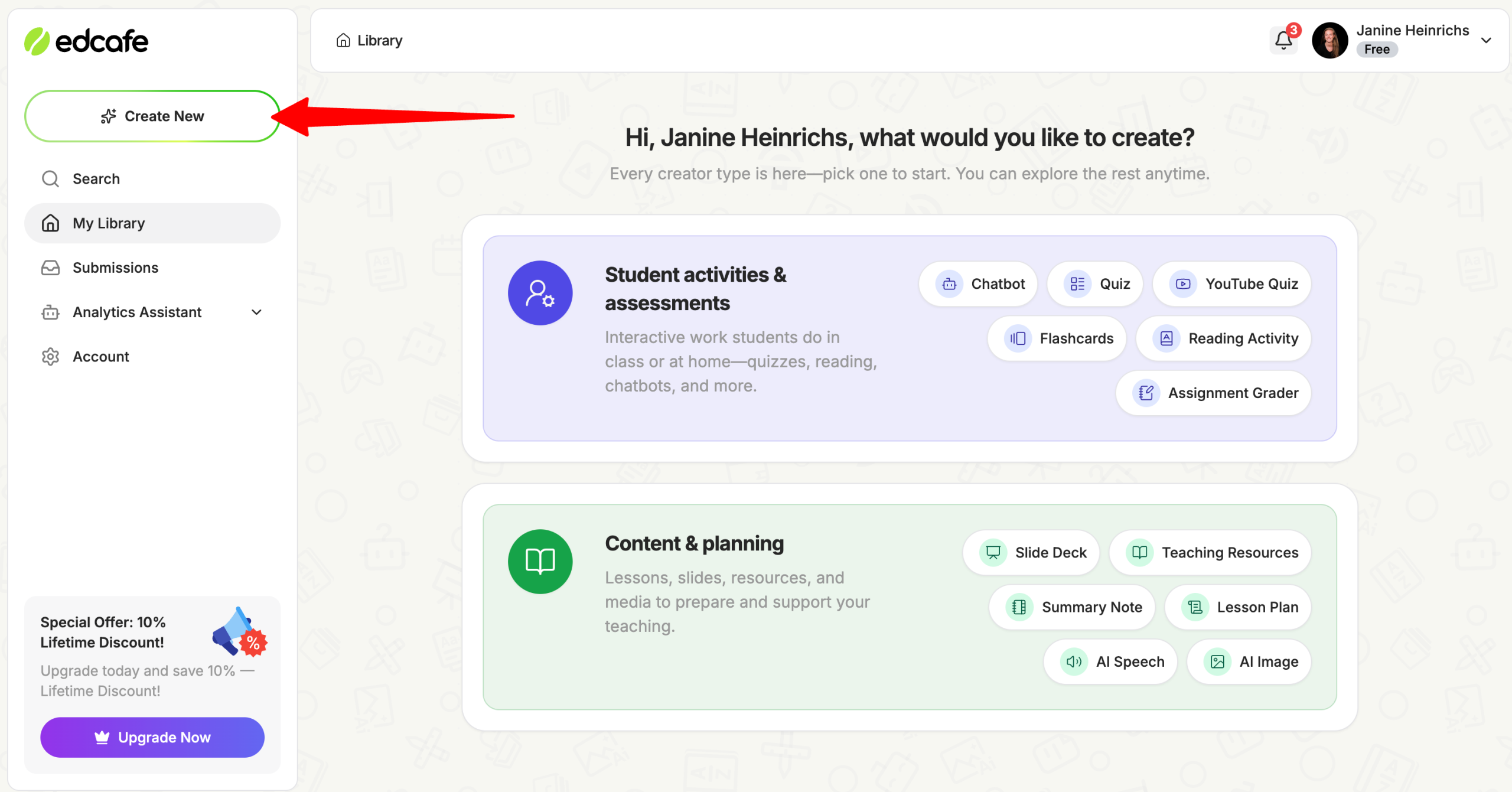
Go to “Create New” to create a new activity.
Step 3: Choose What to Create
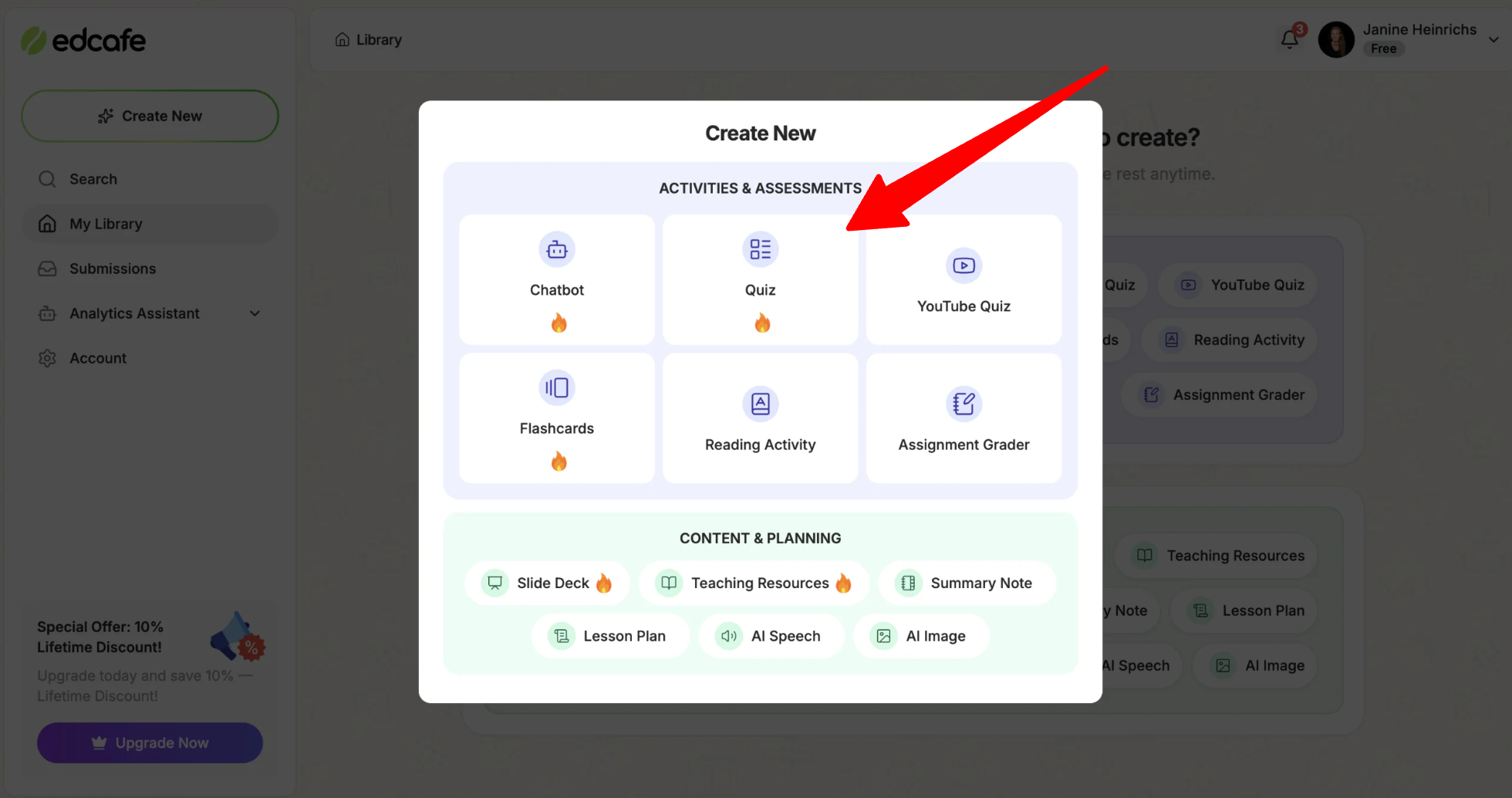
With Edcafe, you can create a number of activities and content:
- Chatbot
- Quiz
- YouTube Quiz
- Flashcards
- Reading Activity
- Assignment Grader
- Slide Deck
- Teaching Resources
- Summary Notes
- Lesson Plan
- AI Speech
- AI Image
Step 4: Choose Your Input Source
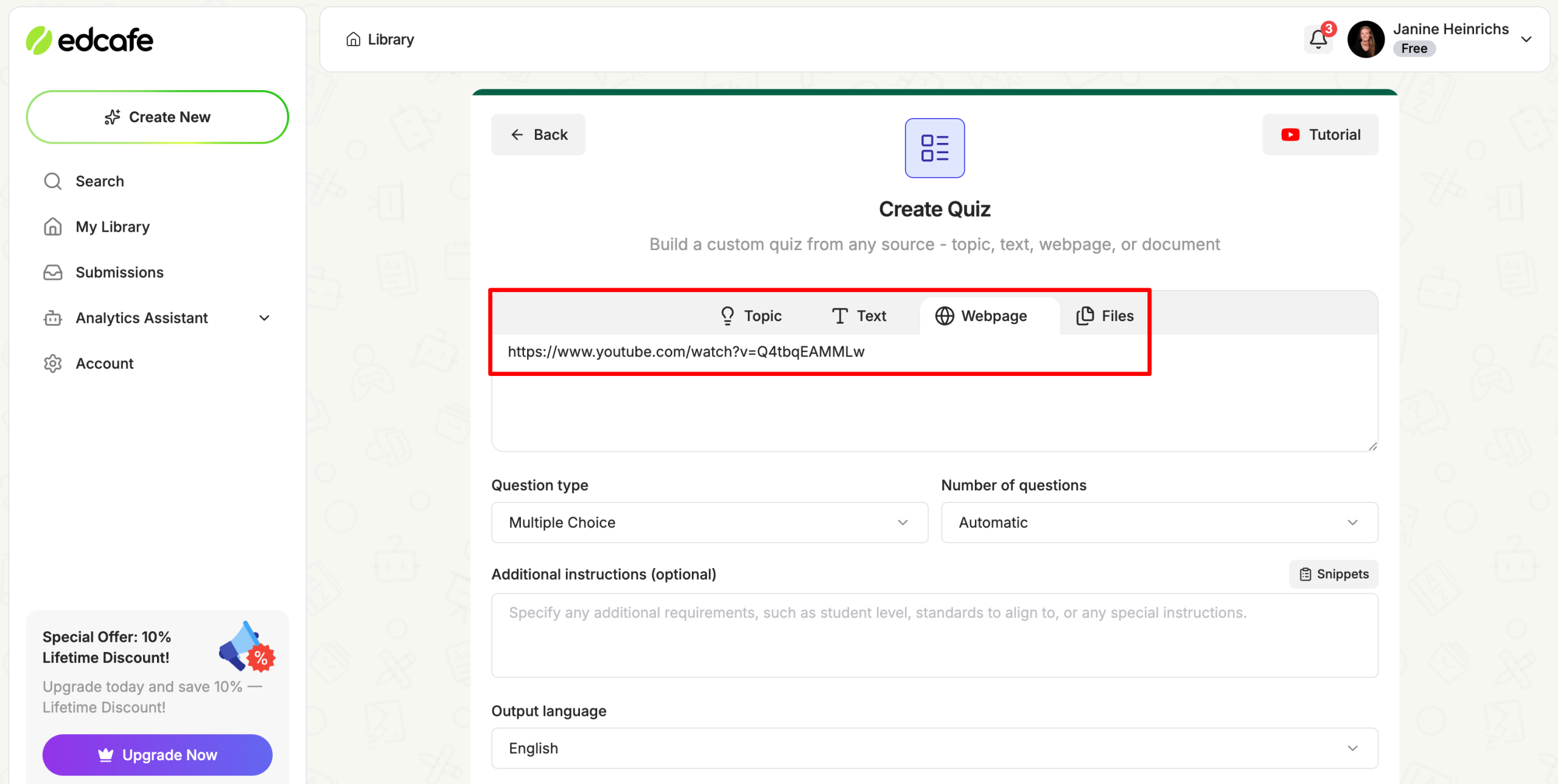
For a new activity like a quiz, you can start from a topic, a pasted text passage, a website/YouTube link, or an uploaded file such as a slide deck or document (up to 50MB).
Step 5: Choose the Question Type & Number of Questions
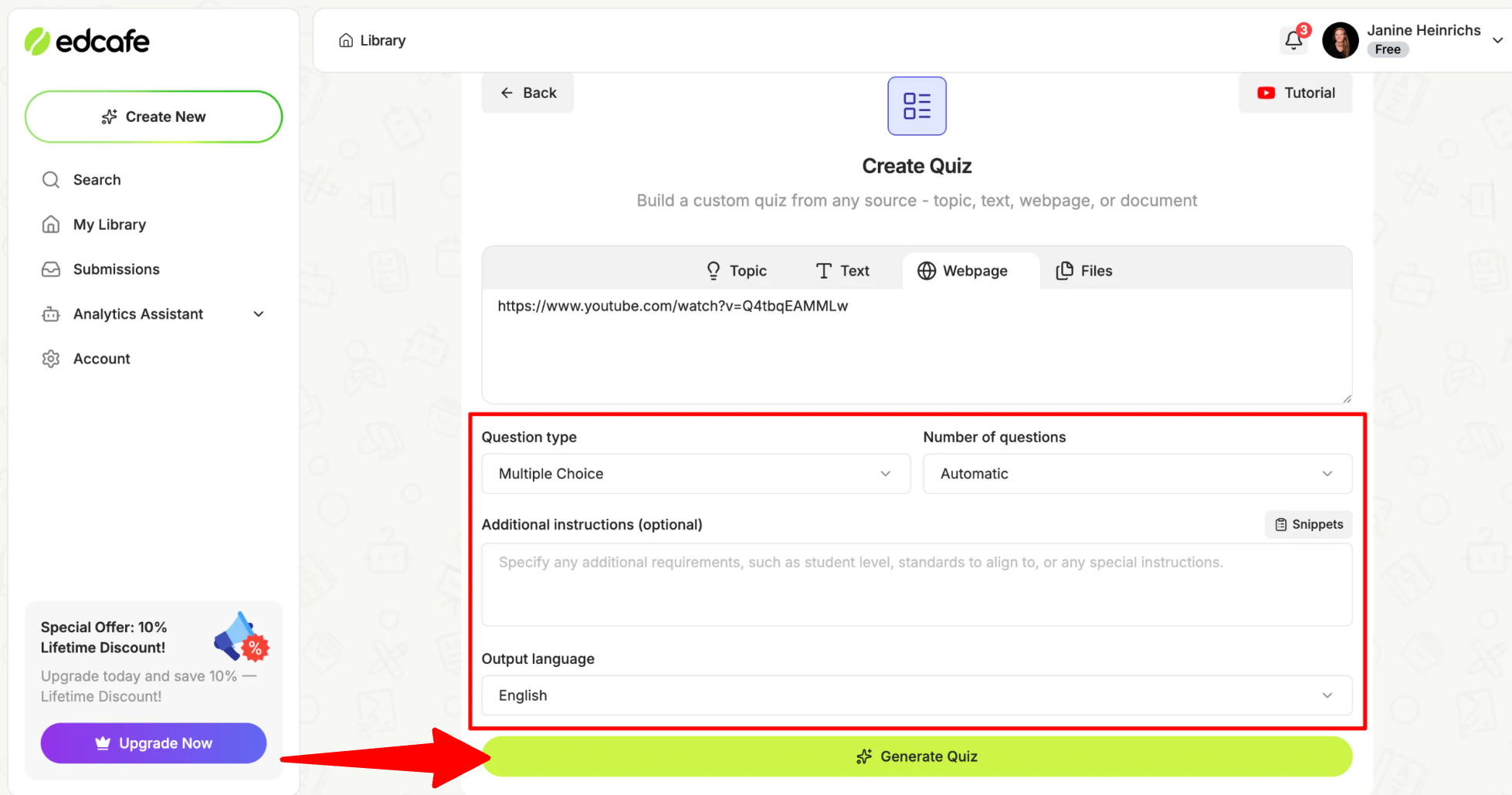
From there, you can choose the question type, number of questions, output language, and additional instructions (optional). Use the “Additonal instructions” field to set the grade level and subject.
Step 6: Generate the Questions
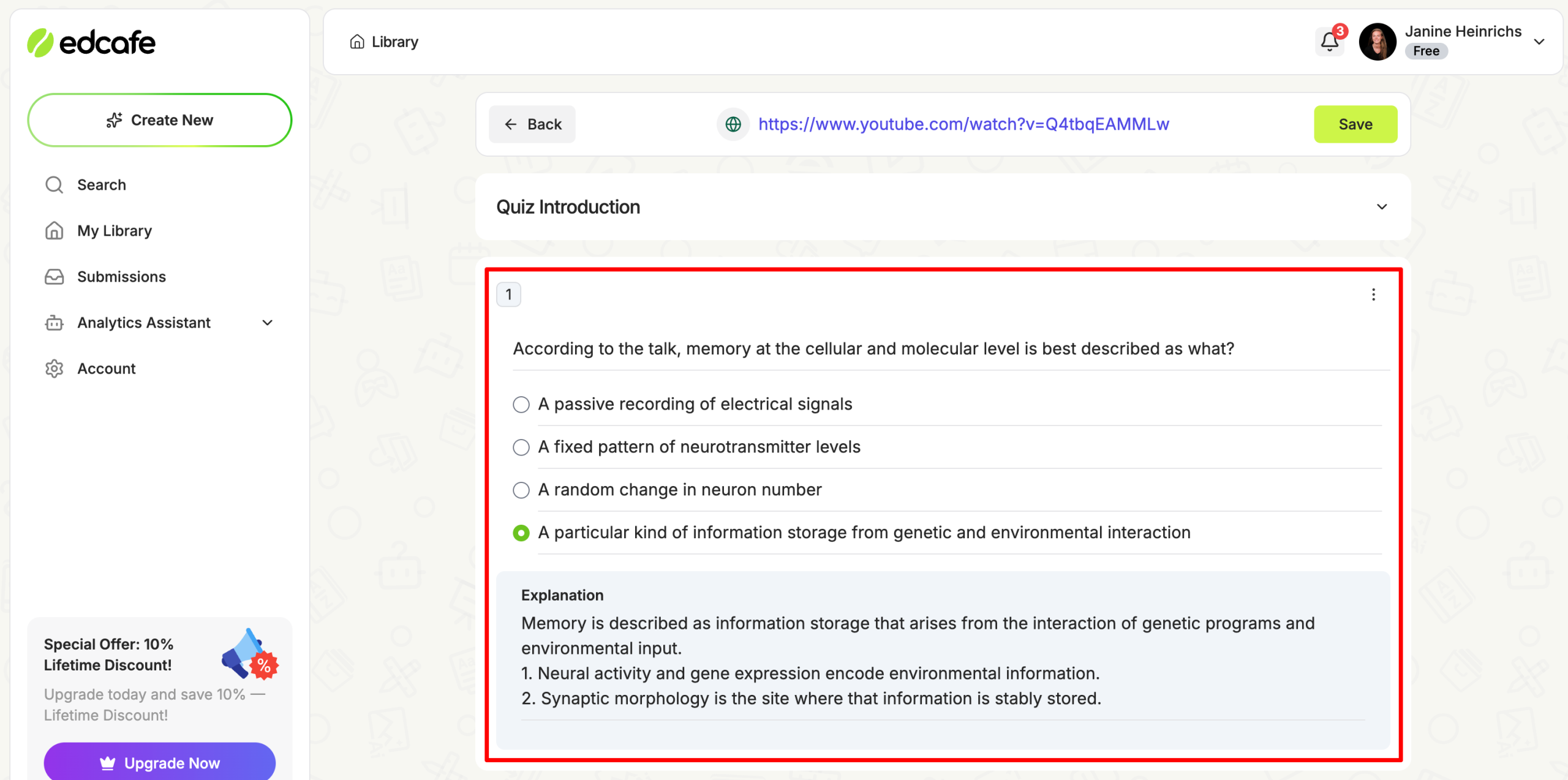
Once your source and settings are in place, Edcafe AI generates the questions in a matter of seconds.
Step 7: Customize the Activity
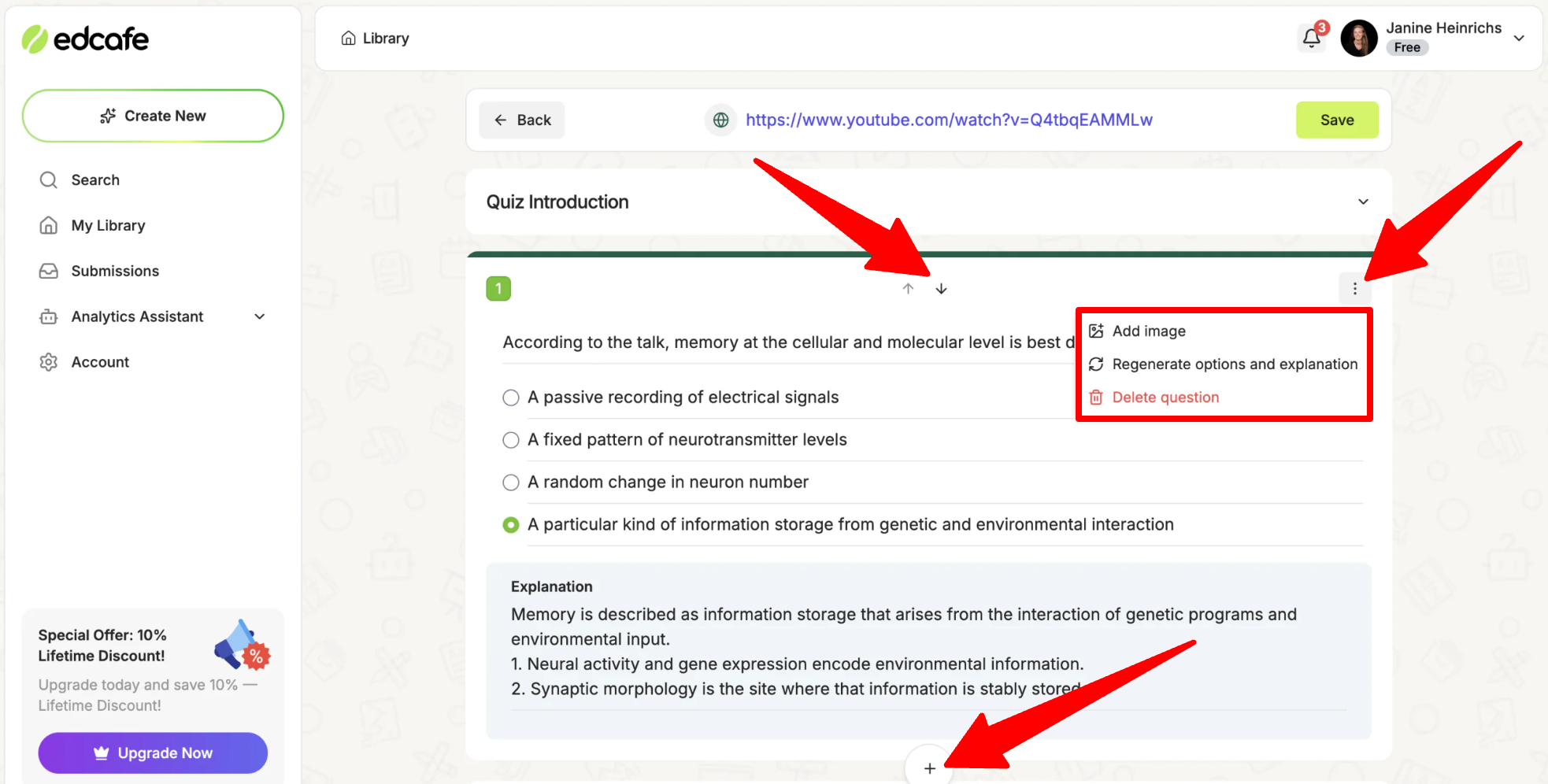
From there, you can edit or remove any question, add your own, generate more, insert images, or rearrange the order until the activity matches what you actually want to teach.
Step 8: Save Your Quiz
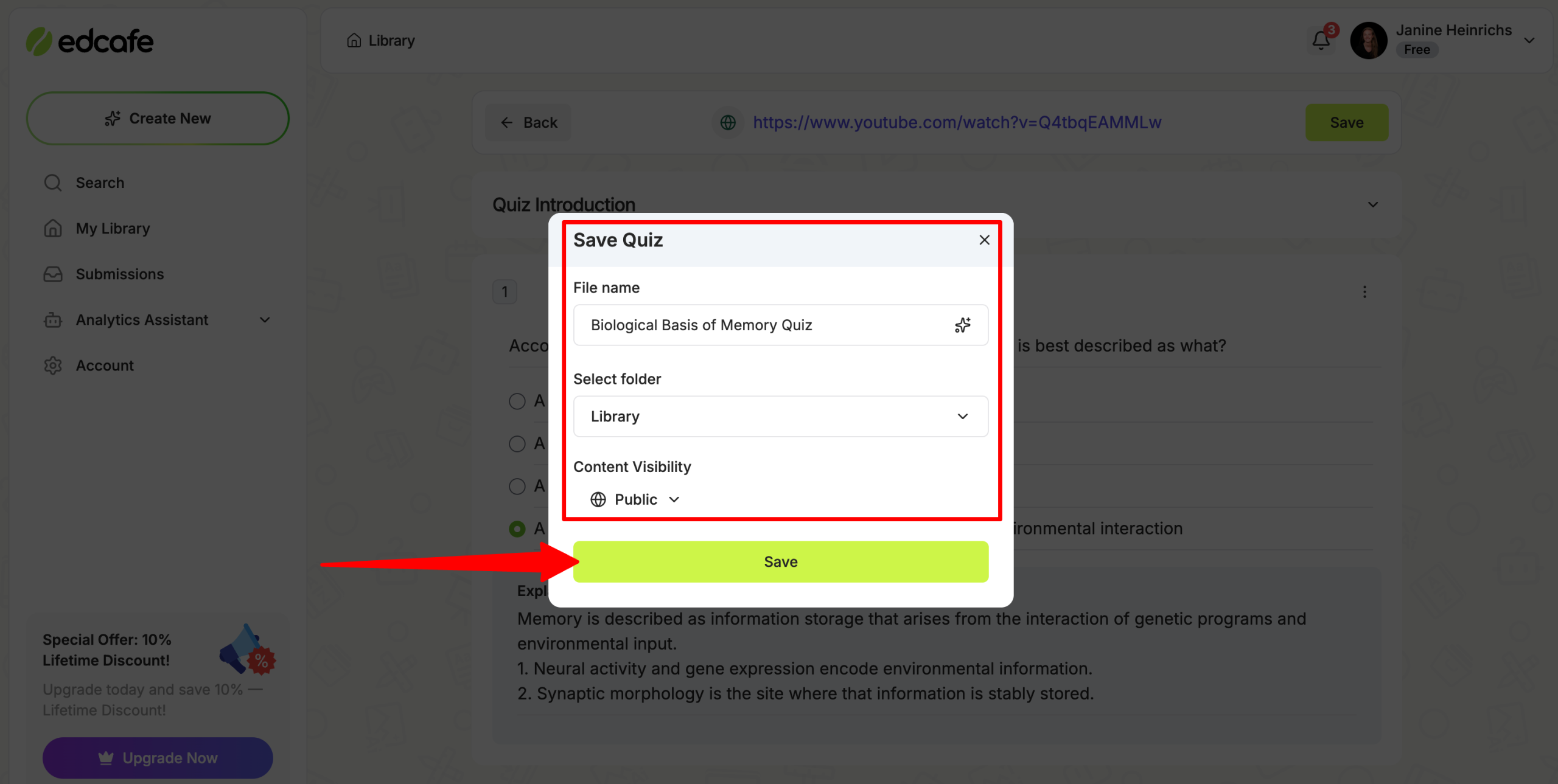
Save your quiz with a name, in the default or custom folder, and make it public or private.
Step 9: Assign to Students
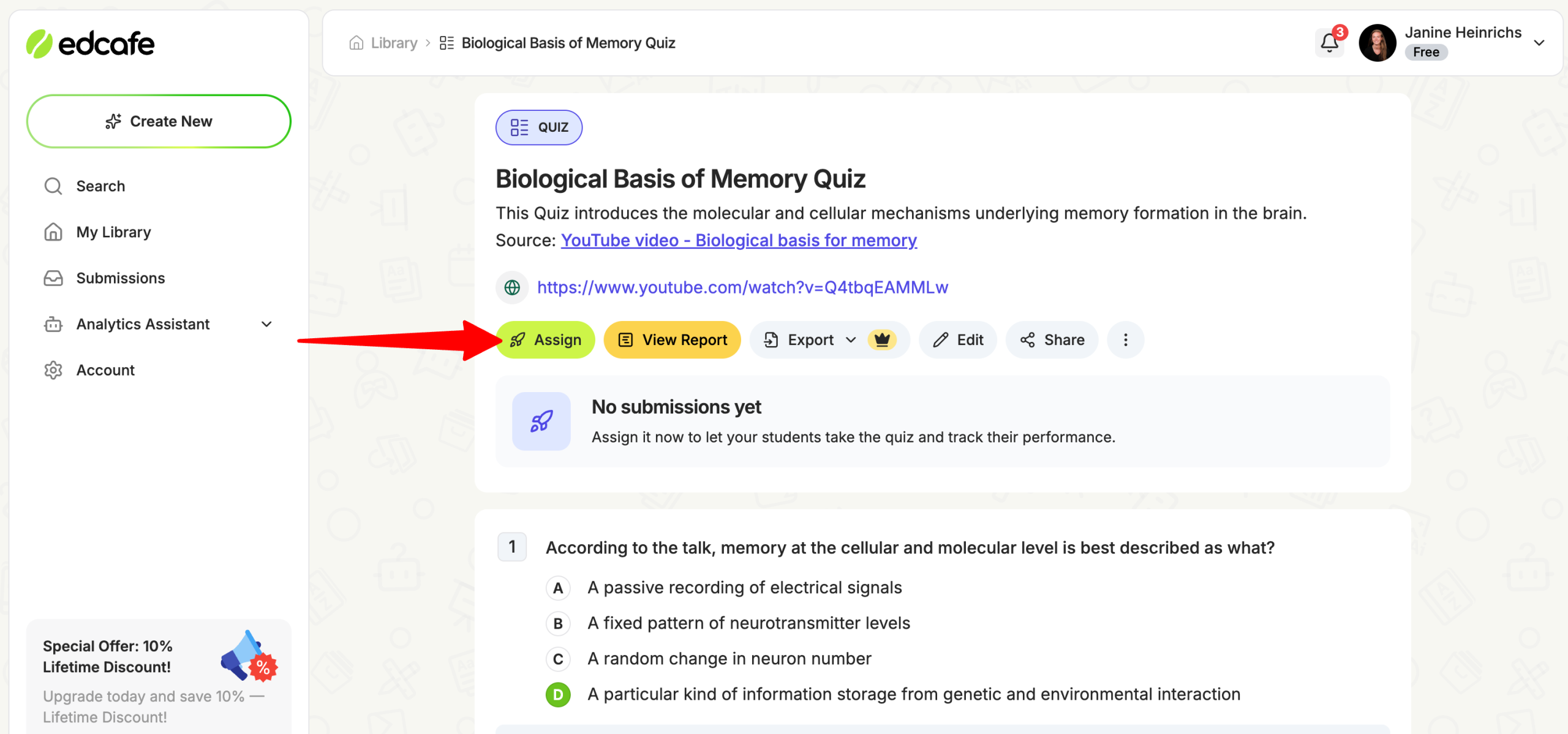
Once your quiz is saved, assign it to your students.
Step 10: Generate a QR Code
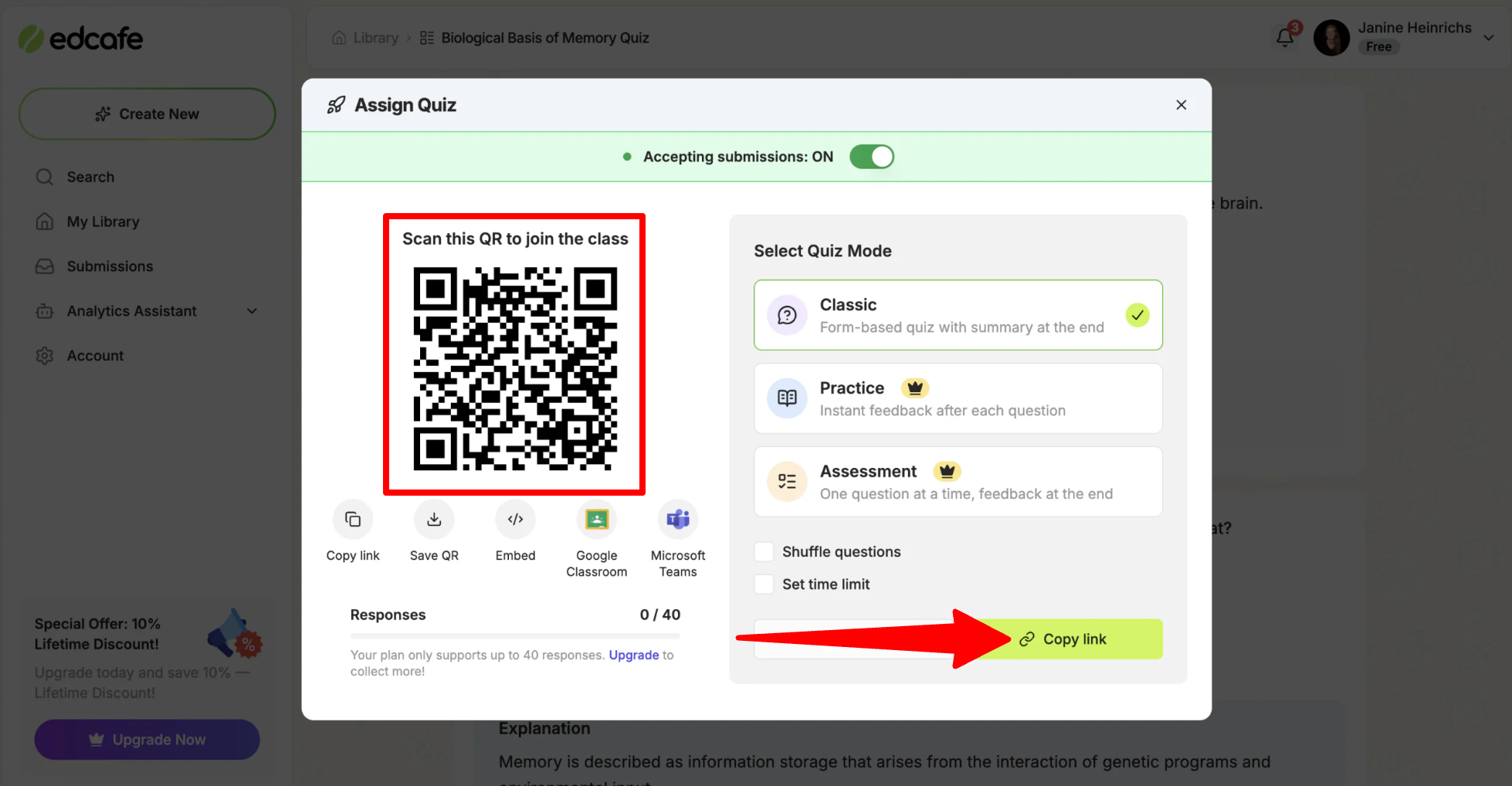
Edcafe AI generates a QR code (or a shareable link) students can use to access the activity on their own devices, without needing an account of their own.
Step 11: Monitor & Grade
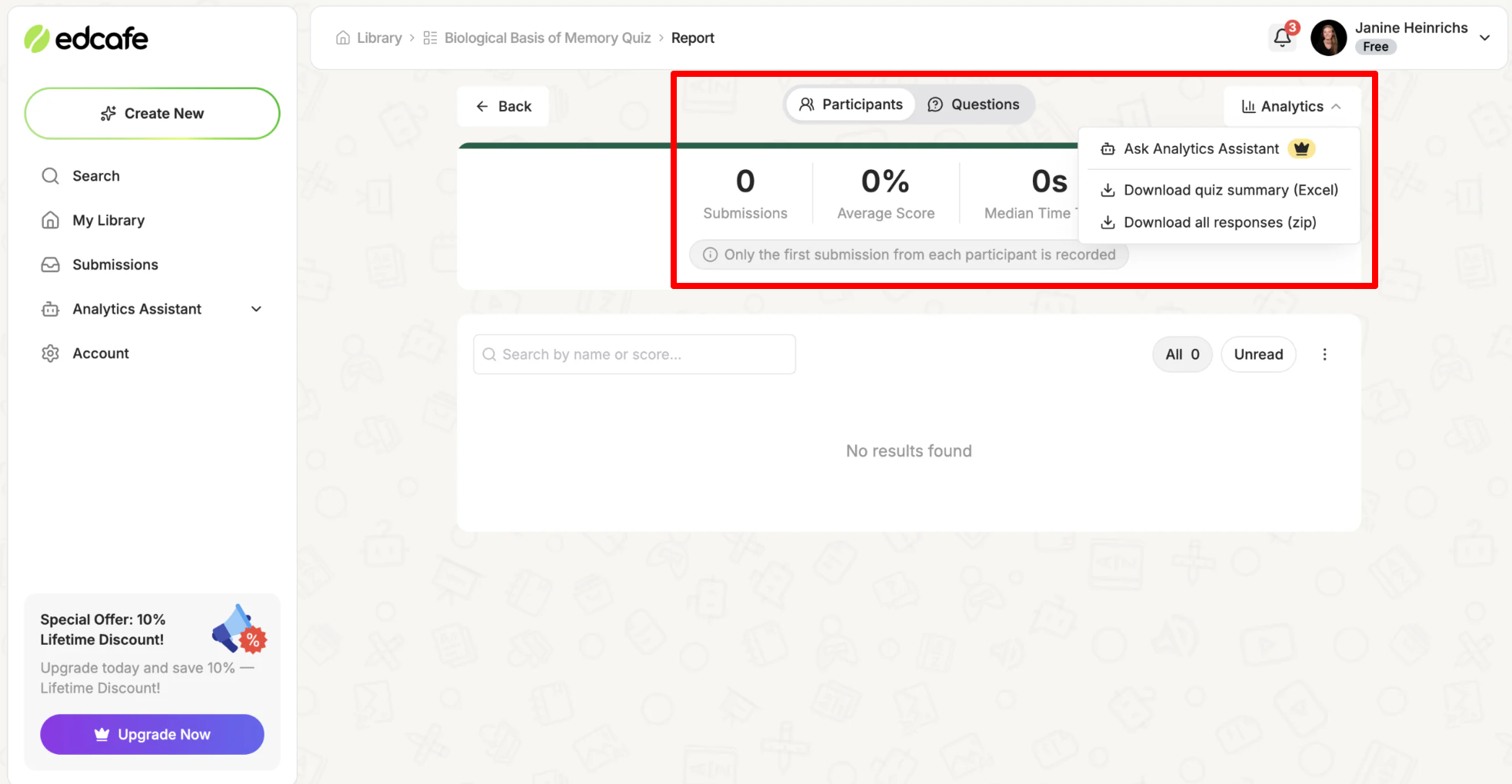
As students complete the activity, they get instant feedback with explanations. Meanwhile, you get a live dashboard showing submissions and class performance and a downloadable report you can use to spot learning gaps.
That same plan, create, save, assign, assess structure carries across Edcafe AI’s other tools too, whether you’re building flashcards, a chatbot, or a full lesson plan instead of a quiz.
Overall, Edcafe AI makes it easy for you to turn existing materials into classroom activities, with plenty of ways to customize each one. You can quickly create, edit, assign, and monitor a quiz without requiring students to create their own accounts.
Top 3 Edcafe AI Alternatives
Here are the best Edcafe AI alternatives:
MagicSchool
The first Edcafe AI alternative I’d recommend is MagicSchool. It is an AI platform built for the same core audience (teachers, students, schools, and districts) with 80+ teacher tools covering lesson planning, presentations, writing feedback, rubric creation, and quiz building.
Both platforms take a similar approach: combine a teacher’s AI tools into one place, and back it up with SOC 2 and FERPA and COPPA compliance. However, the difference comes down to focus.
On the one hand, MagicSchool leans more toward breadth. It has a very large library of individual tools for nearly every task a teacher might need. Meanwhile, Edcafe AI puts more emphasis on interactive tools for students, such as quizzes, chatbots, and flashcards that students can easily access through a link or QR code.
For the widest possible library of individual AI tools for teaching tasks, choose MagicSchool. For a more streamlined workspace built around interactive materials students can jump right into, choose Edcafe AI.
Read my MagicSchool AI review or visit MagicSchool AI!
Khanmigo
The next Edcafe AI alternative I’d recommend is Khanmigo, the AI tutor and teaching assistant from Khan Academy. It guides students to an answer through questions rather than simply handing it to them. It also has classroom tools for teachers like lesson planning and rubric generation.
Khanmigo stands out for its teaching approach. It focuses on helping students work through problems rather than simply giving them the answers, and independent education reviewers have praised its approach to safety and learning.
Meanwhile, Edcafe AI is more focused on helping teachers produce and distribute a wide range of classroom materials quickly, from quizzes to slide decks to chatbots trained on a teacher’s own content.
Choose Khanmigo if your priority is a guided, one on one style AI tutor for students. Otherwise, choose Edcafe AI for a workspace that helps teachers efficieintly plan, create, and assign classroom materials.
Quizlet
The final Edcafe AI alternative I’d recommend is Quizlet. It’s one of the better known classroom study tools, especially for its flashcards and active recall features. Over time, it’s added a broader suite of AI study tools on top of that foundation.
Quizlet’s strength is in its scale and familiarity. Millions of students already know how to use it, and its flashcard and game based study tools are proven and easy to adopt. Meanwhile, Edcafe AI goes further into full lesson and assessment creation for teachers, covering chatbots, reading activities, and grading rather than focusing mainly on study and review.
Choose Quizlet if flashcards and student study habits are your main focus. Otherwise, choose Edcafe AI for a broader workspace that also handles things like lesson planning and grading.
Edcafe AI Review: The Right Tool For You?
After trying Edcafe AI myself, what stood out most was how much work it could take off a teacher’s plate. Building a quiz from a topic I typed in and assigning it through a QR code felt like a real shortcut compared to piecing the process together across several different tools.
However, it’s not going to replace everything in your stack. If you need well-designed presentations or want multiple teachers to collaborate on the same lesson, you’ll probably still need another platform. But for the basics of planning, creating, and assessing classroom materials, Edcafe AI is a reliable option.
If Edcafe AI is not the right fit for you, here are three alternatives I’d recommend:
- MagicSchool is best for teachers who want the widest library of AI tools for classroom tasks.
- Khanmigo is best for a guided, one on one AI tutor experience for students, backed by Khan Academy.
- Quizlet is best for teachers and students who are mainly focused on flashcards and active recall study habits.
Thanks for reading my Edcafe AI review! I hope you found it helpful. If you’re curious, head over to edcafe.ai to try it for free and see how it fits into your own classroom routine.
Frequently Asked Questions
What grade levels does Edcafe AI support?
Edcafe AI is built for teachers from kindergarten through 12th grade. It adjusts generated content based on the grade level and subject you set.
Is Edcafe AI safe for student data?
Edcafe AI states that it meets SOC 2, GDPR, FERPA, and COPPA compliance standards. However, most schools will still want to run their own privacy review before rolling out any new software district wide.
Do students need an account to use Edcafe AI?
No. Students can access assigned quizzes, flashcards, and other activities through a shareable link or QR code without creating their own account.
Does Edcafe AI work with Google Classroom?
Edcafe AI lets you quickly share activities to Google Classroom, but the connection is fairly basic rather than fully integrated.
Who created Edcafe AI?
Edcafe AI was built by Inknoe, an EdTech company with over a decade of experience in classroom software before launching the platform.


