Until recently I hadn’t tried running models locally for quite a while, the disappointment
had just always been too high when I did it. About a month ago though, I dove back in – there
were just too many claims out there to ignore, about how far they have come, how it’s now much
more feasible to run them, and how some of them have become really good at coding. So this is
my personal experience with using them, on and off, over the past 4 weeks or so.
In this memo, I will start with a more general introduction and go through the factors that influence the
viability of these models for coding. In a follow-up memo, I will describe my actual experiences in more detail.
Scope
My main interest is how useful they are for coding, and not just auto complete, but
agentic coding. Secondly, I’m interested in how ready and usable they are more
broadly, for developers who don’t want to dive into a bunch of specs and extra tooling and
tweaks to make it work.
In terms of hardware, I have been running models on these two machines:
- Apple M3 Max, 48GB RAM
- Apple M5 Pro, 64GB RAM
Factors that influence viability
There are a myriad of factors at play that can influence the results, which makes it quite
a tedious undertaking to evaluate which setup works best under the resource constraints we
have. It also makes it very hard to filter the signals from the noise when people share their
successes with these models online.
I found it particularly baffling that in the automated eval setup, one model clearly delivered better outcomes on the stronger machine (not just speed, but better code!), in spite of all other settings being the same.
I’ll start with a summary, before going into details of each of these factors.
prefills
(system prompt, tools, …)
varying tool schemas influence…
provides templates to improve
better hardware fit leads to better…
differ in optimisation for…
Figure 1: The many factors that can
impact the results – tap or hover over boxes to highlight arrows.
- Runnability: RAM is the core constraint. I used models between 15-25GB, context
windows of maximum 64K, harnesses OpenCode and Pi with zero Skills and MCP servers active) - Response speed: Is impacted by many factors, but was quite good for some models, and leaps and bounds from where it was a year ago. Setups: LM Studio + 4BIT quantization + M3 Max/M5 Pro + GGUF/MLX both
- Viability for agentic coding: Tool calling was tricky still, the models often failed, but can usually self-recover from their failures. This is a key component of agentic coding specifically. Without it, you can still go the old-fashioned way of copying and pasting from a chat window of course. And small models are definitely a lot more viable for auto complete than agentic use.
- Quality of outcomes: Depends on the task (more on that in the next memo), but obviously nowhere near the type of capability we can get from the big models. Overall it was very hit and miss. I only looked at correctness of functionality, didn’t go into code quality.
RAM
The model weights must fit into the available RAM, or more specifically, VRAM. If they
don’t, the runtime either crashes (happened to me once!) or drops to unusably slow
speeds.
On Apple Silicon, virtually all RAM is accessible to the GPU with no separate VRAM
limit,
this can be different in other machine configurations.
Impacts: Model runnability; Speed of responses
My experience: On the machine with 48GB, I ran models between 8 and almost 30GB.
The 30GB stretches it a lot of course, especially when the context window gets added,
the 15-25GB size is more comfortable and I don’t have to close quite as many other
applications. On the machine with 64GB, I once ran a model that was 48GB big – which
went great at first, but then it quickly crashed…
Processing power
More cores generally means faster token generation, but architecture matters too, and
newer chip generations can close the gap even with fewer cores. This is a tough one to
compare between machines without diving much deeper into the details of each
configuration
and architecture.
Impacts: Speed of responses
My experience: On both the M3 Max and the M5 Pro, all models I ran had quite an
impressive speed, compared to where they were a year ago. Speed degrades though the longer a conversation gets. I am okay using them at the current speed for some tasks – if the quality of the output were acceptable.
Memory bandwidth
Memory bandwidth is a bottleneck for token generation, determining how fast data moves
between RAM and the compute units.
Impacts: Speed of responses
My experience: Both the M3 Max and the M5 Pro I used have a nearly identical
bandwidth of ~300 GB/s, so I don’t really have a comparison to something else. But as
mentioned before, the speed of all models I tried was quite acceptable.
Number of parameters
The parameter count basically represents the size of a model’s learned knowledge and
capabilities. More parameters generally mean better output quality, but also a larger
file
size.
Impacts: Amount of RAM needed; Quality of results
My experience: With 48GB, I used models around 30B parameters, +/- 5B. The
biggest model I loaded on the 64GB machine was Qwen3 Coder Next 80B (MoE), which solved
the task I gave it a lot better than the smaller models – but then crashed after I
continued the conversation.
Reasoning capabilities
Reasoning models go through a “chain of thought” process before responding, which helps
with complex multi-step tasks, but can also generate significantly more tokens and slow
responses down.
Impacts: Complexity of the tasks; Speed of response; Context window size (and
therefore need for RAM)
My experience: All of the models I tried had reasoning capabilities, and they were switched on by default throughout most of my experiments. However, I
often noticed them going in endless circles inside of the reasoning chain, especially
the smaller ones. (“Wait, …”, “Actually, …”, “But wait, …”) So I also did a few runs of my automated setup with reasoning off – and lo and behold, it’s not only faster (which was to be expected), but also performed the same to slightly better! A good reminder that reasoning is not always necessary, and can sometimes even be counterproductive.
Tool calling capabilities
For agentic use, a model must be able to reliably emit structured tool call syntax that
matches the schema the harness expects. Models that weren’t specifically trained or
fine-tuned for tool calling often produce malformed calls.
Impacts: Ability to use agentic harnesses
My experience: This was a common issue with the models I tried, though they
could often self-correct and recover from a failed tool call (e.g. using wrong parameter
names like file.path instead of filePath).
Format
GGUF is the standard format for llama.cpp-based runtimes like LM Studio and Ollama, and
has by far the largest model library. MLX is Apple’s own framework built specifically
for
Apple Silicon and can be faster, but fewer MLX-formatted models are available at the
moment.
Impacts: Speed of responses
My experience: I tried both formats for one or two of the models, but I
personally didn’t feel much of a difference. That could be due to the
unstructured type of evaluation I did – on the other hand, as any user experience
researcher would tell us, the
perceived speed is ultimately what matters, not what the clock says…
Quantization
Quantization compresses model weights to reduce the file size, trading some quality for
a
much smaller RAM footprint. The level of quantization is usually marked in model names
and
descriptions as Q4 / Q6 / Q8, or 4BIT / 6BIT / 8BIT, with lower numbers meaning higher
compression. The newest buzz recently have been QAT (Quantization-Aware Training)
variants
of models, which are trained with quantization simulated during the training. They are
supposed to preserve quality better than standard quantization.
Impacts: Amount of RAM needed; Speed of responses; Quality of responses
My experience: All of the models I downloaded were at Q4 / 4BIT, I didn’t get
around to trying different variations yet. I also haven’t gotten around to trying a QAT
one.
Architecture
MoE (Mixture of Experts) models have a large total parameter count but only
activate a subsection of their weights at inference time, so a 35B MoE model needs
significantly less RAM and can run faster than a 35B dense model.
Impacts: Amount of RAM needed; Speed of responses
My experience: The Qwen3.6 35B MoE model was by far giving me the best balance between number of parameters and RAM usage, and therefore runnability and quality of outcomes. This could be due to the MoE architecture, I’m not sure. The architecture might also explain my experience of getting better coding abilities out of the model on the 64GB machine than the 48GB – it might be loading more experts there? I’m not sure if that’s true, but it’s the only sensible hypothesis I have so far.
Context window size setting
Context window size consumes RAM on top of model weights through the KV cache, which
grows with context length. The default size configured in the runtimes is far too small
for agentic coding, it has to be set to at least 32K, if not 64K.
Impacts: Size and complexity of tasks; Amount of RAM needed; Speed of responses;
Ability to use reasoning
My experience: I tried to see how little I could get away with. For small tasks
I could sometimes work with 32K, but often I had to increase to 64K, so that seems to be
a good default minimum. As the models themselves were already pushing the boundaries of
my available RAM, I’m not sure how how much more I could still increase it, even on the
64GB machine… So while many of these models in theory support a larger window,
actually using it is limited by the memory constraints.
List of models used
The buzz for coding has been all around Qwen3 and Gemma 4, so those were the ones I
went
for.
Qwen3
- Qwen3.6 35B-A3B MoE Q4 GGUF (22 GB)
- Qwen3.6 Coder Next 80B MoE GGUF (45 GB)
Gemma 4
- Gemma 4 12B Q4 GGUF (7.5 GB)
- Gemma 4 26B 4BIT MLX (15.6 GB)
- Gemma 4 31B 4BIT MLX (29 GB)
Runtime
The runtime handles model discovery, configuration, and loading. It also determines the
practical question of how we integrate our harness with the model. Usually this happens by
starting a web server that provides a range of typical APIs that the harnesses support,
and the localhost URL of that web server is then configured as a model
provider in the harness. Most widely supported by harnesses is the OpenAI API, but Claude
Code e.g. expects Anthropic’s
Claude API .
Impacts: Ease of configuration and discoverability; ease of integration with
harnesses; speed of responses
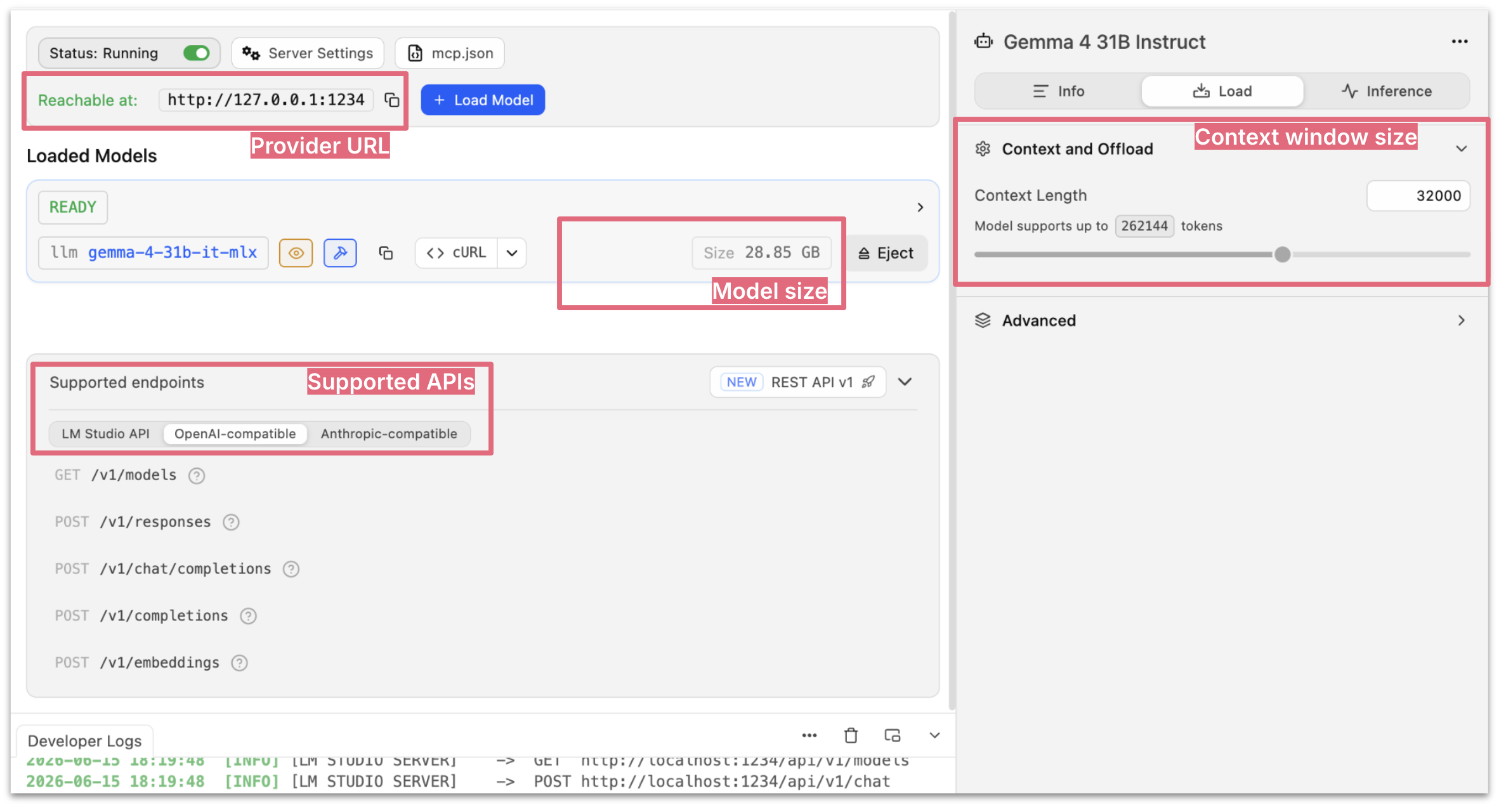
Figure 2: The “Developer” view in LM Studio, showing a
running server and many of the factors described so far (provider url, model size, APIs,
context window size configuration)
My experience: While I have used other runtimes in the past, I am currently back
using LM Studio, mainly for its user experience. There are lots of ins and outs of which runtime is the most optimised for which hardware and what type of models, to get even more speed out of it. But thinking back to the broader viability of running local models, user experience plays a huge role
for that. For what it’s worth, the most frequently mentioned alternative from my colleagues was oMLX.
Harness (Claude Code, OpenCode, Pi, …)
Coding harnesses can vary significantly in how much overhead they inject into the context
window (system prompt, number of tools), which becomes more of a problem locally where
we’re
so resource constrained. Our own expanded harness around that also makes a difference,
e.g.
how many skills or MCP servers are active. A description of each of them will be sent to
the
model, and again, take up space in the context window.
I mentioned above that small models still struggle with tool calling – and it probably
doesn’t help that each harness has slightly different schemas for the basic tools. Let’s
take editing a file as an example:
- Pi:
old_textandnew_text(see
here) - OpenCode:
oldStringandnewString(see
here) - Claude Code:
old_stringandnew_string(at least that’s what
it says when I asked it)
Finally, not all harnesses easily support the integration of local models. Open source
tools are usually the go-to, but Claude Code can also be pointed at local providers. GitHub
Copilot seems to support it for their CLI, and I think it’s possible in Cursor as well
to override the OpenAI base URL and point it to localhost.
Impacts: Size of context window needed; Tool calling success; Integratability
My experience: In my attempts, I used OpenCode and Pi. I avoided Claude Code as it
apparently would burden the context
window quite a bit.
Coming up
In my next memo, I will dive more deeply into the types of tasks I gave the models, and what I experienced.
A preview of my overall conclusions: Using small models like this is still quite messy and hard to evaluate. It was a frustrating experience to come to conclusions, as the results depend on so many things. I would therefore say that it’s still not ready for a simple “plug and play” experience for developers who don’t want to spend too much time on it.
However, based on this experience I do have a go-to model that I’m using locally now, which is Qwen3.6 35B MoE. It offered the best balance of capability, speed and RAM footprint among what I tried.
More to come!


