Enterprise data architectures have become fundamentally distributed. Over the past decade, organizations have made deliberate investments across multiple platforms such as relational databases for transactional workloads, cloud data warehouses for analytics, object stores for unstructured data, and SaaS applications for domain-specific functions. Each was chosen to solve a specific problem, serve a specific team, or meet a specific performance requirement. The result is not accidental sprawl. It is a deeply heterogeneous data landscape shaped by intentional, workload-driven decisions. The challenge now is not consolidation, but interoperability: enabling these systems to function as a unified foundation for the next generation of AI-driven applications.
Agentic AI systems that autonomously reason, plan, and take action on behalf of users are moving rapidly from experimentation to enterprise production. These systems do not just retrieve information. They synthesize it, act on it, and learn from it. And unlike traditional analytics tools that can work with a well-scoped dataset, AI agents require something more demanding: unified, governed, and real-time access to all relevant enterprise data, regardless of where it lives.
This is the gap that matters most right now. Enterprises that have invested in building strong data capabilities across multiple providers are well-positioned, but only if those platforms can be accessed together, consistently, and with the governance controls that enterprise AI requires. Without a unified data foundation, AI agents operate with incomplete context, governance becomes inconsistent, and the promise of autonomous AI remains out of reach.
Solution approach
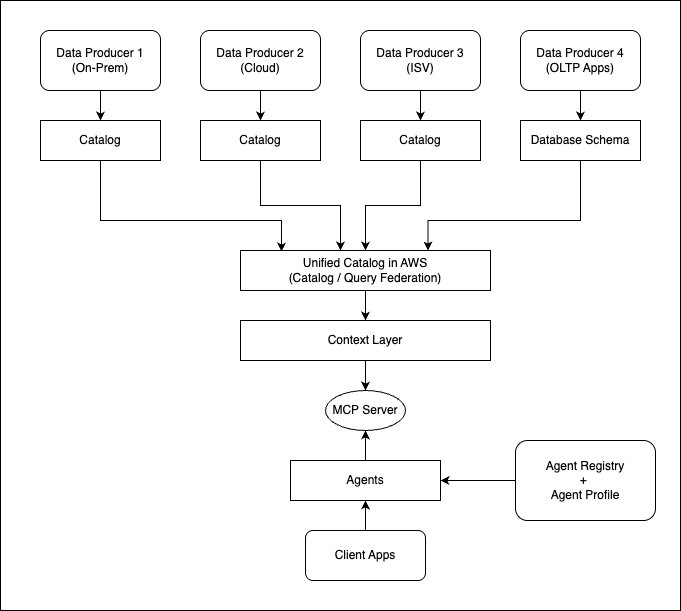
The following high-level architecture explains how you can onboard metadata catalogs and MCP servers to your context layer, which becomes the primary input for your AI agents.
Assuming your data products have a well-defined metadata catalog, you can take a unified-catalog-first approach, then build the context layer on top of it to let your AI agents discover all the context from one place. This helps bring in centralized governance and audit control, because every request gets routed through the centralized metadata catalog and context layer to simplify implementation of unified governance. In addition, this brings simplicity to enable business semantics, define attribute priorities, and define authoritative sources for the consumer use cases.
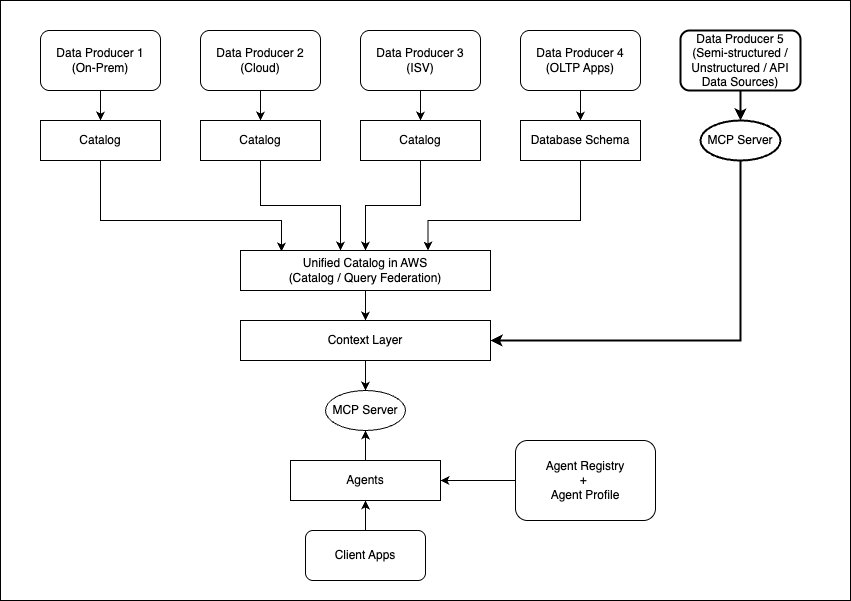
If any of the data sources does not have a well-defined metadata catalog, you can define Model Context Protocol (MCP) servers on them, and then directly onboard them to the context layer. For example, if you have semi-structured or unstructured datasets for which you do not have a well-defined metadata catalog, or you want to onboard third-party data sources through REST APIs, then you can add their respective MCP server to the context layer directly. The following architecture explains the extended flow for it.
In this series of posts, we demonstrate how you can unify the metadata catalog access across multiple providers, how you can enable AI agents to query the unified catalog, and how the context layer can be integrated to unify metadata from catalogs and MCP servers. We have divided the series into the following parts.
- Part 1: Architecture approach with tradeoffs to unify a multi-cloud lakehouse architecture that can power Agentic AI (this post).
- Part 2: Implementing an example solution to unify catalogs from multiple providers and deploy AI agents to query the unified data access layer.
- Part 3: Integrate a context layer on top of the unified catalog for AI agents.
- Part 4: Onboard additional data sources to the context layer through MCP servers and demonstrate the full solution.
This post focuses on explaining the architecture approach to build the open lakehouse architecture on AWS, unifying the metadata catalog across providers for the AI agents to access. In addition, it highlights the architecture trade-offs and best practices.
Use case
Every AI initiative launched on a fragmented data foundation is an initiative that will need to be rebuilt. Organizations that establish unified data access today are the ones that will scale Agentic AI with confidence tomorrow. Consider a large enterprise managing petabytes of data across a diverse set of environments:
- On-premises: Network device telemetry, customer records, and operational databases.
- Multiple cloud platforms: Marketing analytics, HR systems, and enterprise applications distributed across cloud providers.
- Data platforms: Data science workloads, feature engineering pipelines, and finance and supply chain analytics running on specialized platforms.
- SaaS applications: Salesforce, SAP, Zendesk, ITSM, and other business tools that each hold a critical piece of the enterprise data picture.
The business objective is to build a unified analytics and AI platform that can:
- Query and analyze data across all environments without requiring full data migration.
- Enforce consistent data governance and access control regardless of data location.
- Power AI agents that can autonomously discover, query, and act on enterprise data.
- Reduce total cost of ownership by eliminating redundant pipelines and storage.
This architecture directly addresses these needs by combining flexible data integration patterns, an open-table-format-based lakehouse architecture (with an example of Apache Iceberg), AI agent deployment to access unified metadata, and centralized governance.
Reference architecture
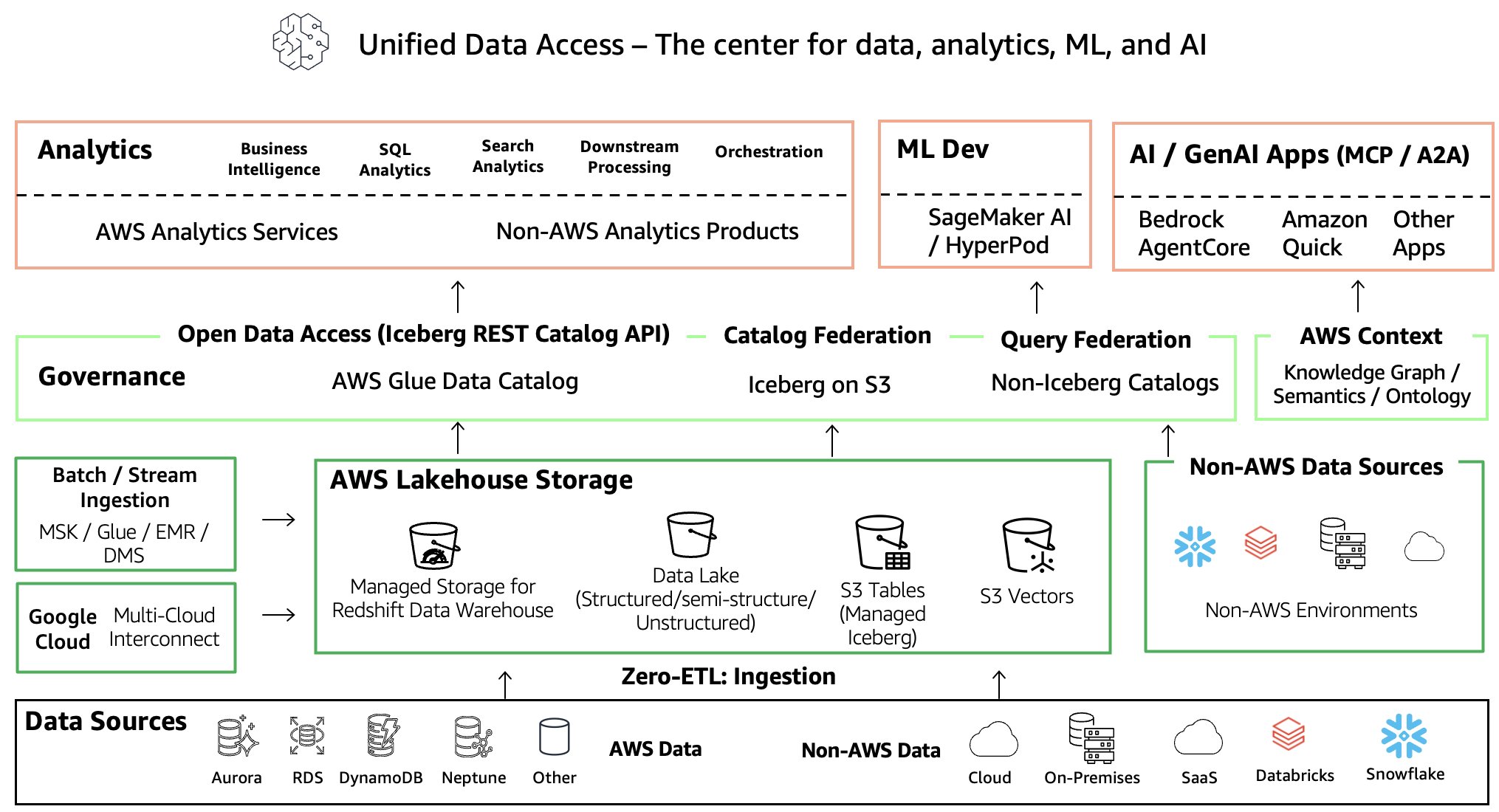
Before going deeper into a specific architecture, let’s revisit at a high level how the AWS open lakehouse architecture enables data ingestion and query or catalog federation to power analytics, machine learning development, and generative AI application development.
The following architecture diagram represents an end-to-end flow that includes:
- Data ingestion to the data lake or data warehouse through Zero-ETL and batch or stream processing using AWS native services, or accessing data from Google Cloud Platform using AWS Interconnect – multicloud.
- A centralized metadata catalog layer that includes data on AWS and metadata representation of non-AWS data sources using query or catalog federation.
- A context layer that you can integrate to create a knowledge graph with ontology and business semantics that can enrich context for AI agents.
- The consumption layer, which can include analytics, machine learning model development with Amazon SageMaker AI, and generative AI application development with Amazon Bedrock AgentCore, Amazon Quick, or other AWS and non-AWS AI applications.
Let’s look at an expanded version of this architecture that details the data ingestion and data consumption patterns to build a unified data access layer on AWS that spans multiple cloud and ISV providers.
Expanded technical architecture walkthrough
The following architecture demonstrates the comprehensive AWS approach for metadata catalog consolidation through flexible integration patterns, and it also highlights patterns for building a lakehouse on AWS. Built on the open standards of Apache Iceberg for storage and governance through AWS Lake Formation, it creates a unified data foundation that connects existing investments without requiring wholesale migration, and it makes enterprise data AI-ready from day one. This architecture delivers value at every layer: business teams query across platforms without data movement, IT teams manage governance through a single federated layer with the flexibility to federate or ingest per use case, and compliance teams enforce policies once across all sources with full lineage and audit coverage.
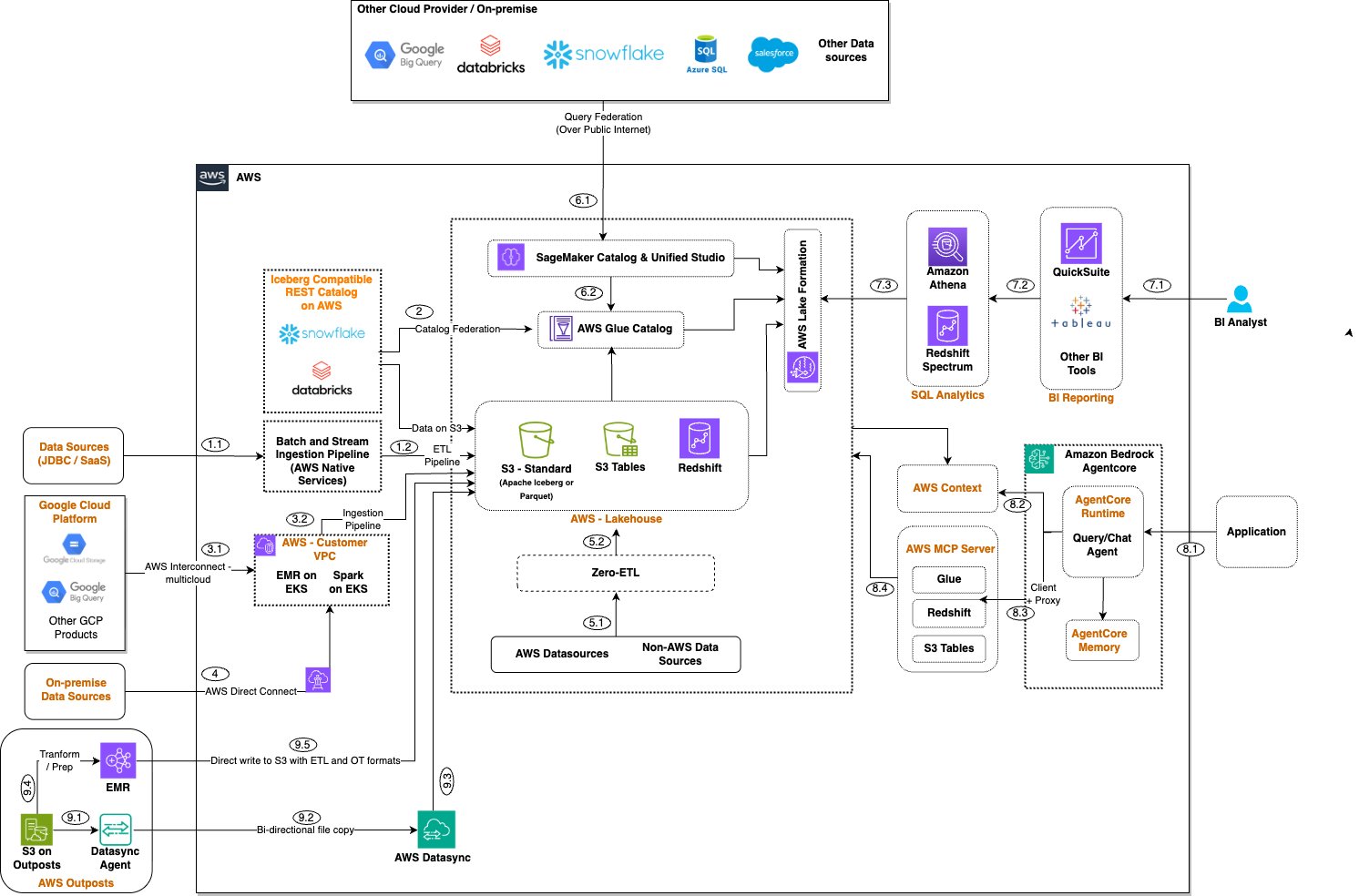
The following are the key components of the architecture.
Data access methods
This section provides options to access data that is not available in AWS Glue Data Catalog and not available on AWS.
1. Iceberg catalog federation (Reference points 2, 6.1, 6.2)
- AWS Glue Data Catalog implements the Iceberg REST Catalog API specification, which enables seamless federation with Databricks, Snowflake, or other Iceberg-compatible catalogs set up with Amazon Simple Storage Service (Amazon S3) as the storage layer.
- With the growing adoption of Apache Iceberg, catalog federation will become a common standard in the future and simplify metadata unification.
2. Query federation (Reference point 1.1)
- Direct cross-cloud querying over the public internet to Google BigQuery, Azure SQL, Salesforce, and other platforms.
- Real-time access to external data sources without replication, and seamless access with AWS analytics services.
- Provides flexibility, because the catalog federation capability of the Iceberg REST catalog is limited to Iceberg tables only.
2.1. Secured private connectivity to Google Cloud Platform using AWS Interconnect for multi-cloud (Reference points 3.1, 3.2)
The default query federation approach makes the connection and transfers data over the public internet, which has its own latency implications depending on the target platform and the data volume transferred over the internet. During re:Invent 2025, AWS announced the public preview of AWS Interconnect – multicloud, which recently became generally available.
AWS Interconnect – multicloud is a managed service that provides private, high-speed, and secure network connections between Amazon Web Services (AWS) and other cloud providers, starting with Google Cloud Platform (GCP), with Microsoft Azure and Oracle Cloud Infrastructure (OCI) coming later in 2026. You can enable the integration with three steps: 1) specify the target cloud service provider, 2) select the destination Region on the other side, and 3) pick the required bandwidth.
The following architecture represents AWS and GCP integration with AWS Interconnect – multicloud.
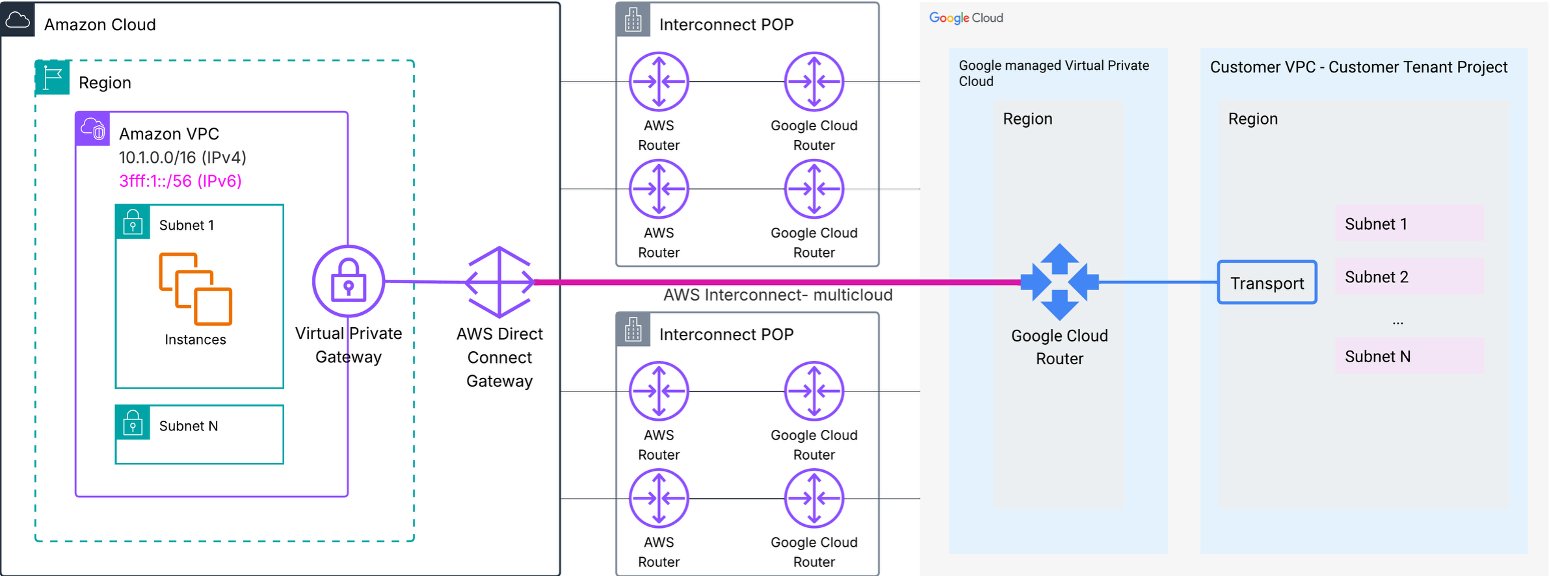
On the AWS side, you need an AWS Direct Connect gateway (a global construct that acts as a route reflector), which you can attach to your Amazon Virtual Private Cloud (Amazon VPC) through a virtual private gateway or AWS Transit Gateway, or AWS Cloud WAN. On the GCP side, you need a Google Cloud Router that you attach to your customer VPC. Interconnect – multicloud offers pre-cabled capacity pools at shared Interconnect points of presence (PoPs) in selected Regions, where both AWS and GCP routers are co-located and pre-wired.
Because Interconnect – multicloud primarily routes traffic within the VPC through a private network, to benefit from it you need to keep your query engine or jobs within a customer VPC.
2.2. High network bandwidth with on-premises systems (Reference point 4)
- AWS Direct Connect for high-bandwidth, low-latency on-premises connectivity.
Data ingestion methods
This section focuses on ways you can use to onboard datasets (complete or subset) to a lakehouse on AWS.
1. Zero-ETL: Data movement to AWS with Zero-ETL ingestion (Reference points 5.1, 5.2)
- AWS Zero-ETL capabilities for seamless data loading from AWS and non-AWS sources.
- Flexibility to choose your target as an Amazon S3 based data lake or Amazon Redshift.
2. Extract, transform, load (ETL): Extract data from JDBC or SaaS sources and transform through a batch or stream pipeline (Reference points 3.1, 3.2)
The following architecture expands the flow 1.1 to 1.2 ingestion method that integrates AWS services to onboard data to the Amazon S3 raw layer and then takes it through an ETL pipeline for data cleansing and transformations. It also includes steps to onboard unstructured data to Amazon S3 using Amazon Bedrock Data Automation, and taking the lakehouse data for machine learning development with Amazon SageMaker AI.
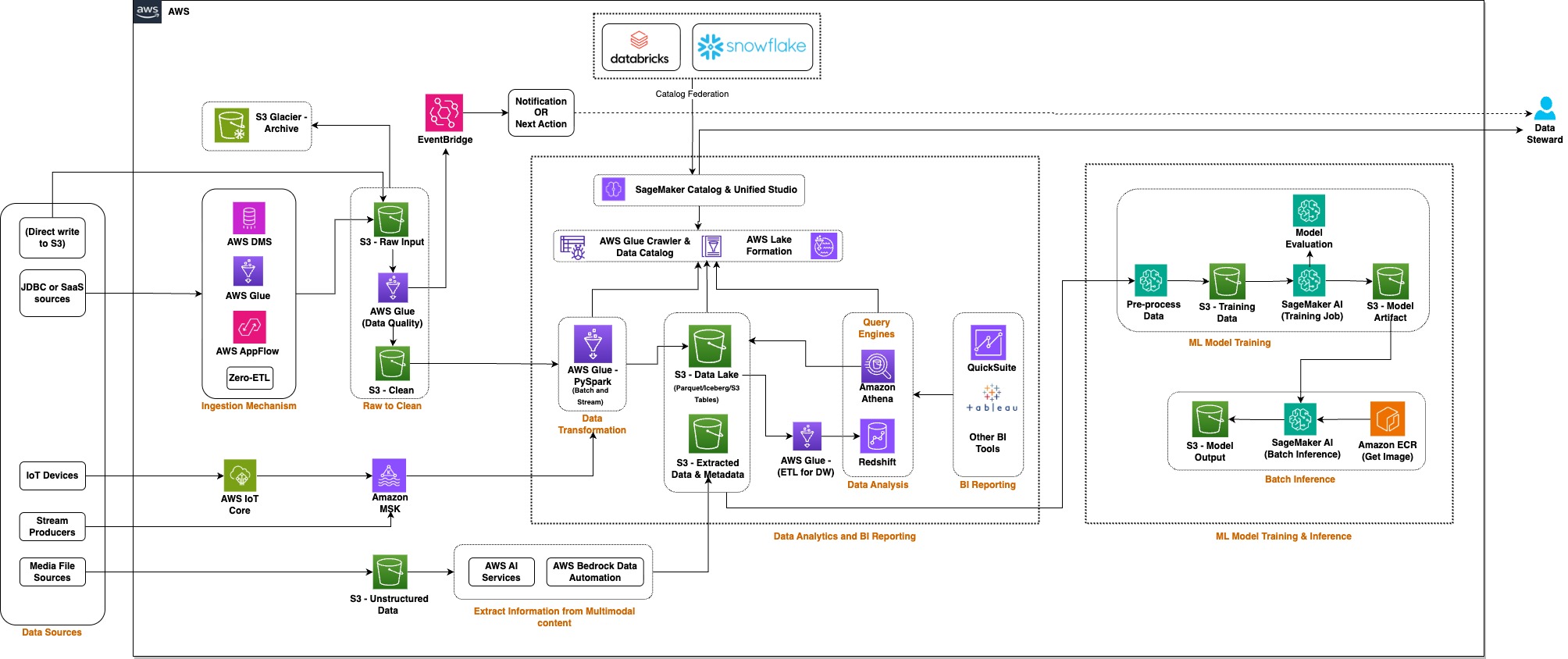
You can also use AWS Interconnect – multicloud to run Spark jobs (Spark with Amazon EMR on EKS or open source Spark on any compute within a customer VPC) to ingest and transform data from Google Cloud with private connectivity.
3. Accessing data from Google Cloud over a private network
Refer to the preceding data access methods (3.1 and 3.2).
4. Onboarding data from AWS Outposts (S3 on Outposts) (Reference points 9.1 to 9.5)
- Option to onboard S3 on AWS Outposts data to regional Amazon S3 through AWS DataSync (reference 9.1 to 9.3), which might be a better fit to sync files as-is through a scheduled batch or an event-driven approach.
- Flexibility to transform the S3 on Outposts data using an Amazon EMR clusters on Outposts job, and then directly write the transformed output to a regional Amazon S3 bucket in the formats you want (including open table formats such as Apache Hudi, Apache Iceberg, and Delta Lake).
Lakehouse foundation with Apache Iceberg
By standardizing on Apache Iceberg, you’re not choosing AWS over your other platforms. You’re choosing interoperability and future flexibility. Your data becomes truly portable across any Iceberg-compatible engine.
- Open table format: Industry-standard format supported across AWS, Databricks, Snowflake, and other platforms, which eliminates vendor lock-in.
- ACID transactions: Reliability with full transactional consistency.
- Time travel and schema evolution: Built-in versioning and flexible schema management.
- Performance optimization: Advanced features such as hidden partitioning, partition evolution, and metadata management.
Note that lakehouse storage is not limited to the Apache Iceberg format, and you have the flexibility to include other open table formats (for example, Apache Hudi and Delta Lake) or file formats (for example, Apache Parquet and Apache Avro).
Unified governance and access control
AWS governance capabilities transform the lakehouse from a storage layer into a fully governed data platform. This delivers security, compliance, and data quality out of the box, applied consistently across all data sources including federated catalogs. A unified catalog consolidates metadata from AWS and non-AWS sources with generative AI-powered business glossary generation, while automated ML-powered classification identifies sensitive data (for example, PII, PHI, and financial data) across structured and unstructured datasets. AWS Identity and Access Management (AWS IAM) and AWS Lake Formation enforce fine-grained access control at the row, column, cell, and tag level, applied consistently across Amazon Athena, Amazon Redshift Spectrum, Amazon EMR, and federated sources. End-to-end data lineage tracking provides visual data flow graphs, impact analysis, and compliance audit trails. When AI agents explore metadata from the unified catalog and submit a query to Amazon Athena for execution, the Lake Formation fine-grained access control filters data based on the user interacting with the AI agent.
For the foundation model integrated into your AI agents, you can use Amazon Bedrock Guardrails, which implements customized safeguards to block harmful content and minimize hallucinations. Amazon Bedrock AgentCore provides fine-grained policy control over agent actions with real-time enforcement and managed authentication for agents accessing AWS and third-party services.
A comprehensive audit and compliance stack spans Amazon CloudWatch, AWS CloudTrail, AWS IAM, AWS Key Management Service (AWS KMS), AWS Audit Manager, and AWS PrivateLink. This stack makes sure every agent invocation is traceable, every key is managed, and every configuration is automatically mapped to frameworks including ISO, SOC, GDPR, and HIPAA.
When an end user interacts with the AI chat assistant, the layers of security and governance should go through the following.
Layer 1: Who can access?
- Enable Active Directory and single sign-on integration for user authentication, and a combination of AWS IAM roles for AWS API-level authorization.
Layer 2: What can they see?
- Integrate an agent profile to define what datasets each agent can access, because not all agents should have access to all datasets.
- Enable fine-grained access control on the metadata layer using AWS Lake Formation that can filter rows and columns.
- Enable data masking as applicable while the query responses are served through the query engine.
Layer 3: What can the agent do?
- Control agent actions by restricting them to read-only, and apply restrictions to
INSERT,UPDATE, andDELETEif the agents are supposed to query only. - Apply a limit on the number of rows that can be returned from the query, and apply a query scan limit to reduce cost.
Layer 4: What does the agent reveal?
- Enable output filtering to make sure no PII is included.
- Apply Amazon Bedrock Guardrails on large language model (LLM) responses to make sure the model does not produce anything inappropriate.
- In addition, enable audit logging of all queries to make sure future audit and compliance needs can be met.
Comprehensive analytics ecosystem (Reference points 7.1, 7.2, 7.3)
AWS offers a complete analytics ecosystem that includes the following.
- Amazon Athena: Serverless SQL queries with Iceberg v2 support, including provisioned capacity for consistent performance and workgroups for resource and cost management.
- Amazon Redshift Spectrum: Federated queries across the data warehouse and Iceberg data lake.
- Amazon Quick Sight: Enterprise visualization with governed access to all data.
- AWS Glue and Amazon EMR: Distributed data processing capability for enterprise transformations.
AI-ready architecture (Reference points 8.1 to 8.4)
A consolidated lakehouse architecture helps you make data ready for AI agents that can access the data through readily available MCP servers or through the AWS SDK for Python (Boto3) for Amazon Athena or Amazon Redshift Spectrum. AI agents can integrate the AWS MCP Server to interact with AWS analytics services such as AWS Glue, Amazon Athena, and Amazon S3 Tables, a capability of Amazon S3, to query both data and metadata.
AI agents need context to understand how the catalog tables and their attributes are linked to each other, how users have queried them in the past, or what priorities are defined to understand which one is an authoritative source for a particular natural language question. To enable the AI agent with additional context, we can integrate the AWS Context service that was pre-announced recently at the AWS New York Summit 2026.
Governance integration: AI agents automatically inherit Lake Formation permissions, because the agent can submit the SQL query to be run through Amazon Athena or Amazon Redshift Spectrum. This makes sure they only access data that users are authorized to see. Amazon SageMaker Unified Studio data lineage tracks AI agent queries for full auditability.
The following diagram represents how the AI agent request flow looks.
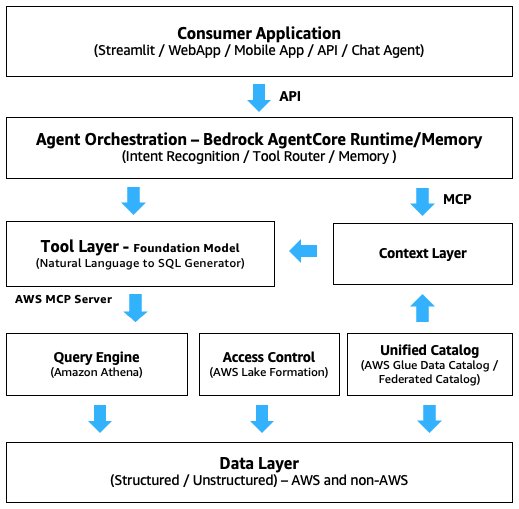
This architecture delivers value across every layer of the organization. Business teams gain faster time-to-insight by querying data across all platforms without waiting for data movement, while eliminating duplicate storage and reducing transfer costs through federation. The Apache Iceberg open table format ensures data portability and freedom from vendor lock-in. For IT and data teams, a single governance layer across all sources, including federated catalogs, reduces operational complexity, while the flexibility to choose between federation and ingestion for each use case, combined with the elastic AWS infrastructure and the petabyte-scale metadata architecture of Iceberg, delivers both agility and scalability. Data governance and compliance teams benefit from a single point of policy enforcement across all data regardless of location, complete lineage and access logs for audit and compliance reporting, automated sensitive data classification, and policies that are defined once and enforced everywhere, including across federated sources.
Architecture tradeoffs and best practices
The following are a few key trade-offs you need to consider while designing the solution.
Data ingestion and access methods
Use catalog federation (Iceberg REST) when:
- The source platform supports the Iceberg REST API (Databricks, Snowflake Polaris).
- Data is already in Iceberg format with Amazon S3 backed storage.
- You want bidirectional discovery (AWS tables visible in Databricks or Snowflake too).
Use query federation (Amazon SageMaker Lakehouse architecture or AWS Glue connectors) when:
- The source is BigQuery, SQL Server, or another non-Iceberg platform.
- Data must stay in the source cloud (sovereignty, contractual, or latency reasons).
- Real-time access is required without replication lag.
Use ingestion (Zero-ETL, AWS Glue, or Amazon EMR) when:
- Data is accessed frequently with a low-latency requirement by AI agents or high-concurrency analytics.
- The business decides to build a data lake and warehouse on AWS.
- You need full governance, time travel, and performance optimization.
Use AWS Interconnect – multicloud when:
- You need real-time or near-real-time query federation to GCP data sources (BigQuery, AlloyDB, Cloud Spanner) and latency or security requirements prohibit public internet routing.
- You have high-volume, recurring data transfers between AWS and GCP where public internet egress costs or bandwidth variability are unacceptable.
- Your organization has compliance or regulatory requirements mandating that data never traverse the public internet (HIPAA, PCI-DSS, or financial services regulations).
- You need bidirectional connectivity, such as GCP workloads calling AWS APIs, or AWS workloads calling GCP APIs, both over private paths.
Choosing between federation and ingestion based on use case
| Dimension | Federation (Query in Place) | Ingestion (Move to AWS) |
| Data freshness | Real-time or near-real-time | Dependent on ingestion frequency |
| Query performance | Subject to source system latency and network | Subject to data volume and operation, avoids cross-cloud network latency |
| Cost | Lower storage cost. Higher per-query cost for cross-cloud egress | Higher upfront ingestion cost. Lower ongoing query cost |
| Governance | Partial. Source system retains some control, and a unified catalog can simplify governance for consumers | Full. Lake Formation enforces all policies across all AWS analytics services |
| Data portability | Data remains in source | Data fully portable in open format |
| AI readiness | Limited. Agents depend on source availability | High. Agents query optimized, governed Iceberg tables |
| Operational complexity | Lower initial setup. Harder to debug cross-cloud issues | Higher initial setup. Simpler long-term operations |
Integrating Amazon Bedrock AgentCore Gateway and Amazon Bedrock AgentCore Runtime based on use case
The following are key differences between AgentCore Gateway and AgentCore Runtime that are relevant for our use case.
| Dimension | Amazon Bedrock AgentCore Gateway | Amazon Bedrock AgentCore Runtime |
| Timeout | 5 minutes (hard limit) | 15 min sync / 8 hours async |
| Statefulness | Stateless (per-request) | Stateful (session-based) |
| Best for | Lightweight API proxying | Long-running data processing |
| Your lakehouse queries | Will time out frequently | Handles multi-hour jobs |
Because AgentCore Gateway has a 5-minute hard timeout limit, use AgentCore Runtime for data processing jobs.
- AWS Glue ETL jobs can run for minutes to hours.
- Amazon Redshift queries on large datasets routinely exceed 5 minutes.
- Athena federated queries (especially cross-cloud through Interconnect) can be slow.
- Iceberg table scans on multi-TB datasets take time.
You can use AgentCore Gateway if the scope is limited to Glue Data Catalog interactions to fetch metadata schema, because that won’t run for more than 5 minutes.
Design considerations for production implementation
In practice, there are multiple aspects to consider when deploying the solution for production. The following summarizes a few of the key issues you might encounter and approaches to address them.
Catalog federation: The metadata drift problem
One of the first surprises in production is metadata drift, the state where your federated catalog no longer reflects the actual schema of the source system, because the source system’s metadata changes are not reflected in the unified catalog. The agent continues to generate SQL against the stale schema, producing silent failures that are hard to trace.
The following are a few ways you can address the metadata drift issue.
- Implement a catalog refresh schedule. Even a daily Glue crawler run against federated sources catches most drift before it causes agent failures.
- Add schema validation as a pre-query step in your agent tool. Before running SQL, verify that the referenced columns exist in the current catalog metadata.
- Instead of pulling metadata changes from the source in a scheduled manner, you can design an event-driven system, where the source system triggers a push event to run the schema change in the federated catalog.
Query federation: Latency is non-deterministic
Query federation works well for moderate data volumes, but latency becomes non-deterministic at scale. A query that returns in 3 seconds during testing can take more than 10 seconds in production when the source system is under load, the network path is congested, or the federated connector is cold-starting.
The following are a few approaches you can consider to improve the performance.
- Set explicit query timeouts in your Athena execution context. Without them, a slow federated query will block your agent indefinitely.
- Implement query result caching for frequently asked questions. Most business users ask the same questions repeatedly, and caching at the agent layer improves perceived performance.
- For time-sensitive use cases, consider caching aggregated data in an AWS lakehouse on a schedule rather than querying live. This trades freshness for reliability.
AgentCore memory: Statefulness cost
AgentCore Memory enables stateful conversations, but in production, unbounded memory accumulation creates its own problems. An agent that remembers every conversation eventually starts surfacing stale context. For example, a user who asked about Q3 revenue six months ago gets that context injected into a Q1 query today.
The following are a few ways you can optimize cost and improve relevance.
- Set explicit memory expiry (we use 30 days as shown in the implementation) and enforce it consistently.
- Use session-scoped memory for transactional queries and long-term memory only for user preferences and recurring patterns.
- Implement a memory review step in your LangGraph workflow. Before invoking the model, filter retrieved memories by recency and relevance score rather than injecting all of them.
LangGraph orchestration: When tool calls loop
The conditional routing of LangGraph is powerful, but in production we observed a failure mode where the agent enters a tool call loop. The model repeatedly calls the same tool with slightly different parameters, never reaching a satisfactory answer. This typically happens when the tool returns partial or ambiguous results and the model keeps trying to refine.
What we learned:
- Add a maximum tool call counter in your LangGraph state. If the agent has called tools more than N times in a single session, force a graceful exit with a summary of what was found.
- Return structured, unambiguous responses from your tools. Include row counts, column names, and explicit null indicators so the model can reason clearly about completeness.
- Log every tool invocation with its input and output. This is the single most valuable debugging artifact when diagnosing agent misbehavior in production.
Handling hallucination risks in federated agent architectures
This is the most important section for teams moving from prototype to production. Hallucination in agentic AI systems that query real data is qualitatively different from hallucination in general-purpose LLMs, and it is more dangerous because the outputs look authoritative.
There are three distinct hallucination risk zones in a lakehouse AI agent:
- SQL generation: The model generates SQL that is syntactically valid but semantically wrong. For example, when asked “What is our revenue growth this quarter?”, the model might generate a query that compares the wrong date ranges, uses the wrong aggregation function, or joins tables on incorrect keys, and then returns a confident, formatted answer with the wrong numbers.
- Cross-source synthesis: When the agent queries multiple federated sources and synthesizes results, the risk compounds. The model may correctly retrieve customer counts from Amazon S3 and revenue figures from Snowflake, but incorrectly draw conclusions that aren’t supported by either dataset individually.
- Memory-augmented reasoning: When long-term memory is active, the model may blend historical context with current query results in ways that are factually incorrect. For example, it might apply a business rule that was true six months ago but has since changed.
To improve, before any agent output informs a business decision, apply the following three-step validation framework:
- Step 1: Source verification. Can you trace the answer back to a specific table, column, and row count? If the agent can’t show you the SQL and the row count, the answer is unverified.
- Step 2: Reasonableness check. Does the answer fall within expected ranges? A sudden 10x spike in customer count is a signal to investigate.
- Step 3: Cross-validation. For critical decisions, run the equivalent query directly in Athena or your BI tool and compare. Discrepancies reveal either a model reasoning error or a data quality issue. Resolve both before the answer is trusted.
These lessons don’t diminish the value of the architecture. They make it production-ready. The teams that move fastest with agentic AI are not the ones who skip these guardrails. They’re the ones who build them in from the start and spend less time firefighting in production.
Alternative to the unified catalog approach
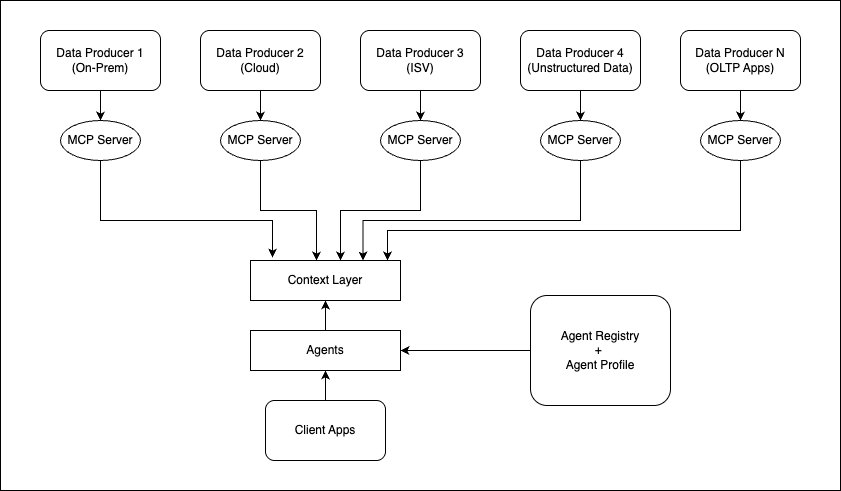
In case you face technical and process challenges to unify catalogs across providers, you can let each data producer expose the metadata and data through MCP servers, as represented in the following diagram. In this approach, each producer takes the responsibility of maintaining the MCP servers and exposing them to the context layer. While this approach provides autonomy to data owners to operate independently and with flexibility, it also creates operational overhead to synchronize all metadata in a consistent way.
What’s next
In Part 2 of this series, we walk through the full implementation step by step, including hands-on scripts to:
- Load example sales datasets into Databricks and marketing data to Snowflake as Iceberg tables, and federate them into AWS Glue Data Catalog through the Iceberg REST API.
- Register Google BigQuery as a native federated data source in Amazon SageMaker, instead of a traditional AWS Lambda connector integration.
- Create a customer master table as a native Iceberg table in Amazon S3.
- Run a single SQL query in Amazon Athena that joins all four sources across two federation patterns, with no data movement.
- Deploy an AI agent on Amazon Bedrock AgentCore that can autonomously query the same unified catalog using Amazon Athena and answer complex business questions in natural language queries. In addition, integrate AgentCore Memory to persist user context.
Conclusion
In this post, we summarized how you can unify data access across multiple cloud and ISV providers on AWS with the combination of catalog federation, query federation, and data movement to AWS. We then explained how AWS Glue Data Catalog and Lake Formation help provide unified catalog and access governance, and how AI agents hosted in Amazon Bedrock AgentCore can access it using MCP servers to explore the metadata context, convert user natural language queries to SQL, and use Amazon Athena to run the query across data sources to get the response to the end user. In addition, we provided an overview of different data ingestion methods to build a lakehouse architecture on AWS, including AWS Interconnect – multicloud and where it adds value.
We also provided architecture trade-offs and best practices to integrate the service capabilities. In the next post (Part 2), we will take a specific use case and provide a step-by-step implementation guide to unify the catalog and deploy the agent to Amazon Bedrock AgentCore.
About the author


