


Top pick
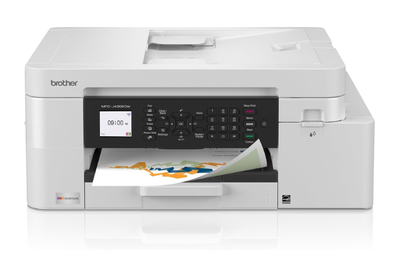
If you need a basic color printer that can also scan and fax, this inkjet printer is a good option. It is relatively inexpensive and can handle a variety of jobs.
Who this is for: This is the printer to get if you don’t have big productivity demands and need a cheap multifunction printer with solid performance.
Why we like it: For a little over $200 at this writing, the Brother MFC-J4355DW is among the most affordable models we’ve tested, and it doesn’t gouge you with high printing costs in exchange. It prints with a sharpness that rivals many laser printers and does a stellar job at printing glossy photos.
Like most printer brands, Brother offers different types of ink refills with different capacities. While the highest-yield cartridges cost more than the printer itself (about $250 at this writing), you’re saving a bundle in printing costs — they’re good for up to 5,000 black-and-white pages or 2,500 color pages per set, which translates to per-page costs of roughly 1.5 cents to 1.7 cents for monochrome (with a single or pack of two) and 8.2 cents for color.
You can avoid the high up-front cost of replacement cartridges by joining Brother’s Refresh EZ Print subscription at $2.50 to $30 per month. With this delivery service you pay based on how much you print, and it also extends the two-year limited warranty by another year.
You’ll need to print a lot in color to make a subscription worth it on a pure cost basis, though. The program charges a flat rate per page, meaning the per page monochrome print prices are actually higher than what they’d be if you ponied up for ink a la carte. However, combined with the convenience of home delivery, an extended warranty, and minimal upfront costs, the subscription may be worth it for some.
Regardless of ink source, prints look great. During our tests, the MFC-J4355DW reliably printed sharp text down to 4 points in sans serif fonts, rivaling laser printers like the DCP-L2640DW, our pick for a black-and-white multifunction printer. Images also look great: Glossy photos showed realistic sharpness, saturation, and contrast that compared well with results from inkjets twice the price.
Flaws but not dealbreakers


Installation takes time. Overall, in our tests this printer’s setup took about 20 minutes, while others we tested were up and running in 10 to 15 minutes.
The control panel is clunky. This inkjet has a backlit, 1.8-inch LCD screen that’s easy to read. But the non-touch screen is paired with an archaic push-button control panel.
It’s noisy. The MFC-J4355DW is the only printer we’ve tested that makes a whistling sound like air escaping from a balloon during printing; we attribute the sound to the carriage rail and motors shifting while printing.
Its scans look flat. Don’t expect the MFC-J4355DW to produce a carbon copy of your favorite photos. In our testing, this printer overcompensated in its scans by adding too much contrast, destroying detail in darker areas. Scanned color documents and reports also looked dull and lifeless.
Key specs
Dimensions: 17.1 by 13.5 by 7.1 inches
Weight: 19.6 pounds
Pages per minute (stated): 20 monochrome, 19 color
Cost per page: 1.5 cents for black, 8.2 cents for color
Learn more in our full guide to the best all-in-one printer.


